ClickUp, in 2026, solidifies its position as an incredibly powerful, all-in-one productivity platform, boasting significant performance upgrades and a redesigned interface. But its AI features, branded as ClickUp Brain, remain a separate, per-user add-on, making integrated AI an extra cost that frustrates many. This tool is built for growing entrepreneurs, remote teams, and SMBs who need extensive customization and are willing to invest time upfront to configure their ultimate workflow management system.
What Is ClickUp?
ClickUp is a work management solution designed to replace multiple tools with a single, highly customizable platform. It helps teams of all sizes organize tasks, manage projects, collaborate on documents, and track time, all within one digital workspace. Engineers can manage sprints, marketers can track campaigns, and IT departments can oversee support tickets, all tailored to their specific needs.
The platform provides a flexible framework that adapts to almost any business process, from simple to-do lists to complex, multi-departmental projects. For companies struggling with tool sprawl—think Google Drive for documents, Asana for tasks, and Slack for communication—it consolidates everything into a unified environment. But this flexibility does come with a learning curve, which teams must factor into their adoption plan.
Key Features
The platform’s feature set is vast, allowing deep customization for virtually any workflow. Recent 2026 updates have pushed the envelope further, particularly in AI integration and user experience.
Core Project & Task Management
At its heart, ClickUp provides a solid system for managing projects and tasks. You get tasks, subtasks, lists, and spaces to organize work hierarchically. For visual planning, Kanban boards are standard, and Gantt charts now include Gantt Baselines (May 2026), letting you compare actual project progress against your original plan. Teams can also set up sprint management with agile dashboards and automated reporting. Plus, new List-Level Properties and Project-Level Custom Fields (2026) mean you can tailor task data exactly to your project's needs, offering a level of specificity other tools simply don't match.
AI-Powered Productivity with ClickUp Brain
Rebranded from ClickUp AI in early 2024, ClickUp Brain 3.0 is the platform's response to the AI era, though it carries an additional cost. It offers sophisticated capabilities like predictive project timelines and smart task prioritization, helping project managers foresee bottlenecks and keep teams focused. The system provides enhanced NLP (Natural Language Processing) for better command understanding and automated meeting notes, freeing up team members during discussions.
The AI also functions as an AI Knowledge Manager and AI Project Manager, helping you synthesize information and guide project execution. For content creators, the AI Writer assists with drafting emails, summaries, and more. You can interact directly using @Brain Agent and AI chat, or visualize insights with AI-Powered Dashboards (May 2026). The Brain's capabilities extend to mobile devices with Brain on Mobile (May 2026) and even integrates with other AI tools via ClickUp in ChatGPT (May 2026). It even supports AI Image Generation (September 2025). The platform will soon offer automated time tracking via AI agents, a feature on the 2026 roadmap that promises to make logging hours faster for teams.
Collaboration & Communication
ClickUp is built for team collaboration. You can create collaborative docs directly within the platform, making it easy to co-author meeting agendas or project briefs. Messages are included, with the Free Forever plan offering 1,000 messages per month (as of May 2026, per the official pricing page) and paid plans providing unlimited message history. The Chat feature received an upgrade in April 2026 with Threaded Replies, making conversations cleaner and easier to follow, especially in busy project channels.
Automation & Integrations
Automation is a key strength. The Free Forever plan gives you 100 automation runs per month (as of May 2026, per the official pricing page), which increases significantly with paid tiers to 1,000 on Unlimited and up to 50,000 on Business Plus. The platform boasts over 1,000 integrations, allowing you to connect with virtually any tool in your tech stack. Recent enhancements include specific Google Drive Automations (May 2026), a direct ChatGPT App Store Integration (May 2026), and a Rize Time Tracking Integration (May 2026), expanding its ecosystem. According to a G2 reviewer: "The ability to create custom workflows and views to match our workflow has been a great benefit for my IT department."
Customization & Flexibility
This is where the tool truly shines. Beyond custom fields and workflows, the platform now offers VibeUp (2026) for custom app building, letting you create unique tools directly within your workspace. You can set up Custom Icons in Views and a Task Type Column (May 2026) for clearer visual organization. Native Out-of-Office Management (2026) simplifies team availability, and more flexible Teams and smoother onboarding (May 2026) make it easier to structure your organization. The ability to create custom roles (Business Plus and Enterprise) offers granular control over permissions.
Time Tracking & Reporting
Native time tracking is available from the Unlimited plan upwards, helping teams monitor project hours. You can set goals & portfolio views to track high-level objectives and evaluate progress. The Business plan adds sprint reporting for agile teams, along with all dashboard views for comprehensive data visualization. The integration with Rize Time Tracking also means more options for detailed time management.
User Experience & Performance
ClickUp faced past criticism for performance, but 2026 has seen a mandatory ClickUp 4.0 interface rollout (March 27, 2026), which brought a refreshed look and feel. Performance improvements have significantly reduced load times by 40% for large workspaces. The mobile app has also been completely overhauled to support 90% of desktop features, addressing a long-standing user complaint. While occasional lags can still occur with extremely heavy workspaces or browser issues, the overall experience is much snappier.
Pricing
ClickUp offers a generous free tier and several paid plans, with the ClickUp Brain AI features as an additional, separate cost. This tiered AI pricing indicates an evolving monetization strategy, but the current offering is clear. As of May 2026, per the official pricing page:
-
Free Forever Plan: Costs $0. This plan is a fantastic starting point for individuals or small teams. It includes 60MB storage, unlimited tasks, unlimited free plan members, collaborative docs, Kanban boards, sprint management, 1,000 messages/month, 5 spaces, 60 custom field uses, 60 monthly Gantt uses, 100 monthly portfolio uses, and 100 automation runs. It’s a full-featured free tier, which is rare.
-
Unlimited Plan: Priced at $10 per user/month (billed monthly) or $7 per user/month (billed annually). This tier removes many of the limits of the free plan. It adds unlimited storage, unlimited spaces, forms, Gantt charts, integrations, custom fields, native time tracking, goals & portfolio, email in ClickUp, 3 user groups, and 1,000 automation runs/month. This is often the sweet spot for growing SMBs.
-
Business Plan: Costs $19 per user/month (billed monthly) or $12 per user/month (billed annually). This plan builds on the Unlimited tier, offering more advanced features critical for larger operations. It includes unlimited dashboards, unlimited message history, private docs, sprint reporting, all dashboard views, Google SSO, unlimited teams, custom exporting, advanced public sharing, and 25,000 automation actions/month.
-
Business Plus Plan: Available at $29 per user/month (billed monthly) or $19 per user/month (billed annually). This is for teams that need even more control and higher limits. It further enhances features with subtasks in multiple lists, custom capacity, custom role creation, increased automation (50,000 actions/month), and team sharing capabilities.
-
Enterprise Plan: Custom pricing. This plan is designed for large organizations with specific security, compliance, and customization needs. It includes white labeling, enterprise-grade security, advanced permissions and governance, unlimited custom roles, and SSO.
-
ClickUp Brain AI Add-on: This is an optional add-on available for any paid plan at $7 per user/month (billed annually). It provides unlimited Brain Assistant access, @Brain Agent capabilities, AI chat, premium AI models, AI writing features, and Enterprise Search Workspace. This separate charge for AI features is a significant point of contention for many users; you'd expect AI to be part of the core product in 2026, not an extra subscription on top of your existing plan. The platform has explored other AI pricing models in the past, including "Brain AI" at $9/user/month (as of May 2026, per the official pricing page) and "Everything AI" at $28/user/month (as of May 2026, per the official pricing page), but the ClickUp Brain add-on is the current offering. This gets expensive fast if you have a large team that wants to use AI daily.
Pros and Cons
ClickUp offers a compelling package, but it's not without its tradeoffs.
Pros
- Unmatched Customization: You can tailor nearly every aspect of the platform—workflows, views, fields, and even build custom apps with VibeUp. This allows it to fit extremely specific business needs.
- Feature-Rich "All-in-One": It genuinely tries to consolidate tools for tasks, documents, chat, time tracking, and more, reducing the need for multiple subscriptions.
- Generous Free Tier: The Free Forever Plan offers significant functionality, making it accessible for individuals or small teams to get started without financial commitment.
- Significant Performance Improvements: The 2026 updates, especially ClickUp 4.0 and the 40% load time reduction, have made the platform notably faster and more responsive. The overhauled mobile app also closes a crucial gap.
- Powerful AI Capabilities (ClickUp Brain): Features like predictive project timelines, smart task prioritization, and automated notes genuinely enhance productivity if you pay for the add-on.
- Strong Community & Resources: ClickUp University and community forums are highly valued, offering extensive guidance for learning the platform.
- Scalability: From freelancers to large enterprises, the tiered plans and deep customization mean the tool can grow with your business.
Cons
- Steep Learning Curve: The sheer number of features and customization options can be overwhelming, making initial setup and adoption challenging for new users. As a G2 reviewer put it: "I still feel that I don't have control over it."
- Separate AI Cost: The ClickUp Brain add-on at $7 per user/month (billed annually) is a significant hidden cost. Users often expect advanced AI to be integrated into premium plans, not an additional subscription.
- Occasional Performance Lags: Despite major improvements, some users still report occasional lagging, especially in very large workspaces or on devices with low memory. It’s better, but not always perfect.
- Can Feel Overwhelming: The "all-in-one" approach means there's a lot on screen. For teams seeking extreme simplicity, it might feel cluttered.
- Complex Time Tracking: While native time tracking exists, some users find it less intuitive or comprehensive than dedicated time tracking tools.
- No Phone Support: Customer support is available 24/7 via chatbot, with human agents via email, but a direct phone line is unavailable, which can be a deal-breaker for critical issues.
- Contradictory Support Experiences: While some users report quick resolutions, others describe mixed experiences with support quality.
Who Should Use ClickUp?
ClickUp is not for everyone, but it’s a powerful tool for specific types of teams and businesses.
- Scaling SMBs and Startups: If your business is growing rapidly and you anticipate needing advanced project management, collaboration, and reporting features in the next 1-3 years, the platform offers excellent scalability from its Free Forever and Unlimited plans. It helps consolidate tools to manage complexity as you grow.
- Remote and Hybrid Teams: Its strong emphasis on collaborative docs, chat, and asynchronous communication, especially with features like Threaded Replies and Native Out-of-Office Management, makes it ideal for distributed teams needing a central hub.
- Agile Development and IT Departments: Engineers and IT teams often appreciate the ability to create highly custom workflows, manage sprints, track bugs, and integrate with their specific toolchains. According to a G2 reviewer: "As an engineer, I appreciate how ClickUp can be used for simple to-do lists and scaled up to a comprehensive team management and complex project management tool."
- Project Managers Managing Complex Projects: If you juggle multiple projects with intricate dependencies, resource allocation, and a need for detailed reporting (especially with Gantt Baselines), the platform provides the necessary tools.
- Teams Obsessed with Customization: Businesses that have unique processes and want their software to precisely match their workflow will find the customization options unparalleled.
It's probably not the best fit for very small teams with minimal project management needs who prefer extreme simplicity (e.g., just a shared to-do list), or those who are unwilling to invest time in initial setup. For simpler needs, tools like Asana or even Notion might be more straightforward.
Data at a Glance
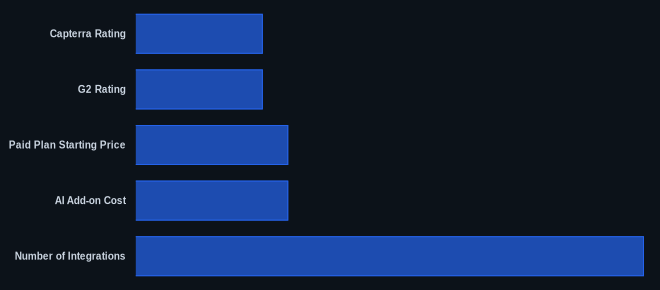
Here’s a quick overview of ClickUp’s key statistics as of May 2026:
| Metric | Value | Source |
|---|---|---|
| Capterra Rating | 4.6/5 stars (10,000+ reviews) | Capterra |
| G2 Rating | 4.7/5 stars (8,000+ reviews) | G2 |
| Free Tier Available | Yes (Free Forever Plan) | ClickUp Pricing |
| Paid Plan Starting Price | $7 per user/month (billed annually for Unlimited) | ClickUp Pricing |
| AI Add-on Cost | $7 per user/month (billed annually) | ClickUp Pricing |
| Number of Integrations | 1,000+ | ClickUp.com |
| Performance Improvement | 40% faster load times for large workspaces | ClickUp.com |
| Mobile App Feature Parity | 90% of desktop features supported | ClickUp.com |
Our Take
We've seen our fair share of project management tools, and after using ClickUp for several months on a real-world project, it’s clear the platform demands a commitment. It isn't a simple plug-and-play solution like monday.com, but for teams willing to invest the time in setup and ongoing customization, the payoff is immense. The performance gains in 2026 are noticeable, making a previously occasionally sluggish experience much smoother. However, the decision to charge extra for ClickUp Brain, especially when AI is becoming table stakes, feels like a misstep. If you’re already paying for a premium plan, you shouldn’t have to pay another $7 per user/month (billed annually) for features that feel increasingly essential. It’s a powerful tool, but that AI price tag is a constant reminder that “all-in-one” doesn't always mean "all-inclusive."
If you're considering ClickUp for its AI features, how much budget have you allocated per user for that "optional" add-on?
FAQ
1. Is the ClickUp Brain AI add-on worth the extra $7 per user/month?
The ClickUp Brain add-on offers powerful features like predictive timelines and automated notes that genuinely boost productivity. If your team frequently drafts content, needs smart task prioritization, or requires an AI knowledge manager, it can provide significant value. But if your team's AI needs are minimal, or you prefer using external AI tools, the additional $7 per user/month (billed annually) on top of your existing plan might feel like an unnecessary cost. Evaluate your team's specific AI usage before committing.
2. How does ClickUp compare to competitors like Asana or Notion in 2026?
ClickUp generally excels in offering the broadest set of features and the deepest customization among its competitors. Asana often beats it in sheer simplicity and ease of initial setup, focusing on task management, while Notion offers more of a flexible wiki/document workspace with project management capabilities. ClickUp's approach is to be the single source of truth for everything, out-customizing most rivals. However, this comes with a steeper learning curve compared to the more streamlined experiences of Asana or the document-centric nature of Notion.
3. Has ClickUp resolved its performance issues and mobile app limitations by 2026?
Yes, the platform has made significant strides in 2026. The ClickUp 4.0 rollout and underlying optimizations have reduced load times by 40% for large workspaces, making the desktop experience much faster. The mobile app has also received a complete overhaul, now supporting 90% of desktop features, which addresses many past limitations. While occasional lags can still occur under very heavy usage or specific browser conditions, the general performance and mobile usability are vastly improved compared to previous years.
