
Jira Software continues to dominate the agile project management space for development teams in 2026, offering unparalleled configurability for complex software workflows and deep integration within the Atlassian ecosystem. This review will help entrepreneurs and SMBs determine if its powerful feature set outweighs its learning curve and cost for their specific needs.
What Is Jira Software?
Jira Software is Atlassian's flagship project management tool, purpose-built for agile software development. It helps teams plan, track, and release software by providing robust issue tracking, customizable workflows, and powerful reporting tailored for Scrum, Kanban, and hybrid methodologies. Its core strength lies in its ability to adapt to almost any development process.
It acts as the central hub for development work, allowing product managers, developers, and QA teams to collaborate on tasks, bugs, and user stories. Teams use it to manage sprints, visualize backlogs, and gain insights into team performance through various agile-specific reports.
Key Features
Scrum and Kanban Boards
Visualize your team's work with configurable Scrum boards for sprint management and Kanban boards for continuous flow. These boards track tasks from ideation to completion.
Backlogs & Roadmaps
Prioritize all your development work in a centralized backlog. Use Roadmaps to plan future iterations, visualize dependencies, and communicate long-term project goals to stakeholders.
Issue Tracking
Track every piece of work — from bugs and feature requests to user stories and tasks — with a highly detailed and configurable issue tracking system. Each issue can contain sub-tasks, attachments, comments, and custom fields.
Reporting & Analytics
Monitor team performance and project health with over 12 built-in agile reports. These include burndown charts, sprint reports, velocity charts, and cumulative flow diagrams, offering data-driven insights.
Workflows
Design and implement custom development processes with highly flexible workflows. Automate status transitions, assignees, and notifications to match your team's unique operational needs.
Automation
Streamline repetitive tasks with built-in automation rules. Automate actions like assigning issues, updating statuses, or sending notifications based on predefined triggers.
Integrations
Connect Jira with thousands of developer tools (like GitHub and Jenkins), communication platforms (Slack, Microsoft Teams), and other business applications through the extensive Atlassian Marketplace.
Pricing
As of May 2026, per the official Jira Software pricing page, Cloud Standard pricing tiers are as follows:
- Free: Up to 10 users, 2 GB storage, Scrum & Kanban boards, Backlog, Roadmaps, Agile reporting. This tier costs $0 and is suited for small teams or startups getting started with agile.
- Standard: $7.75/user/month (billed annually, $8.15/user/month monthly) for 11-10,000 users. Includes all Free tier features plus 250 GB storage, advanced permissions, audit logs, and 9-5 standard support. This is the most popular choice for growing teams.
- Premium: $15.25/user/month (billed annually, $16.00/user/month monthly) for 11-10,000 users. Builds on Standard with unlimited storage, advanced roadmaps, sandbox environments, IP allowlisting, 99.9% uptime SLA, and 24/7 Premium support. Large organizations needing high reliability often opt for this.
- Enterprise: Custom pricing for 1,000+ users. Offers centralized user management, data residency, multi-site deployments, and enterprise-grade support. This tier is for very large organizations with complex needs.
Pros and Cons
Pros:
- Highly customizable workflows and issue types adapt to any software development methodology.
- Deep integration with the Atlassian ecosystem (Confluence, Bitbucket) creates a unified platform.
- Robust reporting and analytics provide essential insights for agile teams.
- Extensive marketplace for third-party integrations broadens its capabilities.
- Scales effectively from small developer teams to large enterprise-level organizations.
Cons:
- Can have a steep learning curve due to its extensive features and configuration options.
- Risk of "Jira sprawl" if not set up and governed correctly, leading to complexity.
- Pricing can become expensive quickly as user count grows, particularly for Premium tiers.
- User interface, despite improvements, can still feel less intuitive than simpler alternatives like Asana for new users.
- Primarily focused on software development; less ideal for non-technical project management without significant adaptation.
Who Should Use Jira Software?
Jira Software is explicitly designed for software development teams, product managers, quality assurance (QA) teams, and IT teams adhering to agile methodologies like Scrum and Kanban. It's an excellent fit for organizations that require meticulous issue tracking, sophisticated workflow management, and deep integration with developer toolchains.
Teams working on complex software projects, needing detailed reporting, or operating at scale will find Jira invaluable. It's less suited for non-technical teams or those simply seeking a very basic, lightweight task management system. If you're building software and require a rigorous process with robust tracking, Jira is a top contender.
Data at a Glance
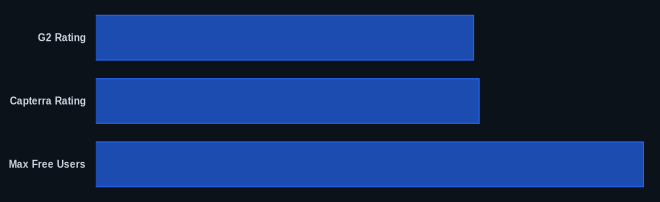
| Metric | Value | Source |
|---|---|---|
| G2 Rating | 4.2/5 | G2.com |
| Capterra Rating | 4.4/5 | Capterra.com |
| Starting Price | $0 (Free tier) | Atlassian Pricing |
| Integrations | Thousands | Atlassian Marketplace |
| Max Free Users | 10 | Atlassian Pricing |
Our Take
We believe Jira Software remains the default choice for serious software development teams in 2026 for good reason. Its configurability lets you mold it to your exact processes, rather than forcing your team into a generic workflow. While the initial setup can feel like a big lift, the long-term benefits of detailed tracking, integrated collaboration with tools like Confluence, and powerful reporting for agile metrics far outweigh the upfront effort for teams committed to building quality software. Just be mindful of managing its complexity to avoid "Jira fatigue" within your team.
FAQ
Q: Is Jira Software suitable for non-technical teams?
A: While Jira Software is highly configurable, its core design and terminology are geared towards software development. Non-technical teams will likely find its interface and complexity overwhelming, and simpler tools like Trello or Monday.com might be a better fit for general project management.
Q: How does Jira Software integrate with other development tools?
A: Jira Software boasts a vast marketplace of integrations, connecting directly with popular tools like GitHub, GitLab, Bitbucket for code management, Jenkins for CI/CD, and communication platforms such as Slack and Microsoft Teams. It also offers open APIs for custom integrations.
Q: Can Jira Software scale with my business as it grows?
A: Absolutely. Jira Software offers multiple pricing tiers, from a Free tier for up to 10 users to Enterprise plans for thousands of users, complete with advanced administrative features, security, and support. This allows it to scale from small startups to very large global organizations.
