HubSpot CRM stands out as a genuinely integrated growth platform, not just a CRM, making it an excellent choice for SMBs and growing enterprises seeking to unify their marketing, sales, and service efforts.
What Is HubSpot CRM?
HubSpot CRM is a comprehensive platform designed to manage customer relationships across their entire lifecycle, from lead generation to post-sales support. Unlike many CRMs that focus narrowly on sales, HubSpot aims to be an all-in-one ecosystem for businesses adopting an 'inbound' strategy.
It centralizes customer data, automates workflows, and provides tools for marketing, sales, customer service, content management, and operations, ideal for companies wanting to avoid piecing together multiple disparate SaaS tools.
Key Features
CRM Platform
The core of HubSpot is a centralized database for all your contacts, companies, deals, and service tickets. It provides a unified view of every customer interaction, making handoffs between teams seamless.
Marketing Hub
This suite includes powerful tools for email marketing (up to 2,000 emails/month on the Free tier), landing page creation, forms, and marketing automation. Higher tiers add SEO tools, blogging, social media management, and ad tracking.
Sales Hub
Manage your sales pipeline with CRM, sales automation via sequences, email tracking, and meeting scheduling. Features like quotes, sales forecasting, and playbooks are available in higher tiers, aiding sales teams from lead to close.
Service Hub
Streamline customer support with live chat, a robust help desk, ticketing systems, and a knowledge base. Customer feedback surveys and service automation help improve post-purchase experiences.
CMS Hub
Build and manage your website and blog with drag-and-drop editors and SEO tools. It allows marketing and development teams to collaborate efficiently on content, ensuring it's personalized and optimized.
Operations Hub
Automate data sync across your tech stack, program custom workflows, and clean up data quality issues. This hub ensures data consistency and operational efficiency, crucial for scaling businesses.
Reporting & Analytics
Customizable dashboards and detailed reports are available across all modules. Gain insights into marketing campaigns, sales performance, service efficiency, and overall customer health.
Pricing
As of May 2026, per the official pricing page, HubSpot CRM offers a range of tiers:
- Free Tools: A surprisingly robust starting point, including the CRM database, contact management, deal pipelines, tasks, live chat, meeting scheduling, basic forms, email marketing, and reporting dashboards. This is genuinely powerful for startups.
- Starter (from $50/month, billed annually): Builds on the Free tier with increased limits, simple automation, sales sequences, shared inbox, conversational bots, and basic service tickets. Each 'Hub' (Marketing, Sales, Service, CMS, Operations) can be purchased individually or bundled.
- Professional (from $500/month, billed annually): Significantly expands capabilities across all hubs with marketing automation, advanced reporting, custom objects, blog & SEO tools, sales forecasting, knowledge base, and more. This tier often requires a higher minimum seat count for sales/service. Prices vary based on chosen Hubs and contact/user counts.
- Enterprise (from $4,000/month, billed annually): Tailored for large organizations, this tier offers advanced permissions, SSO, sandboxes, predictive lead scoring, advanced A/B testing, custom bots, and dedicated support. Pricing is highly customized based on needs.
Pros and Cons
Pros:
- Robust Free Tier: An excellent starting point for small businesses with core CRM functions.
- Integrated Platform: Unifies marketing, sales, and service, providing a singular customer view.
- User-Friendly Interface: Intuitive design makes it easy for new users to get started.
- Scalability: Grows seamlessly with businesses through its various 'Hubs' and tiers.
- Extensive Resources: A vast knowledge base and HubSpot Academy offer abundant learning opportunities.
Cons:
- Cost at Scale: Can become very expensive when upgrading to Professional or Enterprise, especially with multiple Hubs and high contact volumes.
- Complexity: The sheer number of features can overwhelm very small teams that only need basic CRM.
- Pricing Structure: Contact-based pricing for Marketing Hub can lead to unexpected cost increases as your database expands.
- Customization Limitations: While flexible, deep customization for highly unique business processes might require higher tiers or workarounds.
Who Should Use HubSpot CRM?
HubSpot CRM is ideal for small to medium-sized businesses (SMBs) and growth-focused enterprises that prioritize an integrated approach to customer relationship management. The Free Tools tier is perfect for startups testing the waters, enabling them to manage contacts and basic sales processes without upfront investment.
Companies adopting an 'inbound' marketing and sales strategy will find its unified platform particularly beneficial, helping them avoid the fragmentation that comes with stitching together multiple point solutions like a standalone CRM (e.g., Salesforce Sales Cloud) and a separate marketing automation tool. It suits marketing and sales teams needing tight alignment and a single source of truth for customer data.
Data at a Glance
| Metric | Value | Source |
|---|---|---|
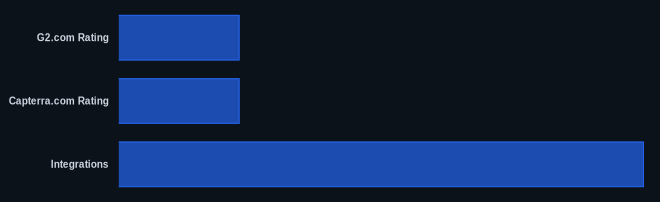
| G2.com Rating | 4.4/5 stars | G2.com HubSpot CRM Reviews |
| Capterra.com Rating | 4.5/5 stars | Capterra.com HubSpot CRM Reviews |
| Starting Price | $0 (Free Tools) | HubSpot Pricing Page |
| Integrations | 1,500+ | HubSpot App Marketplace |
| Free Tier Available | Yes | HubSpot Pricing Page |
Our Take
We find that HubSpot CRM’s strength lies in its commitment to a unified customer experience. While it can get expensive at scale, the value isn't just in individual features but in how well they work together. For a business truly committed to an inbound strategy, the platform's ability to seamlessly transition a lead from a marketing email to a sales deal, and then to a service ticket, is a significant differentiator that standalone tools like Zoho CRM struggle to match without extensive custom integrations.
FAQ
Is HubSpot CRM truly free, and what's included?
Yes, HubSpot CRM offers a powerful Free Tools tier that is genuinely free forever. It includes core CRM features like contact management, deal pipelines, tasks, live chat, meeting scheduling, basic forms, email marketing (up to 2,000 emails/month), and basic reporting. This tier is robust enough for many small businesses and startups to get started.
How does HubSpot CRM handle scalability for growing businesses?
HubSpot is designed to scale with your business through its modular 'Hubs' (Marketing, Sales, Service, CMS, Operations) and escalating pricing tiers (Starter, Professional, Enterprise). You can add new Hubs or upgrade tiers as your needs grow, unlocking more advanced features like marketing automation, custom objects, and advanced reporting.
What are the main cost considerations when moving beyond the free tier?
The primary cost considerations for HubSpot are the chosen Hubs (you can buy them individually or bundled), the tier level (Starter, Professional, Enterprise), and your contact volume, especially for the Marketing Hub. Prices can increase significantly with higher contact counts and as you add more users to Sales or Service Hubs. Always review the official pricing page carefully for your specific needs.