ClickUp CRM isn't a dedicated, purpose-built CRM, but rather a project management platform with powerful customization that allows sales teams to build out their own customer relationship workflows. ClickUp is an excellent choice for businesses that need a unified workspace for both sales operations and broader project management and are comfortable with a bit of setup. This tool offers great flexibility to manage your entire customer journey, from lead capture to post-sale support.
What Is ClickUp CRM?
ClickUp, at its core, is an all-in-one productivity platform designed to replace multiple tools. It lets teams manage projects, tasks, documents, and communication in a single place. For sales teams, this means it provides the building blocks—custom fields, automation, different views, and reporting—to construct a highly tailored CRM system within its existing framework. It's not a ready-to-go, out-of-the-box CRM like Salesforce; instead, it's a flexible environment where you configure your sales pipelines, contact management, and deal tracking using its adaptable features.
This approach targets businesses that value deep customization over off-the-shelf simplicity. It works especially well for those already using the platform for project management and wanting to consolidate their tech stack. Think of it as a highly capable LEGO set for your sales process, allowing you to design exactly what you need rather than settling for a pre-built house.
Key Features
The software provides many features that, when configured correctly, turn its general-purpose functionality into a powerful CRM solution. Here’s how its main components translate to sales and customer management:
Customizable Workflows and Statuses
You can build custom statuses that reflect each stage of your sales pipeline, from "New Lead" to "Qualified," "Proposal Sent," and "Closed Won/Lost." This lets you visually track deals as they progress, giving your team a clear overview of where every opportunity stands. It makes moving deals forward intuitive and easy.
Custom Fields for Contact Data
This is essential for any CRM. The platform allows you to create an unlimited number of custom fields for contacts and deals. You can track everything from lead source, company size, industry, specific needs, last contact date, deal value, and even assign sales reps. It ensures you capture all the relevant information for effective lead nurturing.
Multiple Views for Sales Pipelines
Its flexible views change how sales teams see their pipeline. You can see your sales pipeline as a Board view (Kanban style) for dragging deals through stages, a List view for detailed data, a Calendar view for follow-up schedules, or even a Table view for spreadsheet-like analysis. This adaptability means every sales rep can work with the data in a way that best suits them.
Automation for Sales Tasks
Automations in the tool cut the steps in manual, repetitive tasks that often bog down sales teams. You can set up rules like automatically changing a deal's status when a certain custom field is updated, sending follow-up reminders, assigning tasks to reps, or notifying managers when a high-value deal enters a critical stage. It ensures consistency and saves precious selling time.
Task Management for Follow-ups and Activities
Every interaction with a lead or customer can be tracked as a task. Schedule calls, meetings, email follow-ups, or even internal discussions related to a specific deal. This ensures nothing falls through the cracks and your sales team maintains consistent engagement with prospects. It's a foundational element for reliable sales processes.
Dashboards and Reporting
The platform offers highly customizable dashboards where you can visualize sales performance, team activity, and pipeline health. Create widgets to track deal values, conversion rates, individual rep performance, and projected revenue. This gives sales managers the insights they need to make data-driven decisions.
Integrations
It integrates with a large ecosystem of other business tools. This connectivity is vital for a comprehensive sales stack. You can connect it with email marketing platforms, communication tools like Slack or Microsoft Teams, accounting software, and more, creating a connected workflow without constant context switching.
AI Capabilities for Sales Support
ClickUp consistently integrates AI across its platform to enhance productivity. For sales, this typically translates to features like AI-powered summaries of client communications, automated content generation for outreach, or intelligent insights derived from deal data. These capabilities aim to reduce administrative burden and provide smarter recommendations, helping sales teams focus on closing deals.
Pricing
ClickUp CRM, as an adaptable solution, doesn't have a separate "CRM" pricing tier. Instead, its CRM capabilities are included in its core platform plans. This means you're paying for the overall productivity suite and configuring it for your sales needs.
The platform generally offers a Free Forever plan (as of June 2026, per the official pricing page), which is great for individuals or very small teams to get started and experiment with its features. This plan often comes with limitations on storage, advanced features, and reporting.
Beyond the free option, the platform provides several paid tiers (as of June 2026, per the official pricing page), typically structured to scale with business size and feature needs. These plans commonly include:
- Unlimited
- Business
- Business Plus
- Enterprise
Each tier offers increasing capabilities, such as more storage, advanced automation, expanded reporting, and priority support. Higher-tier plans are where you truly use the power to build and scale a sophisticated CRM system, especially for larger sales teams requiring extensive custom fields, detailed dashboards, and complex automations.
Pricing details are dynamic and can change frequently. For the most accurate and up-to-date pricing information, including specific feature breakdowns for each plan, you should always consult the official ClickUp pricing page. The official site will also detail any free trials or promotional offers currently available.
Pros and Cons
Like any powerful tool, ClickUp CRM has its strengths and weaknesses when used for sales and customer management.
Pros:
- Extreme Customization: You can tailor sales pipelines, contact fields, and workflows exactly to your business needs. This means you don't pay for features you won't use.
- Unified Workspace: It combines project management, task management, document collaboration, and CRM into one platform. This reduces app switching and data silos.
- Scalability: From solopreneurs managing a handful of clients to large sales organizations, the platform can be configured to grow with your team.
- Cost-Effective (Potentially): If you're already using the software for project management, adapting it for CRM saves you from subscribing to another standalone tool.
- Rich Feature Set: Even if not "CRM-specific," features like advanced automations, solid reporting, and multiple views directly benefit sales teams.
Cons:
- Not a Native CRM: It requires significant setup and configuration to function as a CRM. This isn't an out-of-the-box solution for immediate use.
- Steep Learning Curve: Because of its immense flexibility, new users might find the platform overwhelming initially. Building a good CRM setup takes time and expertise.
- Potential for Over-Complication: Without proper planning, it's easy to create overly complex workflows that become hard to manage.
- Pricing Complexity: While powerful, the higher tiers required for advanced CRM features can get expensive fast, especially if you're only using a fraction of its broader PM capabilities.
- Performance at Scale: For very large datasets or complex operations, the general-purpose nature of the tool might not be as performant or specialized as a dedicated, enterprise-grade CRM.
Who Should Use ClickUp CRM?
ClickUp CRM is best suited for specific types of businesses and teams that prioritize flexibility and consolidation. It's not for everyone, particularly those looking for an immediate, plug-and-play sales solution.
- Growing SMBs Already Using ClickUp: If your team is already managing projects with the platform and wants to bring sales into the same ecosystem without adding another subscription, this is a strong contender. You've already done most of the heavy lifting for onboarding.
- Startups and Agencies with Unique Sales Processes: Businesses that have non-standard sales cycles or require very specific data points will appreciate the ability to build their CRM from the ground up. Creative agencies, for instance, can combine client project tracking with new business development.
- Teams That Value Customization Over Simplicity: If your sales ops team loves digging into settings, building automations, and perfecting workflows, the tool will reward that effort with a system perfectly tailored to your needs.
- Sales Teams Working Closely with Project Delivery: For companies where sales, project management, and customer success are tightly integrated, having a unified platform speeds up handoffs and internal communication.
- Organizations Looking to Consolidate Tools: If you're paying for separate project management, task management, and basic CRM software, the tool offers the potential to roll all those functions into one, simplifying your tech stack.
It's probably not for businesses that need an industry-specific, ready-made CRM with minimal setup, or those that are completely new to CRM and prefer a simpler, guided experience like what you'd get from HubSpot Sales Hub.
Data at a Glance
| Feature | Value | Source |
|---|---|---|
| Free Plan Available | Yes | ClickUp Pricing |
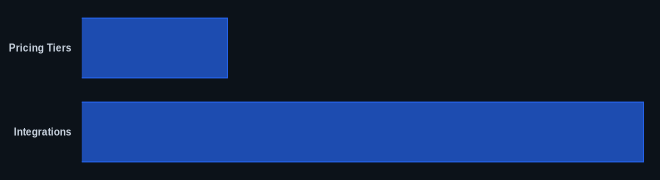
| Pricing Tiers | 5+ (Free, Paid) | ClickUp Pricing |
| G2 Rating | Check Live Site | G2 ClickUp Page |
| Capterra Rating | Check Live Site | Capterra ClickUp Page |
| Starting Price | Varies; Free Plan available | ClickUp Pricing |
| Integrations | 1,000+ | ClickUp Official Site |
| Primary Use Cases | Project Management, CRM, Task Management | ClickUp Official Site |
Our Take
ClickUp delivers a compelling argument for being an all-in-one solution, particularly when you consider its CRM capabilities. It’s not just about managing tasks anymore; it’s about creating an entire operational backbone for your business. For sales, this means you get to design your process with precision, rather than adapting your process to a rigid CRM. It demands a significant initial investment of time to configure everything, but the payoff is a system that perfectly mirrors your sales cycle and integrates with your broader team's work. This means fewer missed follow-ups and better insights, driving real results for companies willing to get their hands dirty. We found that while it can be a steeper learning curve, the ability to consolidate multiple tools (especially for project management and CRM) into one platform can lead to significant cost savings and better team alignment over time.
If you're considering ClickUp CRM, how much is the initial time investment in setup worth to your team in terms of long-term cost savings and workflow consolidation?
FAQ
Q: Can ClickUp replace dedicated CRM software like HubSpot or Salesforce?
A: It can, but with caveats. For many SMBs and teams that need a flexible, customizable solution and already use the platform for project management, it can absolutely consolidate or replace basic CRM functions. However, if you require highly specialized, out-of-the-box CRM features like advanced sales forecasting, lead scoring, or industry-specific compliance, a dedicated CRM might still be a better fit. It depends entirely on your specific sales needs.
Q: Is ClickUp CRM suitable for large enterprise sales teams?
A: The platform offers Enterprise plans (as of June 2026, per the official pricing page) with advanced security, permissions, and scaling capabilities that make it suitable for larger organizations. However, the decision often comes down to internal expertise for configuration and the desire for a unified workspace versus a best-in-class, purpose-built CRM that requires less setup. For very complex, global sales operations, the configuration effort might be substantial.
Q: What's the biggest challenge in using ClickUp as a CRM?
A: The biggest challenge is the initial setup and ongoing optimization. Since it's not a native CRM, you have to actively build your pipelines, custom fields, automations, and reporting dashboards. This requires a clear understanding of your sales process and a willingness to invest time in configuration. The learning curve can also be steep for teams new to highly customizable platforms.