ClickUp promises to be the "everything app" for project management, but while its AI-powered features are genuinely impressive, persistent performance issues, especially on mobile and in larger workspaces, mean you might be trading cutting-edge intelligence for day-to-day frustration. This tool is best for highly customized, feature-hungry teams with strong IT support who value deep configuration over out-of-the-box simplicity, and who are willing to pay a premium for advanced AI capabilities.
What Is ClickUp?
ClickUp is a highly customizable project management software that centralizes workflows, tasks, documents, and communication for teams of all sizes. The platform aims to replace multiple standalone tools by offering an expansive suite of features, from basic task lists to complex sprint management and CRM-like functionalities. Its core strength lies in its ability to adapt to virtually any methodology, whether you're managing agile software development, marketing campaigns, or even personal to-do lists.
The tool’s nature means it serves a broad user base, from individual freelancers using its Free Forever Plan to large enterprises requiring advanced security and automation. Recent updates, including a significant investment in artificial intelligence, have positioned the platform as a leader in intelligent project management, even as it navigates ongoing challenges with user experience and speed.
Key Features
ClickUp is packed with features that bring virtually every aspect of your work into a single interface. The platform consistently rolls out updates, with a major ClickUp 4.0 Launch in December 2025 that converged workspaces, and a mandatory rollout in March 2026. This means the core experience has been refreshed and unified recently.
AI-Powered Workflows
The platform has made substantial investments in AI, rebranding its AI features as ClickUp Brain in early 2024. The latest iteration, ClickUp Brain 3.0, offers predictive project timelines, smart task prioritization, and AI automations. This means the software anticipates your needs and helps manage your workload more intelligently.
A significant addition in late 2025/early 2026 was Super Agents, described as human-like AI agents capable of assisting with various tasks. Other key AI components include an AI Notetaker (enhanced in February and May 2026) for meetings, AI Task Type Classification to automatically categorize work, and VibeUp, which lets you build custom applications within the platform. The integration of ClickUp Brain Mobile in May 2026 also extends these intelligent capabilities to your phone, aiming for continuity across devices.
Task Management & Planning
At its heart, the tool offers solid task management. You get unlimited tasks even on the free plan. Paid tiers give you sophisticated planning tools like Gantt charts, essential for visual project timelines, and Goals & Portfolio Management for tracking high-level objectives. The May 2026 update introduced Gantt Baselines, allowing you to compare actual progress against original plans.
You'll find Kanban boards for agile teams and sprint management features for structured development cycles. For detailed resource allocation, Granular Capacity Grouping in Workload View (April 2026) offers better control over team bandwidth.
Collaboration and Communication
The software supports collaborative docs, allowing teams to create, edit, and share documents directly within the workspace. Unlimited free plan members on the Free Forever Plan make it easy to onboard small teams without cost barriers. For more complex collaboration needs, private docs become available on higher-tier plans.
Automations are a big part of the platform's efficiency. You get a set number of automation actions per month, increasing significantly with higher plans. The April 2026 update brought Google Drive Automations, making it easier to connect your cloud files with your workflows. The platform also integrated with the ChatGPT App Store in May 2026, expanding its AI-driven conversational capabilities.
Customization and Flexibility
If you need a tool that bends to your will, this is it. The platform offers extensive customization, from basic custom fields on the Free Forever Plan to unlimited custom views on the Unlimited Plan. You can even create custom roles on the Business Plus Plan, giving granular control over permissions. This flexibility is a double-edged sword; it’s powerful but can make the initial setup incredibly complex.
Other Notable Features
The platform provides native time tracking, which is crucial for billing clients or analyzing team productivity, available from the Unlimited Plan. For reporting, unlimited dashboards and sprint reporting are included in the Business Plan, offering deep insights into project performance. The platform also offers white-labeling on its Enterprise Plan, allowing large organizations to brand the interface as their own.
Pricing
ClickUp offers a tiered pricing structure that can scale from individual use to large enterprises, but watch out: adding AI can significantly increase your monthly spend.
-
Free Forever Plan: $0 (as of June 2026, per the official pricing page)
- Includes: 60MB storage, unlimited tasks, unlimited free plan members, collaborative docs, Kanban boards, sprint management, basic custom fields.
- Ideal for: Personal use or very small teams needing basic task organization. It's quite generous for a free tier.
-
Unlimited Plan: $7 per user/month when billed annually ($10 per user/month monthly) (as of June 2026, per the official pricing page)
- Includes: Everything in Free Forever, plus unlimited storage, Gantt charts, native time tracking, goals & portfolio management, and unlimited custom views.
- Ideal for: Small to medium-sized teams who need more advanced project planning and tracking without breaking the bank.
-
Business Plan: $12 per user/month annually ($19 per user/month monthly) (as of June 2026, per the official pricing page)
- Includes: Everything in Unlimited, plus unlimited dashboards, private docs, sprint reporting, and 25,000 automation actions per month.
- Ideal for: Growing businesses with more complex reporting, security, and automation needs.
-
Business Plus Plan: $19 per user/month annually ($29 per user/month monthly) (as of June 2026, per the official pricing page)
- Includes: Everything in Business, plus subtasks in multiple lists, custom capacity in workload view, custom role creation, and 50,000 automation actions per month.
- Ideal for: Larger teams or departments requiring advanced resource management and granular permission controls.
-
Enterprise Plan: Custom pricing (as of June 2026, per the official pricing page)
- Includes: Advanced security, governance, SSO, and white-labeling.
- Ideal for: Large corporations needing specialized features and dedicated support.
AI Add-ons: Where Costs Really Climb
The AI features, while powerful, are generally add-ons that significantly increase the per-user cost.
- ClickUp Brain AI: $9 per user/month (as of June 2026, per the official pricing page)
- ClickUp Everything AI: $28 per user/month (as of June 2026, per the official pricing page)
- A general AI add-on for specific features (AI Knowledge Manager, AI Project Manager, and AI Writer for Work) is also mentioned at $7 per user/month (billed annually) (as of June 2026, per the official pricing page).
This means if you're on the Unlimited Plan and want ClickUp Brain AI, your per-user cost jumps from $7 to $16 per month. If you want ClickUp Everything AI on top of the Business Plus Plan, you're looking at $40 per user/month. This gets expensive fast.
Negotiation Insights:
Vendr data suggests that buyers with 50+ seats can often negotiate 15-25% below list pricing for the Business tier through volume discounts and annual prepayment. Multi-year commitments can further reduce effective rates. However, there have been reports dating back to February 2025 of unexpected price increases on renewals, so keep an eye on your contract and negotiate transparency.
Pros and Cons
Pros
- Unrivaled Customization & Flexibility: You can truly tailor the software to almost any workflow or project methodology. This means it can grow and adapt with your business.
- Feature-Rich "All-in-One" Platform: It genuinely tries to be everything, potentially replacing multiple tools like Asana, Trello, and even some document management systems.
- Generous Free Plan: The Free Forever Plan is genuinely useful for individuals and small teams, offering a lot of core functionality without any cost.
- Significant AI Investment: Features like ClickUp Brain 3.0 and Super Agents promise a more intelligent and automated approach to project management, a definite edge for those seeking new tools.
- Strong Community and Resources: The tool has an average rating of 4.7/5 stars on G2.com and 4.7/5 stars on Capterra, showing a large, generally satisfied user base. According to Lauren Makielski, Chief of Staff: "ClickUp is the best thing I've rolled out in the past two years."
Cons
- Steep Learning Curve and Overwhelming UI: Because it does so much, the initial setup and adoption can be daunting. A Capterra reviewer states: "The learning curve is incredibly steep, and the user interface can feel very overwhelming and cluttered when you are first setting things up."
- Persistent Performance Issues: Despite major funding and updates, users, especially those with larger workspaces, still report lag, freezing, and general slowness. This directly contradicts the smooth experience you'd expect from a modern SaaS tool.
- Mobile App Limitations: The mobile experience is consistently criticized as slow, buggy, and lacking essential desktop features. If your team relies on mobile access, this is a significant drawback.
- AI as an Expensive Add-On: While the AI features are powerful, they significantly increase the cost per user, potentially pushing the platform out of budget for many SMBs. It's not built-in like some competitors.
- "Everything App" Paradox: The very thing that makes the software powerful—its many features—can also lead to an overwhelming user experience and make it difficult to gain control. A G2 reviewer warns: "I feel insecure when I use ClickUp. Somewhere in the back of my mind, I fear losing tasks just because after a couple of weeks of using ClickUp on an everyday basis I still feel that I don't have control over it."
- Mixed Customer Support Experiences: While 24/7 support is offered, resolution for complex issues can take 24-48 hours, and some users report a lack of transparency or responsiveness.
Who Should Use ClickUp?
ClickUp is not for everyone, but it’s an excellent fit for specific types of teams and use cases:
- Teams Overwhelmed by Multiple Tools: If your organization juggles Trello for tasks, Asana for projects, Google Docs for collaboration, and a separate time tracker, the platform offers a compelling solution to centralize these functions. This consolidation is a huge win for operational efficiency.
- Businesses Requiring Extreme Customization: If off-the-shelf solutions don't quite fit your unique workflows, and you need to build a system precisely to your specifications, its flexibility is unmatched. Think agencies, software development teams, or internal operations departments with highly specific processes.
- Organizations Prioritizing AI-Powered Automation: If you’re serious about using AI for predictive project management, smart task prioritization, and automated workflows, and you have the budget for the AI add-ons, the platform’s advancements in this area are new.
- Growing SMBs that Need to Scale Complexity: Starting with the Free Forever or Unlimited Plan and gradually adding features and users as your complexity grows. Just be prepared for the learning curve and potential performance hiccups.
- Teams with Dedicated Admins or IT Support: Because of its depth and complexity, having someone on staff who can dedicate time to setting up, maintaining, and optimizing the workspace will significantly improve user adoption and satisfaction.
It's probably not for small teams seeking simplicity and a rapid onboarding, or those heavily reliant on a flawless mobile experience for daily operations. If ease of use and speed are your top priorities, you might find more immediate satisfaction with tools like monday.com or Asana.
Data at a Glance
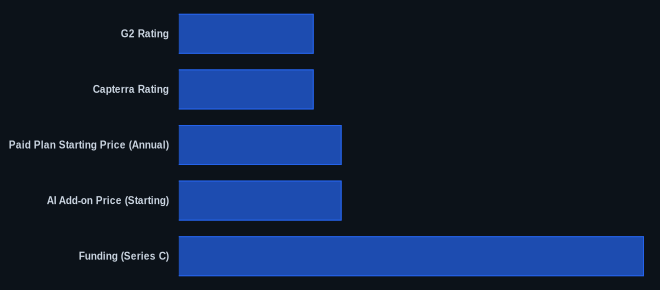
| Metric | Value | Source |
|---|---|---|
| G2 Rating | 4.7/5 stars | G2.com/products/clickup/reviews |
| Capterra Rating | 4.7/5 stars | Capterra.com/p/162804/ClickUp/ |
| Starting Price | $0 (Free Forever) | ClickUp.com/pricing |
| Paid Plan Starting Price (Annual) | $7 per user/month | ClickUp.com/pricing |
| AI Add-on Price (Starting) | $7 per user/month | ClickUp.com/pricing |
| Funding (Series C) | $400M (2021) | ClickUp.com |
| Chatbot Response | 5 minutes (average) | ClickUp.com |
Our Take
We've seen countless "everything apps" promise the moon, and while ClickUp delivers an impressive constellation of features, it still struggles with earthbound performance issues. The platform's commitment to AI is genuinely forward-thinking, especially with ClickUp Brain 3.0 and Super Agents paving the way for more intelligent project management. But if your team frequently works from a slower connection or relies heavily on a mobile device, the friction from lag and bugs might negate the benefits of those advanced capabilities. It's a trade-off: unparalleled depth and customization versus consistent speed and ease of use. If you have the technical savvy and patience to configure it perfectly, and your budget stretches to include the AI add-ons, you'll be rewarded with an incredibly powerful tool. Otherwise, you might find yourself wishing for a simpler, faster experience.
If you're considering ClickUp for its advanced AI, are you confident your team's current setup or mobile usage won't be derailed by its known performance issues, especially when scaling up?
FAQ
Q: Is ClickUp suitable for small businesses or startups?
A: Yes, the Free Forever Plan and the Unlimited Plan ($7/user/month billed annually as of June 2026, per the official pricing page) offer excellent value for small businesses and startups. The free plan provides core features like unlimited tasks and Kanban boards, making it ideal for getting started. However, be prepared for a learning curve as the platform offers many advanced features that can be overwhelming initially.
Q: How much does ClickUp's AI really cost, and is it worth it?
A: ClickUp's AI features are generally add-ons. ClickUp Brain AI costs $9 per user/month (as of June 2026, per the official pricing page), while ClickUp Everything AI is $28 per user/month (as of June 2026, per the official pricing page). There's also a general AI add-on at $7 per user/month (billed annually) (as of June 2026, per the official pricing page) for specific features. This means adding AI can increase your per-user cost by 100% or more, depending on your base plan. It's worth it if your team will actively use the predictive insights, automations, and content generation to save significant time, but it's a premium expense.
Q: Given the performance complaints, should my team still consider ClickUp in 2026?
A: You should still consider it if your team prioritizes deep customization, advanced features (like Gantt Baselines or Workload View with Granular Capacity Grouping), and especially if you're keen on AI-driven project management, which the platform is heavily investing in. However, if your team primarily works on the go, has limited technical support, or operates with very large datasets that historically cause lag, you'll need to weigh the benefits against the reported performance issues, particularly on the mobile app.