Asana, in 2026, costs at least $10.99 per user/month (billed annually) for its Starter plan, but requires a minimum purchase of two seats, meaning teams pay at least $21.98/month even for a single user. This review helps entrepreneurs, remote teams, and SMBs find a visually intuitive platform to manage complex projects, track goals, and keep distributed teams aligned, provided they're prepared for potential cost escalations and varied support experiences.
What Is Asana?
The platform brings clarity and structure to complex projects, making tasks and deadlines visible across your team. It is a work management solution that helps teams organize, track, and manage their work, from daily tasks to strategic initiatives. For businesses bogged down by email chains or scattered spreadsheets, the tool offers a centralized hub to define objectives, assign responsibilities, and monitor progress in real time.
It helps teams avoid missed deadlines and miscommunications by creating a single source of truth for all work. Managers quickly see project status, identify bottlenecks, and reallocate resources as needed. Its visual nature and focus on clear workflows make the software particularly effective for teams that thrive on structure but need flexibility in how they view their work.
Key Features
The past year has significantly evolved the platform, particularly in its AI capabilities and user experience.
AI Teammates & Automation
In March 2026, the tool introduced AI Teammates, prebuilt AI agents designed to handle administrative tasks. Imagine an AI agent automatically compiling a weekly status report from task updates, saving your project manager hours. Other Asana AI features arriving in 2026 include automating task assignments, providing next steps, generating task summaries, and intelligently grouping related tasks. This means less manual data entry and more time focused on actual work. AI Studio Basic, available on paid plans, offers varying credit allocations to fuel these advanced capabilities, ensuring the platform gets smarter as you use it.
Visual Project Tracking & Strategy
Tracking goals and portfolios becomes much simpler with the updates. Enhanced Goal Monitoring rolled out in Winter 2026, providing better visualization and structured progress tracking. For managers overseeing multiple initiatives, Portfolio Management Improvements allow for portfolio duplication and bulk actions in the portfolio grid, making it faster to set up and manage similar projects. Features like Timeline and Gantt view on the Starter Plan and Workload and Goals on the Advanced Plan help teams map out dependencies and prevent burnout.
Workflow Builder & Customization
The Workflow Builder received several enhancements through Winter 2026 and early 2026. You can now manage complex rule logic more easily, duplicate rules, and select AI models for rule building. The platform lets you use custom fields in rules, trigger actions when a collaborator is added, and even pause individual rules. These updates significantly boost the platform's ability to automate routine processes, from simple task assignment to more intricate conditional workflows. Limits apply: Starter Plan includes up to 250 rules/month (as of early 2026, per the official pricing page), while Advanced jumps to 25,000 actions/month (as of early 2026, per the official pricing page).
Integrations
Connectivity is crucial for any modern tech stack. The platform rebuilt its Asana for Google Chat app in January 2026, now part of the existing Google Workspace add-on. This makes it easier to turn conversations into actionable tasks. Similarly, Slack Integrations received updates in January and April 2026, allowing for auto-tagging tasks from emails, predictive task suggestions, and even creating tasks directly from emoji reactions. These integrations mean less jumping between apps and more focus on getting things done where your team communicates most. There's also a Claude integration for AI-powered assistance.
UI & Experience
In March 2026, the platform underwent a UI Redesign, organizing the interface into 'work,' 'strategy,' 'workflow,' and 'people' sections. This reorganization aims to provide a clearer path to different functionalities, making navigation more intuitive, especially for new users. Collapsible board columns also came with this update, letting you customize your view further. These changes improve overall usability, ensuring a smoother experience for daily task management. Small but impactful updates like Private task breadcrumb navigation and easier subtasks also enhance the user experience.
Enterprise Capabilities
For larger organizations, the Enterprise and Enterprise+ Plans offer crucial scalability and security features. These include SAML authentication and SCIM for solid user management, universal workload for comprehensive resource planning, and capacity planning to optimize team allocation. Features like view-only licenses, project admin controls, and the ability to edit restrictions on assignee/due date (Enterprise) give administrators granular control over projects and data integrity, essential for large, complex operations.
Pricing
The platform's pricing structure, as of early 2026, per the official pricing page, requires careful consideration, especially regarding its minimum seat purchases and potential hidden costs. This isn't a simple per-user minimum in the traditional sense; you can't buy just one paid seat.
-
Personal Plan (Free): At $0 (as of early 2026, per the official pricing page), this plan offers unlimited tasks, projects, messages, and basic views (list, board, calendar). It includes basic search, over 100 integrations (as of early 2026, per the official pricing page), and unlimited storage (with a 100MB/file limit, as of early 2026, per the official pricing page). While it allows up to 10 team members (as of early 2026, per the official pricing page), it's practically capped at 2-3 users for effective collaboration due to usability limitations at scale. It’s excellent for individuals or very small teams getting started.
-
Starter Plan: Priced at $10.99 per user/month (billed annually, as of early 2026, per the official pricing page) or $13.49 per user/month (billed monthly, as of early 2026, per the official pricing page). This tier unlocks limited Asana AI credits, Timeline and Gantt views, Workflow Builder (up to 250 rules/month, as of early 2026, per the official pricing page), project dashboards, custom fields, and forms. A critical detail: it requires a minimum purchase of 2 seats (as of early 2026, per the official pricing page). So, even if you only need one paid user, you'll pay for two. Seat increments also apply; you buy licenses in blocks: up to 30 in 5-seat increments, 30-100 in 10-seat increments, and 100+ in 25-seat increments (as of early 2026, per the official pricing page). This gets expensive fast if your team size fluctuates or lands awkwardly between increment blocks.
-
Advanced Plan: At $24.99 per user/month (billed annually, as of early 2026, per the official pricing page) or $30.49 per user/month (billed monthly, as of early 2026, per the official pricing page). This plan includes all Starter features plus AI Studio Basic (with 75K credits per billing account/month, as of early 2026, per the official pricing page), unlimited portfolios, Goals, Workload, approvals, proofing, forms branching, and native time tracking. It also requires a minimum of 2 users (as of early 2026, per the official pricing page), with similar seat increment rules as the Starter plan. This tier is where teams unlock more sophisticated work management capabilities, including built-in time tracking, though some users find its native options less solid than dedicated solutions like Paymo or Teamwork.com.
-
Enterprise Plan: This plan features custom pricing (as of early 2026, per the official pricing page) and requires you to contact sales. It includes all Advanced features plus AI Studio Basic (with 200K credits per billing account/month, as of early 2026, per the official pricing page), SAML authentication, SCIM, universal workload, capacity planning, service accounts, view-only licenses, and project admin controls.
-
Enterprise+ Plan: Also with custom pricing (as of early 2026, per the official pricing page), this offers enhanced integration, data exporting, and administrative controls beyond the Enterprise plan.
Hidden costs are a significant factor. Beyond the minimum seat purchases and seat increments, the Starter plan's 250 rules/month automation limit (as of early 2026, per the official pricing page) can quickly become a bottleneck for active teams. Upgrading to Advanced for 25,000 actions/month (as of early 2026, per the official pricing page) often becomes necessary, driving up costs. Furthermore, heavier usage of AI Studio can incur additional charges, as the included credits might not be enough for larger teams or more intensive AI operations. Dedicated customer success is a paid add-on, and 24/7 support is reserved for Enterprise customers, which is a surprising limitation for a platform of this caliber.
Pros and Cons
Choosing a project management tool means balancing powerful features against usability and cost. Here’s a breakdown for the platform.
Pros:
- Outstanding User Interface (UI) and Ease of Adoption: According to a G2 reviewer: "Asana is one of the easiest tools I've ever used. Seriously. You just log in to Asana using an email and your account is set up within seconds. The backend of Asana is so straightforward that you can learn how to use it in under 5 minutes." The visual design is clean, intuitive, and highly conducive to clear task organization. Teams get up and running quickly without extensive training.
- Powerful Visual Project Tracking: Features like Timeline, Gantt charts, Boards, and Calendar views offer incredible flexibility in visualizing project progress and dependencies. According to another G2 user: "One of the things I love about Asana is that I can see all my tasks together – client tasks, internal projects, and personal life. I absolutely love using the calendar view every day. And the best part is that you can color code each project so it visually easier to tell projects apart." This clarity is invaluable for managers and team members alike.
- Aggressive AI Integration for Efficiency: The platform's 2026 updates, particularly AI Teammates and AI-powered Workflow Automation, promise significant time savings. Automating status reports, task assignments, and summaries directly translates to less manual grunt work, allowing teams to focus on strategic tasks.
- Solid Goal and Portfolio Management: For businesses tracking OKRs or managing multiple strategic initiatives, the Goals and Portfolio features provide a structured way to align individual tasks with broader company objectives. The ability to duplicate portfolios simplifies scaling efforts.
- Strong Integration Ecosystem: With rebuilt integrations for Google Workspace and Slack, alongside a Claude integration, the platform fits well into existing communication and collaboration tools. This means fewer context switches and a more cohesive workflow.
Cons:
- Opaque Pricing with Mandatory Minimum Seats: The requirement to purchase a minimum of 2 seats (as of early 2026, per the official pricing page) for paid plans, plus seat increments (e.g., in 5-seat blocks up to 30), can lead to unexpected costs. This isn't ideal for small teams or those with odd team sizes. A single paid user will pay for two. This gets expensive fast.
- Inconsistent Customer Support & Hidden Support Costs: Despite being a leading SaaS platform, dedicated customer success is a paid add-on, and 24/7 support is only for Enterprise customers. Reports of slow response times and difficulty reaching a human agent can be frustrating, though resolutions are often quick once an agent is assigned. This pushes many teams into higher tiers for essential support.
- Manual Workload & Setup for Complex Needs: According to one user: "The main difficulty with Asana comes from how much manual work is required to actually stay atop of the work you're trying to get done." While easy to start, setting up complex workflows or intricate automations beyond the basic limits can still be time-consuming. Competitors like monday.com or ClickUp often offer more out-of-the-box customization.
- Occasional Performance Issues: The platform experienced a significant service disruption on January 22, 2026 (per Asana's service status page), alongside occasional reports of lagging or slow loading. While generally reliable, these incidents can disrupt critical workflows for dependent teams.
- Limited Native Time Tracking and Budget Management on Lower Tiers: While the Advanced Plan includes native time tracking, it's not as comprehensive as dedicated solutions. For teams needing solid budget management or detailed time-sheet reporting, the platform may require integration with a third-party tool, adding another layer of complexity and cost.
- Potential for High Costs with AI and Automation Usage: While AI features are powerful, the limited credits for AI Studio Basic on lower plans and automation rule limits can quickly necessitate an upgrade, driving up subscription costs further for active users.
Who Should Use Asana?
The platform shines brightest for specific types of teams and organizations looking to bring order to their operational chaos.
- Marketing Agencies and Creative Teams: The visual project boards, proofing tools, and clear task assignments make it excellent for managing campaigns, content creation, and client deliverables. Teams track progress from ideation to approval with ease.
- Product Development Teams: It provides the visibility needed to track feature development, bug fixes, and sprint planning, especially when integrating with tools like Jira for engineering-specific tasks. The Timeline view is critical for managing dependencies.
- Remote or Hybrid Teams: Its centralized nature and strong communication features help distributed teams stay aligned on goals and tasks, reducing the need for constant check-ins and lengthy email threads.
- Managers Tracking Goals and OKRs: With enhanced Goal Monitoring and Portfolio features, the tool is a solid choice for leaders needing to connect daily work to strategic objectives. You see how individual tasks contribute to company-wide goals.
- SMBs Focused on Clarity and Process: If your business is growing and needs to formalize its workflows but isn't ready for an overly complex "all-in-one" solution like ClickUp that offers CRM or HR, it offers a great balance. It helps establish clear processes without overwhelming users.
However, it's not the ideal fit for everyone. Solo entrepreneurs or very small teams (1-2 people) might find the Starter Plan's minimum 2-seat requirement an unnecessary expense, and could get by with the Free plan or simpler tools like Trello. Additionally, organizations requiring extensive, built-in CRM, HR, or highly specialized financial management will likely find its scope too narrow and may need to consider more comprehensive platforms like Bitrix24 or develop a robust integration strategy.
Data at a Glance
| Metric | Value | Source |
|---|---|---|
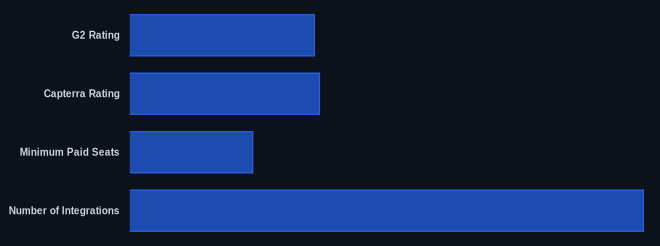
| G2 Rating | 4.3/5 (9,000+ reviews) | G2 Asana Reviews |
| Capterra Rating | 4.5/5 (10,000+ reviews) | Capterra Asana Reviews |
| Starting Price (Annual) | $0 (Free), $10.99 user/month (Starter, as of early 2026) | Asana Pricing |
| Minimum Paid Seats | 2 (Starter Plan, as of early 2026) | Asana Pricing |
| Number of Integrations | 100+ (as of early 2026) | Asana.com |
| Free Tier Available | Yes | Asana Pricing |
| UI Redesign (March 2026) | New 'work', 'strategy', 'workflow', 'people' sections | Asana What's New |
Our Take
Asana in 2026 is a powerful engine for teams prioritizing clarity, visual organization, and process. Its continuous evolution, particularly with the aggressive integration of AI, keeps it competitive and genuinely enhances productivity. But it's not a charity. The platform demands a careful accounting of its true cost beyond the per-user sticker price, especially concerning mandatory minimum seats and the tiered access to critical support and advanced features. For example, Enterprise-level customers get 24/7 support, but most customers get slower, bot-reliant assistance. If your team thrives on structured visibility and is willing to invest in what amounts to an enterprise-grade price tag for what looks like SMB plans, it delivers. If you're looking for an all-inclusive, budget-friendly option with guaranteed white-glove support, you might find yourself frustrated by its enterprise-centric approach to customer service.
Are Asana's AI Teammates and advanced automation features compelling enough to justify paying for 2 seats on the Starter Plan when you only need one?
FAQ
Is Asana worth the cost for a growing SMB in 2026?
Yes, it's worth it for growing SMBs that prioritize visual project clarity and structured workflows, especially with its new AI capabilities. However, be aware of the minimum 2-seat purchase for paid plans (as of early 2026, per the official pricing page) and potential cost escalations from seat increments or increased AI/automation usage. You'll need to carefully consider your team size and feature requirements against its tiered pricing.
How do Asana's AI features compare to other project management tools?
The platform's 2026 AI updates, including AI Teammates and enhanced AI Studio Basic, put it at the forefront of AI integration in project management. While competitors like ClickUp also offer AI, the platform's focus on prebuilt agents for specific administrative tasks (like reporting or task summarization) makes its AI immediately actionable. It's a strong contender if AI-driven efficiency is a top priority.
What are the main complaints about Asana and should I be concerned?
The recurring complaints center on its customer service (slow response times, reliance on bots, 24/7 support only for Enterprise) and pricing transparency (minimum seat purchases, automation limits, paid customer success). While these are valid concerns, the platform's core functionality, ease of use, and effective project management capabilities often outweigh these shortcomings for many users. You should be concerned if dedicated, readily available support is non-negotiable for your business, or if your team size makes the minimum seat purchases financially inefficient.