For asynchronous video messaging, Loom offers an AI-enhanced solution, but its perceived reliability and customer support have notably declined since the Atlassian acquisition, making it a nuanced choice for entrepreneurs and SMBs. If your team relies heavily on the Atlassian ecosystem and values speedy screen recording over advanced editing or guaranteed real-person support, the platform is still worth considering. However, be prepared for potential technical hiccups and automated support interactions.
What Is Loom?
Loom provides quick, simple video recording directly from your screen or camera, then instantly hosts and shares those clips via a link. It's built for speeding up communication, allowing remote teams to explain complex ideas, provide feedback, or give updates without scheduling a live meeting. The core appeal lies in its frictionless workflow, turning what used to be a multi-step process into a few clicks, making it a daily driver for many in product development, sales, and customer support.
The software targets anyone looking to cut down on long emails or repetitive meetings, facilitating asynchronous collaboration. Freelancers use it for project updates, small businesses onboard new hires with video tutorials, and larger teams that integrate extensively with tools like Jira or Confluence.
Key Features
The platform has significantly evolved, especially following its October 2023 acquisition by Atlassian and subsequent AI focus. Here's what sets it apart in 2026:
AI-Powered Capabilities
The software truly differentiates itself today. The Business + AI plan adds a suite of features that use artificial intelligence to make your video content more consumable and actionable. It automatically generates concise auto-titles that capture the video's essence. This saves time on manual tagging and makes videos instantly searchable.
You also get auto-generated summaries and chapters, which are invaluable for long recordings. Viewers can quickly grasp the main points or jump to specific sections without watching the entire video. The platform also includes instant silence/filler word removal, cleaning up your recordings by cutting out "ums," "ahs," and awkward pauses, resulting in more polished, professional-sounding content without manual editing.
New in 2026 are AI Workflows that can transform your videos into documents or populate Jira tickets automatically. Imagine recording a bug reproduction, and the tool creates a draft Jira ticket with technical details already filled in. It also offers AI-powered call-to-action buttons that can dynamically change based on video content or viewer behavior, prompting engagement. The Edit by Transcript feature is also a specific benefit; you can edit your video simply by deleting text from an automatically generated transcript, making cuts and revisions as easy as editing a document.
Core Recording & Sharing
The fundamental strength of the tool remains its ease of recording and instant sharing. You can record your screen, camera, or both simultaneously with just one click using its desktop app or the highly praised Chrome extension. This makes it incredibly fast to capture thoughts, explain processes, or demonstrate issues. Once recorded, the video is immediately uploaded to the cloud and a shareable link is copied to your clipboard.
This frictionless workflow is often cited as its best aspect. It significantly cuts friction in communication, allowing teams to deliver context-rich messages quickly. The ability to add custom branding for paid plans also helps maintain a consistent professional image when sharing videos externally.
Editing & Customization
While not a full-fledged video editor like Camtasia or ScreenFlow, the platform offers essential post-recording tools that handle common needs. You can perform basic waveform editing, which means trimming the beginning or end of your videos to cut out dead air. It lets you stitch clips together, adding a more coherent narrative to your message.
You can also enhance videos with visual elements. This includes adding backgrounds, inserting text overlays, and using arrows or box overlays to draw attention to specific parts of your screen. These features help create clearer, more engaging video messages, especially useful for tutorials or feedback sessions. For more advanced needs, you might still need a dedicated editor, but for quick async comms, it gets the job done.
Atlassian Ecosystem Integration
Since its acquisition in October 2023, the software has seen deep integration into the Atlassian ecosystem, a major selling point for teams already embedded in Jira and Confluence. You can now native embed videos in Jira and Confluence, making project updates, bug reports, and documentation much richer and more interactive. This means your team doesn't have to switch contexts to view critical information.
The platform also introduced AI workflows for Atlassian tickets/pages, automating the process of turning video content into structured data within those tools. For instance, a recording of a user issue could automatically populate a Jira service desk ticket with key details. It also offers automated bug reporting, which populates Jira tickets with technical details and the recorded video, speeding up the development feedback loop.
Collaboration & Analytics
Beyond recording, the platform provides features that enhance team collaboration and give insights into viewer engagement. Each video is instantly hosted in the cloud, allowing for easy organization and access for your team. You can create shared workspaces, making it simple for everyone to find relevant content.
Viewer analytics are a powerful tool, letting you see who watched your video, when they watched it, and even how much of it they consumed. This data is invaluable for confirming message reception, understanding engagement, and iteratively improving your video communications. Comments and reactions directly on the video timeline further facilitate discussion and feedback.
Pricing
As of April 2026, per the official pricing page, Loom offers four distinct pricing tiers to cater to various user needs, from individuals to large enterprises.
-
Starter (Free): This plan is ideal for individual users or small teams just getting started. It includes up to 50 members and allows for 25 videos per person. Each video is limited to a 5-minute recording limit. You get unlimited screenshots and basic screen/camera recording. The 5-minute limit is a common complaint, as it quickly pushes regular users towards an upgrade.
-
Business ($18 per user per month, billed monthly, as of May 2026; or $15 per user per month, billed annually, as of May 2026): Designed for growing teams, this tier removes the restrictive video and recording time limits. It adds essential features like basic waveform editing, custom branding for a professional look, and the ability to upload and download videos. Enhanced collaboration tools are also part of this plan, making it a solid choice for teams needing more flexibility than the free tier.
-
Business + AI ($24 per user per month, billed monthly, as of May 2026; or $20 per user per month, billed annually, as of May 2026): This is Loom's most popular plan, and where the 2026 AI focus truly shines. It includes all Business features and adds the AI capabilities detailed above: automatic video enhancement, auto-generated titles, summaries, and chapters, advanced text-based editing, instant silence/filler word removal, and AI workflows. This plan is aimed at teams looking to maximize efficiency and content impact through smart automation.
-
Enterprise (Custom Pricing, as of May 2026): Tailored for larger organizations with specific needs, this plan encompasses everything in Business + AI, along with advanced security and administrative features. This includes custom security options like SSO (Single Sign-On) and SCIM (System for Cross-domain Identity Management), a dedicated account manager for personalized support, advanced admin controls for managing large user bases, and custom data retention policies. Priority support is also included, which can be critical for enterprise operations.
Loom also offers a free trial for both the Business and Business + AI plans, letting you test out the paid features before committing. While the acquisition by Atlassian in October 2023 and the introduction of the 'Business + AI' plan suggested price increases, the current per-user model can get expensive fast for large teams, especially when you factor in add-ons like premium support and advanced analytics, which can tack on an additional 10-20% to Enterprise contracts (as of May 2026, per the official pricing page).
Pros and Cons
Choosing a video messaging tool means weighing its strengths against its weaknesses. Here's what stands out:
Pros:
- Exceptional Ease of Use: Recording and sharing videos takes just a few clicks, making it incredibly intuitive for new and experienced users alike.
- Rapid Asynchronous Communication: It cuts down on meeting times and long emails, letting teams communicate complex ideas clearly and quickly, often reducing back-and-forth. According to a G2 reviewer: "Instead of typing long messages, I record quick Loom videos to show exactly what needs to be revised. This has reduced back-and-forth with my team since they can see the exact issue and replay the video anytime."
- Strong Atlassian Integration: For teams using Jira and Confluence, the deep native embedding and AI workflows are a significant advantage, speeding up project management and documentation.
- AI-Powered Efficiency: Features like auto-summaries, chapters, and filler word removal save substantial time in content creation and consumption, making videos more digestible.
- Valuable Viewer Analytics: Knowing who watched your video and for how long helps confirm message delivery and track engagement effectively.
- Instant Cloud Hosting & Organization: Videos are immediately uploaded and easily managed in your personal or team library, accessible from anywhere.
- Edit by Transcript: This feature makes editing videos almost as simple as editing a text document.
- Chrome Extension: The browser extension provides an incredibly fast way to capture screen recordings without launching a dedicated app, integrating into web-based workflows.
Cons:
- Declining Reliability Post-Acquisition: Users frequently report increased lag, audio sync issues, failed uploads, and general performance degradation, particularly after the Atlassian acquisition. Loom experienced elevated error rates and degraded performance from a public cloud provider outage on May 8, 2026.
- Frustrating Customer Support: Reaching a real human for support has become difficult for many, with overwhelming reliance on AI-based support, leading to unresolved recurring issues.
- Limited Free Plan: The 5-minute recording limit and 25-video cap on the Starter plan are highly restrictive and quickly push users to upgrade, making it difficult for casual use. A Capterra user notes: "The free plan caps you at 25 videos and 5 minutes per recording, which becomes a real limitation fast for regular users."
- Bloat and Performance Issues: Many long-time users feel the software has become "bloated," experiencing crashes and slower performance, especially compared to lighter alternatives like Supercut.
- Basic AI Features for the Cost: Some users find the AI capabilities, particularly in the "AI tier," to be less sophisticated than expected for the premium price tag.
- Mandatory Cloud Upload: All recordings are automatically uploaded to the cloud, which can be a concern for highly sensitive data, specific compliance requirements (like GDPR or SOC 2), or environments where local recording is preferred. This is a point where alternatives like BB Recorder or QuickTime Player excel.
- Per-User Pricing Can Be Expensive: For larger teams, the per-user per-month model, especially for the AI-enabled tiers, can become quite costly, leading some to seek more cost-effective options like Vidyard or even OBS Studio for advanced users.
- Lacks Advanced Editing: While basic edits are possible, the platform doesn't compete with professional video editors like Camtasia or Screen Studio for complex production needs.
Who Should Use Loom?
Loom is best suited for specific types of teams and individuals who prioritize speed and asynchronous communication over extensive video production or rock-solid, human-led support.
- Remote & Hybrid Teams: If your team is distributed across time zones or operates with flexible hours, the tool is fantastic for reducing meeting overload and ensuring everyone stays updated without needing to be online simultaneously. It's a lifesaver for clarifying complex instructions or providing detailed feedback.
- Product Teams & Software Developers: For demonstrating bugs, explaining new features, or sharing design iterations, the ability to quickly record and integrate videos into Jira or Confluence is incredibly powerful. The automated bug reporting and AI workflows make it even more compelling for development cycles.
- Sales & Customer Success: Use it to personalize outreach messages, provide quick visual explanations of product features, or resolve customer issues with a step-by-step video guide. The immediate sharing and viewer analytics are invaluable here.
- Freelancers & Small Business Owners: If you're a solopreneur or run a small agency, it's an excellent way to communicate with clients, provide project updates, or onboard new contractors efficiently. The free plan offers a taste, but you'll likely need to upgrade quickly.
- Teams Already Invested in Atlassian: This is where the platform offers a distinct advantage. If your team lives in Jira, Confluence, or Trello, the native integrations and AI workflows create a much more cohesive experience.
The tool isn't for everyone, though. If you require advanced video editing capabilities, demand impeccable reliability, or need guaranteed real-person customer support for mission-critical tasks, you might find yourself frustrated.
Data at a Glance
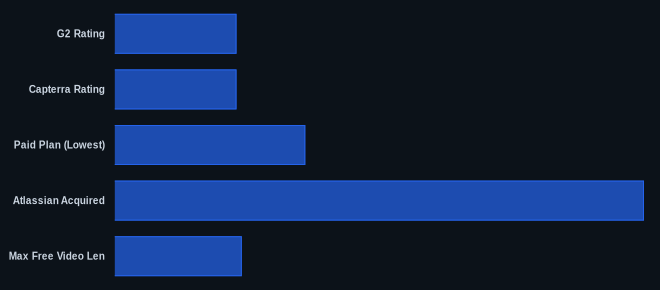
| Metric | Value | Source |
|---|---|---|
| G2 Rating | 4.7/5 stars | G2 |
| Capterra Rating | 4.7/5 stars | Capterra |
| Starting Price | Free (Starter Plan) | Loom Pricing |
| Paid Plan (Lowest) | $15/user/month | Loom Pricing |
| Atlassian Acquired | Oct 2023 | Atlassian Newsroom |
| Max Free Video Len | 5 minutes | Loom Pricing |
| Free Videos Limit | 25 per user | Loom Pricing |
Our Take
Loom's core promise of quick, frictionless video messaging still holds up. The AI features, like Edit by Transcript and auto-summaries, are genuinely useful and save significant time. But, we've also personally experienced the performance dips and the frustrating maze of AI-driven support that makes you yearn for a real human. It's a classic tradeoff: you get incredible convenience and deep Atlassian integration, but at the cost of stability and support quality that feels a step down from what it once was. For our team embedded in Jira, the integration benefits often outweigh the intermittent technical issues, but we acknowledge it’s a tightrope walk.
If you're considering Loom's Business + AI plan, have you factored in the potential costs of add-ons, or considered if the AI features truly justify moving away from a more stable, human-supported screen recording tool?
FAQ
Q: Is Loom's free plan truly sufficient for a small business?
A: The free Starter plan offers 5-minute recording limits (as of May 2026, per the official pricing page) and a cap of 25 videos per user (as of May 2026, per the official pricing page). For very occasional, short clips, it might suffice. But if you plan to use it regularly for detailed explanations, client updates, or internal tutorials, you'll hit those limits incredibly fast. Most small businesses quickly find themselves needing to upgrade to the Business plan to remove these restrictions.
Q: How reliable is Loom in 2026, especially after the Atlassian acquisition?
A: Reliability has become a noticeable concern since the Atlassian acquisition in October 2023. While the platform still performs its core function, user reviews and our own experience highlight an increase in lag, audio sync issues, and occasional failed uploads. The platform also suffered a public cloud provider outage in May 2026. If rock-solid stability is your absolute top priority, you might want to consider alternatives like Screen Studio or look for a more enterprise solution.
Q: What benefits does the new AI-powered plan offer over the standard Business plan?
A: The Business + AI plan unlocks significant time-saving features by using artificial intelligence. These include automatically generated video titles, summaries, and chapters, which make long videos far more digestible. You also get advanced text-based editing (like Edit by Transcript) and instant removal of filler words/silences. Crucially for Atlassian users, it includes AI Workflows for integrating videos directly into Jira tickets or Confluence pages. This tier is for teams looking to automate content creation and optimize video consumption within their workflow.