Miro Review 2026: AI-Powered Visual Collaboration Workspace?
Miro pricing in 2026 starts at $8.00 per user per month (billed annually for the Starter plan) and can reach $16.00 per user per month (billed annually for the Business plan), positioning it as a robust platform for complex, cross-functional collaboration and strategic product development, though costs can escalate quickly for growing teams. This review helps entrepreneurs, project leads, and product managers evaluate Miro's comprehensive offerings.
What Is Miro?
Miro serves as a dynamic visual collaboration platform. It enables distributed teams to transform ideas into action through real-time brainstorming, agile planning, and end-to-end product design processes. Miro facilitates everything from customer journey mapping to product roadmapping, providing a shared canvas where diverse teams can align and execute.
Key Features
Miro's 2026 feature set reflects its strategic acquisitions and significant focus on artificial intelligence.
AI Workflows and Sidekicks
Miro AI powers a suite of functionalities to boost team productivity and creativity. This includes generative AI for ideation and content creation, summarization and information synthesis from complex boards, and automatic diagram generation from text. Miro AI Workflows, launched around March 2026, introduces specialized 'Sidekicks' (AI agents) and 'Flows' (visual AI workflows) that convert canvas content into actionable deliverables, streamlining tasks from brainstorming to project execution.
Enhanced Collaboration & Template Library
The platform supports real-time, synchronous, and asynchronous teamwork. Users collaborate on an infinite canvas, leveraging over 5,000 templates for diverse use cases like agile ceremonies, design sprints, and strategic planning. Talktracks allow for guided presentations directly within the board, enhancing workshop facilitation for remote teams. According to a Capterra reviewer, "The best whiteboarding tool with a wide variety of templates to choose from which can be used for collaboration with multiple users."
Innovation Workspace Expansion
Strategic acquisitions have broadened Miro’s scope. The Reforge acquisition in March 2026 integrates an AI platform for product teams, accelerating Miro's role in the product building lifecycle. The Butter acquisition in January 2026 enhanced Miro Engage, providing tools for interactive workshop facilitation. These moves position Miro as a central hub for end-to-end innovation, not just ideation.
Scalability and Integrations
Miro supports teams of all sizes with features like Single Sign-On (SSO) for security and simplified access, advanced facilitator tools, and flexible licensing. With over 160 integrations, Miro connects with popular project management, communication, and design tools, ensuring it fits into existing tech stacks.
Pricing
Miro offers a tiered pricing structure designed to scale with team needs, alongside a free option. As of October 2026, per the official Miro pricing page:
- Free Plan: $0 per month. This plan includes up to 3 editable boards, over 5,000 templates, and 10 Miro AI credits per month per team. It is suitable for individuals or very small teams experimenting with core features.
- Starter Plan: $8 per user per month when billed annually, or $10 per user per month when billed monthly. Aimed at small to medium-sized teams, it offers unlimited and private boards, custom templates, core integrations, and unlimited Talktracks.
- Business Plan: $16 per user per month when billed annually, or $20 per user per month when billed monthly. Tailored for larger businesses, it includes everything in Starter, plus advanced integrations, SSO, advanced facilitator tools, and 25 Miro AI credits per member per month.
- Enterprise Plan: Custom pricing, typically for organizations with 30 or more users. This plan provides the highest level of security, scalability, dedicated support, flexible licensing, and 100 Miro AI credits per member per month.
- Consultant Plan: $15 per user per month. This plan is specifically designed for consultants managing multiple client projects across different organizations.
Hidden Costs: Costs can escalate quickly as teams expand and require features locked behind higher tiers. Users report that the limited free plan often necessitates an upgrade. If Miro's feature set doesn't cover all specific needs, additional software might be required, leading to further expenses.
Pros and Cons
Miro excels in several areas but also presents challenges for some users.
Pros:
- Real-time collaboration and alignment: Facilitates instant teamwork, enabling quick consensus on ideas and plans.
- Versatile and extensive templates: Over 5,000 templates support a wide array of use cases, significantly boosting productivity.
- Advanced AI capabilities: Miro AI Workflows and Sidekicks streamline ideation, summarization, and content creation.
- Broad platform functionality: Extends beyond whiteboarding to include robust diagramming, wireframing, and mind mapping.
- Enterprise-grade scalability: Strong governance controls and integrations make it suitable for complex, multi-team environments.
Cons:
- Performance issues with large boards: Users report that boards can become slow and heavy when content grows significantly.
- Limited free plan: The restriction to three editable boards often pushes users to upgrade prematurely.
- Complexity/Overwhelm: The extensive feature set and interface can be daunting for users seeking simple whiteboarding.
- Cost escalation: Pricing can become substantial for growing teams, especially for premium features.
Who Should Use Miro?
Miro is an ideal solution for distributed and hybrid teams across various industries, particularly those focused on product development, strategic planning, and complex project management. It suits medium to large businesses that require robust collaboration tools, extensive integrations, and advanced AI assistance. Product teams will find its Reforge-enhanced capabilities valuable for end-to-end product lifecycle management. Organizations that run frequent workshops and interactive sessions will benefit from the Butter-driven enhancements for facilitation.
While excellent for cross-functional collaboration, design-centric teams deeply embedded in the Figma ecosystem might find FigJam more native for their workflows. Similarly, for companies needing extremely specialized diagramming and data linking, Lucidchart could offer more depth. For those primarily within the Microsoft 365 ecosystem, Microsoft Whiteboard offers seamless integration but a simpler feature set.
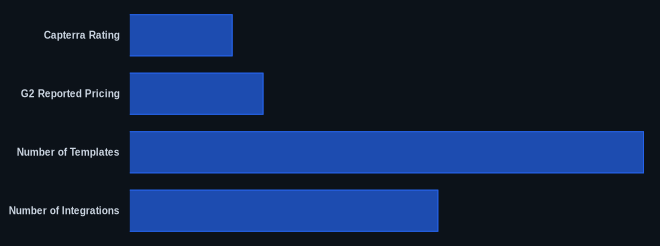
Data at a Glance
| Metric | Value | Source |
|---|---|---|
| Capterra Rating | 4.7/5 stars (based on 1,684 reviews) | Capterra |
| G2 Reported Pricing | $8.00 – $16.00 (per user/month) | G2 |
| Starting Price | $0 (Free Plan) / $8 (Starter Plan) (as of May 2026, per the official pricing page) | Miro Pricing Page |
| Number of Templates | 5,000+ | Miro.com |
| Number of Integrations | 160+ | Miro.com |
| Free Tier Available | Yes | Miro Pricing Page |
Our Take
Miro’s aggressive strategic acquisitions of Reforge and Butter, coupled with its advanced AI Workflows and ‘Sidekicks,’ signal a clear, decisive pivot towards becoming the definitive end-to-end innovation workspace. While the reported performance issues on massive boards remain a concern for a tool designed for expansive visual collaboration, Miro is building a platform that aims to own the entire journey from initial spark to product delivery. This makes it a compelling, albeit complex, choice for organizations serious about scaling innovation, particularly those with a budget to support team growth beyond the free tier.
FAQ
Is Miro's free plan sufficient for small teams or individuals?
The Free Plan offers 3 editable boards and 10 Miro AI credits per month (as of May 2026, per the official pricing page), which is good for exploring basic features or occasional use. However, most small teams will quickly hit the board limit and find themselves needing to upgrade to the Starter Plan for unlimited, private boards and more AI credits.
How do Miro's AI features enhance collaboration and productivity?
Miro AI significantly boosts productivity by automating tasks like summarization, generating ideas and diagrams from text, and adjusting content tone. The Miro AI Workflows and Sidekicks act as specialized assistants, transforming raw canvas content into structured deliverables, enabling teams to move faster from ideation to execution.
Is Miro a suitable solution for enterprise-level deployment?
Yes, Miro is well-suited for enterprise organizations, particularly with its custom-priced Enterprise Plan. This tier offers the highest levels of security, scalability, dedicated support, and advanced features like flexible licensing and 100 Miro AI credits per member per month (as of May 2026, per the official pricing page), designed to meet the complex needs of large-scale deployments.