Notion in 2026 remains the ultimate flexible workspace for startups, remote teams, and growing SMBs willing to invest time in building their perfect system, but its persistent mobile app performance issues create a frustrating contradiction to its otherwise advanced AI capabilities on the go. Its Plus Plan costs $10 per member/month (billed annually) or $12 per member/month (billed monthly) (as of May 2026, per the official pricing page), earning strong approval for consolidating multiple tools into one workspace. This deep dive into its features and recent updates will help you decide if it’s the right central hub for your company.
What Is Notion?
Notion is an 'all-in-one workspace' that centralizes virtually every aspect of a company's operations, from note-taking and document management to task assignment, project tracking, and sophisticated database management. It functions as a highly adaptable digital canvas where teams build interconnected systems to manage information and workflows. This tool lets users consolidate multiple functions typically spread across different applications—think wikis, project boards, and CRM systems—into a single, unified environment, aiming to be the singular "home base" for all company knowledge and activity.
Key Features
The platform's strength lies in its modularity and the breadth of its capabilities, which have continued to expand dramatically into 2026.
Unrivaled Customization and Workspace Building
The core appeal of the software is its block-based editor and database functionality, allowing users to build almost anything. You can create interconnected pages for meeting notes, shared wikis, detailed project plans, or even a full-fledged CRM. This flexibility is truly unique, letting teams design their workspace exactly to their specifications using a vast array of templates or starting from scratch. According to a G2 reviewer: "What I like most about Notion is the flexibility it has to organize practically any type of information." This is where the tool shines, providing the tools to craft bespoke solutions for diverse business needs. However, this power also creates a common pitfall: the "building vs. using" trap. Users often spend excessive time designing intricate, aesthetically pleasing workspaces that become difficult to maintain or too heavy to actually use for daily tasks, diverting precious time from productive work. As one article finding put it: "The system became the project. The actual work got ignored."
Intelligent AI Integration
Notion has significantly deepened its AI capabilities, especially with updates like Notion 3.2 (Jan 20, 2026) and 3.4 (Mar 26 & Apr 14, 2026). The platform now offers Mobile AI for on-the-go assistance, which is fantastic on paper. You also get access to advanced New AI Models (GPT-5.2, Claude Opus 4.5, Gemini 3), allowing for more nuanced content generation and analysis. Key features include Notion Agent, which automates tasks and answers queries, and AI Meeting Notes for instant summaries and action items. The Enterprise Search (beta) allows for powerful information retrieval across your entire workspace.
Beyond these, Custom Agents offer tailored AI assistance, initially free to try (e.g., until May 3, 2026) and then credit-based. The tool also boasts AI Autofill in Databases to populate fields automatically, and new generative capabilities for Image/Chart/Slide/Diagram Generation. These features, particularly the configurable AI models and Custom Agents, make the software a powerful assistant for content creation, data analysis, and workflow automation.
Collaboration and Knowledge Management
Notion excels as a collaborative hub. Teams share pages, assign tasks, and track projects with multiple views (table, board, calendar, gallery). Features like Private Teamspaces and Granular Database Permissions (available in higher tiers) ensure sensitive information is managed securely. The platform is often lauded as a company intranet, home base, and document database rolled into one. A Capterra user noted: "It's our company intranet, home base, document database, project manager, and task assigner." Its powerful Search Functionality makes finding information across thousands of pages remarkably quick, a critical feature for knowledge-heavy organizations. The recently redesigned sidebar and new "Tabs" Block further enhance navigability within large workspaces.
Productivity Tools and Integrations
Recent updates have brought several practical improvements. Notion 3.4 (Mar 26 & Apr 14, 2026) introduced Dashboards for a high-level overview of projects and tasks, alongside a dedicated Presentation Mode to share content directly from your workspace. Mail to Notion Pages allows you to send emails directly into your database or page, turning emails into actionable items. Integrations have also seen a boost, with Improved Jira Integration and new AI Connectors for Salesforce and Box, expanding its reach into other business-critical applications. Desktop users also benefit from significant Desktop Performance Improvements (Jan 20, 2026), with Windows seeing a 27% boost and Mac an 11% increase, making the core experience much snappier. The launch of the Notion Developer Platform (Notion 3.5) (May 13, 2026), alongside API updates and a new Developer Portal, signals a commitment to extensibility and custom solutions.
Pricing
Notion's pricing structure is tiered and has evolved to integrate its powerful AI features more deeply (as of May 2026, per the official pricing page).
-
Free Plan: $0 per member/month. This plan offers basic pages, databases, 7-day page history, and a 5MB file upload limit. Crucially, it includes a limited trial of Notion AI, allowing individual users to test the waters. It's great for personal use or very small, basic teams getting started.
-
Plus Plan: $10 per member/month (billed annually) or $12 per member/month (billed monthly). The Plus Plan removes the 5MB file upload limit, offers a 30-day page history, and supports unlimited guests. It also provides a limited trial of Notion AI. Many users find this plan to be a sweet spot. A review excerpt states: "The Plus plan at $10/month earns strong approval for consolidating multiple tools into one workspace."
-
Business Plan: $20 per member/month (billed annually) or $24 per member/month (billed monthly). This is where Notion's full AI potential truly unlocks. The Business Plan provides full access to Notion AI, including Notion Agent, AI Meeting Notes, and Enterprise Search. It also features SAML SSO, private teamspaces, granular database permissions, and a 90-day page history. This tier targets businesses that rely heavily on advanced collaboration and AI-driven insights.
-
Enterprise Plan: Custom pricing. Contact Notion sales for details. This plan is designed for large organizations, offering zero-data-retention AI, SCIM provisioning, audit logs, and dedicated support.
Notion AI Pricing: Full Notion AI is bundled with the Business Plan. However, Custom Agents are now priced credit-based at $10 per 1,000 monthly Notion credits (as of May 2026, per the official pricing page), after an initial free trial period (e.g., until May 3, 2026). This shift represents a move from a flat $8/member/month add-on for core AI to a more granular, consumption-based model for specialized AI tasks.
Hidden Costs or Add-ons:
- Custom Domains and Branding for Notion Sites: If you use Notion as a public-facing site, this costs $8 per month per domain (billed annually) or $10 per month per domain (billed monthly) (as of May 2026, per the official pricing page).
- Custom Agents: Beyond the free trial, these become an additional cost based on credit usage. For teams heavily reliant on specialized AI workflows, this can get expensive fast.
Pricing Changes in Last 12 Months: The most significant change has been the integration of core Notion AI features directly into the Business Plan, moving away from a universal add-on. The pricing for Custom Agents also evolved into a credit-based model, offering more flexibility but also introducing a new layer of cost management for advanced AI users. Pricing concerns are consistent across G2 reviews, with many users describing Notion AI as expensive relative to standalone AI tools like ChatGPT.
Pros and Cons
Pros
- Unmatched Flexibility: Create almost any workflow or information structure you can imagine, from simple notes to complex project management.
- All-in-One Workspace: Consolidates wikis, project trackers, databases, and documents, acting as a single source of truth for your organization. According to a Capterra user: "It's our company intranet, home base, document database, project manager, and task assigner."
- Powerful AI Integration: Advanced features like Notion Agent, AI Meeting Notes, Custom Agents, and support for multiple leading AI models significantly boost productivity for writing, analysis, and automation.
- Excellent Search: Quickly locate specific information across your entire workspace, even in vast, interconnected databases.
- Strong Community and Templates: A massive library of community-created templates and a vibrant user base means you rarely start from scratch.
- Improved Desktop Performance: Recent updates have made the Windows and Mac desktop apps noticeably faster and more responsive.
Cons
- Steep Learning Curve: Its immense flexibility means it can be overwhelming for new users. A G2 reviewer noted: "The tool is not the problem. The problem is almost always one of three things: Over-engineering on day one."
- "Building vs. Using" Trap: The temptation to continually refine and over-engineer the workspace can detract from actual productive work.
- Persistent Mobile App Issues: Despite the introduction of Mobile AI in 2026, the underlying app performance remains sluggish, clunky, and difficult to navigate, especially with databases. On Reddit, one user wrote: "But I genuinely don't understand why the mobile experience is still so bad. Databases are hard to navigate, things feel slow and clunky, and even simple actions like adding tasks or checking projects feel wonky."
- Automation Limitations: Core automation capabilities are less reliable than dedicated project management tools like ClickUp, requiring workarounds or integrations for complex workflows.
- Offline Mode Limitations: Functionality is significantly reduced or non-existent without an internet connection, a critical drawback for some users. A Capterra review excerpt stated: "Notion… doesn't work offline."
- AI Can Be Costly: While core AI is integrated, advanced features like Custom Agents are credit-based and can add up, potentially making the platform more expensive than perceived.
Who Should Use Notion?
Notion is ideal for entrepreneurs, remote teams, and small to medium-sized businesses (SMBs) who prioritize flexibility and centralized knowledge management.
It's perfect for:
- Startups and Agencies needing a single, adaptable platform for everything from client onboarding to content calendars and internal wikis.
- Remote Teams that require a "digital office" to collaborate on documents, manage projects, and share company knowledge without being tied to a physical location.
- Creative Teams (marketing, design, content) who benefit from visual project boards, strong document creation, and AI assistance for brainstorming and content generation.
- Organizations focused on building a comprehensive knowledge base or company intranet. Its docs-first approach makes it excel here.
- Teams willing to invest time in initial setup and customization. If you enjoy tinkering and designing your own systems, you'll love it. If you need an out-of-the-box, highly structured solution, you might find the learning curve frustrating.
Teams that need highly specialized, structured project management out-of-the-box, like those deeply embedded in Agile or complex Gantt charts, might find themselves better served by tools like Asana or ClickUp, or require significant initial build-out time within the software.
Data at a Glance
| Feature/Metric | Value | Source |
|---|---|---|
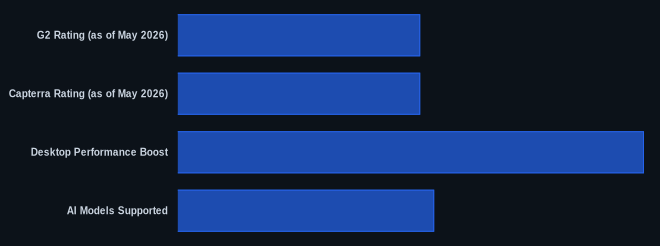
| G2 Rating (as of May 2026) | 4.7/5 stars (from 7,000+ reviews) | G2 Reviews |
| Capterra Rating (as of May 2026) | 4.7/5 stars (from 2,500+ reviews) | Capterra Reviews |
| Starting Price (Plus Plan) | $10/member/month (annual billing) (as of May 2026) | Notion Pricing |
| Free Tier Available | Yes | Notion Pricing |
| Notable Integrations | Jira, Slack, Salesforce, Box | notion.so |
| Desktop Performance Boost | Windows +27%, Mac +11% (Jan 20, 2026) | notion.so |
| AI Models Supported | GPT-5.2, Claude Opus 4.5, Gemini 3 | notion.so |
Our Take
Notion is still one of the most compelling tools on the market for teams that value flexibility above all else. Its 2026 AI advancements are genuinely impressive, bringing powerful capabilities right into your workspace, and the desktop app is faster than ever. But here’s the kicker: the promise of mobile AI feels hollow when the underlying mobile app struggles with basic navigation and performance, especially on databases. It’s a paradox that keeps the tool from truly being 'all-in-one' in every context. You'll either love building with it, or you'll find yourself trapped in an endless cycle of optimization, wishing you'd picked a more opinionated tool like Coda or ClickUp from the start.
If you're considering the Business Plan for its full AI suite, have you truly assessed if your team can overcome the mobile app's limitations for daily tasks, or will those advanced features mostly gather dust on the desktop?
FAQ
Is Notion still relevant for small businesses in 2026, or is it too complex?
Notion is highly relevant for small businesses in 2026, especially those that need a single platform to manage diverse information and workflows. While it has a learning curve, its flexibility means you can start simple and scale complexity as your business grows. The Free Plan and Plus Plan make it accessible, and AI features significantly reduce the manual effort of content creation and information retrieval.
How do Notion's AI features compare to standalone AI tools like ChatGPT, and are they worth the cost?
Notion's integrated AI offers convenience and context-awareness, working directly within your documents and databases. It's fantastic for generating content, summarizing meeting notes, and auto-filling database properties based on existing information. While standalone tools like ChatGPT might offer more raw AI power for specific tasks at a lower per-query cost, Notion's value comes from its seamless integration into your existing workspace. For businesses already using Notion as their central hub, the bundled AI in the Business Plan or credit-based Custom Agents can be worth it for the workflow efficiency gains, even if the per-credit cost for custom agents might feel higher.
What are the main limitations of Notion that I should be aware of before committing?
The primary limitations revolve around its steep learning curve, the potential for over-engineering your workspace, and the persistent issues with its mobile application performance, despite recent mobile AI advancements. If your team relies heavily on mobile access for complex tasks or needs reliable, out-of-the-box automation and structured project management without extensive setup, you might encounter frustrations. Offline functionality is also very limited, so teams needing constant access without internet connectivity should consider alternatives.