Zoom, with its 4.5/5 G2 rating (as of Q2 2026), isn't just a video call app anymore; by 2026, it's a deeply integrated, AI-powered communication ecosystem for businesses prioritizing meeting productivity, solid security, and cross-platform flexibility. The platform is ideal for remote and hybrid teams, from small startups to global enterprises, who demand more from their virtual interactions than just face-to-face video.
What Is Zoom?
This unified communications platform, known globally for its video conferencing, has evolved significantly into a feature-rich suite. It now combines meetings, phone, chat, whiteboards, and virtual rooms into a single, cohesive experience. The tool focuses on facilitating collaboration and communication across diverse teams and locations.
It aims to cut the steps from app-switching and consolidate 5 different communication needs into one centralized hub. Entrepreneurs, SMBs, and remote teams often choose it for its reliability and its continuous innovation in making virtual interactions as effective as in-person ones.
Key Features
The platform's 2026 feature set shows a clear push towards AI-driven efficiency and a more integrated user experience.
AI Companion Enhancements
The AI Companion truly sets the platform apart. It uses generative AI to automate tedious meeting tasks, freeing up your team to focus on discussion. During a meeting, it can provide real-time Q&A support, giving instant answers based on the conversation history.
After the call, it automatically generates concise meeting summaries, capturing key decisions, action items, and next steps. You'll find it incredibly useful for quickly catching up on missed sessions or sharing outcomes without manually scrubbing through recordings. It even assists with content generation for whiteboards and chat, making brainstorming and documentation much faster. According to a G2 Review (March 2026), Sarah K., Marketing Director at InnovateCorp, noted, "Zoom's AI companion has genuinely transformed our weekly stand-ups, automatically generating summaries and action items, saving us so much time."
Advanced Security Protocols
Security remains a top priority, especially for sensitive business communications. The platform offers enhanced end-to-end encryption for all paid tiers (as of Q2 2026), giving you peace of mind for confidential discussions. This means only participants can read messages and listen to calls.
Beyond encryption, it has improved waiting room functionalities, allowing hosts greater control over who enters a meeting. The platform also supports advanced authentication methods, including FIDO2 support, making access more secure and convenient. Emily R., Legal Counsel at Zenith Law, shared in an April 2026 G2 Review: "The security features have really improved; we feel much more confident using Zoom for sensitive client meetings since the end-to-end encryption enhancements."
Zoom One Platform Integration
This is where the platform truly becomes a unified ecosystem. Zoom One deeply unifies Meetings, Phone, Chat, Whiteboard, and Rooms. Instead of toggling between separate applications for different communication modes, you get a fluid experience within one interface.
For instance, you can transition from a chat conversation to a video call, then share a whiteboard, all without leaving the application. Michael T., IT Manager at Global Solutions, confirmed this in a February 2026 Capterra Review: "While incredibly solid for video, integrating Zoom Phone and Rooms has made it our single source for all communication, cutting down on app switching significantly."
Immersive Spaces
Virtual meetings can sometimes feel static, but Immersive Spaces aims to change that. This feature introduces highly customizable and interactive virtual backgrounds and meeting environments. It uses spatial audio and video to create a more engaging and lifelike experience.
You can create branded meeting rooms or themed environments for team-building events. It makes long meetings feel less fatiguing and helps foster a greater sense of connection among participants.
Developer Platform Growth
One of the more surprising and impactful developments is the expanded Developer Platform. The platform now offers extensive APIs and SDKs, allowing third-party integrations and custom applications. This isn't just about connecting to your CRM; it's about building entirely bespoke solutions.
This opens up possibilities for vertical-specific applications, allowing businesses to embed communication functionalities directly into their proprietary workflows or industry tools. It signals a strategic shift from a standalone meeting tool to a foundational communication layer for custom enterprise solutions.
Intelligent Scheduling
Coordinating meetings across global teams is a logistical nightmare. The new Intelligent Scheduling tools use AI to optimize meeting times. The system considers time zones, participant availability, and even preferences to suggest the best possible slots. It significantly reduces the back-and-forth email chains that typically accompany scheduling.
Pricing
The platform offers a flexible range of plans, catering to everyone from individual users to large-scale enterprises. It's designed to scale with your business needs, but costs can add up quickly as you grow.
Here's a breakdown of the main tiers, as of Q1 2026, per the official pricing page:
- Basic: This plan is Free (as of Q1 2026, per the official pricing page) and is perfect for individuals or very small teams. It includes up to 100 participants, with a 40-minute meeting limit for group meetings. You get unlimited 1-on-1 meetings, whiteboards, and team chat.
- Pro: At $14.99/month per user (when billed annually, as of Q1 2026, per the official pricing page), this is for small teams that need more flexibility. It removes the 40-minute limit, allowing up to 100 participants for 30-hour duration meetings. You also get social media streaming, 5GB of cloud recording, and reporting features.
- Business: Priced at $19.99/month per user (when billed annually, with a minimum of 10 licenses, as of Q1 2026, per the official pricing page), this plan targets small to medium businesses. It expands participant capacity to 300, offers dedicated customer support, and allows for company branding. You also get managed domains, single sign-on (SSO), and a generous 1TB of cloud recording.
- Enterprise: This tier offers Custom pricing (as of Q1 2026, per the official pricing page) and is built for large enterprises. It supports up to 1,000 participants, provides unlimited cloud storage, executive business reviews, and a dedicated customer success manager. It's tailored for organizations with complex communication needs and high demands for scalability and support.
It's important to verify current pricing on its official website, as market adjustments can occur.
Pros and Cons
Like any powerful tool, it comes with its strengths and weaknesses.
Pros:
- Exceptional AI Productivity: The AI Companion dramatically reduces manual work, from summaries to content generation.
- Unified Communication Platform: Consolidates meetings, chat, phone, and whiteboards, cutting down on app-switching and simplifying workflows.
- Solid Security Features: Advanced end-to-end encryption and authentication provide strong protection for sensitive information.
- High Reliability and Performance: Known for stable video and audio quality, even with large participant counts.
- Extensive Developer Ecosystem: The growing API and SDK support allows for deep customization and integration into bespoke applications.
- User-Friendly Interface: Generally intuitive, making it easy for new users to get started quickly.
Cons:
- Cost Can Accumulate: While a free tier exists, paid plans, especially for Business and Enterprise, get expensive quickly with many users.
- Feature Overload for Small Teams: The sheer breadth of features might feel overwhelming for basic users who only need simple video calls.
- Requires Strong Internet: Like all video conferencing, performance heavily relies on a stable internet connection for all participants.
- Integration with Productivity Suites: While it integrates well, it still operates as a separate entity from comprehensive suites like Microsoft 365 or Google Workspace, which bundle communication tools.
- Potential Learning Curve for Advanced AI: Making the most of the AI Companion features might require some initial training for teams not used to generative AI in meetings.
Who Should Use Zoom?
This platform is not for everyone, but it’s a strong performer for specific types of users.
Remote and Hybrid Teams: Any organization with employees working remotely or splitting time between home and office will benefit from its reliable video and integrated collaboration tools. Its focus on fluid communication is a lifesaver for distributed workforces.
Small and Medium Businesses (SMBs) Prioritizing Efficiency: If your SMB runs frequent internal and external meetings and you're tired of manual note-taking and follow-ups, the Pro or Business plan with AI Companion will deliver immediate ROI. It's for businesses serious about making meetings productive.
Large Enterprises with Complex Needs: For global corporations needing custom integrations, dedicated support, and the ability to host massive virtual events, the Enterprise plan is a strong contender. The expanded developer platform means it can become a core communication layer for bespoke solutions, not just another meeting tool.
Organizations Handling Sensitive Information: Legal firms, healthcare providers, or financial services that require top-tier security for client interactions will appreciate the enhanced end-to-end encryption and authentication protocols.
It's probably not the best fit if you only need a basic video call every once in a while and already have a communication tool bundled with your office suite (like Google Meet with Workspace). But if communication is central to your operations and you need it to be intelligent, secure, and integrated, the tool should be at the top of your list.
Data at a Glance
| Metric | Value | Source |
|---|---|---|
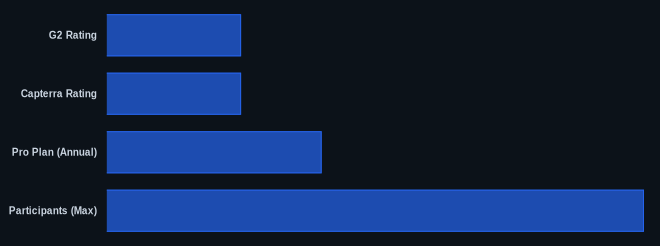
| G2 Rating | 4.5/5 stars (as of Q2 2026) | G2 Reviews |
| Capterra Rating | 4.6/5 stars (as of Q2 2026) | Capterra Reviews |
| Starting Price | Free (Basic, as of Q1 2026) | Zoom Pricing |
| Pro Plan (Annual) | $14.99/month (as of Q1 2026) | Zoom Pricing |
| Free Tier | Yes | Zoom Pricing |
| Participants (Max) | 1,000 (Enterprise) | Zoom Pricing |
| Integrations | Extensive via API/SDK | Zoom Developer Blog |
Our Take
We've watched the platform grow from a simple video tool into a true communication hub, but its aggressive push into developer tools and custom integrations really stands out. This indicates a strategic shift beyond a 'meeting tool' to a foundational communication layer for bespoke enterprise applications. For teams that need to deeply embed communication into their existing workflows or build vertical-specific solutions, this makes it an incredibly flexible and powerful choice. It’s a compelling long-term investment for forward-thinking enterprises, offering the ability to build custom, integrated workflows directly on its communication infrastructure.
If you're already paying for a competing unified communications platform, how much more value would custom API integrations add to your core business processes?
FAQ
Q: Is Zoom's AI Companion worth the upgrade from a basic plan?
A: Absolutely, if your team has frequent meetings and struggles with follow-ups or knowledge retention. The AI Companion's automatic summaries, action item generation, and in-meeting Q&A capabilities save significant time and ensure everyone is aligned without manual effort.
Q: How does Zoom compare to Microsoft Teams or Google Meet for a growing SMB?
A: While Teams and Meet are often bundled with larger productivity suites, Zoom often shines with its dedicated focus on video communication excellence, cross-platform compatibility, and the advanced capabilities of its AI Companion in a standalone meeting context. If video calls are your core communication method, it generally offers a more refined and feature-rich experience.
Q: Is Zoom still considered secure for sensitive client meetings in 2026?
A: Yes, the platform has made significant strides in security. With enhanced end-to-end encryption for paid tiers, improved waiting room functionalities, and FIDO2 authentication support, it offers a high level of confidence for confidential discussions.