Zendesk, while a powerful customer service platform for scaling businesses, often comes with a steep price tag due to its complex add-on structure, and users frequently report an outdated interface and surprisingly poor customer support. This review is for entrepreneurs, remote teams, and SMBs who need a solid customer service solution and are weighing its cost against its capabilities.
What Is Zendesk?
Zendesk provides a customer service platform that centralizes and manages all customer interactions. It helps companies manage support across various channels like email, chat, voice, and social media. The tool helps teams handle high volumes of customer queries, automate routine tasks, and improve service efficiency.
It serves as a core hub for customer support operations, from basic ticketing to advanced AI-driven assistance. The platform is especially suited for growing businesses that anticipate scaling their support efforts significantly, requiring a solid system that can adapt to increasing complexity and agent numbers.
Key Features
The software combines a deep feature set with a heavy focus on AI to manage complex customer service needs.
Omnichannel Support Hub
This platform brings all customer conversations into one place. Whether a customer reaches out via email, web chat, phone, or even social media, the system captures it. Agents get a unified view of every interaction, which prevents context switching and speeds up resolution times. It's why many larger teams stick with the tool. According to an anonymous user: "Zendesk Support Suite helps us manage a high volume of customer queries efficiently by centralizing communication across multiple channels like email, chat, and social media."
Advanced AI and Automation
Zendesk has poured resources into AI, and it shows. Features like Copilot offer agents AI-assisted replies and summaries, reducing manual effort. The Advanced AI add-on takes this further with ticket triage, generative AI responses, and workflow automation. It acquired Forethought in early 2026 to power Action Flows for AI Agents, letting these agents integrate with external systems. You can create no-code AI agents with its Agent Builder and gain insights with the Automation Potential Report.
Solid Ticketing System
At its core, the software has a highly capable ticketing system. It allows for detailed ticket management, custom workflows, and powerful routing rules to ensure queries land with the right agent. This solid foundation makes it a reliable choice for businesses with complex or high-volume support needs.
Extensive Customization and Integrations
The platform offers deep customization options, from custom objects to intricate workflow automation. It boasts an ecosystem of over 1,800 apps and integrations. This means you can connect it to almost any other business tool you use, whether it's your CRM, marketing automation, or project management software.
Workforce and Quality Management
With add-ons like Workforce Management (WFM) (as of May 2026, per the official pricing page) and Quality Assurance (QA) (as of May 2026, per the official pricing page), you can optimize agent schedules, forecast demand, and monitor performance. The acquisition of Klaus in 2024 brought in advanced QA capabilities, allowing you to score interactions and identify coaching opportunities. This is critical for maintaining high service standards in larger teams.
Self-Service Options
You can build comprehensive Help Centers with knowledge bases, allowing customers to find answers independently. With recent additions like Generative Search in Help Centers (as of May 2026, per product updates), customers can ask natural language questions and get precise answers, further reducing the load on agents.
Pricing
Zendesk's pricing is where many users hit a wall. It’s structured around agent seats, billed monthly or annually, with annual billing offering discounts. A 14-day free trial is available (as of May 2026, per the official pricing page), usually for the Suite Professional plan (as of May 2026, per the official pricing page), but there’s no permanently free tier.
As of May 2026, per the official Zendesk pricing page:
Zendesk Support Plans (Ticketing Only):
These are for basic email and web form ticketing. AI is an add-on.
- Support Team: $19 per agent/month (billed annually) or $25 monthly (as of May 2026, per the official pricing page).
- Support Professional: $55 per agent/month (billed annually) (as of May 2026, per the official pricing page).
Zendesk Suite Plans (Omnichannel Support):
These bundle ticketing, messaging, chat, voice, and basic AI agents.
- Suite Team: $55 per agent/month (billed annually) or $69 monthly (as of May 2026, per the official pricing page).
- Suite Growth: $89 per agent/month (billed annually) or $109 monthly (as of May 2026, per the official pricing page). AI is included.
- Suite Professional: $115 per agent/month (billed annually) or $149 monthly (as of May 2026, per the official pricing page).
- Suite Enterprise: Custom pricing (as of May 2026, per the official pricing page).
Hidden Costs and Add-ons:
This is where the pricing gets complicated, and expensive. Many essential AI features and management tools are separate add-ons.
- Copilot (AI-assisted replies, agent digest): $50 per agent/month (as of May 2026, per the official pricing page).
- Advanced AI (ticket triage, agent copilot, generative AI responses, advanced workflow automation): $50 per agent/month (billed annually) (as of May 2026, per the official pricing page). This contradicts the platform's February 2026 claim of providing AI features for $14/agent/month, highlighting a confusing pricing structure.
- Quality Assurance (QA): $35 per agent/month (as of May 2026, per the official pricing page).
- Workforce Management (WFM): $25 per agent/month (as of May 2026, per the official pricing page). A bundle of WFM and QA is available for $50/month (as of May 2026, per the official pricing page).
- Contact Center: $50 per agent/month (as of May 2026, per the official pricing page).
- Advanced Data Privacy and Protection (ADPP): $50 per agent/month (as of May 2026, per the official pricing page).
Beyond per-agent costs, you also pay for Automated Resolutions (ARs). Suite and Support plans include a fixed number of ARs (e.g., 5 on Suite Team, 10 on Suite Professional) (as of May 2026, per the official pricing page). Go over those limits, and you're charged an additional $1.50 per committed AR (as of May 2026, per the official pricing page) and $2.00 per pay-as-you-go AR (as of May 2026, per the official pricing page). Implementation and training costs are also a factor for larger deployments.
Overall, pricing has become more complex and expensive due to these mandatory-feeling add-ons. While SMB pricing saw a slight decrease of 0.48% year-over-year based on some customer spend data, enterprise pricing reportedly increased by 19.77% in the last 12 months. This gets expensive fast, especially if you want all the advertised AI goodies.
Pros and Cons
Like any powerful tool, it comes with tradeoffs.
Pros:
- Solid Ticketing and Omnichannel: Excels at centralizing communications across email, chat, voice, and social, making it easy to manage high volumes.
- Powerful AI Features: The recent heavy investment in AI (Copilot, AI Agents, generative search) significantly reduces agent workload and improves efficiency. According to an anonymous user: "The platform's AI usage is very impressive and significantly reduces workload."
- Extensive Customization and Automation: Offers deep flexibility to tailor workflows, rules, and integrations to precise business needs.
- Vast Integration Ecosystem: With over 1,800 apps, it connects with virtually any other business tool you use.
- Scalability: Built to handle the demands of large enterprises and growing teams, offering features that smaller tools can't match.
Cons:
- High and Complex Pricing: The cost structure, particularly with numerous add-ons and AR limits, quickly escalates and can be confusing. According to a G2 reviewer: "The basic subscription Zendesk plan for an all-in-one suite starts from $69 per agent/month. No doubt, Zendesk offers rich functionality that huge companies can benefit from. But for SMBs, the prices are just too high."
- Outdated and Clunky Interface: Many users report that the UI feels dated, slow to load, and requires too many refreshes, impacting agent productivity.
- Subpar Customer Support (Ironically): Despite being a customer service platform, its own support receives surprisingly low ratings (Trustpilot score of 1.7/5), which is a common complaint.
- Steep Learning Curve: The extensive features and customization options mean it can take a significant amount of time and effort to set up and master.
- Performance Issues: Slowness and lagging are frequently mentioned in user reviews, especially when handling larger datasets or complex dashboards.
Who Should Use Zendesk?
This platform is definitely not for everyone. It’s best suited for:
- Mid-to-Large Sized Businesses: Companies with growing customer bases and multiple support channels that need a centralized, scalable solution.
- Teams with Complex Support Workflows: If your customer queries are varied and require intricate routing, automation, and integrations, it can handle it.
- Businesses Prioritizing AI-Driven Efficiency: Organizations ready to invest in AI tools to assist agents, automate tasks, and improve self-service options will get the most out of the recent feature updates.
- Companies That Need a Unified Omnichannel Experience: If you want all customer interactions (email, chat, voice, social) in one agent interface, this tool does it well.
- Organizations Already Using Salesforce: While Salesforce Service Cloud is a competitor, the platform still offers a broader integration ecosystem for businesses not fully entrenched in the Salesforce universe but needing deep CRM connections.
If you’re a small startup with a handful of agents, the cost and complexity will likely be overkill. You might find more affordable, simpler alternatives like Freshdesk or Help Scout a better fit. But if you’re scaling past 10-15 agents and complexity is increasing, the tool becomes a serious contender.
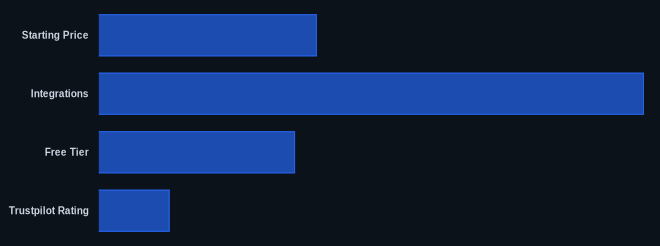
Data at a Glance
| Metric | Value | Source |
|---|---|---|
| G2 Rating | Highly rated, 6,838 reviews | G2 Zendesk Suite |
| Capterra Rating | Strong standing, 4,079 reviews | Capterra Zendesk |
| Starting Price | $19/agent/month (billed annually for Support Team) | Zendesk Pricing Page |
| Integrations | 1,800+ apps | Zendesk Official Site |
| Free Tier | No (14-day free trial available) | Zendesk Pricing Page |
| Trustpilot Rating | 1.7/5 (for Zendesk's own customer support) | Trustpilot |
Our Take
Zendesk is a powerful beast, capable of handling almost anything you throw at it, especially if you're a scaling company. Its extensive customization and AI capabilities, like the new Knowledge Copilot and Analyst Copilot (as of May 2026, in early access), are key for larger teams reducing agent workload. Yes, its UI often feels like a relic from a previous decade, and its customer support can be infuriatingly slow for a tool built for customer support. But if you're running a complex operation with a large team and need extensive omnichannel capabilities alongside serious AI agent assistance, the platform has the depth. Just be ready for the price tag to grow faster than you expect, and budget for its many add-ons. It's built for scale and advanced use cases, not for quick, cheap, or simple setups.
If you're considering Zendesk's Suite Professional plan, are you budgeting for the additional $100/agent/month for Copilot and Advanced AI to get the full promised functionality, or are you hoping basic AI features will suffice?
FAQ
Is Zendesk a good option for small businesses or startups?
While Zendesk offers an entry-level Support Team plan at $19/agent/month (as of May 2026, per the official pricing page), its overall pricing structure, especially with the necessary add-ons for full functionality, quickly becomes expensive. Small businesses might find it too complex and costly for their needs, preferring more streamlined and affordable alternatives like Freshdesk or Intercom, which offer simpler pricing and potentially free tiers.
How much do Zendesk's AI features actually cost?
Zendesk has integrated some basic AI into its Suite Growth plans and above (as of May 2026, per the official pricing page). However, key advanced AI features like Copilot (AI-assisted replies, agent digest) (as of May 2026, per the official pricing page) and Advanced AI (ticket triage, generative AI responses, advanced workflow automation) (as of May 2026, per the official pricing page) are separate add-ons, each costing $50 per agent/month (as of May 2026, per the official pricing page). This means getting the full benefit of its AI capabilities significantly increases your overall subscription cost.
What are the main alternatives to Zendesk, and who are they for?
The main alternatives depend on your specific needs. Freshdesk is often cited for its affordability, ease of use, and faster setup, making it ideal for SMBs looking for a simpler, cost-effective solution. Salesforce Service Cloud offers deeper integration for businesses already heavily invested in the Salesforce ecosystem, providing robust CRM-centric support. Intercom focuses on conversational engagement and proactive chat, suitable for companies prioritizing real-time customer interaction and a modern UI.