GoTo Webinar, priced as low as $49 per organizer per month (Lite plan, billed annually as of June 2026), remains a reliable choice for businesses hosting virtual events. However, its premium cost and interface that some users call dated make recent feature additions like 'AI Summary' crucial for staying competitive for entrepreneurs and growing SMBs making real software buying decisions.
What Is GoTo Webinar?
GoTo Webinar is a dedicated online event platform for hosting virtual seminars, training sessions, and large-scale presentations. For years, businesses have used the tool to connect with audiences globally, focusing on lead generation, customer education, and internal communications. The platform provides an environment for managing everything from registration to post-event analytics, ensuring a professional and stable experience for both organizers and attendees. It's built for scale, capable of handling hundreds to thousands of participants without issues.
Key Features
The platform delivers features to speed up the entire webinar lifecycle, from planning and promotion to engagement and post-event analysis. Recent updates show a clear effort to blend its renowned stability with modern demands.
Easy Setup and Management
GoTo Webinar consistently earns praise for its straightforward setup process. Organizers can schedule events, customize registration forms, and manage attendee lists with minimal fuss. The dashboard gives a clear overview of upcoming events, making it easy to prepare. Custom branding options let businesses maintain a consistent look across all event communications. This simplicity helps busy teams.
Dynamic Audience Engagement
Keeping attendees involved is crucial for successful webinars. The software provides a Q&A panel, live polls, and surveys to gather immediate feedback and facilitate interaction. Attendees can use quick emoji reactions for real-time, non-disruptive responses. For more intimate discussions, Breakout Rooms allow small groups to collaborate, which helps with training or workshops. You can also allow participants to download the Q&A list after the event, a useful detail for follow-up.
Professional Presentation Tools
Organizers gain control over the presentation environment. Features like Virtual Backgrounds ensure a polished look, while Camera Control lets organizers manage participant video feeds (as of April 28, 2026). Spotlight Feature Updates (as of April 1, 2026) now allow participants to pre-set spotlights and presenters to enable them from a share preview, making transitions smoother. A recent Microphone Clarity Check (as of May 8, 2026) even helps hosts ensure their audio is perfect before going live.
Advanced Recording and Analytics
Every webinar can be recorded, providing valuable content for on-demand viewing. The platform also offers recording transcripts, which are useful for content repurposing and accessibility. For Pro and Enterprise users, video editing tools allow for post-production refinements. Reporting and analytics track registration, attendance, engagement, and post-event survey results. For sales and marketing teams, source tracking for lead attribution (Enterprise) helps measure ROI effectively.
Modern Accessibility and AI
Addressing market demands, the platform now includes Closed Captioning (new as of February 2026), making webinars accessible to a wider audience. A significant recent addition is AI Summary (new as of February 2026), which aims to automate post-webinar tasks by providing key takeaways and potentially transcriptions. This step shows the platform is finally embracing AI to reduce manual effort.
Scalable Hosting and Integrations
GoTo Webinar supports audience sizes from small groups of 250 to large events with up to 3,000 attendees on its Enterprise Plan. It also facilitates automated/pre-recorded events, allowing organizers to schedule previously recorded content to run as if it were live. For businesses that rely on CRM systems, Salesforce and HubSpot CRM integration (Enterprise) ensures lead management and follow-up.
Pricing
GoTo Webinar operates on a tiered subscription model, scaling primarily with the number of attendees and features, with discounts for annual commitments. There isn't a free version, but you can try it out with a 7-day free trial. This is key for evaluating its fit before committing financially.
As of June 2026, per the official pricing page, here are the available plans:
- Lite Plan:
- Monthly Price: $59 per organizer (as of June 2026)
- Annual Price: $49 per organizer per month (billed yearly, saving $120 annually, as of June 2026)
- Includes: Up to 250 attendees. This plan is for small businesses or individuals hosting occasional webinars with niche, smaller audiences.
- Standard Plan:
- Monthly Price: $129 per organizer (as of June 2026)
- Annual Price: $99 per organizer per month (billed yearly, saving $360 annually, as of June 2026)
- Includes: All Lite features, plus up to 500 attendees, custom branding, source tracking, recording transcripts, and 5 organizer licenses. This is a popular choice for growing businesses that need more attendees and basic branding capabilities.
- Pro Plan:
- Monthly Price: $249 per organizer (as of June 2026)
- Annual Price: $199 per organizer per month (billed yearly, saving $600 annually, as of June 2026)
- Includes: All Standard features, plus up to 1,000 attendees, video editing tools, certificates of attendance, priority support, and automated/pre-recorded events. This plan suits larger organizations running frequent, more sophisticated webinars requiring advanced engagement and post-production.
- Enterprise Plan:
- Monthly Price: $499 per organizer (as of June 2026)
- Annual Price: $399 per organizer per month (billed yearly, saving $1,200 annually, as of June 2026)
- Includes: All Pro features, plus up to 3,000 attendees, 5 pages, Salesforce and HubSpot CRM integration, source tracking for lead attribution, custom branding on registration pages, multi-admin accounts, and SSO support. This top-tier plan is for large enterprises with significant webinar needs and complex operational requirements.
Pricing Changes & Hidden Costs: While the core structure has been consistent over the last year, slight variations in reported monthly vs. annual prices (e.g., Lite plan between $59 and $99 per month depending on plan, per the official pricing page) suggest promotional offers can sometimes vary. A significant point of frustration for users, especially small businesses, is the overall cost. The platform gets expensive fast, and some users note that important registration confirmation emails sometimes land in spam folders, potentially leading to lost attendees if not properly managed.
Pros and Cons
GoTo Webinar's long-standing presence in the market has cultivated a strong reputation for certain aspects, but it also carries criticisms.
Pros:
- Easy Setup and Management: Setting up and managing webinars is straightforward, from scheduling to launching. According to James C., a Small-Business Marketing Director: "I like that GoTo Webinar is very easy to set up, which simplifies our process of hosting webinars to build our clientele."
- Reliability and Stability: The platform rarely experiences major glitches, offering consistent, high-performance delivery for large audiences. A Capterra user noted: "The biggest upside for using GoTo Webinar is the lack of issues our audiences run into when joining and/or attending our events. It's easy to use and doesn't require that anyone downloads an application to enter meetings/webinars."
- Engagement Tools: Features like polls, Q&A, chat, and surveys are well-integrated and effective at keeping attendees involved. Tilak M., an Enterprise user, praised its "useful engagement tools like polls and Q&A to keep attendees involved."
- Strong Attendee Tracking: It makes it easy to track registrants and attendees, providing valuable data for follow-up and lead nurturing. James C., a Small-Business Marketing Director, appreciated "how easy it is to track registrants and attendees."
- New AI Features: The introduction of AI Summary and Closed Captioning shows a commitment to modernizing the platform and enhancing user experience and accessibility.
- Dedicated Webinar Focus: Unlike general meeting software, it's purpose-built for webinars, offering specific tools for lead generation and large-scale event management.
Cons:
- Dated User Interface: Many users describe the interface as "clunky" and "outdated." Tilak M. specifically mentioned: "At times, it feels a bit outdated and lacks extensive customization options." It just doesn't feel as modern as newer alternatives like Demio.
- Premium Pricing: The cost is often cited as high, especially for smaller businesses or those on lower-tier plans, considering the features offered. You might feel you're paying a lot for basic functionality compared to competitors.
- Limited Lower-Tier Functionality: Basic plans often feel restrictive in terms of attendee limits and customization options, pushing users to more expensive tiers quickly.
- No True Evergreen Automation: While it offers pre-recorded events, it primarily focuses on live webinars. It lacks the advanced marketing automation and true evergreen (always-on, self-serve) webinar capabilities found in tools like WebinarKit.
- Application Download Requirement: While browser-based participation is available, some scenarios still require attendees to download a desktop application, which can be a minor barrier.
- Support Inconsistencies: Some users report slow or unhelpful customer support experiences, a potential frustration if you run into technical issues during a critical event.
Who Should Use GoTo Webinar?
GoTo Webinar isn't for everyone, but it shines in specific scenarios for particular business types.
Established SMBs and Mid-Market Companies will find value here. If your business regularly hosts webinars for lead generation, customer training, or internal communications, and prioritizes a stable, reliable platform over the absolute latest in UI trends, this tool is a strong contender. The ease of setup and consistent performance mean less time troubleshooting and more time engaging your audience.
Organizations needing Enterprise-Grade Stability and Scale should also consider it. For businesses that require hosting large virtual events for hundreds or thousands of attendees, the platform's infrastructure is incredibly dependable. Its Enterprise Plan offers SSO, multi-admin accounts, and advanced CRM integrations (Salesforce, HubSpot) that larger corporations demand for security and operational efficiency.
Teams Focused on Simplicity over Complexity will appreciate the platform. If your marketing or training team needs a dedicated webinar solution that just works, without a steep learning curve or overwhelming customization options, GoTo Webinar delivers. It's especially good for those who may not have a dedicated technical team for every event.
Companies with Budget for a Premium Tool will get the most out of it. Yes, it's pricey. But if you run weekly, high-stakes webinars, the reliability and engagement tools can justify the investment by ensuring a smooth, professional experience for your audience every time. Think of it as investing in peace of mind.
It’s less ideal for startups with tight budgets, those who need advanced marketing automation integrated with their webinar tool, or businesses looking exclusively for true evergreen, self-serve webinar capabilities. For those scenarios, alternatives like Demio or WebinarKit might offer better value or more specialized features.
Data at a Glance
| Metric | Value | Source |
|---|---|---|
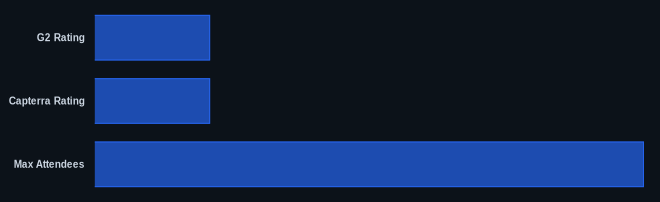
| G2 Rating | 4.2 out of 5 stars (based on 803 reviews) | G2.com GoTo Webinar Reviews |
| Capterra Rating | 4.5 out of 5 stars (based on 2,073 reviews) | Capterra GoTo Webinar Reviews |
| Starting Price | $49/month (Lite plan, billed annually, as of June 2026) | GoTo Webinar Pricing |
| Free Trial Available | Yes, 7 days | GoTo Webinar Pricing |
| Max Attendees | 3,000 (Enterprise Plan) | GoTo Webinar Pricing |
| New AI Features | AI Summary, Closed Captioning (as of February 2026) | GoTo Webinar Blog |
| CRM Integrations | Salesforce, HubSpot (Enterprise Plan) | GoTo Webinar Pricing |
Our Take
GoTo Webinar's core strength is its stability. Its 4.5/5 Capterra rating from over 2,000 users reflects that it simply works for large audiences. While its interface might feel less flashy than newer tools, its ease of use is a big plus for teams without dedicated tech support for every event. The recent inclusion of AI Summary and Breakout Rooms is a welcome step, showing the platform's commitment to modernizing without sacrificing its core reliability. It's a solid, enterprise-grade workhorse that justifies its premium price through peace of mind and consistent performance, particularly for high-stakes, recurring webinars.
If you're considering GoTo Webinar, does the "dated interface" complaint actually matter more to you than rock-solid reliability, especially if you're hosting large, revenue-generating events?
FAQ
1. Is GoTo Webinar still a relevant choice for businesses in 2026?
Absolutely. Despite criticisms about its interface and pricing, GoTo Webinar remains a highly relevant platform. Its consistent reliability, ease of setup, and strong engagement tools make it a top choice for businesses prioritizing stability for their virtual events. The recent introduction of features like AI Summary and Breakout Rooms (as of February 2026) also shows a clear commitment to evolving with modern user needs.
2. How does GoTo Webinar compare to Zoom Webinars?
GoTo Webinar generally offers a more dedicated webinar experience, often praised for its simplicity and reliability specifically for large-scale presentations. Zoom Webinars, while also popular, is part of a broader communication ecosystem (Zoom Meetings, Phone, Chat), which can offer more versatility for an organization's overall communication needs. GoTo Webinar often has a less complex organizer interface. However, Zoom Webinars can sometimes offer more advanced marketing automation integrations and is generally perceived as having a more modern interface. It truly depends on whether you need a dedicated webinar workhorse or a more integrated communications suite.
3. Does GoTo Webinar offer true evergreen or automated webinars?
GoTo Webinar offers the ability to run automated/pre-recorded events on its Pro and Enterprise plans. This means you can upload a pre-recorded video and schedule it to play at a specific time, simulating a live event. However, it doesn't typically offer "true" evergreen webinar functionality in the sense of a fully self-serve, always-on system with advanced marketing automation triggers that some newer, marketing-focused webinar platforms provide. If your primary need is a set-it-and-forget-it evergreen sales funnel, you might find other tools more specialized in that area.