Typeform excels at creating beautiful, engaging forms that drive high completion rates, but businesses betting their lead generation on it should know about its concerning pattern of unacknowledged submission errors and outages detected by third-party monitors. For example, third-party monitors detected intermittent submission errors on June 15, 2026, and June 11, 2026, that were not reflected on Typeform's official status page. This Typeform review 2026 is for entrepreneurs, marketers, and HR teams who prioritize user experience and design in their data collection, but need to understand the true cost and potential reliability trade-offs for mission-critical operations.
What Is Typeform?
Typeform is a SaaS tool designed to transform mundane data collection into a captivating experience. It moves beyond traditional, static forms by presenting questions one at a time, creating a conversational flow that feels more like a chat than a chore. Major players like Apple Inc., Airbnb, Uber, and Nike, Inc. use its capabilities to connect with their audiences, showcasing its ability to handle high-profile use cases.
The platform's goal is simple: make data collection so appealing that people actually want to complete forms and surveys. For businesses, this translates directly into higher engagement, better quality data, and ultimately, more qualified leads or richer customer insights. It’s built for anyone who needs to collect information from users, whether it’s for market research, lead capture, job applications, or customer feedback, all while maintaining a sleek, modern aesthetic.
Key Features
The platform isn't just a pretty face; it packs a punch with features designed to boost engagement and speed up workflows. Recent updates show a strong push into AI, aiming to make form creation even faster and more intelligent.
Engaging User Experience & Design
The standout feature of the software is its focus on the respondent’s experience. Instead of overwhelming users with a long scroll of questions, it presents one question at a time. This conversational, full-screen approach significantly reduces cognitive load and feels far more interactive than standard forms. Studies and user feedback consistently show completion rates between 40-60%, a figure traditional form builders struggle to match. You can customize every aspect, from fonts and colors to backgrounds, ensuring the form perfectly matches your brand identity.
Powerful AI Capabilities
The past year has seen a significant investment in artificial intelligence, making form creation and data analysis smarter. Typeform AI can instantly build forms based on a simple prompt or even a web search, cutting down design time dramatically. For researchers, AI Data Enrichment and Research Flow offer AI-moderated research agents, helping you gather and understand insights more deeply. It also includes AI Connectors to External Apps for segmentation and follow-ups, which means the platform isn't just collecting data, it's helping you act on it intelligently.
Advanced Logic & Customization
Creating dynamic forms that adapt to user input is straightforward. The intuitive drag-and-drop interface allows you to set up logic jumps, directing respondents to relevant questions based on their previous answers. This means a more personalized and efficient experience for each participant. Beyond logic, you can integrate custom thank-you screens, collect signatures (as of May 2026), and even add scheduling questions (as of May 2026) directly into your forms. For those serious about optimization, drop-off analytics help you pinpoint where respondents are abandoning your forms, allowing for targeted improvements.
Integrations & Automations
A form builder is only as good as its ecosystem. The tool connects with hundreds of popular apps, ensuring your data flows into your existing workflows. Essential integrations include Slack, Mailchimp, Google Sheets, HubSpot, and Salesforce. But it goes further with Automations with Airtable and Google Sheets (as of June 2026), allowing for powerful two-way syncs and conditional actions. The newer Contacts & Automations add-on provides solid tools for email drip campaigns and managing respondent data, turning data collection into an active lead nurturing process. New Webhook URLs now require HTTPS, enhancing security for data transfer (as of June 2026).
Workflow & Data Management
Once you've collected your responses, managing them is straightforward. Exporting data to Sheets and CSV is consistently praised for its ease and reliability. According to a user review: "Exporting my responses to Sheets and CSV has been really smooth so far. Nice. It just works without any hassle, which I definitely appreciate." The platform offers features like preventing duplicate responses with unique URL parameters (as of June 2026), which is crucial for surveys or contests. You can also generate customizable results summaries with Brand Kit (as of June 2026), making it simple to present your findings professionally without extra design work. It even includes minor but impactful features like "None of the above" options (as of June 2026) and customizable question placeholder text (as of June 2026) to enhance survey precision.
Pricing
As of July 2026, Typeform's pricing is primarily structured around monthly responses, with significant jumps in cost for higher volumes. Many users, ourselves included, find the free plan largely symbolic, and the response-based limits quickly become a real bottleneck for any growing business. While annual billing offers a discount, the base rates remain a common point of contention.
Core Plans (Annual Billing – monthly rates are higher)
- Free: $0/month (as of July 2026, per the official pricing page). This plan offers 1 user, 10 questions per form, and 100 total responses per month. You're limited to basic integrations and logic jumps, and Typeform branding is mandatory. It’s too restrictive for most businesses.
- Basic: $25/month (annually, as of July 2026, per the official pricing page, equivalent to $39/month if billed monthly). This tier provides 100 responses per month, unlimited forms, custom thank-you screens, and 1 seat. It's often seen as pricey for the limited response count.
- Plus: $50/month (annually, as of July 2026, per the official pricing page). Jump up to 1,000 responses per month, 3 seats, and importantly, it removes Typeform branding. You also get custom subdomains, file uploads, and payment fields.
- Business: $83/month (annually, as of July 2026, per the official pricing page). This plan includes a generous 10,000 responses per month, 5 seats, crucial drop-off analytics, and priority support. This is where the platform starts to feel truly feature-rich for growth-focused teams.
Growth Plans (Recently Launched)
For larger organizations or those with very high volume needs, the platform has introduced more specialized plans:
- Growth Pro: between $349/month and $379/month (as of July 2026, per various pricing sources). This plan offers substantially more responses and features, with custom pricing available for even higher tiers.
- Talent: $169/month (as of July 2026, per the official pricing page). This niche plan is designed for recruitment and HR functions, likely including specialized templates and workflows.
- Enterprise: Custom quoted (as of July 2026, per the official pricing page). This top-tier package typically includes unlimited responses, advanced features, dedicated support, HIPAA compliance, and single sign-on (SSO). It's built for large corporations with strict compliance and security needs.
Add-ons
- Contacts & Automations: This separate add-on starts at $25/month for 2,400 actions or $75/month for 12,000 actions (as of July 2026, per the official pricing page), allowing you to expand your marketing automation and contact management capabilities.
Pricing remains a frequent complaint among users. While the Basic plan's annual rate has seen minor adjustments (e.g., noted at $29/month in October 2025, now $25/month annually), the core issue of high cost for limited responses persists. According to one reviewer: "The pricing honestly made me cringe – $29/month for just 100 responses feels restrictive when you're trying to scale." The most significant hidden cost is the strict response limit; your forms simply stop collecting data once the monthly cap is reached. This can lead to a sudden loss of valuable leads or research data, making it a "strange tax" on successful lead capture. Basic features like CAPTCHA protection are also often locked behind higher tiers, which is frustrating.
Pros and Cons
Like any powerful tool, Typeform comes with its strengths and weaknesses. It's a trade-off that every business needs to weigh.
Pros
- Superior Respondent Experience: The one-question-at-a-time, conversational design genuinely leads to significantly higher completion rates (often 40-60%) compared to traditional forms. People actually enjoy filling them out.
- Aesthetically Pleasing Design: Forms look professional, modern, and branded right out of the box, with extensive customization options. This makes a strong first impression.
- Remarkable Ease of Use: The drag-and-drop builder is intuitive, making form creation incredibly fast, even for non-technical users. The template library and visual logic jump configuration are excellent.
- Solid Integrations: It connects seamlessly with essential business tools like Slack, Mailchimp, HubSpot, Salesforce, Google Sheets, and Airtable, ensuring your data fits into your existing ecosystem.
- Advanced AI Features: Recent additions like Typeform AI for instant creation and AI Data Enrichment genuinely speed up form design and provide deeper insights, making the platform feel new and helpful.
Cons
- Restrictive and Expensive Pricing: The response-based billing model is a major pain point. Fees escalate quickly for growing businesses, and forms stop collecting once the limit is hit, potentially losing valuable leads. The Basic plan, for example, feels too limited at $25/month (as of July 2026, per the official pricing page) for just 100 responses.
- Frequent Unacknowledged Outages: This is a critical concern. Third-party status monitors like IsDown and StatusGator frequently detect intermittent submission errors and outages (e.g., June 15, 2026; June 11, 2026; November 14, 2025; and a multi-day "No healthy upstream error" in January 2025) that are often not reflected or promptly acknowledged on the official status page. This contradiction is alarming for a tool handling lead generation.
- Limited Free Plan: The Free plan, with its 100 total response limit and branding, is largely insufficient for any practical business use. You'll quickly need to upgrade.
- Artificial Feature Tiering: Many advanced features, crucial for more complex workflows (like CAPTCHA or certain integrations), are locked behind the more expensive Plus or Business plans, making lower tiers feel incomplete.
- No Offline Capability: This software requires an internet connection, making it unsuitable for fieldwork or data collection in areas with unreliable connectivity.
- Inconsistent Support Experience: While some users report quick resolutions, others complain about being redirected to community forums before getting direct support, increasing resolution times.
Who Should Use Typeform?
Typeform is best suited for businesses that prioritize an exceptional respondent experience above all else and have a clear, predictable volume of form submissions.
- Marketers: If your goal is to capture high-quality leads, conduct engaging quizzes, or run interactive campaigns, the platform’s design will significantly boost engagement and conversion rates. It’s fantastic for agencies or in-house marketing teams focused on brand experience.
- HR Teams: For recruitment, employee feedback surveys, or onboarding questionnaires, the tool offers a friendly and professional interface that enhances the candidate and employee experience. The new Talent plan caters specifically to this use case.
- UX Researchers: When collecting qualitative data, user feedback, or conducting user testing, the conversational style and rich question types provide a much better experience for participants, leading to more thoughtful responses.
- SMBs with Defined Budgets & Use Cases: If you know your monthly response volume won't exceed the limits of the Plus or Business plans, and you value design over pure cost savings, it delivers a polished product that reflects well on your brand.
However, if you're a lean startup with an unpredictable, high volume of form submissions, a budget-conscious non-profit, or rely on forms for mission-critical operations where any downtime could be catastrophic, alternatives like Jotform or Tally might offer better value or more consistent uptime for your specific needs.
Data at a Glance
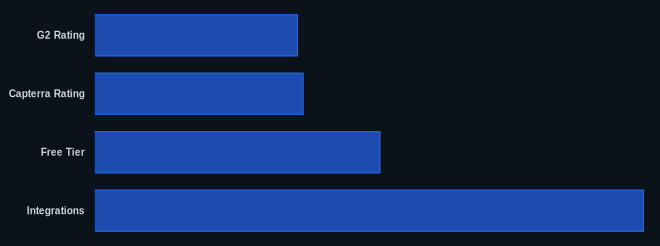
| Metric | Value | Source |
|---|---|---|
| G2 Rating | 4.5/5 stars | G2 Reviews |
| Capterra Rating | 4.7/5 stars (based on over 900 reviews) | Capterra Reviews |
| Starting Price (Basic Plan) | $25/month (billed annually, as of July 2026) | Typeform Pricing |
| Free Tier | Yes (10 questions/form, 100 responses/month, Typeform branding) | Typeform Pricing |
| Reported Completion Rates | 40-60% | Typeform.com |
| Integrations | 100s of popular apps (e.g., Slack, Mailchimp, HubSpot, Salesforce, Airtable) | Typeform.com |
| Known Outages (2025-2026) | Intermittent, detected by third-party monitors (e.g., StatusGator) | StatusGator |
Our Take
Typeform's user experience and design are truly superior, leading to significantly higher completion rates that can drive marketing success. But, for a tool vital to lead generation and customer data, its pattern of unacknowledged submission errors and outages, consistently flagged by third-party monitors, is a significant red flag. This problem forces businesses to choose between beautiful forms and absolute reliability, a trade-off that is not clearly communicated upfront. While its AI features are impressive, they don't address this core reliability concern.
If you rely on every form submission for leads or critical data, are you willing to risk potential unacknowledged downtime for Typeform's superior user experience, or would you seek a more reliable, albeit less aesthetically pleasing, alternative?
FAQ
Q: Is Typeform worth the cost, given its pricing complaints?
A: Whether Typeform is "worth it" depends entirely on your priorities and budget. If achieving exceptional respondent experience and high completion rates is paramount for your brand, and you have a predictable, manageable volume of responses, then the investment can be justified. However, if budget is tight, your response volume is high and unpredictable, or you need advanced features on lower tiers, alternatives like Jotform or even free tools like Google Forms and Tally offer better value for money.
Q: How does Typeform compare to free alternatives like Google Forms or Tally?
A: Typeform offers a significantly superior user experience and design compared to Google Forms, which is bare-bones but completely free and offers unlimited responses. Tally is a strong contender, often called a "Typeform clone," providing a similar engaging interface with unlimited forms and responses, including conditional logic, for free. While Typeform provides more sophisticated AI and design capabilities, these free alternatives are much more generous with their response limits and can be a better choice for budget-conscious users or those with high-volume needs.
Q: Are Typeform’s new AI features genuinely useful for businesses?
A: Yes, Typeform's AI features, particularly Typeform AI for instant form building and AI Data Enrichment, are genuinely useful and can save businesses significant time in design and analysis. The ability to quickly generate forms from prompts or web searches, and to gain AI-moderated research insights, pushes the platform into a more intelligent realm than many competitors. For teams looking to accelerate their content creation and deepen their understanding of collected data, these AI additions provide real, tangible value, making the form-building process more efficient and insightful.