monday.com, having officially rebranded as an "AI Work Platform" in May 2026, is no longer just a project management tool; it's a rapidly evolving work OS built around a new generation of AI agents. This platform aims to be the central hub for any team, from marketing to development, seeking visual, highly customizable workflows and deep AI integration, but it comes with a price tag that can surprise new users.
What Is monday.com?
The platform offers a highly visual, board-centric work operating system that helps teams plan, manage, and track their work across various departments. Its core strength lies in its adaptable interface, allowing users to build custom workflows for nearly any business process. For growing SMBs and marketing agencies needing to juggle client projects, content calendars, or intricate campaign launches, it provides a flexible framework that goes beyond simple task lists.
The tool provides distinct products—Work Management, CRM, Dev, and Service—each tailored to specific functions but built on the same underlying customizable boards. This modular approach lets teams start with a project management solution and expand into other areas as their needs evolve, all within a familiar ecosystem.
Key Features
The strength of this software lies in its modularity and deep customization, now significantly enhanced by its recent shift towards an AI-first architecture.
Visual Work Management & Customization
At its core, monday.com excels as a visual work management solution. Users get boards that are essentially highly adaptable spreadsheets, where each row is an item (a task, a lead, a project) and columns are customizable data points (status, owner, date, priority). The platform offers 15+ views, including Table, Kanban, Timeline, Calendar, and Map, allowing teams to visualize their work in the way that makes the most sense for the task at hand. If you need to see a project roadmap, switch to Timeline. Planning events? Use Calendar. It handles everything from basic task lists for small remote teams to complex project portfolios for larger operations.
The customization is extensive. Users can create custom statuses, automate workflows, and design dashboards that act as live command centers. This flexibility means a marketing team can track campaigns, a sales team can manage leads, and a product team can track sprints, all using the same underlying framework but configured to their specific needs. A Capterra user notes: "Monday has been a great tool to help us stay on top of all our tasks and finances. It has given us the ability to create custom workflows that are tailored to our specific needs."
Advanced AI Integration and Agents (New for 2026)
The biggest specific change for monday.com in 2026 is its complete rebranding and rebuild as an "AI Work Platform." This isn't just a few AI features tacked on; the platform is fundamentally structured around AI agents designed to automate complex tasks and provide insights. In May 2026, the company launched one-click connectors to leading AI platforms like Anthropic's Claude, Microsoft 365 Copilot, and OpenAI's ChatGPT. This means workflows can now use powerful external AI models directly.
Key AI features include the "Call My Agent" automation block, introduced in February 2026. This allows users to trigger specific AI agents to perform actions like summarizing board data, automatically assigning tasks based on criteria, detecting project delays, or generating recommendations for next steps. For instance, an AI agent could analyze project progress, identify a bottleneck, and suggest reallocating resources, all with minimal human intervention. The Sidekick, the platform's natural language AI assistant, can now build entire automations from natural language prompts and even create new WorkDocs (collaborative documents) based on natural language instructions.
The platform also added AI columns within templates, allowing specific data points to be automatically generated or analyzed by AI, and rich text formatting in emails for AI workflows. For sales teams, a new CRM Lead Agent can enrich lead data or suggest follow-up actions. This focus on "AI visibility" and "AI Workflows" means the tool is increasingly designed to proactively manage and optimize tasks.
Workflow Automation and Integrations
Beyond AI agents, the platform offers solid workflow automation capabilities. Users can set up triggers and actions (e.g., "When status changes to 'Done', notify team leader and move item to 'Archived' board"). The Standard plan (as of early 2026, per the official pricing page) offers 250 automation actions per month, while the Pro plan (as of early 2026, per the official pricing page) jumps to a generous 25,000 actions. These automations are critical for reducing manual work and ensuring consistency across projects.
The software boasts over 200 integrations (as of May 2026, per the official pricing page) with popular tools like Slack, Zoom, Google Drive, Excel, Jira, and Salesforce. These allow users to connect work streams, pulling data in and pushing updates out, ensuring teams stay synchronized. However, it's crucial to note that automations and integrations are completely absent on the Free and Basic plans, which can be a significant limitation for small teams looking to automate.
Collaboration and Communication
Collaboration is central to the platform's design. Teams can communicate directly within tasks using updates, mentions, and file attachments, keeping all context in one place. WorkDocs provide a collaborative space for document creation and sharing, and the new Sidekick-to-WorkDoc creation speeds this up. Users can invite guests to specific boards (available from the Standard plan, as of early 2026, per the official pricing page) to collaborate with external stakeholders, like clients or freelancers, without giving them full access to the account. The platform’s real-time updates and notifications help everyone stay on the same page.
For larger organizations, Enterprise board roles, introduced in January 2026, provide finer-grained control over permissions, enhancing security and governance. Multi-level subitems, now up to 4 levels deep (as of January 2026, per product updates), allow for more granular task breakdown, a feature many users have requested for complex projects.
Reporting and Analytics
The platform includes powerful reporting dashboards that act as live command centers. Users can pull data from multiple boards into a single customizable dashboard, using 50+ reporting widgets (as of May 2026, per the official pricing page) to visualize progress, identify bottlenecks, and track key performance indicators (KPIs). These dashboards are excellent for executive-level oversight or for team leads to monitor project health across various initiatives. Widgets include charts, tables, numbers, and more, all updating in real-time. This solid reporting capability is a strong selling point for businesses that need clear, actionable insights from their work data.
Pricing
monday.com uses a tiered pricing structure across its various products, but its Work Management offering is the most widely known. All paid plans require a minimum of 3 user seats (as of early 2026, per the official pricing page) and offer a discount for annual billing. This 3-seat minimum is a common "gotcha" for small teams or solo entrepreneurs. A price spike was announced in January 2024, so it’s worth double-checking the latest rates on their official site.
As of early 2026, per the official monday.com pricing page:
-
Free Plan (Work Management only): This plan is available for individuals or very small teams, supporting up to 2 users. It's quite basic, offering simple task lists, a single reporting dashboard, 500 MB storage, and a 1-week activity log. Users get 200+ templates and a whiteboard. Limitations include just 3 boards and 2 views (Table, Kanban). Crucially, it lacks automations and integrations. This is fine for a personal to-do list, but not for team project management.
-
Basic Plan: Priced at approximately $9 per seat per month when billed annually (as of early 2026, per the official pricing page), or $12 per seat per month billed monthly (as of early 2026, per the official pricing page). Given the mandatory 3-seat minimum, a single user (or a team of 1-3) will pay at least $27/month annually (as of early 2026, per the official pricing page). This plan includes unlimited boards/documents, 5 GB storage, unlimited items, and prioritized support. However, like the Free plan, it still lacks automations and integrations, which many users expect from a paid project management tool.
-
Standard Plan (Most Popular): This tier costs about $12 per seat per month annually (as of early 2026, per the official pricing page), or $15 per seat per month monthly (as of early 2026, per the official pricing page). With the 3-seat minimum, users are looking at $36/month annually (as of early 2026, per the official pricing page). This plan significantly expands capabilities, adding Timeline, Calendar, and Map views, along with guest access. Most importantly, it includes 250 automation actions and integrations per month. For many small to medium-sized teams, this is the sweet spot, but be aware that 250 actions can be quickly consumed by active automations, potentially leading to extra costs.
-
Pro Plan: At approximately $19 per seat per month annually (as of early 2026, per the official pricing page), or $24 per seat per month monthly (as of early 2026, per the official pricing page), the 3-seat minimum pushes the annual cost to $57/month (as of early 2026, per the official pricing page). This plan includes all Standard features, plus a substantial upgrade to 100 GB storage, a 1-year activity log, and a generous 25,000 automation actions per month. It adds advanced features like private boards/docs, native time tracking (a feature ClickUp offers at lower tiers), and formula/dependency fields. This is where the platform truly shines for teams with complex needs and higher automation demands.
-
Enterprise Plan: This plan offers custom pricing for large organizations. It provides the most advanced features, tailored onboarding, enhanced security, and dedicated support.
Hidden Costs and Considerations:
The 3-seat minimum for all paid plans (as of early 2026, per the official pricing page) is often cited as a hidden cost. For a solo user or a two-person team, paying for three seats immediately inflates the cost. The 250 automation actions on the Standard plan (as of early 2026, per the official pricing page) are often insufficient for active teams, leading to additional charges or forcing an upgrade to the Pro plan. Furthermore, while the platform is embracing AI, more advanced AI features or higher usage of AI agents might operate on a credit system with additional fees, which isn't always transparent on lower tiers. Essential administrative controls and deeper granular features are consistently locked behind the higher-priced Pro and Enterprise plans.
Pros and Cons
Choosing a platform like monday.com means weighing its strengths against its limitations, especially for budget-conscious teams.
Pros
- Exceptional Visual Appeal and Ease of Use (for basics): The interface is clean, colorful, and intuitive for setting up basic boards and tasks. Users often praise its aesthetics, making it engaging to use daily. According to a G2 reviewer: "Monday is a visually appealing, easy-to-use, and powerful tool for teams."
- High Degree of Customization and Flexibility: Users can build highly tailored workflows for almost any use case, from marketing campaigns to product roadmaps, using custom columns, statuses, and board types. The 15+ views (as of May 2026, per the official pricing page) cater to different team preferences.
- Strong AI Integration and Future-Proofing: With its 2026 rebranding as an "AI Work Platform," the tool is at the forefront of AI-driven project management. Features like AI agents, "Call My Agent" automations, and one-click connectors to major AI models offer significant potential for efficiency gains.
- Solid Reporting and Dashboards: The ability to create comprehensive, real-time dashboards with 50+ widgets (as of May 2026, per the official pricing page) provides excellent visibility into project progress and team performance across multiple boards.
- Effective for Collaboration and Visibility: Real-time updates, notifications, and direct communication within tasks foster team collaboration and ensure everyone has visibility into project status. Guest access is also valuable for external stakeholders.
- Extensive Integrations: With over 200 integrations (as of May 2026, per the official pricing page), the software connects well with other tools in your tech stack, speeding up workflows.
Cons
- High Cost and "Hidden" Fees: The mandatory 3-seat minimum for all paid plans (as of early 2026, per the official pricing page) quickly inflates costs for smaller teams. Automation limits on the Standard plan (250 actions/month, as of early 2026, per the official pricing page) are often too restrictive, pushing users to the much pricier Pro plan or incurring extra charges. A user notes: "The tools works well and easy to manage, but the pricing becomes tough to justify. A lot of essential admin control and deeper features are locked behind higher plans."
- Steep Learning Curve for Advanced Features: While basic use is easy, setting up complex automations, intricate dashboards, or leveraging advanced AI agents can be challenging. Many users report a learning curve for team rollout, and the interface can feel cluttered for beginners.
- Limited Features on Lower Tiers: Critical functionalities like automations, integrations, and time tracking are absent on Free and Basic plans, and severely limited on Standard. Users will pay premium prices to access the tool's true power.
- Basic Task Hierarchy: While multi-level subitems now go up to 4 levels (as of January 2026, per product updates), competitors like ClickUp offer more native task hierarchy options for deeply nested projects.
- Inconsistent Customer Support: User reviews for support are contradictory. Some praise responsive help, while others report slow or unhelpful responses. This inconsistency can be frustrating when dealing with critical issues.
- Reliability Concerns: Some users have reported issues with broken board connections, automations failing, and even security concerns or being locked out of data, which are serious red flags.
Who Should Use monday.com?
This platform is ideal for specific types of teams and businesses looking for a highly visual and adaptable work management solution, especially those ready to embrace AI.
- Marketing and Creative Agencies: Teams managing multiple client projects, content calendars, campaign launches, and design workflows will find its visual boards, customization, and solid reporting invaluable. The ability to integrate with creative tools and manage assets makes it a strong contender.
- Operations Teams in Growing SMBs: Businesses needing to standardize and track operational processes, HR onboarding, procurement, or facility management can build custom workflows that ensure consistency and visibility. The platform helps manage the complexity as an SMB scales.
- Teams Prioritizing Visuals and Customization: If your team thrives on seeing work laid out clearly, with colorful status updates and flexible views (Kanban, Timeline, Calendar), this is an excellent choice. It works well for teams that want to configure their tools precisely to their needs rather than fitting into a rigid framework.
- Companies Ready to Invest in AI-Driven Workflows: Given its 2026 rebranding and deep integration of AI agents, teams looking to automate complex decision-making, data summarization, and proactive issue detection will find the platform's AI capabilities compelling. However, be prepared for potential additional costs for advanced AI usage.
- Product and Development Teams (on higher tiers): While Linear.app might be better for pure development, the monday.com Dev product, especially on the Pro or Enterprise plan with its formulas, dependencies, and solid automations, can manage sprints, bug tracking, and product roadmaps effectively.
The tool is less suited for solo entrepreneurs or very small teams (1-2 people) on a tight budget due to the 3-seat minimum and the locking of essential features behind higher, more expensive tiers. It's also not ideal for teams that prefer a very deep, hierarchical task structure out-of-the-box, where ClickUp might offer more native power.
Data at a Glance
| Metric | Value | Source |
|---|---|---|
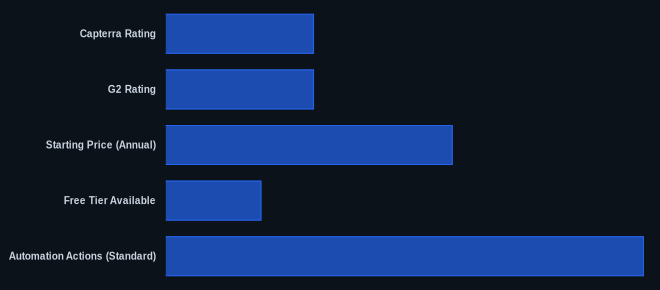
| Capterra Rating | 4.6/5 (6,016 reviews) | Capterra monday.com reviews |
| G2 Rating | 4.7/5 (over 10,000 reviews) | G2 monday.com reviews |
| Starting Price (Annual) | $27/month (Basic, 3 seats, as of early 2026) | monday.com pricing |
| Number of Integrations | 200+ (as of May 2026) | monday.com official site |
| Free Tier Available | Yes (up to 2 users, limited) | monday.com pricing |
| Automation Actions (Standard) | 250/month (as of early 2026) | monday.com pricing |
Our Take
We've seen monday.com evolve from a visually appealing project board to a truly ambitious AI Work Platform, and that transition in 2026 is exciting but comes with a clear trade-off. Yes, it’s pricey and the 3-seat minimum feels like an unnecessary hurdle for small businesses. And yes, you'll need to pay for the higher tiers to truly use its potential. But if your team regularly grapples with complex, visual workflows and you’re prepared to integrate AI into your daily operations, the investment begins to make sense. monday.com’s shift to AI agents isn't just a marketing ploy; it's a fundamental architectural change that promises to automate decision-making, which none of its competitors have yet fully matched in scope. The platform achieved a 4.6/5 rating on Capterra from over 6,000 reviews, showing its core strength, but the value-for-money rating of 4.3/5 highlights the tension with its pricing model.
If you’re a marketing or operations team currently paying for an Enterprise plan, have you seen a quantifiable ROI from the new AI agents that justifies the cost increase over the Pro plan?
FAQ
1. Is monday.com really worth the cost for a small business?
For a small business, it depends heavily on your team size and feature needs. If you're a team of 1-2, the mandatory 3-seat minimum makes it an expensive proposition, costing at least $27/month (as of early 2026, per the official pricing page) just for the Basic plan without automations. For teams of 3 or more who need strong visual project management, customization, and are ready to invest in the Standard or Pro plan for automations and advanced AI, it can be worth it. Consider alternatives like SmartSuite for more competitive pricing or ClickUp for deeper hierarchy at lower costs.
2. How reliable are monday.com's AI features, and will they cost extra?
monday.com's AI features, particularly the new AI agents and "Call My Agent" automations launched in 2026, are deeply integrated and designed for reliability. They use leading external AI models like Claude and ChatGPT. However, while some basic AI functionalities might be included in paid plans, it's a common industry practice for advanced AI features or higher usage volumes to be tied to a credit system or additional fees. Always verify the specifics for your chosen tier on the official pricing page to avoid surprises.
3. I'm worried about the learning curve and customer support. Is it easy to get started?
Getting started with basic boards and tasks is quite easy due to the intuitive visual interface. However, mastering advanced features like complex automations, intricate dashboards, or using the new AI agents does have a learning curve, which many users highlight. Customer support reviews are mixed: some praise responsive help, while others report slow or unhelpful responses. The platform does offer extensive self-serve resources, including a knowledge base and onboarding hub, which should be your first stop.
