HubSpot CRM Professional, starting at $100/month/seat (as of April 2026, per the official pricing page), requires a serious budget, but its deep integration across marketing, sales, and service functions makes it a powerful, scalable choice for growing businesses that prioritize an inbound growth strategy. This review is for entrepreneurs, growing SMBs, and remote teams wrestling with the choice between a sprawling, integrated system and more specialized, budget-friendly tools. If you're serious about scaling your sales, marketing, and customer service under one roof, the platform offers a lot – just be ready to navigate its vastness and the cost that comes with it.
What Is HubSpot CRM?
HubSpot CRM serves as a "Smart CRM," a central nervous system for your customer data. It manages contact information, tracks interactions, and provides a unified view of your entire customer journey. This isn't just about sales; it's the foundation upon which its famous "Hubs" for Marketing, Sales, Service, Content, Data, and Commerce are built. For businesses looking to move beyond disjointed spreadsheets and multiple single-purpose tools, the platform offers a cohesive environment. It's especially geared towards companies embracing an inbound growth strategy, helping them attract, engage, and delight customers from first touch to loyal advocate.
The tool gives you all the levers you need to grow your business, from generating leads to supporting customers, all within a single interface. While it champions ease of use, its sheer breadth means getting the most out of it often requires dedicated setup and an understanding of how each module works together.
Key Features
The power of the platform lies in its integrated Hubs, each offering a suite of specialized tools. As of 2026, the feature set is more sophisticated than ever, heavily infused with AI.
Smart CRM & Contact Management
This is the heart of the system, a solid database for all your contacts, companies, deals, and activities. The Free Plan (as of May 2026, per the official pricing page) alone offers significant capabilities, including unlimited CRM data storage and up to 5 free core seats (as of May 2026, per the official pricing page). You can track customer interactions, log calls, schedule meetings, and manage your sales pipeline without spending a dime. It brings all your customer data into one place, making it easier to see the full picture.
Marketing Hub Capabilities
For attracting and nurturing leads, the Marketing Hub is strong. It includes powerful email marketing features, custom forms, and landing page builders. You get simple marketing automation even on the Starter Tier (as of May 2026, per the official pricing page), moving to advanced workflows at Professional. Recent additions like HubSpot AEO (Answer Engine Optimization) (April 2026) help you tailor content for AI-driven search, keeping you visible in the evolving digital landscape. The platform also has an expanded video editor in its social composer (May 2026), giving teams more creative freedom.
Sales Hub Functionality
The Sales Hub helps your sales team with tools for efficiency and insight. It handles deal pipeline tracking, sales automation, email sequencing, and forecasting. The Professional Tier (as of May 2026, per the official pricing page) adds advanced analytics, automatic lead rotation, and more sophisticated reporting. AI features like Smart Deal Progression (as of May 2026) act as an assistant for sales reps, offering next-step guidance. The AI Prospecting Agent (as of May 2026) automates the prospecting lifecycle, a huge time-saver for sales development teams. You can even update CRM records directly from Claude and ChatGPT (February 2026), which changes how quick data entry works.
Service Hub & Customer Support
Customer service gets a major boost with the Service Hub. It includes live chat, conversational bots, and a ticketing system to manage customer inquiries. Onboarding Plans (May 2026) in the Service Hub speed up the customer journey, while the ability to assign tasks to customers (May 2026) makes collaboration smoother. New features like Customer Agent Multi-Brand Support (Public Beta) (May 2026) and a Customer Agent that can read images and control response languages (March 2026) show a significant investment in AI-driven support. This means faster, more intelligent resolution of customer queries, often 24/7.
Content & CMS
Beyond basic forms, the Content Hub (or CMS Hub) helps you create and manage your digital presence. The platform's social composer has an expanded video editor (May 2026), and you can build custom reports on form submissions (February 2026). Integrations like Reddit (Public Beta) (May 2026) and TikTok Ads (March 2026) ensure you're connecting with audiences where they are. With HubSpot AEO (April 2026), the platform actively works to make your content perform better in AI-driven search environments.
Operations & Data Hub
This Hub is crucial for data cleanliness and automation across the board. It offers advanced marketing automation, data synchronization, and data quality tools. You can restore CRM properties and records within a 14-day window (March 2026), a lifesaver for accidental deletions. New formula options with conditional logic (March 2026) give you more power over data calculations. The AI Data Agent (as of May 2026) speeds up customer research, letting you pull insights faster. It’s the glue that holds the entire platform together, ensuring your data is accurate and workflows are smooth.
AI Integrations & Enhancements
HubSpot has doubled down on AI in 2026. Breeze Assistant is now deeply integrated, generating multi-object reports and allowing users to create reports directly with AI (March 2026). It also reimagines prompts with @Mentions for CRM data (February 2026). The ability to update CRM directly from Claude and ChatGPT (creating/updating records, logging activities, accessing history) (February 2026) drastically reduces manual data entry. Connection Insights (Public Beta) (March 2026) provides AI-driven understanding of buyer intent signals, while new company news signals (February and May 2026) refine prospecting. The platform's AI features make every team member more efficient, from sales to service.
Pricing
HubSpot’s pricing model can feel like a labyrinth, especially for new users. In 2024, it shifted to a seat-based model, which continues to evolve into 2026. While more transparent in some ways, the costs can escalate quickly as you add features, contacts, and users across its various Hubs and tiers. Always verify current pricing on the official HubSpot pricing page as of your decision date.
-
Free Plan: This is genuinely useful. It includes the functional Smart CRM with contact management, CRM data storage, up to 5 free core seats (unlimited view-only users), basic email marketing with HubSpot branding, forms, live chat, conversational bots, simple marketing automation, deal pipeline tracking, and basic reporting (as of May 2026, per the official pricing page). It’s an excellent starting point for small businesses and startups.
-
Starter Tier: This is often the first step for businesses ready to remove HubSpot branding and expand capabilities. It offers bundled access to Marketing, Sales, Service, Content (CMS), Operations, and Commerce Hubs. Generally priced around $20 per month per user (as of May 2026, per the official pricing page), or as low as $9 per seat per month (billed annually) (as of May 2026, per the official pricing page) for specific hubs. This tier removes HubSpot branding, includes about 1,000 marketing contacts (additional available in bundles), email scheduling/tracking, reporting dashboards, conversational bots, goals, sales automation, and email/in-app chat support (as of May 2026, per the official pricing page).
-
Professional Tier: This is where the pricing really starts to diverge by Hub and where things can get expensive. Onboarding fees are mandatory and significant (as of May 2026, per the official pricing page).
- Marketing Hub Professional: Around $890/month (as of May 2026, per the official pricing page), includes 3 core seats and 2,000 marketing contacts. Expect a mandatory onboarding fee of roughly $3,000 (as of May 2026, per the official pricing page).
- Sales Hub Professional: Starts at $100/month/seat (as of May 2026, per the official pricing page), with additional seats priced at $100 (as of May 2026, per the official pricing page). Some "core" seats might be $50 (as of May 2026, per the official pricing page).
- Service Hub Professional: Starts at $100/month for one seat (as of May 2026, per the official pricing page), with extra seats costing between $50-$100 (as of May 2026, per the official pricing page).
- Content Hub Professional: Starts at $500/month (as of May 2026, per the official pricing page) for 3 seats, additional seats are $50 (as of May 2026, per the official pricing page).
- Data Hub Professional: Begins at $800/month (as of May 2026, per the official pricing page) for one seat.
This tier adds advanced marketing automation, sales analytics, forecasting, automatic lead rotation, and phone support (as of May 2026, per the official pricing page).
-
Enterprise Tier: Designed for large teams with complex operations, offering the most extensive features, governance, and analytics.
- Marketing Hub Enterprise: Around $3,600/month (as of May 2026, per the official pricing page), includes 5 core seats and 10,000 contacts. Onboarding fees can exceed $6,000 (as of May 2026, per the official pricing page).
- Sales Hub Enterprise: Starts at $150/month/seat (as of May 2026, per the official pricing page), with additional seats priced at $150 (as of May 2026, per the official pricing page). "Core" seats might be $75 (as of May 2026, per the official pricing page).
- Service Hub Enterprise: Starts at $150/month for one seat (as of May 2026, per the official pricing page), with additional seats ranging from $75-$150 (as of May 2026, per the official pricing page).
- Content Hub Enterprise: Starts at $1,500/month (as of May 2026, per the official pricing page) for 5 seats, additional seats are $75 (as of May 2026, per the official pricing page).
- Data Hub Enterprise: Starts at $2,000/month (as of May 2026, per the official pricing page) for one seat.
The overall Bundled Enterprise Platform starts at $4,300 per month (as of May 2026, per the official pricing page).
Hidden Costs & Complexity
Users frequently point out that the costs aren't always clear upfront. Significant one-time onboarding fees for Professional and Enterprise tiers (as of May 2026, per the official pricing page) are often overlooked. Exceeding included marketing contacts quickly adds to your bill, as do additional user seats beyond the initial allocation. Most Professional and Enterprise tiers require mandatory annual commitments. As one Reddit user succinctly put it, "every single sensible feature requires a price from 20€/m to 800€/m." Discounts of 30-35% are often negotiable, so don't take the listed price as final.
Pricing, as of April 2026, based on analysis of Forbes Advisor and HubSpot's official site.
Pros and Cons
HubSpot CRM is a powerful tool, but it's not without its quirks.
Pros
- Intuitive Interface: Many users find the platform incredibly easy to use and get started with, particularly for the core CRM functions. According to EmailTooltester.com: "The fact that it's so user-friendly is a big advantage to using HubSpot's CRM platform."
- Comprehensive All-in-One Platform: The ability to manage marketing, sales, and service from a single data model is a massive advantage, speeding up workflows and providing a unified customer view.
- Powerful Automation Capabilities: From simple email sequences to complex multi-stage workflows across Hubs, its automation features are solid and highly praised for improving efficiency.
- Generous Free Plan: The Free Plan (as of May 2026, per the official pricing page) genuinely offers substantial features that other alternatives charge for, making it an excellent entry point for small teams.
- Extensive Integrations: It plays well with over 12,000 third-party apps, centralizing data and extending functionality without major headaches.
- New AI Features: The rapid rollout of AI tools like Breeze Assistant, Smart Deal Progression, and direct integration with large language models keeps it at the forefront of productivity.
Cons
- High Cost & Complex Pricing: This is the most frequent complaint. Costs escalate rapidly with additional seats, contacts, and higher-tier features, making budgeting difficult and often leading to unexpected expenses. Onboarding fees are also substantial for higher tiers.
- Feature Exclusivity: Many desirable and "sensible" features are locked behind higher-priced tiers, making lower-cost options feel limited or forcing upgrades that stretch budgets.
- Perceived "Clunkiness" and Bloat: While praised for ease of use, a significant number of users describe the interface as "clunky," "complicated," or "buggy," especially as they try to navigate its vast feature set. The "all-in-one" platform can feel "bloated" if you only need specific functionalities.
- Reporting Limitations: Despite improvements, users still cite limitations in custom reporting and generating very specific, nuanced reports, especially compared to highly specialized analytics tools.
- Mandatory Onboarding Fees: These large, one-time fees for Professional and Enterprise tiers are a significant barrier to entry and a common point of frustration.
- Learning Curve for Advanced Features: While the basics are easy, mastering the more advanced automations, custom reports, and integrating various Hubs can be time-consuming and challenging for some teams.
Who Should Use HubSpot CRM?
HubSpot CRM is an excellent fit for several types of businesses, but it's not a universal solution.
You should consider HubSpot CRM if:
- You're a growing SMB or startup that prioritizes an inbound marketing and sales strategy. The platform's strong marketing automation and lead nurturing capabilities are a natural fit for this approach.
- You want an all-in-one solution to centralize your customer data and speed up operations across sales, marketing, and service. If you're tired of integrating separate tools like Mailchimp, Zendesk, and Pipedrive, this could be your answer.
- Your team is expanding and needs a scalable system that can grow with you. The modular Hub structure allows you to add functionality as your needs evolve, provided your budget can keep pace.
- Ease of getting started is crucial. The core CRM is very user-friendly, allowing new users to quickly learn the basics and begin managing contacts and deals.
- You're ready to invest in AI-powered tools to boost productivity and gain deeper insights. The rapid AI development in 2026 makes the platform a strong contender for future-proofing your operations.
It might not be the best fit if:
- You have a very tight budget and only need a basic sales CRM. The costs for advanced features, additional seats, and contacts can escalate much faster than with alternatives like Zoho CRM or Pipedrive.
- You need extreme customization at an enterprise scale for highly complex or regulated industries, where Salesforce (Sales Cloud) might offer more granular control and a vast, specialized AppExchange.
- You only need specific, siloed functionalities. If you just need email marketing, Brevo (formerly Sendinblue) might be more cost-effective. If you only need visual project management with CRM capabilities, monday.com CRM could be a better fit.
- Your team struggles with adopting complex software. While the basics are simple, navigating the depth of its features and integrations can feel overwhelming or "clunky" to some users, despite its reputation for user-friendliness.
Data at a Glance
| Metric | Value | Source |
|---|---|---|
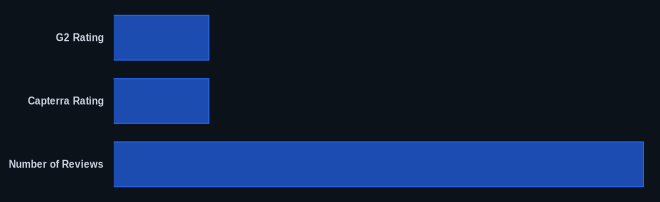
| G2 Rating | 4.4/5 (Sales Hub), 4.3/5 (Marketing Hub) | G2.com |
| Capterra Rating | 4.4/5 (Ease of Use), 4.1/5 (Value for Money) | Capterra.com |
| Starting Price | $0/month (Free Plan, as of May 2026), ~$9/seat/month (Starter, billed annually, as of May 2026) | HubSpot Pricing Page |
| Number of Reviews | 12,000+ (Sales Hub on G2), 12,000+ (Marketing Hub on G2) | G2.com |
| Free Tier Available | Yes | HubSpot Official Website |
| Core CRM Seats | Up to 5 in Free Plan (as of May 2026) | HubSpot Pricing Page |
| Onboarding Fees | Mandatory, starting around $3,000 for Professional tiers (as of May 2026) | HubSpot Pricing Page |
Our Take
HubSpot CRM has evolved from a simple CRM with powerful marketing tools into a genuinely comprehensive growth platform. The investment in AI is undeniably impressive, transforming everyday tasks and offering insights that were previously out of reach for SMBs. This growth, while powerful, has introduced a significant tension: the platform's once legendary simplicity now battles against its immense breadth. Many users, ourselves included, find that while the core CRM is a breeze, truly harnessing the power of multiple Hubs and advanced features can quickly feel "clunky" or overwhelming. Yes, it's pricey, and a Reddit user noted that "every single sensible feature requires a price from 20€/m to 800€/m." But if your business is genuinely committed to an inbound strategy and you need every customer-facing function under one roof, the efficiency gains and centralized data can justify the expense – just be prepared to budget for its full potential, not just the entry-level sticker price. If you’re considering the Professional tier, have you fully accounted for the mandatory onboarding fees and potential contact overage costs?
FAQ
Is HubSpot CRM truly free, or are there hidden costs?
The Free Plan (as of May 2026, per the official pricing page) is genuinely free and provides substantial functionality for contact management, basic marketing, and sales tracking, including up to 5 core seats (as of May 2026, per the official pricing page). However, to remove HubSpot branding, access deeper features, or expand your marketing contacts, you'll need to upgrade to a paid tier. The real "hidden costs" come with the higher tiers: mandatory onboarding fees for Professional and Enterprise plans (often starting around $3,000, as of May 2026, per the official pricing page), additional charges for exceeding included marketing contacts, and per-seat pricing that can quickly inflate your monthly bill.
How much does HubSpot CRM really cost for a growing business?
For a growing business, the cost can vary wildly depending on your needs. If you're just starting, the Free Plan (as of May 2026, per the official pricing page) is excellent. Moving to the Starter Tier will cost you around $20 per month per user (as of May 2026, per the official pricing page) (or as low as $9/seat/month annually for specific hubs). However, if you need advanced marketing automation, sales forecasting, or reliable service tools, you'll likely jump to the Professional Tier. Here, a single Hub could cost anywhere from $100/month/seat (Sales Hub Pro, as of May 2026, per the official pricing page) to $890/month (Marketing Hub Pro, including 3 seats and 2,000 contacts, as of May 2026, per the official pricing page), plus a significant one-time onboarding fee. It gets expensive fast, and it's essential to plan your feature needs carefully and factor in all user seats and contact limits.
Is HubSpot CRM difficult to learn for new users given its "all-in-one" nature?
The core CRM and basic features are widely praised for their ease of use and intuitive interface, making it very quick for new users to get started with contact and deal management. However, as you begin to explore the advanced features across the Marketing, Sales, and Service Hubs – especially complex automations, custom reports, and deep integrations – the platform can indeed feel vast, complicated, and sometimes "clunky." It’s a trade-off: easy to start, but the depth required to master its full potential can present a significant learning curve.