The $12/month (billed annually, as of May 2024, per Descript pricing) Creator plan for Descript makes it an excellent choice for businesses needing to quickly turn text into polished video, but beware: if you produce a lot of long-form content, the pricing scales up fast, making it crucial to evaluate your transcription needs.
What Is SaaS Video Editing Software?
SaaS video editing software in 2026 refers to cloud-based applications that let users create, edit, and publish videos online without needing powerful local hardware or extensive technical skills. These platforms have shifted dramatically from traditional, timeline-based editors to intelligent, often AI-driven, content creation hubs. You access them through a web browser or a lightweight desktop app that syncs to the cloud, allowing for collaborative work and remote access.
This isn't just about simplifying manual tasks. The most significant evolution is the deep integration of AI, which now plays a central role in automating everything from transcription and captioning to generating entire video sequences from text prompts. These tools are built for speed and efficiency, making professional-quality video accessible to teams without dedicated video editors. They target businesses that need to produce high volumes of localized, personalized video content for sales, marketing, training, or internal communications.
Key Features
The current landscape of SaaS video editing software is defined by its AI capabilities, streamlined workflows, and user-friendly interfaces. Here's what you get from leading platforms in this space.
AI-Powered Content Generation and Editing
The most surprising shift comes from advanced AI video generation tools like Google Veo and OpenAI Sora. These can create high-quality, realistic, or stylized videos from simple text descriptions. This means you can conjure a marketing video without ever shooting a frame of original footage. Other tools, such as Canva Video, Colossyan, Runway, and Synthesia, offer capabilities like generating AI avatars or transforming text-to-video from articles or scripts.
Descript stands out for its text-based video editing, letting you edit audio and video by simply modifying a transcript. Deleting a word in the text removes it from the video. The platform also includes features to remove filler words ("um," "uh") automatically, making speakers sound more polished.
Automated Enhancements and Accessibility
Many tools provide AI caption generation with high accuracy, often in multiple languages, making your content more accessible and searchable. Background removal is another common AI feature, letting you change environments without a green screen. VEED is known for its AI captions and ease of use in this regard. This drastically cuts down on post-production time.
Opus Clip Pro and Quso.ai (formerly Vidyo) are examples of platforms focused on automatically repurposing long-form video into short, shareable clips for social media, complete with captions and smart editing. This is crucial for maximizing content reach.
Templates, Brand Kits, and Stock Media
For teams needing quick, consistent content, templates are indispensable. Platforms like Canva Video and VEED offer extensive template libraries for various social media formats, ad types, and presentations. You just swap out text and media. Brand kits allow you to pre-set your logos, colors, and fonts, ensuring every video adheres to your brand guidelines automatically.
Access to royalty-free stock media (images, video clips, music) is often included, especially in paid tiers. Viddyoze and InVideo are examples of platforms that emphasize their asset libraries to facilitate rapid content creation. This saves considerable time and money on licensing.
Intuitive User Interfaces
The core promise of SaaS video editing is ease of use. Tools like InVideo are praised for their intuitive interfaces, allowing users with minimal video editing experience to create compelling content. According to a Capterra user, "InVideo is a SaaS video editing platform that offers an intuitive and easy-to-use interface for editors." Screen Studio (Mac) is noted for creating buttery-smooth cursor and zoom effects out of the box, perfect for software walkthroughs and demos without a steep learning curve. The goal is to make video creation as simple as drafting a presentation.
Pricing
Pricing for SaaS video editing software typically follows a monthly or annual subscription model, often with significant discounts for annual commitments. Most platforms understand the need to try before you buy, offering free plans or trials.
Let's look at some examples:
- VEED: Offers a Free plan with limited features (e.g., watermarks, shorter video limits). Paid plans start around $12/month (billed annually for the Basic plan, as of May 2024, per VEED.io pricing). These tiers unlock higher export quality, longer videos, more storage, and advanced AI features like clean audio.
- Canva Video: Integrates into the broader Canva ecosystem. The Free plan is solid for basic editing. The Pro plan starts at $14.99/month (billed monthly, or $119.99/year billed annually for one person, as of May 2024, per Canva.com pricing), adding brand kits, premium templates, and extensive stock media. For teams, Canva for Teams is available.
- Descript: Offers a Free plan (1 hour transcription per month, 720p export). The Creator plan is $12/month when billed annually (or $15/month billed monthly), providing 10 hours of transcription and 4K export. The Pro plan jumps to $24/month annually (or $30/month monthly) for 30 hours of transcription (as of May 2024, per Descript pricing). This gets expensive fast if you're producing a lot of long-form content.
- Lumen5: Known for turning blog posts into videos. They offer a Free plan. Paid tiers, like the Starter plan, begin around $19/month (billed annually, as of May 2024, per Lumen5.com pricing), increasing video resolution, monthly video limits, and custom branding.
- InVideo: Also provides a Free plan with watermarks. Their paid plans, such as the Business plan, start at $15/month (billed annually, as of May 2024, per InVideo.io pricing), removing watermarks and offering more stock media and export minutes.
Hidden costs are a real concern. Often, limitations on video length, export quality (e.g., locked to 720p on free tiers), and access to premium stock media or advanced AI features are behind higher-priced tiers. Some platforms charge extra for storage or additional team members, so always check the fine print. You might find you need the next tier up sooner than expected, particularly if your video needs grow.
Pros and Cons
Choosing the right SaaS video editing software means weighing what you gain against potential drawbacks.
Pros:
- Ease of Use: Most platforms boast intuitive interfaces, letting non-professionals create polished videos quickly. You don't need years of training.
- AI-Powered Features: Advanced AI capabilities, including automatic captions, text-to-video, background removal, and smart editing, drastically accelerate content creation. This is where the real value lies.
- Speed and Efficiency: Streamlined workflows and automation mean you can produce more video content faster, often within minutes instead of hours. This is crucial for agile marketing.
- Accessibility: Cloud-based nature means you can edit from anywhere, on almost any device, and collaborate with remote teams easily.
- Cost-Effective for SMBs: Eliminates the need for expensive software licenses, high-end hardware, or hiring dedicated video editors for basic to intermediate needs.
Cons:
- Limited Advanced Editing Features: For complex projects requiring granular control, multi-track editing, or sophisticated motion graphics, these tools often fall short. They prioritize speed over deep customization.
- Steep Learning Curves for Powerful Tools: While many are intuitive, platforms with more advanced AI or editing capabilities (like Descript's unique text-based approach) can still require an initial time investment to master.
- High Costs for Premium Features: Unlocking higher resolutions, watermark removal, extensive stock media libraries, or advanced AI generation often means upgrading to expensive tiers. This gets costly fast.
- Reliance on Internet Connection: Being cloud-based means a stable internet connection is vital for smooth operation and collaboration.
- Export Quality/Length Limitations: Free and lower-tier plans frequently restrict video length or export resolution, which can be frustrating when you need broadcast-quality output.
Who Should Use SaaS Video Editing Software?
SaaS video editing software is tailor-made for specific users and team structures, particularly those focused on agile content creation.
- Entrepreneurs and Solopreneurs: If you're running your own business, you need to be lean and efficient. These tools let you create your own marketing videos, social media clips, and product explainers without outsourcing, saving significant budget.
- SMB Marketing Teams: Small to medium-sized businesses can't always justify a full-time video editor or expensive studio equipment. These platforms enable marketing teams to produce high-quality, personalized video content faster, whether it's for product launches, ad campaigns, or social media engagement.
- Remote Teams: With cloud-based collaboration features, remote teams can work on video projects together from different locations. This is essential for decentralized workforces needing to maintain consistent branding and messaging.
- Content Creators and Social Media Managers: For individuals or teams pumping out regular content for platforms like YouTube, TikTok, or Instagram, the speed and AI assistance for captions, repurposing, and quick edits are invaluable.
- Sales and Customer Success Teams: Tools like Hippo Video excel at recording personalized videos for sales outreach or customer support. These humanize interactions and improve engagement.
- Anyone Needing Fast, Polished Demos/Walkthroughs: According to a G2 reviewer: "Loom is fastest for raw walkthroughs. If you want more polish, Screen Studio (Mac) makes buttery-smooth cursor + zoom effects out of the box." This type of SaaS video editing tool is perfect for software companies demonstrating their product.
- Businesses Repurposing Blog Content: A Capterra user notes that Lumen5 is fantastic for turning blog posts into videos, saying, "very AI-driven." This is ideal for content marketers looking to get more mileage out of their written content.
This software is not for everyone. If you're a professional videographer needing precise control over every frame, multi-camera editing, or complex color grading, you'll still lean on desktop applications like DaVinci Resolve or Adobe Premiere Pro. But for speed, accessibility, and AI-powered automation, these platforms are unmatched.
Data at a Glance
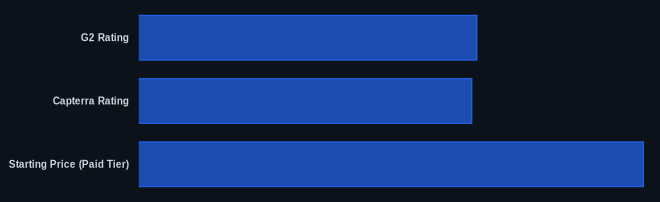
This table provides key data for Descript, a leading example of how AI-powered SaaS video editing software functions in 2026.
| Metric | Descript (Example) | Source |
|---|---|---|
| G2 Rating | 4.6/5 | G2.com (May 2024) |
| Capterra Rating | 4.5/5 | Capterra.com (May 2024) |
| Starting Price (Paid Tier) | $12/month (billed annually) | Descript Pricing (May 2024) |
| Free Tier Available | Yes | Descript Pricing (May 2024) |
| Key AI Feature | Edit audio/video by editing text transcript | Descript Official Site |
Our Take
AI has woven itself into nearly every aspect of the SaaS video editing landscape, and it's startling how far it's come in just a few years. The distinction between AI-assisted editing and true generative AI (like Sora and Veo) is crucial, though, and it's where buying decisions will increasingly diverge. You're no longer just buying an editor; you're buying an AI engine. For most SMBs, the biggest wins will come from tools that simplify existing processes, automating mundane tasks like captioning, rather than outright generating full videos from scratch. Yes, the generative tools are impressive, but the immediate ROI for businesses often lies in making current workflows 10x faster and easier, not necessarily replacing human creativity entirely just yet.
Given the rapid advancements, are you comfortable paying a premium for cutting-edge generative AI that might not fully replace a human editor, or do you prioritize tools that make your current video production workflow significantly more efficient right now?
FAQ
Q1: Is SaaS video editing software truly replacing professional video editors?
Not entirely. While AI-powered SaaS video editing platforms empower non-professionals to create high-quality content quickly, they generally don't replace the need for skilled professional editors on complex, high-budget projects requiring nuanced creative direction, advanced motion graphics, or intricate color grading. They automate mundane tasks and democratize basic video creation, allowing professionals to focus on higher-value creative work.
Q2: What are the main hidden costs to watch out for with these platforms?
The most common hidden costs involve limitations on export quality (e.g., being stuck at 720p unless you upgrade), watermarks on free plans, restricted access to premium stock media libraries, and caps on video length or monthly export minutes. Additionally, advanced AI features (like high-volume text-to-video generation or extensive transcription hours) are typically locked behind higher-tier subscriptions. Always scrutinize what's included in each plan before committing.
Q3: How do I choose the best SaaS video editing software for my business?
Start by assessing your primary use case: Do you need to repurpose blog posts into videos (Lumen5)? Create quick, polished demos (Screen Studio, Descript)? Generate social media clips (Opus Clip Pro)? Or produce AI-generated avatars for explainer videos (Synthesia)? Then, evaluate ease of use, the specific AI features you need, collaboration capabilities, and how pricing scales with your anticipated content volume. Always take advantage of free trials to test the workflow with your own content.