Rippling offers a truly unified solution for HR, IT, and Finance, making it an ambitious choice for growing SMBs and mid-market companies aiming to consolidate their administrative backend. If you're tired of disjointed systems and crave a single source of truth for your employee data, this platform offers a compelling, albeit premium, vision for the future of business operations. However, the lack of transparent public pricing requires a custom quote, which can be a point of friction for smaller businesses or those simply exploring options.
What Is Rippling?
Rippling delivers an all-in-one employee management system that simplifies complex administrative tasks across human resources, information technology, and financial operations. It helps businesses manage the entire employee lifecycle, from onboarding new hires with devices and applications already configured, through payroll, benefits, and performance, to offboarding, all from one dashboard. The tool targets companies looking to reduce manual overhead and improve efficiency by automating processes that usually involve multiple, disconnected software solutions.
Its core strength lies in its ability to connect employee data across these traditionally separate departments. This means when you onboard someone, their payroll is set up, their health benefits are initiated, their laptop is ordered, and their software access is granted almost simultaneously. This level of integration has a significant impact on businesses scaling rapidly, especially those with remote teams.
Key Features
The platform's modular design lets you tailor its capabilities to your specific needs, building on a foundational core that handles basic employee data and workflows. Each module integrates deeply with the others, reducing data silos and administrative burdens.
HR Cloud
This is the cornerstone for managing your people. The HR Cloud simplifies everything from hiring and onboarding to performance reviews and learning management. You can set up custom workflows for employee lifecycle events, ensuring compliance and consistency.
It includes Payroll, which automates paychecks, tax filing, and compliance across all 50 states and globally. You get automated deductions, direct deposits, and year-end reporting, cutting the steps in a critical function. One user noted, "I switched from using separate tools for payroll and HR to Rippling and the integration has been seamless."
The Benefits module lets you manage health insurance, 401(k)s, and other employee perks directly within the system. This centralizes benefit administration, making enrollment and changes simpler for both employees and HR staff.
For talent management, the platform offers Applicant Tracking to speed up your hiring process, Learning Management for employee development, and Performance Management tools to track goals and conduct reviews. According to a general sentiment in HR software discussions: "Rippling's digital training program feature is a valuable function for the virtual work setup adopted by many companies."
IT Cloud
Rippling extends beyond traditional HR with its solid IT Cloud. This module lets you manage all your company's devices, apps, and employee access from a single place. Imagine a new hire receiving their laptop pre-configured with all necessary software and permissions already set up.
Features like Device Management allow you to remotely provision, wipe, and secure company laptops and phones. App Management gives you control over user access to hundreds of business applications, from Slack to Salesforce, automating provisioning and de-provisioning. This significantly enhances security and reduces IT workload.
It handles employee access management, ensuring people have the right permissions to the right tools, and revokes them instantly upon offboarding. According to a user, "The unified platform saves us so much administrative time, especially with onboarding new hires."
Finance Cloud
Completing the trifecta, the Finance Cloud integrates with HR and IT data, providing a unified view of your company's finances tied directly to your employees. This is a critical advantage for understanding spend and operational costs.
The Expense Management module automates expense reporting, approvals, and reimbursements. Employees can easily submit expenses, and managers can approve them, with data flowing directly into your accounting system.
With Corporate Cards, you can issue and manage company credit cards, setting spend limits and categorizing transactions automatically. This provides real-time visibility into company spending.
Bill Pay speeds up invoice processing and vendor payments. You can manage approvals, schedule payments, and reconcile accounts directly within the platform.
Core Foundation & Automation
Underpinning these clouds is a powerful Foundation plan that includes essential HR functionality, a unified employee database, and automated onboarding/offboarding workflows. This core allows for intelligent automation across all modules, reducing manual tasks and minimizing errors. The platform has been incorporating AI-powered features to automate HR operations, reduce errors, and aid in data-driven decision-making, including intelligent automation within payroll and benefits.
Pricing
Rippling operates on a modular pricing structure, which means you build your package based on the specific HR, IT, and Finance services you need. It starts with a core Foundation plan, necessary for all users, which includes essential HR functionality and the unified employee database. This plan, and any of its numerous add-on modules, does not have publicly listed pricing (as of May 2026, per the official pricing page).
To get a price for your business, you'll need to contact sales for a custom quote. This sales-led approach is common for comprehensive enterprise solutions, suggesting the platform targets mid-market to larger SMBs willing to engage in a consultation. It contrasts sharply with the transparent, self-service pricing models of competitors like Gusto or BambooHR.
There's no readily advertised free plan or trial period for the full software, though free demos are offered. This means you can't simply sign up and start experimenting to see if it's a good fit without interacting with a sales representative first. As of March 2026, Rippling's official pricing page (https://www.rippling.com/pricing) directs users to request a demo for specific costs. While this ensures you get a plan tailored to your exact needs, it can be a point of friction for smaller businesses or those simply exploring options. This gets expensive fast if you start adding many modules.
No specific public announcements regarding pricing changes in the last 12 months were found. The custom quoting process likely means any cost adjustments are handled on an individual basis during the sales consultation.
Pros and Cons
Pros
- Truly Unified Platform: It genuinely integrates HR, IT, and Finance, providing a single source of truth for employee data. This is its standout feature, often praised by users moving from fragmented systems.
- Streamlined Onboarding/Offboarding: Automation across departments saves significant administrative time, particularly when provisioning devices and software access for new hires.
- Powerful Automation: From payroll to app management, the platform automates many routine tasks, reducing manual effort and potential errors.
- Modular Design: Businesses can pick and choose the modules they need, allowing for a customized solution that can grow with them.
- Global Capabilities: The platform supports payroll and compliance in multiple countries, which is great for international teams.
Cons
- Lack of Transparent Pricing: The requirement for a custom quote can be a barrier for businesses seeking quick price comparisons or operating on tight budgets. It's tough to gauge initial investment without a sales call.
- Steep Learning Curve: While powerful, one user noted: "While the platform is powerful, the initial setup felt a bit overwhelming due to the sheer number of features." The sheer depth of features means a significant time investment to master.
- Inconsistent Customer Support: Many users mention that response times can be slow, especially for complex issues, which can be frustrating when dealing with critical HR or payroll problems.
- Potentially High Cost for Smaller Businesses: Without public pricing, it's hard to confirm, but the comprehensive nature suggests it might be a significant investment for very small businesses with basic needs.
- Feature Overload for Simple Use Cases: If you only need basic payroll and HR, some users might find the extensive IT and Finance capabilities more than they need, potentially complicating the interface.
Who Should Use Rippling?
Rippling is an excellent fit for growing SMBs (20-500 employees) and mid-market companies that are scaling rapidly and dealing with the complexities of managing people, devices, and finances across multiple departments.
- Companies with Remote or Hybrid Teams: Its strong IT Cloud features for device and app management are invaluable for distributed workforces, ensuring secure and efficient operations.
- Businesses Prioritizing Automation and Efficiency: If you're looking to eliminate manual data entry, reduce administrative overhead, and free up your HR, IT, and Finance teams for more strategic work, this platform is for you.
- Organizations Tired of Disjointed Systems: Those currently struggling with separate tools for payroll, HRIS, expense management, and IT asset tracking will find its unified approach incredibly refreshing. Many users attest to the integration after switching from fragmented systems.
- Companies Focused on Streamlined Onboarding: Businesses with high hiring volumes or a desire to deliver a top-notch new hire experience, including pre-provisioned equipment and software access, will benefit greatly.
It might not be the best fit for very small businesses (under 20 employees) with simple HR needs who prioritize transparent, low-cost solutions like Gusto or BambooHR. Similarly, massive enterprises might prefer deeply specialized solutions like Workday for specific talent management or financial planning functions.
Data at a Glance
| Metric | Value | Source |
|---|---|---|
| G2 Rating (as of Mar 2026) | N/A | g2.com/products/rippling/reviews |
| Capterra Rating (as of Mar 2026) | N/A | capterra.com/p/186596/Rippling/ |
| Starting Price | Custom Quote (as of May 2026) | rippling.com/pricing |
| Free Tier/Trial | No (as of May 2026) | rippling.com/pricing |
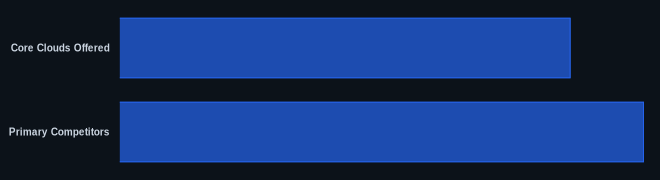
| Core Clouds Offered | 3 (HR, IT, Finance) | rippling.com |
| Primary Competitors | 4 | rippling.com |
| Public Pricing Changes (last 12 months) | 0 | rippling.com |
Our Take
We've seen countless "all-in-one" claims in SaaS, but Rippling truly comes closer than most to delivering on that promise. The deep integration between HR, IT, and Finance isn't just a marketing slogan; it fundamentally changes how you onboard a new employee or offboard a departing one. The initial setup can feel like drinking from a firehose due to its sheer depth, but the long-term payoff in reduced administrative burden and improved data consistency is undeniable. Yes, you'll need to jump through a sales call hoop for pricing, which is old-school, but if you're a growing business bleeding time and money on fragmented systems, that conversation is worth having. Have you found the value in Rippling's IT and Finance integrations sufficient to justify a higher investment compared to HR-only platforms?
FAQ
Is Rippling suitable for very small businesses or startups?
While Rippling is powerful, its comprehensive feature set and custom quoting process might make it a more substantial investment than very small businesses or startups with basic needs are looking for. Simpler, more transparently priced alternatives like Gusto or BambooHR might be a better fit if you primarily need core HR and payroll without extensive IT and Finance integration.
What are the main advantages of using Rippling over separate HR, IT, and Finance tools?
The primary advantage is unification. It means employee data flows across all departments, eliminating duplicate data entry, reducing errors, and speeding up processes like onboarding, payroll, and expense management. This single source of truth saves significant administrative time and provides a holistic view of your workforce and operational costs.
What kind of customer support can I expect from Rippling?
User feedback indicates that customer support response times can be inconsistent, particularly for complex issues. While routine inquiries are generally handled satisfactorily, you might experience delays for more intricate problems. This is a common challenge for many comprehensive SaaS platforms.