Jira Software's Standard plan, at $8.60 per user/month (monthly billing, as of June 2026, per the official pricing page), now includes 25 Rovo AI credits per user per month, making advanced AI features surprisingly accessible to a broader range of teams. This move helps address the platform's historical complexity, but its core structure and reliance on marketplace add-ons still demand a clear understanding of its true cost and best-fit use cases.
What Is Jira Software?
Jira Software sets the industry standard for software development teams, especially those dedicated to Agile methodologies like Scrum and Kanban. It provides a highly customizable environment for tracking issues, managing tasks, and orchestrating development workflows from ideation to deployment. While often seen as a technical tool, its latest updates are pushing it towards broader appeal, aiming to simplify project management across the enterprise.
The software helps teams visualize work, plan sprints, and keep everyone aligned on what needs to be done. It's a central hub where code, conversations, and progress converge, designed to give engineering leaders complete visibility into their development pipeline.
Key Features
Rovo AI-Powered Agile Development
The Spring 2026 release introduces a suite of AI enhancements powered by Atlassian's new Rovo AI engine. This isn't just a chatbot; the platform now features proactive AI agents that you can assign real work, like generating status updates or merging duplicate tickets. You can even create new work items directly from recorded meetings, like a Loom video, which the AI transcribes and structures.
The Rovo Search Integration offers cross-tool search and summarized answers, making it easier to find information buried across your Atlassian ecosystem. Plus, writing complex queries is simplified with Natural Language JQL, where you simply type what you need, and the AI generates the precise JQL for you. This makes advanced data filtering much more accessible for non-technical users.
Advanced Issue and Bug Tracking
Jira Software remains unrivaled in its capacity for detailed issue and bug tracking. Every task, defect, or enhancement request can be meticulously logged, assigned, prioritized, and followed through its lifecycle. The system provides powerful filters and custom fields, ensuring no detail is overlooked and allowing teams to categorize and analyze issues precisely.
Its ability to link issues to code commits, pull requests, and CI/CD pipelines creates a complete audit trail. This level of granularity is essential for maintaining software quality and compliance in regulated industries. You'll find the tool incredibly useful for ensuring every bug has an owner and a clear path to resolution. According to a G2 reviewer, "Most like about Jira is its collaboration capabilities, allowing teams to manage tasks, track progress, assign responsibilities and maintain transparency across projects."
Customizable Workflows and Boards
The flexibility to define custom workflows is a cornerstone of the platform. Teams can map any process, from simple task management to complex multi-stage development cycles, complete with conditions, validators, and post-functions. These workflows ensure consistency and adherence to team processes.
Scrum and Kanban boards are core to the experience, offering visual ways to manage backlogs, plan sprints, and track daily progress. You can drag-and-drop tasks, update statuses, and monitor velocity, giving you a real-time pulse on your team's output. For multi-team, multi-project planning, the Advanced Roadmaps feature in the Premium plan offers a bird's-eye view.
Enhanced Reporting and Analytics
With the Spring 2026 update, the software introduces a New Reporting Experience that features more customizable dashboards and insights powered by Rovo. You can generate a range of reports, from sprint velocity charts to burndown charts and custom metrics. These reports provide critical insights into team performance, project health, and potential bottlenecks.
The ability to create personalized dashboards means every team member can view the data most relevant to their role. This helps stakeholders stay informed and provides data-driven evidence for decision-making and continuous improvement initiatives.
Collaboration and User Experience Improvements
The platform facilitates strong team collaboration by centralizing communication around tasks. Comments, attachments, and status updates live directly on the issue, keeping context clear and accessible. The new Personalized "For You" Page aims to make the interface more intuitive, surfacing the most relevant tasks and updates for each user.
For external partners, Guest Access allows secure collaboration without needing full user licenses. Furthermore, a List View provides a spreadsheet-like way to manage work, offering a familiar interface for those who prefer tabular data over cards. Atlassian is clearly focused on making the tool more accessible to a broader user base.
Pricing
Jira Software offers four primary cloud pricing plans: Free, Standard, Premium, and Enterprise, alongside a self-hosted Data Center option. Pricing is generally per-user, with costs decreasing per user at higher tiers or with annual billing.
-
Free Plan: At $0 (as of June 2026, per the official pricing page), this plan supports up to 10 users. It includes unlimited projects, boards, and basic reporting, along with 2GB storage and 100 automation rule runs per month (team-wide). Support is community-only. This is ideal for very small teams or individuals testing the waters.
-
Standard Plan: This plan costs approximately $8.60 per user/month (monthly billing, as of June 2026, per the official pricing page), or about $7.91 per user/month (billed annually) for up to 300 users (as of June 2026, per the official pricing page). For teams up to 10 users, it's $8.15/user/month annually (as of June 2026, per the official pricing page). It includes everything in Free, plus 250GB file storage, user roles, audit logs, and 1,700 automation rule runs per user per month. Crucially, it comes with 25 Rovo AI credits per user per month. This plan suits growing teams needing more control and automation.
-
Premium Plan: Priced at about $15.80 per user/month (monthly billing, as of June 2026, per the official pricing page) or $14.54 per user/month (annually) for up to 300 users (as of June 2026, per the official pricing page). It builds on Standard with unlimited storage, 24/7 premium support (with response time guarantees), Advanced Roadmaps, sandbox environments, and a 99.9% uptime SLA. It offers 1,000 automation rules per user per month and 70 Rovo AI credits per user per month. This is for larger organizations needing advanced planning and dedicated support.
-
Enterprise Plan: This plan is custom-priced, estimated between $20-$25/user/month (annual only, as of June 2026, per the official pricing page). Designed for 801+ user organizations, it includes multi-site management, enhanced security, and Atlassian Access for SSO.
-
Data Center: For self-hosting, costs start at $51,000 per year for 500 users (effective February 17, 2026, per the official pricing page). Atlassian is phasing this out, with support ending by March 28, 2029.
Pricing Changes & Hidden Costs: Jira pricing has seen consistent increases. Since 2019, Data Center costs have risen over 111% (2019-2026). Cloud plans have had annual increases of 5-15% and a major restructuring in 2019. Loyalty discounts ended in 2023, impacting many long-term customers. More recently, projected increases of 5-20% were expected from October 15, 2025, reflecting feature enhancements like AI.
Be warned: the base pricing can be deceiving. Many teams find themselves needing numerous paid add-ons from the Atlassian Marketplace for essential features like advanced time tracking, enhanced reporting, or specialized integrations. This gets expensive fast, significantly increasing the total cost, especially for larger teams. Limitations on automation in lower tiers and the need for additional Confluence licenses also contribute to a higher true cost.
Pros and Cons
Pros:
- Gold Standard for Agile Development: Purpose-built for Scrum and Kanban, offering solid sprint planning, backlog management, and velocity tracking.
- Powerful Issue and Bug Tracking: Unmatched capabilities for meticulously tracking and managing software defects and feature requests, crucial for quality assurance.
- Highly Customizable Workflows: Lets you design intricate workflows to match any development process, ensuring consistency and governance.
- Deep Developer-Centric Integrations: Superior integration ecosystem with developer tools like GitHub and Bitbucket, and CI/CD pipelines.
- Scales for Technical Teams: Handles large-scale operations and complex engineering environments exceptionally well.
- AI Features on Standard Plan: The Rovo AI engine, with agents and natural language JQL, is surprisingly available from the Standard plan, providing significant value.
- Generous Free Tier: Offers core features for up to 10 users at no cost, making it accessible for startups to experiment.
Cons:
- Steep Learning Curve: The software is notoriously complex, especially for non-technical users, requiring a significant time investment to master.
- Performance Can Be Slow: Users often report slowness when managing a large number of active tickets on a single board, impacting productivity.
- Significant Hidden Costs: Many critical functionalities require paid add-ons from the Atlassian Marketplace, making the total cost of ownership much higher than the base price.
- Overwhelming Interface for Non-Dev Teams: While evolving, the UI can still feel cluttered and overly technical for marketing, HR, or operations teams.
- Support Varies by Plan: Free plan users rely solely on community support, and even paid users sometimes report slow or unhelpful responses, with some tickets lingering for years. According to a G2 reviewer: "I had a Jira ticket opened few years already, however still no respond received, no feedback whatsoever, even I responded another follow up note with same ticket, however no luck hear anything from anywhere, and I can't cancel the ticket from my side either for some odd reason."
- Frequent Pricing Increases: The platform has a history of incremental price hikes and the removal of loyalty discounts, which can make budgeting difficult for long-term customers.
Who Should Use Jira Software?
Jira Software is unequivocally built for software development teams of all sizes. If you're running a Scrum or Kanban team, managing complex codebases, or need detailed bug tracking and release management, this is your tool. Engineering managers, product owners, QA leads, and individual developers will find the platform indispensable for organizing work, tracking progress, and collaborating efficiently.
It's also an excellent fit for growing SMBs with dedicated engineering departments who need to scale their Agile practices and maintain high standards of code quality. Companies that heavily rely on integrating with developer tools like GitHub, Bitbucket, and Jenkins will benefit from its native integrations.
However, if you're a non-technical small business, a marketing agency, or an HR department primarily looking for general task management and visual workflows, you might find the tool overly complex. For those teams, alternatives like Asana, ClickUp, or monday.com often offer a gentler learning curve and a more intuitive interface tailored to their specific needs.
Data at a Glance
| Metric | Value | Source |
|---|---|---|
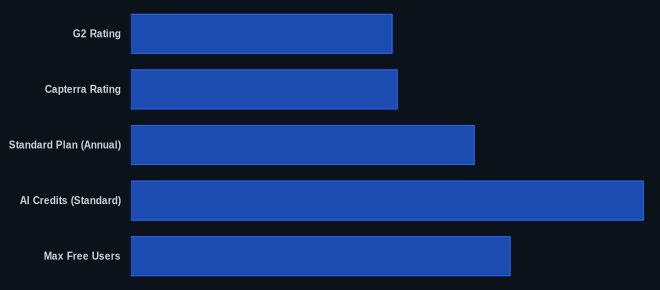
| G2 Rating | 4.3/5 (6,540+ reviews) | G2.com |
| Capterra Rating | 4.5/5 (13,772 reviews) | Capterra.com |
| Starting Price | $0 | Atlassian.com |
| Standard Plan (Annual) | From $7.91 per user/month (up to 300 users) | Atlassian.com |
| AI Credits (Standard) | 25 Rovo AI credits per user/month | Atlassian.com |
| Max Free Users | 10 | Atlassian.com |
| Data Center (starts) | $51,000/year (for 500 users, effective Feb 2026) | Atlassian.com |
Our Take
We've seen Jira Software evolve over many years, and this 2026 AI-powered refresh is the most significant step yet towards broader usability. The inclusion of Rovo AI features, particularly agents and natural language JQL on the Standard plan, is a smart move that tackles the platform's historical complexity head-on. You're getting genuine AI assistance that can reduce manual work and democratize access to advanced functionality without forcing an upgrade to the highest tiers. But don't expect it to magically solve all your problems. The core complexity and reliance on the Atlassian Marketplace for full functionality remain, and performance can still be an issue with many active tickets. If you're a serious software team, it's still the best game in town, but for non-dev teams, the AI might make it less intimidating, not easy.
What's your team's breaking point for Jira's complexity versus the specific developer features it offers that competitors don't?
FAQ
Q: Is Jira Software suitable for non-technical teams like marketing or HR?
A: While Atlassian markets it for cross-functional teams, user feedback often highlights a steep learning curve and overly complex interface for non-technical users. Tools like Asana or monday.com are generally more intuitive for general project management outside of software development. The new AI features might help, but the underlying structure is still very developer-centric.
Q: How do the new Rovo AI features work and what do they cost?
A: Rovo AI agents can take on tasks like summarizing tickets or updating statuses, and you can create work items from recordings. Natural Language JQL lets you generate complex queries using plain English. These features are available starting with the Standard plan, which includes 25 Rovo AI credits per user per month (as of June 2026, per the official pricing page). The Premium plan offers 70 credits (as of June 2026, per the official pricing page).
Q: Are there any hidden costs with Jira Software?
A: Yes, many users report hidden costs. While the core plans are detailed, you'll likely need to purchase additional paid add-ons from the Atlassian Marketplace for functionalities like advanced time tracking, specific reporting, or specialized integrations. These add-ons can significantly increase your total monthly spend, so budget for them during your evaluation.