| Feature | Asana | Monday.com |
|---|---|---|
| G2 Rating | 4.3/5 (13,930 reviews) G2 | 4.7/5 (nearly 15,000 reviews) G2 |
| Capterra Rating | 4.5/5 (13,624 reviews) Capterra | 4.6/5 (18,667 reviews) Capterra |
| Free Tier | Personal (up to 2 users, unlimited tasks/projects/views) (as of July 2026, per the official pricing page) | Free (up to 2 seats, 3 boards, limited storage/features) (as of July 2026, per the official pricing page) |
| Starting Price | $10.99 per user/month (annual, Starter plan, min 1 user) (as of July 2026, per the official pricing page) | $9 per seat/month (annual, Basic plan, min 3 seats) (as of July 2026, per the official pricing page) |
| Key AI Feature | AI Studio (no-code AI workflow builder, Smart Goals, Smart Chat, Smart Summaries) (as of July 2026, per the official pricing page) | AI Sidekick and AI Blocks (credit-based AI) (as of July 2026, per the official pricing page) |
| Integrations | 270+ apps Asana | 200+ apps Monday.com |
| Strengths | Structured workflows, process discipline, advanced task control, AI Studio, enterprise-grade portfolio management. | Visual appeal, customization, dashboards, broader platform (CRM, dev tools), engaging UI. |
| Weaknesses | Can feel rigid for custom workflows, reporting/automation in higher tiers, less visual than its competitor. | Steep learning curve for some, higher pricing for small teams, can be overwhelming if not configured carefully. |
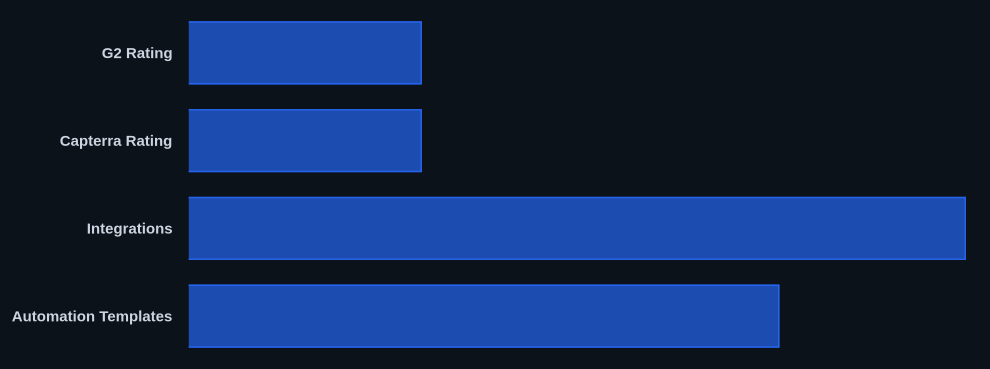
Monday.com holds a G2 rating of 4.7/5 compared to Asana's 4.3/5, indicating a slight edge in user satisfaction, but this doesn't tell the full story for 2026. Your choice between these two project management tools hinges on your team's core working style: prioritize structured workflows and AI-driven process discipline, or crave visual flexibility and a customizable platform that extends beyond just tasks. Most teams find themselves needing the process of the former or the adaptability of the latter, making the decision less about "better" and more about "better for you."
What Is Asana?
Asana is a work management platform that helps teams organize, track, and manage their work. It provides tools for task management, project planning, and collaboration, ensuring everyone knows who is doing what by when. The software excels at breaking down complex projects into manageable steps, offering clear visibility across teams and initiatives. Organizations needing strong operational rigor and a clear hierarchy of work, from daily tasks to strategic goals, often choose it.
The tool focuses on enabling teams to achieve their objectives by creating structured workflows. It facilitates communication around tasks, automates routine processes, and provides insights into progress and potential bottlenecks. With a strong emphasis on dependencies and goal-setting, the platform suits predictable, repeatable processes where clarity and accountability are paramount.
What Is Monday.com?
Monday.com is a work operating system (Work OS) that offers a highly customizable platform for managing projects, processes, and everyday work. It presents information visually, using colorful boards and intuitive interfaces that can adapt to almost any workflow. This flexibility lets users build custom solutions for project management, CRM, software development, and more.
The platform provides a visual workspace where teams can plan, track, and collaborate on tasks. It uses a drag-and-drop interface and 36+ column types and 50+ widgets to let users configure boards exactly to their needs. This makes it an engaging solution for teams that value visual organization and want a single, adaptable hub for diverse types of work.
Key Features
When evaluating these platforms, it's crucial to look beyond basic task lists. Both offer sophisticated capabilities, but their approach to common features — and what they offer uniquely — defines their strengths.
Task Management & Workflow
Asana shines with its structured approach to task management. It offers multi-level subtasks, detailed dependencies, and the ability to assign tasks to multiple projects, known as "multi-homing." This allows for granular control over every piece of work and ensures that complex projects with interconnected tasks remain organized. Its focus is on process discipline, making it excellent for teams needing to follow strict operational guidelines.
Monday.com also provides task management, but its strength lies in visual flexibility. Users can define tasks within boards using a multitude of column types, from status labels to progress bars. While it currently only supports first-level subtasks, the ability to build custom workflows with 36+ Column Types and integrate them into a broader Work OS is a huge advantage for adaptability.
Project Views
Both tools offer essential project views like List, Board, Timeline, Calendar, and Gantt. A G2 reviewer noted, "Asana gives you list, board, timeline, calendar, and dashboard views right away, no setup needed." This immediate accessibility makes it easy for new users to jump in.
The platform offers these views and more, including Charts, Map, Workload, and Workdocs. However, you typically add each view manually to a board. According to one user quote, "The extra step is offset by more control and the new Favorites bar, which keeps your most-used boards and views just a click away." This gives teams greater customization.
Automation
Automation is where efficiency gains really happen. Asana offers unlimited automations on its Starter plan and above (as of July 2026, per the official pricing page), with more advanced options (like conditional logic) in higher tiers. It supports a base of 70+ automation rules out of the box, which can be customized or built from scratch.
Monday.com provides a more extensive library of 200+ automation templates, enabling quick setup for common scenarios. However, the number of automation actions is capped based on the plan, starting at 250 actions/month for the Standard plan and increasing to 25,000 actions/month for the Pro plan (as of July 2026, per the official pricing page). This can get expensive for heavy automation users if they hit limits on lower tiers.
Reporting & Dashboards
Monday.com's dashboards are frequently cited as a major differentiator. They are highly visual and customizable, pulling data from multiple boards into a single, auto-refreshing view. As one user pushing for a switch said, "Anya was the one who pushed for the switch. She'd been a Monday.com power user at her previous company and she missed it. 'The dashboards are so much better,' she kept saying. 'I can see the health of every project on one screen. In Asana I have to click through six projects and piece together the picture in my head.'" This makes it easier for stakeholders to get a quick overview of performance.
Asana offers strong reporting capabilities, particularly in its higher tiers with Universal Reporting and Portfolios. These features allow for a more structured, top-down view of work across multiple projects and teams, essential for enterprise-level portfolio management and goal tracking.
AI Capabilities
AI integration is a significant area of focus for both platforms in 2026. Asana's AI Studio is a standout. It offers a no-code AI workflow builder, Smart Goals, Smart Chat, and Smart Summaries. For paid plans, its AI Studio Basic comes with 50,000 credits/billing account/month on Starter and 75,000 credits/billing account/month on Advanced (as of July 2026, per the official pricing page), with promises of unlimited AI usage on most features for paying customers. This positions it as a powerful tool for automating insights and enhancing productivity.
The AI features of Monday.com include AI Sidekick and AI Blocks. These are credit-based, allowing for AI-powered assistance within the platform. While useful, the credit-based system means usage needs to be monitored, similar to its automation actions.
Unique Offerings
Unique to Asana are features like Goals (company, team, individual goal tracking), Portfolio workload view, Approvals and Proofing workflows, and the aforementioned AI Studio. These are critical for organizations focused on strategic execution and compliance.
Monday.com's unique features include its customizable Workspaces (unlimited workflows), 36+ Column Types and 50+ Widgets for unparalleled board customization, and its broader platform capabilities that extend into CRM and Dev apps. It also provides Monday Workdocs and Whiteboards for collaborative content creation directly within the platform.
Integrations
Both platforms integrate with a wide ecosystem of tools. Asana connects with over 270 apps across all paid plans (as of July 2026, per the official pricing page), covering everything from communication (Slack, Microsoft Teams) to file storage (Google Drive, Dropbox).
The tool integrates with over 200 apps, though some are not available on the Basic plan and certain usages might be capped. Both also offer robust Zapier integrations, allowing connection to thousands more applications.
Pricing
Understanding the pricing structures for 2026 is critical, as both tools have different minimums and feature allocations per tier.
Asana Pricing 2026
As of July 2026, per the official pricing page:
- Personal: This tier is free for up to 2 users. It includes unlimited tasks, projects, list, board, and calendar views, making it a solid option for individuals or small projects.
- Starter: At $10.99 per user/month when billed annually, or $13.49 per user/month monthly. This plan includes unlimited users, Timeline and Gantt views, basic reporting, unlimited automations, forms, custom fields, templates, and unlimited free guests. It also provides AI Studio Basic with 50,000 credits/billing account/month.
- Advanced: This plan costs $24.99 per user/month (annual) or $30.49 per user/month (monthly). It builds on Starter with advanced automation (25,000 actions/month), portfolios, goals, workload management, advanced reporting, custom rules, forms with branching logic, proofing, and advanced admin controls (SAML SSO, user provisioning, advanced permissions). AI Studio Basic credits increase to 75,000 credits/billing account/month.
- Enterprise and Enterprise+: These tiers require custom pricing, generally starting in the range of $30-$40+ per user per month for annual commitments. They offer enhanced security, support, and compliance features.
Asana's core plans have shown stability in recent pricing, making it somewhat predictable for budgeting.
Monday.com Pricing 2026
As of July 2026, per the official pricing page, for Monday Work Management (the primary project management offering):
- Free: This plan supports up to 2 seats and includes 3 boards, 3 docs, 500MB storage, and 200+ templates. It lacks automations and integrations.
- Basic: Starting at a minimum of 3 seats, this plan costs $9 per seat/month (annual billing, $27/month for 3 seats) or $12 per seat/month (monthly, $36/month for 3 seats). It offers unlimited free viewers, unlimited items, and 5 GB storage. Crucially, it omits timeline/Gantt views, calendar, guest access, and automations, which are often essential for project teams.
- Standard: Also with a minimum of 3 seats, this tier is $12 per seat/month (annual, $36/month for 3 seats) or $14 per seat/month (monthly, $42/month for 3 seats). It includes most core PM features but caps automations at 250 actions/month.
- Pro: With a 3-seat minimum, this plan costs $19 per seat/month (annual, $57/month for 3 seats) or $24 per seat/month (monthly, $72/month for 3 seats). It adds time tracking, private boards, and increases automations to 25,000 actions/month. Its AI features are credit-based.
- Enterprise: This custom pricing tier is required for teams over 40 members across all plans. It includes advanced reporting, security, and dedicated support.
Monday.com's pricing and packaging can change often, and it operates as a suite of specialized products (CRM, Dev, Sales, etc.), each with its own pricing. The minimum 3-seat requirement for paid plans means it can get expensive fast for very small teams.
Pros and Cons
Choosing a project management tool involves weighing benefits against drawbacks. Both these tools have distinct strengths and areas where they might not fit every team.
Asana Pros:
- Structured Workflows: Excellent for complex, repeatable processes with clear dependencies.
- AI Studio: Powerful AI-powered automations and insights, with competitive credit allocations.
- Enterprise Features: Strong portfolio management, goals, and advanced admin controls.
- Feature-Rich Free Plan: Unlimited tasks, projects, and views, plus unlimited free guests.
- Faster Adoption: Its more consistent interface often leads to quicker onboarding for new users.
Asana Cons:
- Less Visual: Can feel less engaging and dynamic compared to its more colorful competitor.
- Rigid for Custom Workflows: Less flexible when teams need highly bespoke or non-standard processes.
- Reporting in Higher Tiers: Advanced reporting and workload management are locked behind more expensive plans.
- Accountability Issues: A Capterra user noted a "lack of accountability for edited/deleted comments."
Monday.com Pros:
- Highly Visual & Customizable: Engaging UI, with 15+ views and 50+ widgets to tailor any workflow.
- Superior Dashboards: Easily aggregate data from multiple boards into a single, auto-refreshing view.
- Broader Platform: Can extend beyond PM into CRM, Dev, Marketing, and more within one Work OS.
- Strong Collaboration: Intuitive for cross-functional teams due to its visual nature.
- Extensive Automation Templates: 200+ templates make it easy to set up common automations.
Monday.com Cons:
- Steeper Learning Curve: The sheer flexibility can be overwhelming for non-technical users if not configured well.
- Pricing for Small Teams: The 3-seat minimum for paid plans makes it costly for duos or very small teams.
- Automation Limits: Action caps on lower-tier plans can become a bottleneck for heavy users.
- Limited Subtasks: Only supports first-level subtasks, which can be a limitation for very deep task breakdowns.
Who Should Use Asana?
Asana is ideal for teams and organizations that thrive on structure, clear processes, and predictable workflows.
- Marketing Agencies: Excellent for managing campaigns, content calendars, and client deliverables with approval processes.
- Software Development Teams: Strong for agile project management, bug tracking, and sprint planning, especially with its dependency tracking.
- Operations & Project Management Offices (PMOs): Its portfolio management and goals features are perfect for overseeing multiple initiatives and aligning them with strategic objectives.
- Teams Managing Complex, Repeatable Processes: Any group that benefits from standardized operating procedures and in-depth task control.
- Companies Prioritizing AI-Driven Efficiency: Those looking to use AI Studio for no-code automation, smart goal setting, and insightful summaries.
If your team struggles with inconsistent processes or needs strong accountability across complex projects, Asana's disciplined approach will be a significant asset.
Who Should Use Monday.com?
Monday.com truly shines for teams that value visual organization, customization, and a versatile platform.
- Visual, Non-Technical Teams: Creative agencies, HR departments, event planners, and any team that benefits from a highly visual interface over rigid text-heavy lists.
- Cross-Functional Teams: Great for departments that need to collaborate across different types of work (e.g., marketing, sales, product) on a single, adaptable platform.
- Organizations Needing a Broader Work OS: If you're looking for a tool that can grow beyond project management into CRM, sales, or dev tools without switching platforms, this is a strong contender.
- Teams Who Want to Adapt the Tool to Their Process: Its flexibility allows you to build workflows that perfectly match existing team habits, rather than forcing adoption of a predefined structure.
- Companies Prioritizing Dynamic Dashboards: If seeing the "health of every project on one screen" (as one user put it) is paramount for leadership and project owners, it delivers.
If your team is diverse in its needs and prefers a vibrant, highly configurable workspace, the platform offers an engaging solution. It's often compared to tools like Notion for its customizable "building blocks" approach.
Switching Sides: Migrating Between Platforms
The decision to switch between these two powerful platforms isn't just about features; it's also about a shift in philosophy. The "information gain" from our research brief highlights these core tensions.
Reasons to Switch from Asana to Monday.com
Users often move from Asana when they feel constrained by its structured nature and crave more visual dynamism. The primary drivers are usually:
- Superior Dashboards and Visual Reporting: The ability to create highly customized, auto-refreshing dashboards is a major draw. A Capterra user praised the tool's "intuitive interface" for making data visible.
- Greater Visual Customization and Flexibility: If Asana's predefined views and workflows feel too rigid, the multitude of column types and widgets allows teams to truly build the interface they want.
- Broader Platform Capabilities: For teams looking to consolidate tools for CRM, dev workflows, or other business functions into a single "Work OS," Monday.com's app ecosystem within its platform is compelling.
- More Polished Timeline/Gantt Views: Some users find its visual implementation of these views more engaging and easier to interact with.
Reasons to Switch from Monday.com to Asana
Conversely, teams migrating to Asana often do so because they miss the rigor and discipline it provides.
- Need for Structured Workflows and Process Discipline: When Monday.com's flexibility leads to inconsistent data or difficulty in enforcing specific steps, Asana's inherent structure becomes highly appealing.
- AI-Powered Automation: Asana's AI Studio and its more generous approach to unlimited automations (on paid plans) can be a significant advantage over Monday.com's credit-based or capped systems.
- Simplicity and Consistency: For some, the sheer number of customization options in the platform can be overwhelming. Asana's more consistent UI across projects can lead to faster adoption and less decision fatigue.
- Multi-Level Subtasks: For projects requiring deep task hierarchies, Asana's support for multiple subtask levels is a crucial feature missing in the other tool.
Data Migration and Hidden Costs
Data transfer itself isn't usually the biggest hurdle; third-party tools like Altosio can assist. The real challenge comes from re-architecting workflows and automations. Monday.com's flexibility means you'll spend time rebuilding how tasks flow, which can be a significant undertaking. The lack of multi-level subtasks in Monday.com is also a major structural difference that needs to be accounted for.
Hidden switching costs include:
- Recreating automations and workflows: This takes time and effort to map existing processes onto the new platform.
- Learning curve and re-onboarding: Even for seasoned teams, adapting to a new system requires training and adjustment periods.
- Potential "ghost seats" with Monday.com's fixed seat blocks: If you move a team of 4 to Monday.com, you might pay for 5 seats depending on the tier, unlike Asana's per-user model.
- Loss of historical data context: While data can be moved, the way it's linked and the context around past conversations or decisions might not transfer perfectly.
- Cost of third-party migration tools: These services add to the overall switching expense.
Data at a Glance
| Metric | Asana | Monday.com | Source |
|---|---|---|---|
| G2 Rating | 4.3/5 (13,930 reviews) | 4.7/5 (nearly 15,000 reviews) | G2 |
| Capterra Rating | 4.5/5 (13,624 reviews) | 4.6/5 (18,667 reviews) | Capterra |
| Starting Price | $10.99/user/month (annual, Starter) (as of July 2026) | $9/seat/month (annual, Basic, min 3 seats) (as of July 2026) | Asana Pricing, Monday.com Pricing |
| Free Tier Users | Up to 2 users (as of July 2026) | Up to 2 seats (as of July 2026) | Asana Pricing, Monday.com Pricing |
| Integrations | 270+ apps | 200+ apps | Asana, Monday.com |
| AI Credit (Starter/Basic) | 50,000 credits/month (Starter) (as of July 2026) | Credit-based (specific credits not listed on basic tiers) | Asana Pricing, Monday.com Pricing |
| Automation Templates | 70+ templates | 200+ templates | Asana.com, Monday.com |
Our Take
We've used both platforms extensively for different projects, and it's not a matter of one being definitively "better." We see teams who initially gravitate toward Monday.com's visual flair for quick adoption, only to find themselves needing Asana's goal-setting and process enforcement once projects scale. Conversely, teams tired of Asana's lists often flock to Monday.com for its dashboard glory. For teams growing past 5 users, Asana's per-user pricing model can be more predictable than Monday.com's 3-seat minimum blocks. The real decision boils down to whether your team fundamentally operates best with guardrails or with an open canvas.
If your team is currently using Monday.com and frequently hitting automation action caps, have you considered how much you're actually paying for those extra credits compared to Asana's unlimited automations in its Starter plan?
FAQ
Is Monday.com cheaper than Asana in 2026?
Monday.com's Basic plan is $9/seat/month annually (minimum 3 seats), while Asana's Starter is $10.99/user/month annually (no minimum users) (as of July 2026). For a 3-person team, Monday.com's Basic is $27/month, but lacks crucial features like Gantt, Calendar, and automations. Asana's Starter for 3 users would be $32.97/month, offering a much more feature-rich experience. This means Asana often provides more value at comparable price points for core project management features.
What are the key AI differences between Asana and Monday.com in 2026?
Asana's AI Studio focuses on a no-code workflow builder, Smart Goals, Smart Chat, and Smart Summaries, with substantial credit allocations (or unlimited usage on most features for paid plans) (as of July 2026). Monday.com offers AI Sidekick and AI Blocks, which are credit-based and integrated into its flexible board structure. Asana's AI appears more geared towards intelligent process enhancement and goal alignment, while Monday.com's is for general assistance and content generation within its customizable workspace.
Which tool offers better reporting and dashboards?
Monday.com generally wins for highly visual and customizable dashboards that can pull data from multiple boards into a single, auto-refreshing view. This is a primary reason users switch to it. Asana provides strong reporting, especially in its Advanced tier with Universal Reporting and Portfolios, which are excellent for structured, top-down project oversight and goal tracking. Your preference depends on whether you prioritize dynamic visual summaries or comprehensive, structured project health reports.