monday.com's desktop experience delivers a powerful, AI-driven work management system that excels in visual customization and automation, but its mobile app disappointingly lags, often forcing teams back to their computers for full functionality and a bug-free experience. This makes monday.com a strong contender for businesses prioritizing desktop productivity and intelligent automation for teams of three or more, despite its increasingly complex and expensive pricing structure.
What Is monday.com?
This work OS provides a highly visual and customizable platform designed to manage virtually any team workflow, from project management and CRM to marketing campaigns and HR. It's built for teams seeking to centralize their work, automate routine tasks, and gain clear visibility into progress. The software aims to be a single source of truth for operations, allowing users to tailor boards, dashboards, and automations to fit their precise needs without extensive technical expertise. It helps diverse teams coordinate efforts, track tasks, and collaborate efficiently, making it particularly valuable for those who thrive on visual organization.
Key Features
The platform's strength lies in its modular design and extensive feature set, continually evolving with a strong emphasis on artificial intelligence to speed up operations.
Customizable Work Management Boards
At the core of the tool are its highly adaptable boards. You can create an unlimited number of these digital workspaces, each tailored with columns to track anything from task status, priorities, team assignments, and due dates, to advanced metrics using formula fields. This flexibility allows teams across marketing, product development, sales, and operations to design their ideal workflow dashboards. It supports 7 different views including Kanban, Gantt, Timeline, Calendar, and Workload, enabling different team members to visualize data in the way that best suits their role and project phase. Multi-level Subitems, now supporting up to 4 levels, allow for granular task breakdown within projects.
Powerful Automations and Integrations
The software provides solid automation capabilities that significantly reduce manual work. You can set up custom rules like "When status changes to 'Done', notify manager" or "When an item is created, assign to John." The platform integrates with hundreds of popular apps like Slack, Salesforce, Google Drive, and Zoom, allowing you to centralize communication and data. This makes it a hub for your digital workspace, ensuring information flows freely between your essential tools. Standard and Pro plans include monthly automation actions, with higher limits for larger teams.
AI-Powered Workflows and Tools
The platform is rapidly evolving into an "AI work platform," introducing a suite of features aimed at enhancing productivity and decision-making.
- monday Sidekick: This is your primary AI assistant, context-aware and designed to help with brainstorming, generating content for documents, images, and boards. It connects directly with tools like Gmail, Outlook, and Slack, pulling information from across your accounts. From March 1, 2026, Standard and Pro accounts get 5 free messages per seat per day (as of June 2026, per the official pricing page), with additional AI credits available for purchase.
- "Call My Agent" Automation Block: This advanced feature triggers specialized AI agents within your automations. These agents can review data, summarize key information, assign work based on context, detect potential delays, and even recommend next steps, adding intelligent decision-making to your automated workflows.
- AI Workflows (formerly Workflow Builder): This feature integrates AI agents directly into the visual workflow builder, making it faster and more intuitive to build complex, intelligent automations using natural language prompts. monday Sidekick itself can build automations using plain language.
- AI Columns and Templates: You can embed AI columns directly into your board templates, pre-configuring AI functionalities such as summarization, risk flagging, sentiment detection, or follow-up prompt generation. This means new projects automatically benefit from AI insights from day one.
- monday AI Summarization and Risk Flagging: Beyond specific columns, the AI can automatically summarize overdue tasks, flag potential risks in projects, detect sentiment in communications, and assign labels for prioritization, helping teams proactively address issues.
- monday vibe custom board widget: A unique AI feature that allows users to generate custom code from plain language descriptions, further extending the platform's customizability.
Collaborative Docs and Communication
Beyond task management, the tool offers solid collaboration features. WorkDocs provide a flexible canvas for real-time document creation and co-editing, perfect for meeting notes, project briefs, or knowledge bases. Direct messaging, comments on items, and notification systems keep teams connected. Guest access allows you to bring external collaborators into specific boards without granting full account access, which is crucial for client projects or external partnerships. The new Recents Navigation tab gives quick access to the last seven visited items, improving navigation speed.
Reporting and Dashboards
To help teams visualize their progress and make data-driven decisions, the software offers highly customizable dashboards. These dashboards can pull data from multiple boards, providing a high-level overview of projects, team workloads, budgets, and key performance indicators. You can choose from a 20+ widgets to create a personalized command center, giving stakeholders a real-time pulse on operations. For Enterprise users, Enterprise Board Roles offer more precise permission controls, enhancing data security and governance.
Pricing
monday.com Work Management offers a Free plan and four paid tiers, all requiring a minimum of 3 users for paid subscriptions. Opting for annual billing provides an 18% discount compared to monthly payments. The platform announced a price spike in January 2024, followed by an additional 18% price hike across all tiers in February 2026.
-
Free Plan: Designed for very small teams or individual use, this plan supports up to 2 users (as of June 2026, per the official pricing page). It includes basic project management features, a single dashboard, up to 3 boards, unlimited documents, and 500 MB storage (as of June 2026, per the official pricing page). This is ideal for freelancers or solopreneurs getting started with organized task management.
-
Basic Plan: Priced at $9 per seat/month (as of June 2026, per the official pricing page) when billed annually (minimum 3 seats = $27/month). This tier offers unlimited boards and items, 5GB file storage (as of June 2026, per the official pricing page), and prioritized customer support. It's built for organizing team work and provides a solid foundation for task tracking.
-
Standard Plan: The platform's most popular plan, available at $12 per seat/month (as of June 2026, per the official pricing page) when billed annually (minimum 3 seats = $36/month). This plan expands on Basic with key features like Timeline, Gantt, and Calendar views, guest access, and 250 automations and integrations per month (as of June 2026, per the official pricing page). It's considered the 'workflow automation entry tier'. AI credits are billed separately at $0.01 per credit (as of June 2026, per the official pricing page) for yearly plans, beyond the initial free Sidekick messages.
-
Pro Plan: Aimed at teams needing advanced project capabilities, this plan costs $19 per seat/month (as of June 2026, per the official pricing page) when billed annually (minimum 3 seats = $57/month). It includes all Standard features plus a significant upgrade to 100GB storage (as of June 2026, per the official pricing page), a 1-year activity log, 25,000 actions/month (as of June 2026, per the official pricing page) for automations and integrations, private boards and documents, time tracking, and formula and dependency fields. Like the Standard plan, AI credits are billed at $0.01 per credit (as of June 2026, per the official pricing page) for yearly plans.
-
Enterprise Plan: This plan offers custom pricing (as of June 2026, per the official pricing page) and requires contacting sales. It mandates a minimum 12-month term for bundled products and starts with 20,000 AI credits (as of June 2026, per the official pricing page). Designed for large organizations, it includes advanced security features, enterprise-scale automations, detailed reporting, and dedicated support.
Hidden Costs to Consider: The mandatory minimum of 3 user seats for all paid plans is a significant 'gotcha,' making the actual minimum cost higher than the advertised per-seat price, especially for small teams of 1 or 2 users. Exceeding monthly automation limits on Standard and Pro plans, or heavy usage of AI features beyond the free tiers, will lead to extra costs for AI credits. As of February 2026, prices saw an 18% hike across all tiers.
Pricing information is accurate as of June 2026, per the official monday.com pricing page and support documentation.
Pros and Cons
Choosing a work management solution is a tradeoff. Here's where monday.com shines and where it stumbles.
Pros
- Highly Customizable and Flexible Interface: Users consistently praise the ability to tailor boards, dashboards, and workflows to specific needs without requiring extensive technical expertise. It means you can set it up differently for different projects instead of being stuck with one rigid setup.
- Intuitive and Visual Design: The clean, color-coded, and visual interface makes it easy to see where tasks stand at a glance. It's user-friendly, helping with quicker onboarding for new team members. According to a Gartner Peer Insights reviewer: "The visual layout makes it easy to see where stuff stands at a glance, and I like that I can set it up differently for different projects instead of being stuck with one rigid setup. Onboarding my team went smoother then I expected tbh."
- Strong Automations and Integrations: The platform's solid automation capabilities are a significant time-saver, speeding up repetitive tasks. Its extensive native integrations with other tools create a central hub for various business operations.
- AI Capabilities for Enhanced Productivity: The recent influx of AI features like Sidekick, AI Workflows, and "Call My Agent" automation blocks offers new tools for content generation, intelligent task assignment, and proactive risk management. This helps teams make smarter decisions and automate more complex processes.
- Efficient Workflow Management: Many users report significant improvements in efficiency. According to a Reddit user: "Monday has been a great tool to help us stay on top of all our tasks and finances. It has given us the ability to create custom workflows that are tailored to our specific needs, which has in turn allowed us to be more efficient in managing our daily operations."
Cons
- Buggy and Lacking Mobile App: Despite the platform's strong desktop experience, the mobile application is often criticized for being buggy, slow, and lacking in flexibility and features compared to the desktop version. This frequently forces users to rely on their laptops. A Reddit user wrote: "Monday's mobile app isn't great. It's improved since the first time I used it but it lacks in flexibility."
- Confusing and Potentially Expensive Pricing: The mandatory 3-seat minimum for paid plans is a common complaint, making it less accessible for very small teams or solo users. The recent price hikes and potential for additional costs from exceeding automation limits or heavy AI credit usage can lead to unexpected expenses. A Gartner Peer Insights reviewer mentioned: "Once you got multiple boards running with automations firing off left and right, the notifications pile up and I have caught myself muting things just to get through the day. The pricing per seat also starts to sting when you wanna add occasional collaborators who dont need full experience."
- Notification Overload: When you've got multiple boards running with many automations, notifications can quickly pile up and become overwhelming. This can lead to users muting essential updates just to manage the daily noise.
- Steep Learning Curve for Advanced Features: While basic use is intuitive, the breadth of features and customization options can be daunting for new users, especially when trying to implement advanced functionalities or complex automations.
- Security Concerns (Isolated Incidents): While monday.com holds a respectable A rating from UpGuard, isolated reports, such as a Redditor claiming to find a "significant security loophole" and some customers reportedly being locked out of their data for a week, raise questions about trust for some users, despite no widespread reliability issues being reported.
Who Should Use monday.com?
This platform is best suited for growing SMBs (Small to Medium-sized Businesses), remote teams, and entrepreneurial ventures that require a highly visual and customizable work management system.
- Creative Agencies and Marketing Teams: With its strong visual interface, custom dashboards, and file management capabilities, it's excellent for tracking campaigns, content creation, and client projects. The AI features can help brainstorm campaigns and generate content.
- Product Development and Tech Teams: The ability to manage sprints, track bugs, and visualize timelines with Gantt charts, combined with new multi-level subitems, makes it suitable for agile development. AI agents can help detect delays and suggest next steps.
- Operations and Project Management Offices (PMOs): Teams needing to manage diverse projects, automate recurring tasks, and maintain clear oversight across various departments will find the extensive customization and automation features invaluable.
- Any Team Embracing AI for Workflow Optimization: If you're looking to integrate AI into your daily operations for intelligent assistance, content generation, and smart automations, the platform's aggressive push into AI capabilities makes it a strong contender, particularly for desktop-heavy users.
- Teams of 3+ Users Who Prioritize Desktop Experience: Given the mandatory 3-seat minimum for paid plans and the mobile app's limitations, this tool provides the best value and experience for teams that primarily work from desktops or laptops and have at least three active users. Teams needing solid mobile access should look elsewhere.
Data at a Glance
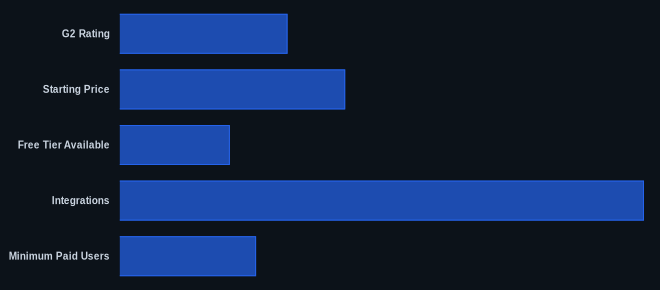
| Feature / Metric | Value | Source |
|---|---|---|
| G2 Rating | 4.6 out of 5 stars (1200+ reviews) | G2 monday.com Profile |
| Capterra Rating | Not Found | monday.com |
| Starting Price | $9 per seat/month (Basic, billed annually) | monday.com Pricing |
| Free Tier Available | Yes (up to 2 users) | monday.com Pricing |
| Integrations | 200+ native integrations | monday.com Integrations |
| Minimum Paid Users | 3 seats | monday.com Pricing |
| Last Price Hike | February 2026 (18% across tiers) | monday.com |
| AI Credits Cost | $0.01 per credit (Standard/Pro yearly) | monday.com Support |
Our Take
We've seen monday.com evolve from a visual task manager into a full-fledged AI-powered work operating system, and its desktop experience, particularly with the new AI features, is genuinely impressive. It allows for a level of customization and intelligent automation that few competitors can match. But there's a disconnect. While the platform pushes the boundaries of AI-driven work, its mobile application remains surprisingly behind the curve. It's almost as if two different teams developed them. This means that despite the advancements, we're still tethered to our desks for the full, reliable experience, which can be a real hindrance for remote or on-the-go teams.
If your team is currently paying more than $57/month for the Pro plan, are you actually using the AI agent automations and 100GB storage that justify that jump, or could you get by with the Standard plan's feature set?
FAQ
Q1: Is monday.com genuinely worth the cost, especially with the recent price hikes and mandatory 3-seat minimum?
The value largely depends on your team size and reliance on its unique visual and AI automation features. For small teams of 1-2, the mandatory 3-seat minimum makes it disproportionately expensive compared to tools like Wrike or ClickUp that offer more flexible pricing or a more comprehensive free tier. But, if your team has 3+ users and actively uses its deep customization, visual dashboards, and integrates the new AI agents and Sidekick into daily workflows, it can offer significant efficiency gains that justify the investment. It gets expensive fast, but if you run complex, visual projects with extensive automations, you'll likely see a return on that investment.
Q2: How do monday.com's AI features compare to its competitors like Asana or ClickUp?
monday.com is aggressively positioning itself as an 'AI work platform,' putting it ahead in certain aspects of integrated AI. Features like monday Sidekick, "Call My Agent" automation blocks, and AI Workflows provide unique intelligent assistance for content generation, task assignment, and proactive risk detection directly within workflows, which competitors are still catching up to. While Asana and ClickUp also integrate AI for tasks like summarization and content generation, the platform's modular approach to AI agents and its AI-first roadmap give it an edge for teams specifically looking to embed AI deeply into their operational processes, rather than just as an add-on.
Q3: Can monday.com effectively replace multiple tools like a CRM, project tracker, and internal comms for a small business?
Yes, for many SMBs, monday.com can serve as a powerful consolidated solution. Its customizable boards can be adapted for lead tracking (CRM), comprehensive project management, and even light HR functions. With integrations, you can pull data from other apps. Its WorkDocs and communication features also handle many internal communication needs. However, it's not a full-fledged, dedicated CRM like Salesforce or a solid HRIS. If your business requires highly specialized features from those dedicated tools, the platform might act as a central hub for data and tasks, but not a complete replacement. For consolidating task tools, chat, and knowledge base, teams might find BridgeApp a compelling alternative, or ClickUp for tasks and docs with basic chat, especially if they left monday.com due to the price hikes.