Trello Review 2026: Still the Best Free Project Management Tool?
Yes, Trello remains an outstanding choice for visual project management, especially for individuals and small teams seeking an intuitive, free solution in 2026. Its enduring appeal lies in its straightforward Kanban board approach, making complex workflows instantly understandable.
What Is Trello?
Trello is a highly popular visual project management tool, a product of Atlassian, built on the elegant simplicity of Kanban boards. At its core, it translates projects into boards, workflow stages into lists, and individual tasks into cards. This visual hierarchy helps teams quickly grasp project status and individual responsibilities.
It's designed for anyone needing to organize tasks, track progress, and collaborate without getting bogged down by overly complex features. From agile software teams planning sprints to marketing teams managing content calendars, Trello offers a flexible canvas.
Key Features
Kanban Boards
The foundational feature, Kanban boards, provides a drag-and-drop interface to visualize tasks moving through defined stages. Each board represents a project, while lists represent steps in a workflow (e.g., "To Do," "Doing," "Done").
Cards
Individual tasks are represented by cards, which are highly customizable. Within each card, you can add descriptions, checklists, due dates, attachments (documents, images), and comments, making them central hubs for task-specific information and collaboration.
Power-Ups (Integrations)
Trello's functionality extends significantly through Power-Ups. These are native integrations or add-ons that connect Trello to hundreds of other tools like Slack, Google Drive, Salesforce, and Jira. This extensibility allows users to tailor Trello to their specific ecosystem.
Automation (Butler)
The built-in Butler automation tool enables no-code automation of repetitive tasks. You can set rules to automatically move cards, assign due dates, or archive completed tasks, saving time and ensuring consistency.
Multiple Views (Premium+)
For users on Premium or Enterprise plans, Trello offers various ways to visualize project data beyond the standard Kanban board. These include Dashboard, Timeline, Table, Calendar, and Map views, catering to different analytical and organizational needs.
Templates
A wide selection of pre-built templates helps users get started quickly with common use cases. These cover areas like marketing campaigns, HR onboarding, editorial calendars, and personal productivity.
Pricing
Trello offers a tiered pricing structure designed to accommodate individuals, small teams, and large organizations.
- Free: This tier includes unlimited cards, up to 10 boards per workspace, unlimited storage (10MB/file limit), 250 workspace command runs per month for automation, custom backgrounds, and stickers. It also provides desktop and mobile apps. This is a very generous free offering, ideal for personal use and small, focused team projects.
- Standard: $5 USD per user/month when billed annually, or $6 USD per user/month when billed monthly. This plan includes everything in Free, plus unlimited boards, advanced checklists, 1,000 workspace command runs per month, saved searches, custom fields, and more integrations.
- Premium: $10 USD per user/month when billed annually, or $12 USD per user/month when billed monthly. This plan builds on Standard by adding Dashboard, Timeline, Table, Calendar, and Map views, unlimited workspace command runs, admin and security features, workspace templates, and priority support. It's suited for growing teams needing more advanced visualization and control.
- Enterprise: Starting at $17.50 USD per user/month for 250 users (billed annually), with pricing scaling down for larger user counts. This comprehensive plan includes all Premium features, plus organization-wide permissions, attachment restrictions, multi-board guests, Power-Up administration, and enhanced security and compliance features for large organizations.
As of May 2026, per the official Trello pricing page.
Pros and Cons
Pros
- Extremely user-friendly interface with intuitive drag-and-drop functionality.
- The Free tier is highly functional and sufficient for many individuals and small teams.
- Visually clear representation of tasks and project progress at a glance.
- Vast ecosystem of Power-Ups for extending functionality with other tools.
- Excellent mobile applications for managing tasks on the go.
- Ideal for agile methodologies, content planning, and simple task tracking.
Cons
- Can become cluttered and difficult to manage for very large, highly complex projects.
- Lacks advanced reporting and analytics capabilities found in more comprehensive project management tools like Asana.
- Native Gantt chart functionality is absent, requiring third-party Power-Ups.
- Not the best fit for projects requiring extensive document management or built-in time tracking.
Who Should Use Trello?
Trello shines for individuals, freelancers, and small to medium-sized teams who prioritize visual organization and ease of use. It's particularly popular with:
- Marketing teams for content calendars, campaign planning, and social media scheduling.
- Agile software development teams for sprint planning, backlog management, and bug tracking.
- Freelancers managing client projects, proposals, and personal to-do lists.
- Educators and students for group projects and academic planning.
- Anyone who feels overwhelmed by the complexity of traditional project management software and prefers a flexible, card-based system.
Data at a Glance
| Metric | Value | Source |
|---|---|---|
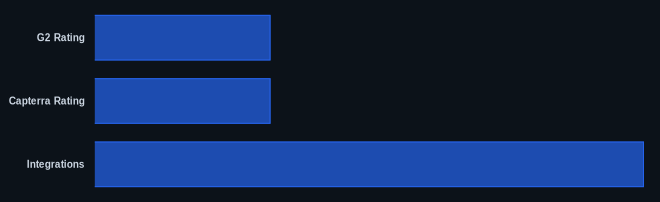
| G2 Rating | 4.4 out of 5 | G2.com |
| Capterra Rating | 4.5 out of 5 | Capterra.com |
| Starting Price | $0 (Free Tier) | Trello Pricing |
| Integrations | 200+ Power-Ups | Trello Blog |
| Free Tier | Yes, robust | Trello Pricing |
Our Take
We've observed that Trello's continued strength in 2026 isn't about competing feature-for-feature with monolithic platforms like ClickUp or Monday.com. Instead, it maintains its unique position by doubling down on what it does best: providing the clearest, most intuitive visual representation of workflow possible. For teams that value simplicity and collaboration over deep analytics or rigid project structures, Trello remains an unbeatable entry point and a highly effective daily driver.
FAQ
Is Trello's Free plan genuinely useful for small teams, or is it just a limited trial?
Trello's Free plan is highly functional and robust, offering unlimited cards and up to 10 boards per workspace, alongside core features like automation and mobile apps. Many small teams and individuals find it perfectly adequate for managing multiple projects without needing to upgrade.
Can Trello handle complex projects, or is it better for simple task management?
While Trello excels at simple task management and visual workflows, it can manage complex projects if organized diligently. For very large projects, you'll likely need the advanced views (Timeline, Table) and unlimited automations offered in the Premium tier, or even consider a more specialized tool like Jira for software development.
How does Trello compare to other popular project management tools like Asana or Monday.com?
Trello differentiates itself by its pure Kanban focus and visual simplicity. Asana and Monday.com typically offer a broader range of project views (Gantt, list, board) natively, more advanced reporting, and often integrate more deeply with document management. Trello remains superior for those who prioritize a straightforward, card-based workflow and less complexity.