monday.com Review 2026: AI Work Platform, Pricing & User Experience
monday.com's pricing structure, with its mandatory 3-seat minimum for all paid plans and user additions often occurring in increments of 5, can lead to significantly higher actual costs than advertised per-seat prices. This review is for entrepreneurs, remote teams, and SMBs weighing the software's substantial benefits against its growing costs and evolving market position in 2026.
What Is monday.com?
At its core, monday.com is a Work OS, a platform that helps teams of all sizes manage projects, tasks, and workflows visually. It consolidates various work streams into a single, intuitive interface, replacing scattered spreadsheets, emails, and disparate tools. The platform provides a flexible, customizable environment where teams can build specific solutions for everything from marketing campaigns to product development or HR onboarding. It’s not just a task manager; it’s an adaptable canvas for diverse operational needs, now heavily infused with artificial intelligence to automate and speed up work.
Key Features
The software, now branded an 'AI Work Platform,' constantly evolves its features to meet modern demands. Its strength lies in combining visual simplicity with powerful underlying capabilities.
Visual Workflows & Customization
This platform shines with its visually driven approach. Teams quickly set up boards using 4+ views like Kanban, Gantt, Timeline, and Calendar to track progress. The drag-and-drop interface makes managing tasks and reordering workflows feel natural. We've used it to run complex content pipelines, and the ability to customize columns, statuses, and item types on the fly meant adapting to new client requests was never a headache. This high degree of flexibility allows teams to tailor the tool to their specific processes without needing extensive coding knowledge, a major benefit over more rigid competitors like Smartsheet. According to a Capterra user: "Monday's notification system is one of the best I've used. When someone completes a task, it automatically triggers the notification system and it lets the next person in the process know they can start their work. I love it."
Automation & Integrations
Automations are a huge time-saver here, reducing repetitive manual work. The platform offers a rich library of pre-built automation recipes, like "When status changes to X, notify Y" or "When an item is created, assign Z." It also integrates with hundreds of popular tools, including Slack, Zoom, and Salesforce. The 250 automations/integrations per month on the Standard Plan (as of July 2026, per the official pricing page) are adequate for many small teams, though larger, more active users will quickly hit the 25,000 actions/month on the Pro Plan (as of July 2026, per the official pricing page). The recent addition of "Call My Agent" allows for triggering AI agents within automations, pushing the envelope on workflow efficiency.
AI Work Platform Capabilities
The rebranding to an 'AI Work Platform' is not just marketing; it brings substantial new functionality. monday Sidekick now helps build automations from simple prompts, creates WorkDocs content, and offers account-wide support. Features like AI Columns in Templates let you automatically categorize data or extract information. For developers, the ask_developer_docs query provides AI-powered answers within the platform, making it faster to find solutions. The acquisition of OneAI in May 2026 for voice agent capabilities signals a continued deep investment in artificial intelligence, aiming to bake AI into every layer of the user experience.
Specialized Product Suites
Beyond general work management, monday.com offers 3+ specialized products built on the same flexible Work OS foundation.
- monday CRM helps sales teams manage leads, contacts, and deals. Its Standard tier includes two-way email integration and an AI email generator, while Pro adds sales forecasting and mass email campaigns.
- monday dev provides tools for software development teams, including issue tracking, sprint management, and bug reporting, with recent improvements to Issue Handling/Ticket Routing.
- monday service is tailored for customer support, offering features for ticket management and customer interaction. This product, however, saw an 18% price hike across all tiers in February 2026. These specialized products aim to provide complete solutions without needing separate software, though they come with their own distinct pricing.
Pricing
The pricing structure for monday.com, as of July 2026, per the official pricing page, is a primary point of concern for many businesses, including ours. While the per-seat monthly rates appear competitive initially, the mandatory 3-seat minimum across all paid plans and the common practice of adding users in blocks (often 5, 7, or 10) can inflate costs significantly. AI credits are now billed separately alongside seats, adding another layer of expense.
All prices below are per seat per month when billed annually. Monthly billing is also available but is roughly 25-30% more expensive.
General Work Management Plans:
- Free Plan: Up to 2 users, 3 boards, unlimited documents, 200+ templates, 500 MB storage, 1-week activity log. It's limited to 200 items, though referrals can extend this to 1000. This is a solid starting point for very small teams or solo users.
- Basic Plan: Starts at $9/seat/month (as of July 2026, per the official pricing page). This includes unlimited items and viewers, 5GB storage, and prioritized support. You also get one dashboard for a single board. Critically, with the mandatory 3-seat minimum, the actual annual cost for the smallest team is $27/month (as of July 2026, per the official pricing page).
- Standard Plan (Most Popular): Starts at $12/seat/month (as of July 2026, per the official pricing page). This is where many teams find their sweet spot, offering essential features like timeline, Gantt, and calendar views, guest access, and 250 automations/integrations per month. For a minimum of 3 users, the annual cost is $36/month (as of July 2026, per the official pricing page). This plan requires an additional $20/month for 2,000 AI credits (as of July 2026, per the official pricing page) if you want to use its AI features.
- Pro Plan: Starts at $19/seat/month (as of July 2026, per the official pricing page). For serious project management, this tier provides 100GB storage, a 1-year activity log, 25,000 actions/month, private boards/docs, time tracking, and advanced dashboards. The 3-user minimum translates to $57/month annually (as of July 2026, per the official pricing page). Expect to add $30/month for 3,000 AI credits (as of July 2026, per the official pricing page) at this level.
- Enterprise Plan: Offers custom pricing (as of July 2026, per the official pricing page) and includes advanced features like SSO, enterprise-level support, and enhanced security.
Specialized Product Pricing (billed annually, per user per month):
These products do not offer a free plan but typically come with a 14-day free trial.
- monday CRM: Basic ($12) (as of July 2026, per the official pricing page), Standard ($17) (as of July 2026, per the official pricing page), Pro ($28) (as of July 2026, per the official pricing page), Ultimate (custom quote) (as of July 2026, per the official pricing page).
- monday dev: Basic ($9) (as of July 2026, per the official pricing page), Standard ($12) (as of July 2026, per the official pricing page), Pro ($20) (as of July 2026, per the official pricing page), Enterprise (custom quote) (as of July 2026, per the official pricing page).
- monday service: This product saw an 18% price hike in February 2026. The tiers are Standard ($31) (as of February 2026, per the official pricing page), Pro ($45) (as of February 2026, per the official pricing page), Enterprise (custom quote) (as of February 2026, per the official pricing page).
Pricing Changes & Hidden Costs: The mandatory 3-seat minimum means even a single user will pay for three. A team of four must buy five seats if that's the next available block, forcing you to pay for unused capacity. AI credits, at $0.01 per credit (yearly) or $0.0125 (monthly) (as of July 2026, per the official pricing page), are another line item that adds up if your team extensively uses the AI features. This gets expensive fast, especially when scaling. As one user noted: "Monday.com features are very lousy. You cannot increase the seats one by one. It has to buy 5, 7, 10, 12, etc."
Pros and Cons
Like any powerful tool, monday.com comes with its strengths and weaknesses that directly impact a buying decision.
Pros:
- Intuitive Visual Interface: Setting up and customizing boards is incredibly easy with its drag-and-drop design. The visual appeal helps teams quickly grasp project status.
- High Customizability: You can tailor boards, workflows, and columns to fit almost any business process without needing a developer. This flexibility is a huge advantage for diverse teams.
- Powerful Automations: The platform excels at automating routine tasks, from notifications to item creation, significantly reducing manual effort and context switching.
- Broad Feature Set (Work OS): The ability to manage CRM, Dev, Service, and general work management all within one ecosystem reduces the need for multiple subscriptions.
- Faster Adoption: Most new users pick up the basics quickly, leading to quicker team buy-in and productivity gains.
- Strong Reporting: Customizable dashboards provide excellent visibility into project progress and team workload.
Cons:
- Confusing and Expensive Pricing: The mandatory 3-seat minimum and user block increments mean you often pay for more seats than you actually need. This quickly escalates costs, making it pricey for growing SMBs.
- AI Credit Costs: While the AI features are powerful, the additional billing for AI credits adds another layer of cost that might deter some teams.
- Customer Service Inconsistencies: While generally responsive, some users report slow responses or unsatisfactory outcomes for complex issues, particularly those related to access or hidden charges.
- Feature Limitations (Tier-Based): Crucial features like time tracking or advanced dashboards are locked behind higher-priced plans, which can feel limiting for teams on Basic or Standard.
- Performance Issues with Scale: Some users report occasional "bugging" or performance slowdowns when dealing with extremely large boards or complex integrations.
- Export Difficulties: Specific issues like exporting deprecated 'Info Box' content can be frustrating for data migration or archiving.
Who Should Use monday.com?
This platform is ideal for remote teams and SMBs that value visual organization, customizability, and solid automation capabilities, especially those looking to consolidate multiple operational tools.
- Marketing Agencies: Its visual boards, campaign templates, and client communication features make it excellent for managing diverse client projects, content calendars, and approval workflows.
- Creative Teams: Designers, writers, and videographers can use its visual project tracking and file sharing to manage creative assets and feedback loops.
- Product Development Teams (SMBs): While not as specialized as Jira, monday dev provides a strong alternative for smaller teams needing issue tracking, sprint management, and bug reporting in a more visual, less intimidating interface.
- Sales Teams (SMBs): monday CRM can be a good fit for smaller sales teams needing a visual pipeline, automated follow-ups, and basic forecasting without the complexity of Salesforce.
- Teams Needing Cross-Functional Visibility: If your organization struggles with silos, the platform's ability to create custom workflows across different departments (e.g., HR, IT, Marketing) can provide a unified view of all ongoing work.
- Organizations Looking to Embrace AI: Businesses keen on integrating AI into their daily workflows, from automating tasks to generating content, will find the platform's "AI Work Platform" features compelling.
If your budget is extremely tight, or you're a single user looking for a bare-bones task manager, the mandatory 3-seat minimum might push you towards alternatives like ClickUp's more generous free plan or a simpler tool like Trello. Similarly, if your organization demands highly structured, enterprise-level process enforcement, Asana or Smartsheet might be a better fit.
Data at a Glance
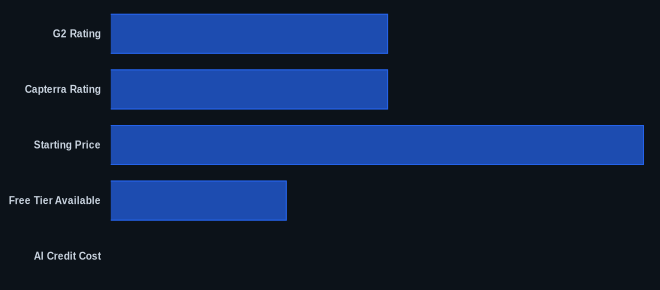
| Metric | Value | Source |
|---|---|---|
| G2 Rating | 4.6 / 5 stars (based on 1,200+ reviews) | G2 monday.com reviews |
| Capterra Rating | 4.6 / 5 stars (based on 9,248 reviews) | Capterra monday.com reviews |
| Starting Price | $27/month (Basic, 3 users billed annually) | monday.com Pricing |
| Free Tier Available | Yes (up to 2 users, limited features) | monday.com Pricing |
| AI Credit Cost | $0.01 per credit (yearly plans) | monday.com Pricing |
| Integrations | 200+ direct integrations | monday.com |
Our Take
monday.com has evolved from a simple project board to a sophisticated 'AI Work Platform,' and its strength remains its intuitive visual approach that genuinely helps teams collaborate. Its pricing, with the mandatory 3-seat minimum and incremented user purchases, feels punitive for smaller or scaling teams. But if you run weekly audits and need a flexible system to track diverse projects with customizable automations, the platform delivers. The recent AI push is genuinely impressive, transforming how workflows are built and managed. The class action lawsuit and stock decline in early 2026, however, casts a shadow, suggesting internal challenges despite strong product development and continued revenue growth. For buyers, this means weighing an excellent, albeit expensive, user experience against an evolving corporate narrative.
If your team is growing from 2 to 4 members, do you really need to jump from a free plan to paying $36/month for 3 seats, and then potentially $57/month for 5 seats?
FAQ
Q: Is monday.com genuinely an 'AI Work Platform' now, or is it just a marketing rebrand?
A: It's a genuine rebranding backed by significant feature releases. The platform has introduced AI Agents, monday Sidekick for automation building, AI Columns in Templates, and specialized AI capabilities for developers. While the core Work OS remains, AI is increasingly integrated into core functionalities to automate tasks and assist users, making the claim more than just marketing.
Q: How do the mandatory 3-seat minimum and user increment purchases impact actual costs for small teams?
A: This significantly increases your actual expenditure. Even if you're a single user or a team of two, you'll be billed for three seats. If your team grows to four, you'll likely have to purchase a block of five seats, meaning you pay for an unused seat. This policy makes scaling costs less predictable and often higher than the advertised per-seat price, so budget carefully.
Q: Given the recent price increases, lawsuit, and stock decline, is monday.com still a stable and reliable choice for long-term use?
A: While these external factors indicate potential corporate turbulence, monday.com continues to invest heavily in product development, particularly in AI, and reports revenue growth with enterprise customer additions. The platform remains a highly-rated tool by users for its usability and features. For buyers, this means the core product is strong, but it's wise to monitor their pricing policies and stay informed about corporate stability if you're planning a very long-term, large-scale deployment.