Airtable, as of June 2026, isn't just a spreadsheet on steroids; it's an AI-powered work OS that brings serious database capabilities to teams needing both flexibility and automated intelligence, even on its Free Plan. The platform is ideal for growing SMBs and remote teams who have outgrown basic spreadsheets but aren't ready for complex enterprise databases.
What Is Airtable?
Airtable helps you build powerful, custom applications to manage data, projects, and workflows. It's a hybrid between a spreadsheet and a database, letting you organize anything from customer lists to complex content calendars with visual clarity. It serves as a centralized source for all your team's operational data.
The tool turns raw information into actionable insights through customizable views, automation, and, crucially, a growing suite of AI capabilities. It helps teams consolidate information from various channels and platforms into one adaptable system.
Key Features
AI-Powered Workflows and Intelligence
Airtable has leaned heavily into AI, especially in 2026, making advanced functionalities accessible across all plans. It includes direct AI integration with Claude as of April 2026, which uses AI reasoning for data analysis and record management. You get 500 AI credits per editor/month (as of June 2026, per the official pricing page) even on the Free Plan.
The platform introduced "Omni" as a dedicated AI assistant. This assistant helps with solution building, formula generation, and designing custom interfaces.
"Field Agents" act like digital employees. They handle continuous operations, such as extracting specific data points from incoming records or automatically categorizing information.
Agentic Automation
Beyond simple IF/THEN rules, the software offers "Agentic Automation." This allows for complex, multi-step reasoning in your workflows, handling more nuanced scenarios and even multimodal inputs. For instance, it can process an image attachment, extract text, and then use that text to update a record.
These automations reduce manual work, ensuring consistency across your data and processes. They integrate deeply with your bases to trigger actions based on specific data changes.
Flexible Database Structure
At its core, Airtable provides a flexible database structure. You define fields, link records across different tables, and visualize data in various ways – grids, calendars, galleries, Gantt charts, and Kanban boards. This lets you adapt the data display to your team's specific needs.
According to a Capterra reviewer: "We replaced four different tools with Airtable and cut our monthly software costs by 60%. The initial setup took two months, but now our entire creative workflow runs through custom bases that perfectly match our process." This shows the power of its flexibility.
Enhanced Interface Designer
The Interface Designer has been significantly improved. You can now build multi-page interfaces, giving different team members or departments tailored views of the data. Granular permissions mean people only see what they need to.
It's a drag-and-drop builder, making it easier to create custom dashboards and data entry forms without code. AI assistance within the designer further speeds up layout suggestions and component placement.
Collaboration Tools
April 2026 brought substantial updates to collaboration. You can now attach files directly to comments, making feedback loops more efficient. Comment resolution helps keep track of discussions, and a notification search allows you to quickly find relevant past communications.
While not a full-blown communication hub like Slack or monday.com, these improvements make in-platform discussions much more useful.
Pricing
Airtable’s pricing structure, as of January 2026, per the official pricing page, includes four tiers, starting with a generous Free Plan. There is no free trial for paid tiers.
-
Free Plan:
- Price: $0 (as of June 2026, per the official pricing page)
- Includes: Unlimited bases, up to 1,000 records per base, 1 GB attachments per base, 100 automation runs per month, 1,000 API calls per month, 2-week revision history, and 500 AI credits per editor/month for up to 5 editors.
- Our Take: This is a surprisingly capable free offering, letting you experiment with AI features from day one.
-
Team Plan:
- Price: $20 per user per month (billed annually, as of June 2026, per the official pricing page) or $24 per user per month (monthly, as of June 2026, per the official pricing page).
- Includes: 50,000 records per base, 20 GB attachments per base, 25,000 automation runs per month, 1-year snapshot history. AI features cost an additional $6 per user per month (as of June 2026, per the official pricing page).
- Our Take: This gets expensive fast if you have a large team and want full AI capabilities. The jump in automation runs is substantial, but paying extra for AI on top of the base fee feels a bit stingy compared to the free tier's inclusion.
-
Business Plan:
- Price: $45 per user per month (billed annually, as of June 2026, per the official pricing page) or $54 per user per month (monthly, as of June 2026, per the official pricing page).
- Includes: 125,000 records per base, 100 GB attachments per base, 100,000 automation runs per month, premium sync integrations, two-way sync, an admin panel, SAML SSO, and free commenters.
- Our Take: The 125% per-seat price increase from Team to Business when hitting limits is significant. However, free commenters are a huge plus for involving external stakeholders without paying for full seats.
-
Enterprise Scale Plan:
- Price: Custom pricing, generally starting around $60 per seat per month (as of June 2026, per the official pricing page).
- Includes: Up to 500,000 records per base, 1 TB attachments per base, 500,000 automation runs per month, and advanced security features like enterprise-grade audit logs and granular access controls.
- Our Take: For large organizations, the record limits and security features are necessary, but the custom pricing means you'll be negotiating for every feature.
Hidden Costs to Consider:
A billing policy change in October 2025 eliminated prorated refunds for mid-cycle seat removals, so plan carefully. You'll also encounter scaling expenses. While commenters are free on the Business Plan, read-only access on lower plans can be limiting. External tools like Zapier for deeper integrations can run you $200-300/month (as of June 2026, per Zapier's pricing). If you need client portals, the Airtable Portals add-on starts around $120/month (as of June 2026, per Airtable Portals official site) for 15 guests on the Team Plan. Additional AI credit packs cost around $40/month (as of June 2026, per the official pricing page) for 20,000 credits. For complex setups, budget for consultant fees.
Pros and Cons
Pros:
- Unmatched Customization and Flexibility: You can truly build almost anything you can imagine to manage your data and workflows. "It's like Google Sheets, but way more powerful," one user noted.
- Powerful AI Integration Across All Plans: Getting 500 AI credits monthly, even on the Free Plan, is a standout feature. Tools like Omni and Field Agents are genuinely useful.
- Hybrid Database/Spreadsheet Functionality: The familiar grid interface makes it approachable, but the underlying database capabilities give it immense power.
- Workflow Automation with AI Capabilities: Agentic Automation lets you create sophisticated, multi-step processes that save serious time and reduce errors.
- Centralized Data Source: According to a G2 reviewer: "We have partners across different channels and platforms and needed a place to consolidate all of this information." The platform excels at that.
- Active Community and Resources: Despite complexity, there are tons of tutorials and user forums to help. Many users find onboarding thorough for initial data population.
Cons:
- Steep Learning Curve: While the UI is intuitive for basic data entry, configuring advanced bases, automations, and interfaces takes time and effort. "The initial setup took two months," a Capterra user observed.
- High Pricing at Scale: It gets expensive fast. The per-user costs, especially on higher tiers, combined with potential hidden costs for AI credits or add-ons, can make it prohibitive for growing teams.
- Limited Collaboration/Communication Features (Compared to Competitors): While improved, it's not a real-time communication hub. You might still need a dedicated tool like monday.com or ClickUp for internal team discussions.
- Reliability Issues: Reported downtime, like the 90-minute outage in Australia on February 20, 2026, and "abysmal" communication during incidents, are concerning.
- Support Limitations: Email support is slower for lower plans, and some users reported "slow or non-existent email replies for urgent matters," as highlighted by a frustrated construction business owner.
- No Free Trial for Paid Tiers: You can't properly test the higher limits and advanced features before committing financially.
Who Should Use Airtable?
Airtable is ideal for project managers and operations teams in SMBs or remote companies who need a highly customizable system to track complex projects, resources, and data without writing code. If your team has outgrown Google Sheets but finds traditional relational databases too daunting, this tool fills that gap perfectly.
It’s an excellent fit for marketing agencies managing diverse campaigns and clients, creative teams tracking asset production, or startups building out their first solid internal systems. Think teams of 5-50 people who value flexibility and the ability to tailor their tools precisely to their workflow. Because it includes AI credits on all plans, it’s also great for businesses eager to experiment with AI data analysis without a huge upfront investment. But be ready to spend time learning it.
Data at a Glance
| Metric | Value | Source |
|---|---|---|
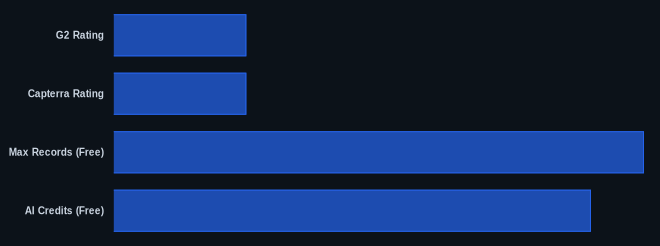
| G2 Rating | 4.6/5 stars | G2 Airtable Reviews |
| Capterra Rating | 4.7/5 stars | Capterra Airtable Reviews |
| Starting Price | $0 (Free Plan) | Airtable Pricing |
| Max Records (Free) | 1,000 per base | Airtable Pricing |
| AI Credits (Free) | 500 per editor/month | Airtable Pricing |
Our Take
Despite the common talk about a steep learning curve, Airtable actually offers a surprisingly intuitive UI for initial data population. The real learning happens when you dive into advanced configurations, linking tables, and setting up complex Agentic Automations. It's a paradox: the initial setup feels familiar, but unlocking its true power demands dedication. What truly impressed us in 2026 is the ubiquitous inclusion of AI features and credits, even on the Free Plan. This move makes sophisticated data analysis and automation accessible from the start, setting it apart from competitors like Smartsheet, which often gate such features behind premium tiers. However, for teams scaling beyond 10-15 users, the cost rapidly becomes a significant factor, potentially eating into the savings gained from consolidating other tools.
If your team is currently on the Team Plan, are you getting enough value from the base features to justify the extra cost for AI, or would moving to the Business Plan's free commenters make more financial sense for your external collaborators?
FAQ
Q: Is Airtable good for small businesses, or is it too complex?
A: Airtable is excellent for small businesses, especially those that need more structure than a spreadsheet but don't want a full-blown database. The Free Plan lets you start without commitment, and the visual interface makes it easier to manage data than complex SQL. However, be prepared to invest time in learning its advanced features.
Q: Are there hidden costs I should worry about with Airtable?
A: Yes, be aware of scaling expenses. While the per-user price on the Team Plan is $20/month (annually, as of June 2026), you'll pay extra for AI features, and moving to the Business Plan for more records or automations can increase per-seat costs by 125%. Add-ons like Portals or external integrations like Zapier can also add significant monthly fees.
Q: How does Airtable compare to Google Sheets for data management?
A: Airtable is far more powerful than Google Sheets for structured data management and workflow automation. While Google Sheets is great for simple lists and calculations, the platform offers true database capabilities with linked records, multiple views (Kanban, calendar, gallery), and advanced automations. It's built for tracking relationships between data, not just rows and columns.
