Dropbox Business (as of May 2026, per the official pricing page) remains a top choice for reliable file syncing and solid storage, but its once-stellar reputation is now shadowed by a perplexing disconnect between product excellence and deeply frustrating customer support. While the product is genuinely excellent, customer support is severely lacking, making it a risky investment for teams that need consistent help. If your team prioritizes lightning-fast, multi-device file access and substantial storage over real-time co-editing within documents, you will need to weigh the cost against its undeniable core strengths and the risk of poor support.
What Is Dropbox Business?
This platform is primarily a cloud storage and file-sharing solution built for companies that need a dependable way to keep their digital assets organized, secure, and accessible across multiple devices and team members. It’s for businesses tired of dealing with slow uploads or sync conflicts. The software excels at ensuring that whether you’re on a desktop, laptop, or mobile device, your files are always the most current version, ready for you and your collaborators. While it has grown to include more workflow tools, its fundamental purpose is still to be the most reliable digital filing cabinet in the cloud.
Key Features
Dropbox Business has been aggressively expanding beyond simple file storage, integrating AI and broader workflow tools that address more complex business needs. Here's a look at its most significant offerings.
File Syncing and Storage
The core strength of the platform lies in its legendary syncing engine. Files update almost instantly across all connected devices, minimizing version control headaches. It handles incredibly large files with ease, supporting individual uploads up to an impressive 2TB via the web or API (as of December 2025). You get multi-platform accessibility, letting your team work from Windows, macOS, Linux, iOS, or Android without a hitch. For teams dealing with huge design files, video projects, or massive datasets, this feature alone often justifies the investment.
Pooled storage is a significant benefit, especially for the Standard and Advanced plans. Instead of individual user limits, your entire team draws from a shared pool, allowing more flexibility for users with heavier storage needs. This system is particularly useful for growing SMBs where individual storage requirements can vary wildly.
Collaboration and Workflow
While the platform isn't designed as a direct competitor to real-time document co-editing tools like Google Docs, it offers a suite of integrated workflow tools that enhance collaboration around files. Dropbox Sign (formerly HelloSign) allows for secure e-signatures directly within your workflow. DocSend enables secure sharing and tracking of documents, perfect for sales proposals or client presentations, giving you insights into who viewed what and for how long.
For creative teams, Dropbox Replay offers a centralized platform for video review and approval, allowing for frame-accurate comments and version management. Capture simplifies screen recording and GIF creation, making it easier to provide quick visual feedback or create tutorials. These additions transform the tool from a mere storage solution into a content collaboration hub.
AI Integration and Intelligent Search
The last 12-18 months have seen exciting developments within the software, primarily through its focus on artificial intelligence. Dropbox Dash acts as a universal search tool, connecting to your third-party apps like Google Workspace, Slack, and Salesforce to find information no matter where it lives. This means less time hunting for documents across disparate platforms.
Building on Dash, Dash AI brings generative AI capabilities to your team's cloud ecosystem. Its "Answers" feature can parse data across your connected cloud services to provide direct answers to complex queries, summarizing information or locating specific data points. Imagine asking a question about a project, and the AI pulls relevant details from Slack conversations, Google Drive documents, and Trello boards simultaneously.
The platform also employs Semantic Image Search (thanks to the Mobius Labs acquisition) and general intelligent search with AI tagging, making it easier to find specific content within vast libraries of images or documents without precise keywords. Dropbox Studio is another AI-powered tool aimed at simplifying video editing, democratizing access to professional-grade content creation.
Security and Administration
For businesses, security is non-negotiable, and the platform delivers with solid encryption (at rest and in transit), two-factor authentication, and advanced security features on higher plans. Features like ransomware detection and 180-day document recovery are crucial safeguards, letting you roll back to previous file versions if disaster strikes.
Admins get powerful controls, including tiered admin roles, audit logs, and the ability to customize user storage limits. Enhanced team storage visibility, introduced in March 2026, allows admins to drill into folder structures to understand usage better. HIPAA compliance readiness on the Advanced plan further solidifies its position for regulated industries. SSO (Single Sign-On) integration simplifies user authentication and enhances security by centralizing access control.
Pricing
Dropbox Business offers tiered plans, primarily structured for teams, with a mandatory 3-user minimum on all paid business plans. This 3-user minimum is the primary hidden cost and something you need to account for from day one. All pricing is accurate as of May 2026, per the official Dropbox Business pricing page.
-
Basic (Free): Offers 2 GB of storage. This is suitable for individual personal use or for testing the basic syncing capabilities, but it's not a viable option for businesses.
-
Standard Plan:
- $18 per user/month (billed monthly, as of May 2026, per the official pricing page)
- $15 per user/month (billed annually, totaling $180 per user/year, as of May 2026, per the official pricing page)
- Includes 5 TB of pooled storage, Microsoft 365 integration, 180-day document recovery, 100 GB file transfer, and basic eSignature capabilities. This plan used to be known as 'Business' before recent rebrands.
-
Advanced Plan:
- $30 per user/month (billed monthly, as of May 2026, per the official pricing page)
- $24 per user/month (billed annually, totaling $288 per user/year, as of May 2026, per the official pricing page)
- Starts with 15 TB of pooled storage. It includes all Standard features plus advanced security controls, SSO, audit logs, ransomware detection, tiered admin roles, and HIPAA compliance readiness. This plan was previously known as 'Business Plus'.
-
Enterprise Plan:
- Custom pricing; requires contacting sales.
- Offers unlimited storage and dedicated support. This is for very large organizations with complex needs.
A 30-day free trial is available for the business plans, which is highly recommended to assess its fit for your specific team workflow. The plan name rebrands over the past year mean that any pre-2024 pricing or plan structure you find online is likely outdated.
This gets expensive fast, especially with the 3-user minimum. Even for a small team of two, you're paying a minimum of $54/month for Standard or $90/month for Advanced (as of May 2026, per the official pricing page) if billed monthly. You'll need to weigh the value of its superior syncing against this baseline cost.
Pros and Cons
Let's break down where Dropbox Business truly shines and where it stumbles.
Pros
- Unparalleled File Syncing: File syncing is fast and reliable. A SoftwareReviews User noted, "Honestly, my favorite thing about Dropbox Business is how fast and reliable the file syncing is." Files update across devices almost instantly, reducing conflicts.
- Multi-Platform Accessibility: You can access your files from virtually any device or operating system. A Digital Marketing Manager praised, "The multiplatform accessibility lets me access any of my files from all my devices." This flexibility is critical for remote teams.
- Generous Storage & Large File Handling: The pooled storage is excellent, and the ability to upload individual files up to 2TB is a huge advantage for creative or data-heavy businesses.
- Solid Security & File Recovery: With strong encryption, ransomware detection, and 180-day document recovery, your files are safer, and you have peace of mind. According to a Sales and Marketing Manager: "Dropbox Business provide us with a safe place for keeping all our documents allowing us to consolidate all our work documents in one secure space."
- Integrated Workflow Tools: Features like Dropbox Sign, DocSend, Replay, and Capture add significant value by centralizing common business processes around your files.
- AI Advancements (Dash AI, Answers): The recent push into AI with Dash and its generative AI capabilities transforms how teams search and retrieve information across their entire cloud ecosystem. This can be a massive time-saver.
- User-Friendly Interface: The interface is clean and intuitive, making it easy for new users to adapt quickly.
Cons
- High Cost & Mandatory 3-User Minimum: This gets expensive fast. The enforced 3-user minimum means even small teams pay for users they don't have, significantly raising the entry price point.
- Severely Lacking Customer Support: This is the biggest pain point. While some users report positive experiences, a significant number complain about a "lack of human interaction," difficulty resolving issues (especially billing, account access, and cancellations), and accusations of being "run around." This contradiction between product quality and support efficacy is alarming.
- Limited Real-time Collaboration: While it has integrated workflow tools, the platform isn't built for real-time, in-document co-editing like Google Workspace. A SoftwareReviews User stated, "What I dislike most is that Dropbox Business feels a bit too basic for team collaboration… once you need things like project organization or real-time editing, you end up relying on other tools."
- Occasional Bugs/Sync Issues: While generally reliable, some users report "bugs and issues sometimes occur that are unusual and can be frustrating with the interruptions it causes to workflow," according to a President in Real Estate. These aren't common but can be impactful.
- Historical Security Concerns: Despite current strong features, past security breaches (e.g., 2012, and 2024 for Dropbox Sign) can make some businesses hesitant, requiring a higher level of trust.
Who Should Use Dropbox Business?
Dropbox Business is best suited for specific types of teams and workflows:
- Creative Agencies & Media Production Houses: If your business deals with massive files – video, high-resolution images, large design assets – its 2TB upload limit and fast syncing are invaluable. You’ll also appreciate Replay for client feedback.
- Remote-First Teams Requiring File Agnosticism: For teams spread across different operating systems (Windows, macOS, Linux) and mobile devices, the platform ensures everyone has current files regardless of their setup.
- SMBs Prioritizing Simple, Reliable File Storage: If your primary need is a rock-solid, easy-to-use cloud drive for secure file consolidation and sharing, and you're willing to pay for premium reliability, it's a strong contender.
- Businesses Augmenting Other Productivity Suites: Many companies use Google Workspace for real-time document creation but struggle with Google Drive's syncing for very large or complex file structures. The software fills this gap perfectly, handling the heavy lifting of file management.
- Sales & Marketing Teams: With DocSend for tracking proposals and Dropbox Sign for contracts, it speeds up crucial aspects of the sales cycle.
It's not for everyone, particularly very small teams (1-2 users) who will feel the sting of the 3-user minimum or businesses whose primary need is real-time, in-document collaboration across spreadsheets and presentations. For them, Google Workspace or Microsoft 365 might be a better fit.
Data at a Glance
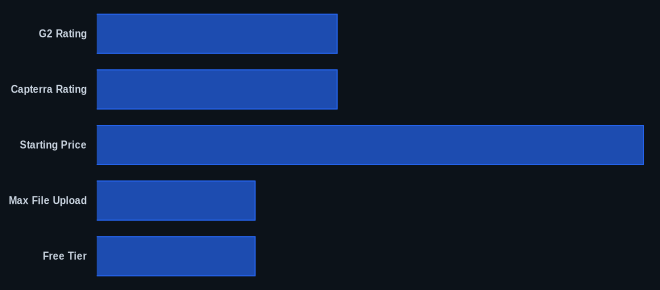
| Metric | Value | Source |
|---|---|---|
| G2 Rating | 4.4/5 | G2.com/products/dropbox/reviews |
| Capterra Rating | 4.4/5 | Capterra.com/p/10398/Dropbox-Business/ |
| Starting Price | $45/month | Dropbox.com/business/pricing (3-user minimum, Standard annual rate, as of May 2026) |
| Max File Upload | 2 TB | Dropbox.com |
| Free Tier | 2 GB (Basic plan) | Dropbox.com/business/pricing |
Our Take
We've used Dropbox Business on projects that involve heavy media files, and for sheer speed and cross-platform reliability, it's tough to beat. But the experience is a tale of two platforms: the product itself is genuinely excellent, consistently delivering on its core promise of flawless syncing. Then there's the customer support. It’s an inexplicable chasm. To build such a powerful tool and then leave users stranded with billing disputes or technical glitches is a strategic blunder. Dropbox is leaning hard into AI to provide more value for its existing, satisfied product users, likely hoping to offset the churn from frustrated support experiences. For businesses where uptime and file integrity are paramount, you're paying for a premium engine; just hope you never need roadside assistance.
Is the promise of a "universal search" via Dash AI worth the risk of abysmal customer support when billing issues arise?
FAQ
Q1: Is Dropbox Business worth the cost for a small team with the 3-user minimum?
For a team of 1-2 people, the mandatory 3-user minimum makes the platform quite expensive, as you're effectively paying for a phantom user. It's often not worth the cost unless you have extremely demanding file syncing needs (like handling very large media files regularly) that alternatives like Google Drive or Microsoft OneDrive for Business can't reliably fulfill. Consider if the speed, AI enhancements, and integrated workflow tools specifically save you more time and money than the extra user cost.
Q2: How do Dropbox Business's AI features, like Dash AI, compare to competitors?
The platform's recent AI push, particularly with Dash AI and "Answers," positions it strongly as a "universal search" and contextual intelligence layer across your entire cloud ecosystem. While competitors like Google Workspace (with Duet AI) and Microsoft 365 (with Copilot) offer powerful generative AI integrated into their own app suites, Dropbox's strength lies in its agnosticism. It aims to connect and provide insights across various third-party tools, not just its own. This makes it uniquely powerful for teams with a diverse tech stack.
Q3: How secure is Dropbox Business, especially considering past security concerns?
Dropbox Business employs solid security measures, including AES 256-bit encryption at rest, SSL/TLS in transit, two-factor authentication, and advanced admin controls like audit logs and ransomware detection. While there have been historical security incidents (e.g., 2012, and a 2024 breach specific to Dropbox Sign), the company has consistently invested in strengthening its security infrastructure. For HIPAA compliance readiness (on the Advanced plan) and enterprise-grade security features, it remains a highly secure platform for most business needs.