Descript is a game-changer for content creators dealing with spoken-word media, offering a text-based editing workflow that significantly cuts production time – but be prepared for occasional bugs, a learning curve, and a pricing model that can quickly get expensive if you're not careful. This review is for entrepreneurs, remote teams, and SMBs evaluating an AI-powered editing solution to speed up their video and audio production.
What Is Descript?
Descript is a modern, AI-powered content creation suite designed primarily for editing video, audio, and screen recordings as easily as editing a document. It blends traditional video and audio editing with advanced artificial intelligence, making it especially powerful for podcasts, YouTube videos, and any content heavily reliant on dialogue. The platform transcribes your media, allowing you to cut, rearrange, and refine your content by simply editing the text transcript. For many, it's become an essential tool for turning raw footage into polished narratives without needing deep expertise in complex video editors.
This software aims to be an all-in-one hub for creators, bundling recording, transcription, editing, and publishing into a single interface. It caters well to individuals and small teams who produce a consistent stream of content and value speed and AI assistance over highly specialized, granular control found in traditional editing suites. If you frequently find yourself removing filler words, enhancing speaker clarity, or cloning voices for quick edits, the tool promises a compelling solution.
Key Features
Descript's standout capabilities revolve around its unique approach to media editing and a growing suite of AI tools. These features combine to offer a workflow that distinguishes it from conventional editors.
Text-Based Editing
The core of Descript's appeal lies in its text-based editing. Once you upload video or audio, the platform automatically transcribes it. You then edit the media by directly manipulating the text transcript. Deleting a sentence from the text removes the corresponding audio and video. Rearranging paragraphs shuffles your clips. This method is intuitive for anyone comfortable with word processing and drastically speeds up the editing process for spoken-word content. According to a G2 reviewer: "Editing by Transcript = Total Gamechanger." A Capterra user noted, "I've edited 2-hour interviews in 30 minutes using this method. It's not hyperbole – it's genuinely transformational."
AI-Powered Audio and Video Enhancements
The software packs a punch with its AI features that tackle common content production headaches. Studio Sound 4.0 automatically removes background noise and enhances voice clarity, making even poorly recorded audio sound professional. The Filler Word Removal feature detects and deletes "ums," "ahs," "you knows," and other verbal tics with a single click. For precise voiceovers or corrections, Overdub 3.0 allows for ultra-realistic voice cloning, letting you type new words or sentences in your own voice (or a stock AI voice) without re-recording. This feature helps fix minor mistakes post-production. The platform also offers Eye Contact AI, which can subtly adjust a speaker's gaze to appear as if they're looking directly at the camera, a small but impactful detail for video creators. Its AI assistant, Descript Underlord v2 (announced January 6, 2026), further aids in content generation and analysis, integrating new models like Claude Sonnet 4.6 and Google Gemini 3.1 Pro.
Collaboration and Project Management
For teams, the platform offers solid collaboration features. Multiple editors can work on the same project simultaneously, with real-time syncing and version history. Features like multi-track editing and shared drive-level Media Library (launched March 2, 2026) make it easy to organize and reuse assets across different projects. Rooms, a feature for live collaboration, now support real-time live captions (as of May 7, 2026). The Descript API, in Open Beta as of April 2026, expands possibilities by allowing connections to tools like Claude and GPTs for automated workflows, offering direct file uploads, project search, and publish triggers (as of May 14, 2026).
Recording Capabilities
Beyond editing, the tool functions as a capable recorder. You can capture screen recordings, webcam footage, or audio directly within the application. It also facilitates remote recording, similar to tools like Riverside.fm, though often without the same level of local 4K fidelity. This makes it a convenient all-in-one solution for podcasters and educators who need to capture interviews or demonstrations.
Advanced Visual and Audio Editing Tools
While not a replacement for professional-grade video editors like Adobe Premiere Pro, Descript has been steadily improving its visual editing tools. Recent updates, like the rebuilt transitions experience with nine new animated transitions (May 7, 2026) and rebuilt color adjustment tools with filter presets and a white balance eyedropper (April 16, 2026), enhance its capability for visual storytelling. It also offers captions templates and the ability to export all scenes as separate files at once (as of April 16, 2026), speeding up workflows for social media content.
Pricing
Descript offers a tiered pricing model that includes a free plan and several paid subscriptions. A significant overhaul in September 2025 shifted the billing from "transcription hours" to "media minutes" and introduced metered AI credit top-ups (as of May 2026, per the official pricing page). This change has made predicting total monthly costs more challenging for many users. Unused media minutes and AI credits do not roll over to the next month.
- Free Plan: At $0 per month (as of May 2026, per the official pricing page), this plan includes 1 hour of transcription, 60 media minutes per month, and a one-time grant of 100 AI credits. It provides basic editing features and limited Overdub access, but exports will have a watermark. It’s a good way to test the core text-based editing.
- Hobbyist Plan: Priced at $16 per user/month (billed annually) or $24 per user/month (billed monthly, as of May 2026, per the official pricing page). This removes the watermark and provides 600 media minutes per month (approximately 10 hours of transcription). It includes 400 AI credits per month, 30 minutes of AI speech with stock AI speakers and custom voice clones, and 5 minutes of avatars. This tier unlocks basic AI tools like filler-word removal.
- Creator Plan: Available at $24 per user/month (billed annually) or $35 per user/month (billed monthly, as of May 2026, per the official pricing page). This plan significantly expands usage to 1,800 media minutes per month (30 hours of transcription) and includes all Hobbyist features. You get unlimited Overdub access, multi-track editing, and collaboration features for up to 3 editors. Users also receive 800 AI credits per month, 2 hours of AI speech, and 30 minutes of dubbing in 20+ languages.
- Business Plan: For larger teams, this costs $50 per user/month (billed annually) or $65 per user/month (billed monthly, as of May 2026, per the official pricing page). It offers 2,400 media minutes (unlimited transcription based on usage patterns), advanced team features, admin controls, and priority rendering. This plan comes with 1,500 AI credits per month, 5 hours of AI speech, and 2 hours of dubbing in 20+ languages. It also provides unlimited access to the full professional AI suite, priority support with an SLA, and free basic seats for collaboration.
- Enterprise Plan: This plan offers custom pricing (as of May 2026, per the official pricing page) and is tailored for larger organizations with 200+ hours/month usage, including API access and tailored billing options.
Users frequently report difficulty in predicting total costs due to the consumption of "media minutes" and "AI credits" for various features. For instance, Studio Sound costs 10 AI credits per use, Eye Contact costs 10 per use, and dubbing costs 15 per minute (as of May 2026, per the official pricing page). Exceeding plan allowances requires purchasing top-ups, which expire 12 months after purchase. A Capterra user expressed frustration: "I feel betrayed and taken advantage of. I've recommended Descript to dozens of creators over the years, but this new structure forces me to end my relationship with them." Some users saw their monthly bills jump from between $30 to over $200 after the September 2025 pricing change. This gets expensive fast if you're not carefully monitoring your usage.
Pros and Cons
Like any powerful tool, Descript has its strengths and weaknesses. Understanding these can help you decide if it’s the right fit for your content creation needs.
Pros:
- Revolutionary Text-Based Editing: This is the platform's biggest selling point. It makes editing audio and video as simple as editing a document, drastically cutting down production time for spoken-word content.
- Powerful AI Features: Tools like Studio Sound, Filler Word Removal, Overdub, and Eye Contact AI significantly enhance content quality and efficiency, automating tasks that used to take hours.
- Excellent for Collaboration: Teams can work together on projects, sharing media and editing in real-time, which is a huge advantage for remote production teams.
- All-in-One Solution: It integrates recording, transcription, editing, and publishing, reducing the need for multiple software subscriptions and complex workflows.
- Rapid Development: The team behind the software constantly rolls out new features and improvements, especially in the AI space, keeping the tool at the forefront of content technology.
Cons:
- Performance and Stability Issues: Users frequently report the software being buggy, unstable, and prone to crashes, particularly with larger projects. A G2 reviewer noted, "The frequent crashes of Descript pose a serious problem, especially considering the slow response time from customer support."
- Unpredictable Pricing and Overage Fees: The shift to "media minutes" and "AI credits" in September 2025 has led to unexpected cost spikes for some users, making budgeting challenging. Many features consume credits, and top-ups can add up.
- Steep Learning Curve for UI: While text-based editing is intuitive, the overall user interface can feel complex and non-standard compared to traditional editors, requiring time to master.
- Customer Support Can Be Slow: Response times for support queries are often reported as slow, with some users waiting a week or more for email replies, which is frustrating when dealing with critical project issues.
- Not for Advanced Visual Editing: While improving, it still can't compete with professional tools like Adobe Premiere Pro or DaVinci Resolve for complex visual effects, detailed color grading, or intricate motion graphics.
Who Should Use Descript?
Descript isn't for everyone, but it excels for specific types of content creators and teams.
It's an ideal tool for podcasters and YouTube creators who primarily produce spoken-word content like interviews, educational videos, or narrative shows. The text-based editing allows them to swiftly remove tangents, refine narratives, and enhance audio quality without deep technical editing skills. It's particularly useful for those who need to edit long-form conversations down to concise, engaging pieces.
Marketers and content teams generating a high volume of video testimonials, explainer videos, or social media snippets will also find it invaluable. The speed of editing, coupled with AI features like filler word removal and instant captions, makes rapid content iteration possible. If your goal is to repurpose long webinars into short, shareable clips, the tool simplifies that process dramatically.
Remote teams benefit greatly from its collaborative features, allowing multiple team members to contribute to a project from different locations. Businesses producing internal communications, training videos, or regularly recording meetings for asynchronous consumption can also use its capabilities to quickly polish and share content.
However, if you're a professional video editor specializing in cinematic productions, complex visual effects, or color grading, Descript will likely feel limiting. Similarly, if your primary need is ultra-high-fidelity remote recording with multiple isolated tracks, a tool like Riverside.fm might be a better fit. Descript shines brightest for those who prioritize efficiency and AI assistance for dialogue-driven content.
Data at a Glance
| Metric | Value | Source |
|---|---|---|
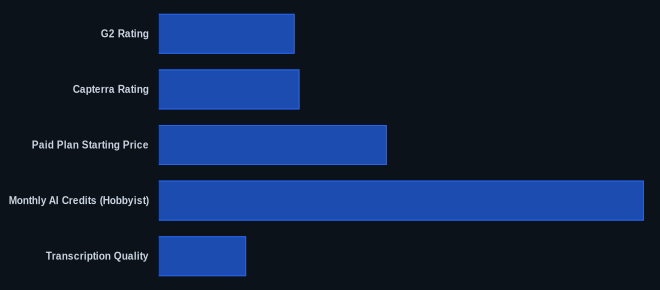
| G2 Rating | 4.5/5 | G2 Descript Page |
| Capterra Rating | 4.7/5 | Capterra Descript Page |
| Starting Price | $0/month (Free) | Descript Pricing Page |
| Paid Plan Starting Price | $16/user/month (billed annually) | Descript Pricing Page |
| Monthly AI Credits (Hobbyist) | 400 | Descript Pricing Page |
| Transcription Quality | ElevenLabs Scribe v2 | Descript Changelog |
| Pricing Overhaul | September 2025 | Descript Changelog |
Our Take
Descript's text-based editing provides a fundamental shift in how teams produce spoken-word content, drastically cutting project hours. While this makes it an essential tool for many, its unpredictable pricing model, which shifted to "media minutes" and "AI credits" in September 2025, remains a significant hurdle for budgeting, alienating many loyal users. The tool is powerful and constantly adding new AI capabilities, but frequent performance issues and slow customer support can create frustrating roadblocks. It's a tool that excels in innovation and speed, but at the cost of stability and transparent long-term costs.
If you're considering Descript, are you prepared to diligently track your AI credit and media minute usage to avoid unexpected spikes in your monthly bill?
FAQ
Is Descript reliable for professional projects?
Descript is widely used for professional projects, particularly in podcasting and online video, but it has known reliability issues. Users frequently report bugs, crashes, and occasional outages, especially with larger projects or an unstable internet connection. While its features are powerful, it's wise to save frequently and be aware of its status pages, as critical projects may encounter unexpected downtime.
How do Descript's AI credits and media minutes work, and are there hidden costs?
Descript's pricing model, updated in September 2025, uses "media minutes" for general content usage and "AI credits" for specific AI features like Studio Sound, Eye Contact, and dubbing. These are consumed based on your activity, and if you exceed your plan's allocation, you'll need to purchase top-ups. These top-ups can significantly increase your monthly cost, and unused minutes or credits do not roll over, making your total expenditure less predictable than with fixed-rate plans.
How does Descript compare to Adobe Premiere Pro for video editing?
Descript and Adobe Premiere Pro serve different needs. Descript excels at rapid, text-based editing of dialogue-heavy content, using AI for speed and convenience. Premiere Pro is an industry standard for professional video editing, offering far more granular control over visual effects, color grading, motion graphics, and complex multi-track timelines. If your primary goal is efficient content creation with an emphasis on spoken word, Descript is a strong choice. If you require advanced visual post-production capabilities, Premiere Pro is the more powerful, albeit more complex, tool.