HubSpot CRM is a strong candidate for businesses committed to an inbound strategy, offering a single source of truth for all customer interactions, but its pricing structure for advanced features can be a significant hurdle for growing teams.
What Is HubSpot CRM?
HubSpot CRM is the cornerstone of a broader platform, offering a centralized system to manage customer relationships and accelerate business growth. The tool helps teams track leads, manage pipelines, automate tasks, and deepen customer engagement across the entire customer lifecycle. It is built for businesses aiming to grow efficiently without grappling with disparate systems. This platform excels at integrating every touchpoint, from initial website visit to post-sale support, all within one intuitive interface.
Key Features
The power of this CRM lies in its interconnected modules, each designed to boost productivity and insight. Recent AI advancements have pushed its capabilities even further, making it a truly smart solution.
Free CRM Core & Contact Management
The free version is more than just a trial; it's a solid foundational CRM. It lets you manage up to 1 million contacts, track deals, assign tasks, and log interactions without cost. You can create custom fields, segment your audience, and maintain a clean, organized database. This free tier is a critical entry point for many startups and small teams. According to a G2 reviewer: "HubSpot's free CRM is an absolute lifesaver for our startup, letting us manage contacts without upfront costs." It truly lowers the barrier to entry for professional CRM use.
Sales Automation & AI
Beyond the basics, the paid tiers transform your sales process. The platform automates repetitive tasks like email follow-ups and lead assignments, freeing your team to focus on closing. New in Q3 2026 is the Sales AI Assistant, which drafts personalized emails based on past interactions, recommends next best actions, and summarizes call transcripts. This assistant significantly reduces manual effort and improves the quality of outreach. Predictive lead scoring, powered by machine learning, helps sales teams prioritize high-potential prospects, ensuring efforts are always focused where they matter most.
Marketing & CRM-Connected Ads (AI-driven)
The CRM tightly integrates with marketing efforts. It provides tools for email marketing, landing page creation, and social media management. A major update in Q2 2026 introduced enhanced CRM-Connected Advertising AI. This feature uses your CRM data to build highly targeted ad audiences across platforms like Google and Meta. It optimizes ad spend by predicting which segments are most likely to convert, maximizing ROI. As a Digital Marketing Specialist on Capterra noted: "The recent AI features for contact enrichment and ad targeting have significantly boosted our campaign effectiveness." This integration ensures your marketing messages are always relevant to where a lead is in their journey.
Service & Support
Customer satisfaction is critical, and the software offers solid tools for this. It includes ticketing systems to manage customer inquiries, a knowledge base to empower self-service, and live chat functionality for real-time support. All service interactions are logged in the CRM, giving sales and marketing teams a complete view of the customer's history. This helps prevent information silos and ensures everyone is on the same page.
Reporting & Analytics (AI Insights)
Data-driven decisions are made easier with the platform's reporting capabilities. You get customizable dashboards, pipeline reports, and sales forecasts. Recent updates, particularly the "AI Growth Suite" launch in Q4 2025, bring AI-driven insights that proactively identify trends, predict customer churn risks, and highlight growth opportunities. This means less time digging through spreadsheets and more time acting on intelligent recommendations.
Pricing
HubSpot offers a powerful Free CRM tier, which forms the bedrock of its offering. For businesses needing more advanced features and scalability, it provides paid tiers primarily through its "Hubs" (Sales, Marketing, Service, CMS, Operations). For this review, we'll focus on the Sales Hub, as it directly addresses CRM functionality, and briefly mention the broader CRM Suite.
-
HubSpot CRM Free: Absolutely free forever. This tier includes contact management, deal tracking, task management, email scheduling, live chat, and basic reporting. It supports up to 1 million contacts and is excellent for startups and small teams managing their initial growth. You get substantial value without any upfront investment.
- (as of October 2026, per the official pricing page)
-
Sales Hub Starter: Starts at $25/month when billed monthly, or $20/month (billed annually), for 2 paid users. This plan introduces simple automation, email sequences (limited), multiple deal pipelines, and meeting scheduling. It's ideal for small sales teams ready to formalize their processes.
- (as of October 2026, per the official pricing page)
-
Sales Hub Professional: Starts at $600/month when billed monthly, or $500/month (billed annually), for 5 paid users. This is where the platform's AI capabilities truly shine for sales. It includes advanced automation, custom reporting, sales forecasting, ABM tools, and the new AI-powered sales tools like the email drafting assistant and advanced lead scoring. Each additional user costs $90/month. This tier is designed for growing SMBs and mid-market companies needing sophisticated sales tools.
- (as of October 2026, per the official pricing page)
-
Sales Hub Enterprise: Starts at $1,800/month when billed monthly, or $1,500/month (billed annually), for 10 paid users. This top tier offers everything in Professional, plus advanced custom objects, granular permissions, enterprise-grade reporting, conversational intelligence, AI-driven contact enrichment, and sandboxes for testing. Each additional user costs $120/month. It suits large organizations with complex sales processes.
- (as of October 2026, per the official pricing page)
Hidden Costs: While the free tier is generous, scaling up with HubSpot CRM means you'll eventually encounter additional costs. For example, Marketing Hub tiers base pricing on your number of "marketing contacts," with increases for larger databases. Professional and Enterprise tiers often require a one-time onboarding fee, which can be substantial. The transition from free to paid, especially to the Professional tier, can feel like a significant price jump. A Capterra user observed: "The transition from the free to the paid tiers felt a bit jarring with the price increase, but the added features are undeniably powerful."
Pros and Cons
Like any powerful tool, it comes with its strengths and areas where it might not be the perfect fit for everyone.
Pros:
- Generous Free CRM: A genuinely solid free tier that offers immense value for startups and small businesses, making it an excellent entry point.
- All-in-One Integrated Platform: Combines sales, marketing, and service, providing a unified view of the customer. On Reddit, one user wrote: "I love how all our marketing, sales, and service data lives in one place with HubSpot. It's truly an integrated solution."
- User-Friendly Interface: Generally intuitive and easy to navigate, even for users new to CRM systems.
- Powerful AI Features: Recent integrations for AI-powered sales assistants, ad targeting, and contact enrichment significantly boost efficiency and effectiveness.
- Scalability: Grows with your business, offering more advanced features and support as your needs evolve from a free user to an enterprise client.
- Extensive Integrations: A vast marketplace of over 1,000 third-party apps ensures it connects with almost any tool your business uses.
Cons:
- Price Jumps: The cost scales steeply from the free tier to the Professional and Enterprise plans, which can be a shock for smaller businesses on a tight budget.
- Complexity for Small Teams (Advanced Features): While the interface is user-friendly, mastering all the advanced features in the higher tiers can still have a steep learning curve.
- Contact Tier Pricing: For Marketing Hub users (often bundled in CRM Suite), exceeding certain contact limits incurs extra costs, which can become expensive fast.
- Support Response Time: While generally effective, some users report that resolving complex issues can take longer than desired. An Operations Manager on G2 mentioned: "Customer support has been responsive, but sometimes resolving complex issues takes a bit longer than expected."
- Customization Limitations (for highly niche needs): While highly configurable, extremely bespoke enterprise requirements might find Salesforce a more flexible option for deep, low-level customization.
Who Should Use HubSpot CRM?
This CRM is purpose-built for specific types of businesses and teams:
- Startups and Early-Stage SMBs: The HubSpot CRM Free tier is perfect for managing initial contacts, deals, and customer interactions without upfront investment. It allows you to build a foundational sales process.
- Growing Sales Teams Focused on Inbound: If your sales strategy relies on attracting, engaging, and delighting customers (the inbound methodology), its integrated sales, marketing, and service hubs are a natural fit.
- Marketing Teams Seeking CRM Integration: For those who want their marketing efforts directly connected to sales data, from lead nurturing to ad targeting, the platform offers unparalleled synergy.
- Businesses Prioritizing User-Friendliness and Integration: If you need a CRM that's relatively easy to adopt and integrates smoothly across your customer-facing departments, this is a strong contender.
- Teams Ready to Use AI for Growth: With its recent influx of AI features for sales, marketing, and data enrichment, it's ideal for businesses looking to automate, predict, and personalize at scale.
- Companies Seeking a Unified Platform: If managing multiple tools (CRM, marketing automation, service desk) feels cumbersome, the CRM Suite provides a cohesive ecosystem. This stands in contrast to piecemeal solutions or overly complex systems like Salesforce, which often requires significant implementation costs and expertise. For those considering a more budget-friendly all-in-one, Zoho CRM might be an alternative worth evaluating.
Data at a Glance
| Metric | Value | Source |
|---|---|---|
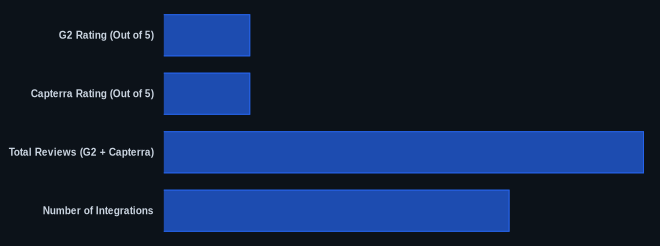
| G2 Rating (Out of 5) | 4.4 | G2.com HubSpot CRM Reviews |
| Capterra Rating (Out of 5) | 4.5 | Capterra.com HubSpot CRM Reviews |
| Starting Price | Free | HubSpot Official Pricing |
| Total Reviews (G2 + Capterra) | 15,000+ | G2.com, Capterra.com (as of Oct 2026) |
| Number of Integrations | 1,000+ | HubSpot App Marketplace |
| Free Tier Available | Yes | HubSpot Official Pricing |
Our Take
We've seen countless CRMs come and go, but this platform consistently stands out for its commitment to the inbound methodology and now, its aggressive push into AI. While the jump from the generous free tier to the professional plans can feel like a cold shower, it's worth it for businesses genuinely committed to scalable growth through integrated sales, marketing, and service. The recent AI additions, especially for predictive sales and CRM-connected advertising, aren't just buzzwords; they're actionable tools that materially improve campaign effectiveness and sales forecasting. We think it's worth the investment for growth-oriented SMBs who value an all-in-one experience over deep, custom enterprise-level tweaks.
If your team is currently using the free tier, at what point do you anticipate the need for the advanced AI features in the Professional plan, and how are you budgeting for that significant price increase?
FAQ
Is HubSpot CRM's free version truly sufficient for a growing startup?
The free version is incredibly powerful for a startup's initial phases, offering core contact management, deal tracking, and basic reporting. It’s perfect for getting organized and building a foundational sales process. However, as you scale and need advanced automation, AI-driven insights, or comprehensive marketing tools, you'll likely need to upgrade to a paid Sales Hub or CRM Suite tier. It won't be enough to automate complex workflows or run sophisticated marketing campaigns.
How do HubSpot CRM's new AI features compare to competitors like Salesforce?
HubSpot CRM's recent AI features, such as the Sales AI Assistant, AI contact enrichment, and CRM-connected advertising, are designed for ease of use and direct integration across its unified platform. While Salesforce offers solid AI capabilities (like Einstein AI), they often require more complex setup, customization, and can come with additional costs, making them more suitable for large enterprises with dedicated IT resources. This platform aims for plug-and-play AI that’s accessible to SMBs.
Are there any hidden costs beyond the monthly subscription fees?
Yes, you should be aware of potential hidden costs. For instance, if you eventually use the Marketing Hub (often bundled in the CRM Suite), your pricing scales based on the number of "marketing contacts" you have, which can increase your monthly bill significantly as your database grows. Additionally, Professional and Enterprise plans typically have mandatory, one-time onboarding fees. Always review the detailed pricing page and inquire about all potential add-ons or user minimums before committing.
