Mailchimp, as of May 2026, presents a complex value proposition: it's an AI-powered email marketing tool that's easy to use for beginners, but its pricing model, particularly charging for unsubscribed contacts and a shrinking free plan, quickly undermines its appeal for growing businesses. This tool excels for small teams needing intuitive design and basic automation, but quickly gets expensive once your contact list expands, forcing many to consider alternatives like ActiveCampaign or HubSpot.
What Is Mailchimp?
Intuit Mailchimp has evolved far beyond a simple email sender; it’s now a marketing platform aiming to be an all-in-one hub for small to mid-sized businesses. The platform helps you build and manage your audience, create engaging email campaigns, design landing pages, schedule social media posts, and even run SMS campaigns. It is designed for entrepreneurs and small marketing teams who need a user-friendly interface to manage customer communications without a steep learning curve. The software's strength lies in bringing together various marketing channels under one roof, making it easier to execute cohesive campaigns.
The tool works by centralizing contacts in a marketing CRM, allowing you to segment them and then target them with various types of content. You can design stunning emails, automate customer journeys, track campaign performance, and use its growing suite of AI features to enhance content and timing. Ultimately, it helps you nurture leads and build customer relationships, even if the cost of doing so becomes a significant factor as your business scales.
Key Features
Mailchimp has invested heavily in expanding its capabilities, moving beyond traditional email marketing to offer a broader ecosystem for online businesses. Its recent product updates show a clear push towards AI and multi-channel integration.
AI-Powered Creation and Optimization
The platform now boasts genuinely helpful artificial intelligence tools designed to speed up content creation and improve campaign effectiveness. The AI Creative Assistant helps you design emails and landing pages, suggesting layouts, fonts, and even writing copy based on your brand and campaign goals. According to Mailchimp's own data, customers have sent over 9.8 billion emails with AI-generated content (as of May 2026, per the official Mailchimp AI Creative Assistant page). This feature cuts down the time spent on design, making it easier for small teams to produce professional-looking campaigns.
Another standout AI feature is Send Time Optimization. This uses machine learning to predict the best time to send emails to individual contacts, aiming for higher open and click-through rates. It analyzes past engagement data for your audience, ensuring messages land when they're most likely to be seen. This capability moves beyond simple guesswork, providing data-driven timing insights.
Audience Management and Segmentation
At its core, Mailchimp provides a Marketing CRM to organize contacts. You can store detailed information about your audience, including their purchase history, engagement data, and demographics. This allows for powerful segmentation. You can create targeted groups based on various criteria, ensuring messages resonate with specific segments of your audience.
The segmentation tools are intuitive, letting you filter contacts by activity, tags, or custom fields. While not as granular or flexible as some advanced CRMs like HubSpot's free offering, it’s more than sufficient for most small businesses. This focus on audience organization helps ensure campaigns are relevant and personalized.
Automation and Customer Journey Builder
Mailchimp's Customer Journey Builder lets you create automated workflows that guide contacts through specific paths based on their behavior. You can set up welcome series, abandoned cart reminders, or re-engagement campaigns. The drag-and-drop interface makes building these journeys relatively straightforward.
However, a repeated complaint is that these automation features, especially on lower tiers, can feel basic and somewhat outdated. According to a G2 reviewer: "Mailchimp's automation features are basic and outdated, making it unsuitable for serious marketing automation needs." For businesses needing complex, multi-branching logic or integrations with many external apps, a more specialized tool like ActiveCampaign might offer better flexibility.
Multi-Channel Engagement
Beyond email, Mailchimp has expanded into a full-fledged marketing hub. It supports landing pages and forms for lead generation, integrates with social media for scheduling posts and running ads, and even offers SMS campaigns for direct mobile communication. The platform also provides optional web hosting and domains, pushing its "all-in-one" value proposition.
This multi-channel approach is a major plus for businesses looking to consolidate marketing efforts. Instead of juggling multiple tools, you can manage emails, social media, and landing pages from a single dashboard. The convenience here is undeniable, especially for lean teams.
Reporting and Analytics
The software offers reporting and analytics to track the performance of campaigns. You can monitor open rates, click-through rates, unsubscribe rates, and even revenue generated from emails. The dashboards are visually appealing and easy to understand, providing actionable insights into what's working and what isn't.
Higher-tier plans include A/B testing and multivariate testing, allowing you to experiment with different subject lines, content, and send times to optimize results. Comparative reporting helps you see trends over time and benchmark campaigns. These tools are crucial for refining a marketing strategy.
Pricing
Mailchimp operates on a tiered pricing model that primarily scales with the number of contacts you have. This system, while seemingly straightforward, carries significant implications for your budget, especially as your business grows. All prices cited are for monthly billing; discounts are typically available for annual commitments.
As of May 2026, per the official pricing page (https://mailchimp.com/pricing/):
-
Free Plan: This plan offers up to 500 contacts and 1,000 emails per month (as of May 2026, per the official pricing page). It includes basic email templates, a marketing CRM, and forms & landing pages. While useful for starting out, this plan has been "aggressively scaled back" (as of May 19, 2026, PCMag review). Historically, the free plan has offered up to 2,000 contacts and 12,000 emails per month, or more recently, a limit of 250 contacts was observed. The current 500-contact, 1,000-email limit is quite restrictive, making it challenging for even slightly growing businesses. You'll hit this ceiling quickly.
-
Essentials Plan: Starts from $13/month for 500 contacts (as of May 2026, per the official pricing page). This tier unlocks all email templates, A/B testing, and 24/7 email and chat support. It builds upon the Free plan, adding vital tools for improving campaign performance. If you need more than the free plan offers in terms of sends or features, this is your entry point. The price scales up from here; for example, 1,500 contacts would cost $26/month (as of May 2026, per the official pricing page).
-
Standard Plan: Starts from $20/month for 500 contacts (as of May 2026, per the official pricing page). This is where Mailchimp's more advanced automation and AI features become available. It includes the customer journey builder, send time optimization, behavioral targeting, and custom templating capabilities. For a business starting to take marketing automation seriously, this plan offers a good balance of features, but remember that the cost increases significantly with more contacts. For 2,500 contacts, you’re looking at $56/month (as of May 2026, per the official pricing page), jumping to $87/month for 5,000 contacts (as of May 2026, per the official pricing page).
-
Premium Plan: Starts around $350/month (as of May 2026, per the official pricing page). This top-tier plan is for larger organizations with complex marketing needs. It provides advanced segmentation, multivariate testing, comparative reporting, and phone support, encompassing all features from lower tiers. The pricing here scales rapidly; for example, 5,000 contacts can cost $350/month (as of May 2026, per the official pricing page), while 10,000 contacts would be $400/month (as of May 2026, per the official pricing page).
Hidden Costs and the Unsubscribed Contact Controversy:
Mailchimp's pricing model has a major point of contention: it charges for all contacts toward your plan limit, including unsubscribed and unconfirmed contacts. This practice often leads to rapidly escalating costs for growing businesses. A G2 reviewer voiced this frustration: "The most frustrating aspect is that Mailchimp counts all contacts toward your plan limit, including unsubscribed contacts." This means if you have 10,000 contacts, but 3,000 have unsubscribed, you're still paying for all 10,000. This gets expensive fast and can feel punitive, forcing businesses to regularly clean their lists to avoid unnecessary charges.
Other potential hidden costs include separate pricing for transactional emails via Mandrill, a service owned by the company, and the fact that many of its advanced AI features are locked behind the higher-tier plans.
Pros and Cons
Choosing Mailchimp means weighing its significant strengths against some notable drawbacks that can impact your budget and marketing capabilities.
Pros
- Exceptional Ease of Use: The drag-and-drop email editor and intuitive interface are consistently praised. You can get a campaign launched quickly, even if you’re a complete beginner. A Capterra user noted: "The drag-and-drop email editor saved me countless hours."
- Powerful AI-Powered Tools: Recent additions like the AI Creative Assistant and Send Time Optimization are genuinely useful. These features save time and improve campaign performance, making sophisticated marketing accessible.
- Comprehensive Marketing Hub: It has evolved beyond email, offering landing pages, social media scheduling, SMS, and an integrated CRM. This consolidation simplifies managing multiple marketing channels from a single platform.
- Solid Email Deliverability: Users often report good deliverability rates, ensuring emails reach their intended recipients rather than landing in spam folders. This reliability is fundamental to any email marketing effort.
- Generous Feature Set on Paid Tiers: The Standard and Premium plans offer solid features like the customer journey builder, behavioral targeting, and advanced reporting. These let you enable deeper engagement and optimization.
Cons
- Rapidly Escalating Costs for Growing Lists: This is the most significant drawback. Mailchimp charges for all contacts, including unsubscribed ones, which makes it prohibitively expensive as your audience grows. As one user noted: "Marketers are departing Mailchimp primarily because the platform doesn't scale well with business growth without significant cost increases."
- Aggressively Scaled Back Free Plan: The current Free Plan limits of 500 contacts and 1,000 emails per month (as of May 2026, per the official pricing page) are very restrictive compared to its past offerings and some competitors. It offers little room for growth before requiring an upgrade.
- Basic and Outdated Automation (on lower tiers): While it has a customer journey builder, many find its automation capabilities less advanced and flexible compared to competitors like ActiveCampaign. One G2 reviewer stated: "But once you need advanced features, people complain it feels too basic."
- Limited Advanced CRM Functionality: While it includes a marketing CRM, it lacks the depth and customization of dedicated CRM solutions. For businesses needing extensive sales, service, or highly customized data tracking, it won't suffice.
- "Jack of All Trades, Master of None" Perception: Despite its broad feature set, some users feel that individual components, especially advanced automation, aren't as powerful or feature-rich as dedicated tools.
Who Should Use Mailchimp?
Mailchimp is not for everyone, but it serves specific audiences exceptionally well. Knowing who benefits most can save you time and money.
New Entrepreneurs and Solo Founders: If you're just starting an online business, launching a side hustle, or have a very small contact list (under 500), the platform's Free Plan or entry-level Essentials Plan is a great way to begin. Its intuitive interface lets you quickly set up your first campaigns without needing a marketing degree. You'll appreciate the drag-and-drop editor and clear analytics.
Small Businesses Prioritizing Ease of Use and Design: Companies where marketing is handled by a single individual or a small, non-specialized team will love the tool's simplicity. If beautiful, branded emails and landing pages are your priority, and you don't need highly complex automation, it offers excellent design tools and templates. Think local cafes, boutique shops, or freelancers who value a polished look over intricate workflows.
Teams Needing an Integrated (But Not Deep) Marketing Hub: If your team wants to manage email, basic social media, and landing pages from one place, and you aren't ready for a full-blown CRM or marketing automation suite, the platform provides that convenience. It’s ideal for those who want a unified dashboard without the complexity or cost of a HubSpot Marketing Hub, understanding that the depth of features will be less.
Businesses with Stable, Smaller Contact Lists: If your audience size is predictable and doesn't grow rapidly beyond a few thousand contacts, the cost implications might be manageable. However, if you anticipate aggressive list growth, especially when factoring in unsubscribed contacts, you’ll likely find the pricing unsustainable.
It's not for highly-scaling businesses with large lists or those needing deeply customized, advanced automation workflows. For those scenarios, alternatives like ActiveCampaign or HubSpot will offer better long-term value and capability.
Data at a Glance
| Feature / Metric | Value | Source |
|---|---|---|
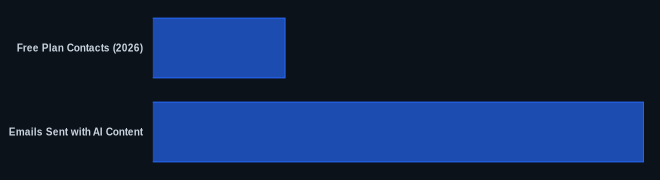
| Free Plan Contacts (2026) | 500 | https://mailchimp.com/pricing/ |
| Starting Paid Price | From $13/month (Essentials plan for 500 contacts, as of May 2026) | https://mailchimp.com/pricing/ |
| Emails Sent with AI Content | Over 9.8 billion | https://mailchimp.com/features/ai-creative-assistant/ |
| Acquisition Year by Intuit | 2021 | https://mailchimp.com/ |
Our Take
We've seen countless tools try to be the "all-in-one" solution, and Mailchimp is making a strong play in that arena. The AI features, especially the creative assistant and send time optimization, are genuinely helpful and move the platform beyond basic email sending. But here's the kicker: the value proposition crumbles under the weight of its pricing model once you start to scale. Paying for unsubscribed contacts is a baffling decision that directly impacts a business’s ability to grow without incurring significantly higher, often unnecessary, costs. If you’re a lean startup, it’s a great place to begin. However, as soon as you have meaningful traction and a growing list, you need to be very honest with yourself about the long-term expense. We’d recommend having a clear exit strategy to an alternative like Brevo or ActiveCampaign in mind for when your contact list inevitably outgrows its welcome on the platform.
If Mailchimp's current free plan only allows 500 contacts, how quickly do you anticipate your list will grow past that point in the next 12 months, and have you factored in the jump to the $13/month plan and beyond?
FAQ
Q: Is Mailchimp good for advanced marketing automation in 2026?
A: Mailchimp's automation, particularly with the Customer Journey Builder on Standard and Premium plans, is sufficient for basic to intermediate workflows like welcome sequences and abandoned cart emails. However, if you need highly complex, conditional logic, multi-channel triggers, or deep CRM integrations, it often falls short compared to dedicated automation tools like ActiveCampaign. You'll likely hit a wall if your automation needs are truly advanced.
Q: How much does Mailchimp cost when my contact list grows?
A: The cost escalates rapidly and linearly with your contact count. For example, the Standard Plan is $20/month for 500 contacts, but jumps to $56/month for 2,500 contacts and $87/month for 5,000 contacts (as of May 2026, per the official pricing page). Critically, this includes unsubscribed contacts, so you're paying for people who no longer want to hear from you. You must actively clean your lists to control costs, which can become a time-consuming chore.
Q: Should I choose Mailchimp or HubSpot Marketing Hub for my SMB?
A: For simplicity and ease of getting started with email marketing, Mailchimp is often the quicker win, especially if design and AI assistance are key. However, if you're planning for aggressive growth, need solid CRM functionality, and want a truly comprehensive sales and marketing platform, HubSpot Marketing Hub (even its free CRM combined with paid marketing tiers) offers superior scalability and deeper features. HubSpot's pricing model can also be complex, but its free CRM offers unlimited users and up to 1 million contacts, which is a major difference.
