Trello offers an exceptional entry point into visual project management with a generous free plan and stable pricing that sets it apart from its Atlassian siblings. While it excels at straightforward task tracking, its limitations for complex projects often push users towards paid Power-Ups, adding unexpected costs to its otherwise transparent tiers.
What Is Trello?
Trello is a popular Kanban-style list-making application that gives teams and individuals a visual way to organize tasks and projects. At its core, the software uses boards, lists, and cards to represent workflows. Each board is a project, lists are stages within that project (e.g., "To Do," "Doing," "Done"), and cards are individual tasks that move through those lists.
Owned by Atlassian since 2017, the platform has consistently aimed for simplicity and visual clarity. It serves as a digital whiteboard that facilitates real-time collaboration, making it easy for distributed teams to see who is working on what, and what the next step is. Many teams choose it for managing anything from a marketing content calendar to personal new year's resolutions.
Key Features
Trello's strength lies in its approachable feature set, continuously refined to keep visual organization front and center while adding smart capabilities.
Intuitive Kanban Boards
The core of the experience is its Kanban board, celebrated for being incredibly user-friendly. You get a clear, visual overview of your tasks and projects, arranged in vertical lists. Cards, representing individual tasks, can be dragged and dropped between lists, making workflow progression immediately obvious. Each card can hold rich information: descriptions, checklists, due dates, attachments, and comments. Moving a card from "Doing" to "Done" is satisfying.
Flexible Workflow Automation (Trello Automation)
Trello's built-in automation, powered by Butler, lets you automate repetitive tasks. You can set rules like "when a card is moved to Done, mark its due date complete" or "every Monday, create a 'Weekly Report' card." This saves a surprising amount of time for routine processes. The free plan offers 250 command runs per month (as of May 2026, per the official pricing page), which is enough for many small teams to get a feel for its power, but more advanced use will require a paid upgrade.
Power-Ups & Integrations
Power-Ups are like apps for your boards. While the basic platform is lean, these extensions add crucial functionality like calendar views, custom fields, and time tracking. The tool integrates with popular services like Slack, Google Drive, and Salesforce. Be aware, though, that many essential Power-Ups for advanced features come with their own separate costs, effectively turning them into hidden add-ons for your overall project management stack.
Atlassian Intelligence (AI) Features
New in 2026, the platform now integrates Atlassian Intelligence (AI) into its Premium plan (as of May 2026, per the official pricing page). This AI helper can assist with writing card descriptions, brainstorming ideas, and potentially summarizing existing tasks. For example, in January 2026, the platform launched a limited-edition, AI-powered New Year's Resolution Board Builder, which instantly generated personalized goal boards. This shows a clear direction towards using AI to enhance task creation and organization.
Collaboration Tools
Designed for teamwork, the software offers solid collaboration features. You can invite team members to boards, assign tasks to individuals, leave comments directly on cards, and get real-time updates on activity. It's easy to loop in guests for specific boards, which is fantastic for client communication or external contractors. The visual nature means everyone quickly understands the project's status without needing lengthy meetings.
Pricing
Trello offers a straightforward tiered pricing model, including a free plan and three paid subscriptions: Standard, Premium, and Enterprise. Annual billing typically provides about 17% savings across all paid plans (as of May 2026, per the official pricing page). Critically, Trello's pricing has remained stable since early 2024, notably unaffected by Atlassian's general price increases in October 2024 and October 2025 that impacted other products like Jira and Confluence. This makes it a surprisingly consistent value in the Atlassian ecosystem. As of May 2026, per the official pricing page, here's the breakdown:
-
Free Plan:
- Cost: $0 per user per month (as of May 2026, per the official pricing page).
- Included Features: You get unlimited cards, up to 10 boards per workspace (as of May 2026, per the official pricing page), basic automation (with 250 command runs per month), unlimited Power-Ups per board (though some Power-Ups themselves have costs), unlimited storage (10MB/file), custom backgrounds, and mobile apps. It’s a generous free tier, letting many small teams operate effectively without spending a dime.
- Free Trial: This is the free plan.
-
Standard Plan:
- Cost: $5 per user per month (billed annually) or $6 per user per month (billed monthly) (as of May 2026, per the official pricing page).
- Included Features: Everything in the Free plan, plus unlimited boards, advanced checklists, custom fields, card mirroring, and 1,000 workspace command runs per month (as of May 2026, per the official pricing page). This is where many growing teams will land, as unlimited boards are a must-have once you manage a few projects.
-
Premium Plan:
- Cost: $10 per user per month (billed annually) or $12.50 per user per month (billed monthly) (as of May 2026, per the official pricing page).
- Included Features: Everything in the Standard plan, plus unlimited workspace command runs, unlimited card views (Timeline, Calendar, Dashboard, Map), Atlassian Intelligence (AI) features, and data export. The additional views are crucial for project managers who need more than just the Kanban layout to understand progress and deadlines.
-
Enterprise Plan:
- Cost: Starts at $17.50 per user per month (billed annually) for up to 50 users (as of May 2026, per the official pricing page), with prices decreasing as user count grows. Monthly billing is not an option here.
- Included Features: Everything in Premium, plus unlimited workspaces, organization-wide permissions, multi-board guest access, Power-Up administration, and 24/7 Enterprise admin support. A big bonus: Atlassian Guard Standard is bundled at no extra charge, which usually costs $4/user/month for other Atlassian products (as of May 2026, per the official pricing page). This offers serious value for larger organizations needing security and control.
Hidden Costs or Add-ons:
While the platform’s pricing is transparent, be prepared for potential external costs. Many advanced functionalities like sophisticated calendar integrations, time tracking tools, or detailed reporting often come from third-party Power-Ups that charge their own fees, typically between $3 and $15 per user per month (as of May 2026, per the official pricing page). If you need enhanced security features like SAML single sign-on for non-Enterprise plans, you’ll also need an Atlassian Access subscription, starting at $4 per user per month (as of May 2026, per the official pricing page).
Pros and Cons
Like any tool, the platform has its strengths and weaknesses, especially depending on your team's specific needs.
Pros:
- Exceptional Ease of Use: The drag-and-drop Kanban system is intuitive. New users pick it up almost instantly, requiring minimal training.
- Visual Clarity: You can see the status of every task at a glance. According to a G2 reviewer: "Its method of arranging tasks with boards, lists, and cards is very user-friendly. Being able to see everything at first glance, whether personal or professional, is something I truly appreciate."
- Generous Free Plan: The Free Plan provides ample features for personal use or very small teams, including 10 boards per workspace and basic automation (as of May 2026, per the official pricing page).
- Stable Pricing: Unlike its Atlassian siblings, Trello's pricing has remained consistent since early 2024, making it a predictable investment.
- High Flexibility for Simple Workflows: From content calendars to editorial pipelines to CRM, the software adapts well to many simple, visual workflows without much configuration.
- Strong Collaboration: Real-time updates, comments, and easy sharing foster excellent team collaboration.
Cons:
- Limited Advanced Project Management Features: For complex projects needing subtasks, Gantt charts, detailed resource management, or intricate task dependencies, the platform can feel restrictive. You'll often find yourself wishing for more native functionality beyond the card-and-list structure.
- Clutter with Scale: As projects grow and more team members are added, boards can quickly become overwhelming and difficult to navigate. Too many cards or lists make the visual benefit disappear.
- Reliance on Power-Ups for Core Functionality: Basic actions and advanced features (like reporting or time tracking) frequently require paid third-party Power-Ups. This can lead to unexpected costs and a fragmented user experience. A Capterra user notes: "Also, the free version has some frustrating limitations around attachment sizes and automation features. If you want calendar views or more advanced automations, you have to jump to a paid plan pretty quickly."
- Minimal Native Reporting: The built-in reporting is basic. If you need in-depth analytics or customizable dashboards, you're almost certainly looking at an external Power-Up.
- Recent Reliability Issues: The platform experienced three degraded performance incidents in May 2026, affecting core features like commenting, loading activity, and attachments. While usually stable, these recent hiccups are worth noting for mission-critical operations.
Who Should Use Trello?
This project management tool isn't for everyone, but it excels for specific users and team types.
- Small Businesses and Startups: If you need a quick, affordable way to get organized without a steep learning curve, the platform is fantastic. Its Free Plan is perfect for bootstrapping.
- Marketing Teams: Great for content calendars, campaign planning, and tracking creative assets. The visual board makes it easy to see where every piece of content stands.
- Remote Teams Focused on Visual Task Management: For teams that thrive on clear, visual communication and prefer to see tasks move through a pipeline, the software is a natural fit. It minimizes the need for long status meetings.
- Personal Productivity & Freelancers: From managing client projects to personal goals like home renovations or travel planning, the tool offers a structured yet flexible approach. One Reddit user mentioned using it for personal planning, though noting it tells them "what exists" rather than helping "decide what actually fits today" (for which they use Sunsama).
- Teams New to Agile or Kanban: It's an excellent entry point into Agile methodologies due to its pure Kanban implementation. It helps teams quickly adopt a visual workflow without getting bogged down in complex terminology.
- Non-Profits and Educational Institutions: Its ease of use and generous free plan make it accessible for organizations with limited budgets or volunteers who need to quickly collaborate on projects.
If you're managing complex software development with intricate dependencies or require extensive native reporting, you're better off looking at alternatives like Jira or Asana. But for visual, collaborative task tracking, it's hard to beat.
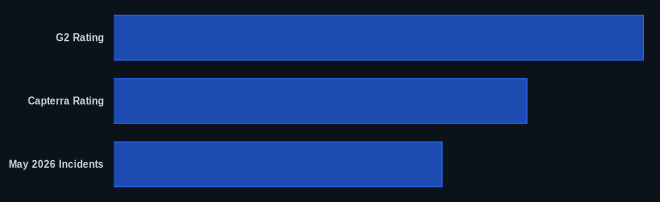
Data at a Glance
| Metric | Value | Source |
|---|---|---|
| G2 Rating | 8.3/10 | G2 Trello Reviews |
| Capterra Rating | 4.7/5.0 | Capterra Trello Reviews |
| Free Tier | Yes | Trello Pricing |
| Starting Price | $0 | Trello Pricing |
| May 2026 Incidents | 3 (degraded performance) | Atlassian Status Page |
Our Take
Trello consistently delivers on its promise of visual simplicity, a key strength we've observed across various projects, from small editorial calendars to client deliverables. What often gets overlooked is how its stable pricing, untouched by Atlassian's broader increases, makes it an increasingly attractive option for SMBs who are tired of annual subscription hikes from other tools. While its reliance on Power-Ups for "core" features like time tracking or advanced reporting can be frustrating, for teams that truly value ease-of-use and an uncluttered Kanban experience, this software remains a go-to. It knows what it is—a great visual task manager—and isn't trying to be a complex project management behemoth, and that's precisely why it continues to thrive, even with occasional reliability hiccups.
Does the potential for hidden Power-Up costs outweigh Trello's core simplicity for your team's budget?
FAQ
Q: Is Trello suitable for managing large, complex software development projects?
A: While Trello can handle aspects of large projects, its simplicity becomes a limitation for complex software development requiring deep issue tracking, sprint planning, or intricate task dependencies. For those needs, a tool like Jira, another Atlassian product, or ClickUp would be a better fit due to their native advanced features and robust reporting.
Q: How has Trello's pricing changed compared to other Atlassian products recently?
A: Trello's pricing has remained remarkably stable since early 2024. This is a significant point, as it was specifically not affected by the general Atlassian price increases that impacted products like Jira and Confluence in October 2024 and October 2025. This makes it a more predictable and potentially more cost-effective option within the Atlassian ecosystem.
Q: Are Trello's new Atlassian Intelligence (AI) features worth upgrading to the Premium plan?
A: The new AI features, primarily for writing and brainstorming within cards, offer a useful boost to productivity for many. If your team frequently struggles with drafting card descriptions or needs creative prompts, the AI can be a time-saver. However, if your team's main goal is just simple task tracking, the additional benefits of unlimited views (Timeline, Calendar, Dashboard) in the Premium plan will likely be a more compelling reason to upgrade than the AI alone.
