Calendly Review 2026: Streamlined Scheduling with AI Enhancements
Calendly offers impressive AI enhancements and significant time savings as of 2026, making it an indispensable asset for entrepreneurs, growing teams, and small to mid-sized businesses looking to optimize their meeting workflows. While its per-seat pricing can scale quickly, the core functionality and recent intelligent features provide strong value for efficient appointment management.
What Is Calendly?
This software is a SaaS platform that eliminates the back-and-forth typically involved in scheduling meetings. It allows individuals and teams to set their availability preferences, create various event types, and then share a personalized link that invitees use to book a time directly onto their calendar. The tool integrates with popular calendar apps, video conferencing solutions, and CRM systems, automating the entire process from initial booking to post-meeting follow-up. A sales professional can have fewer emails and more conversations, and a consultant gets a streamlined booking experience for clients.
The platform targets anyone who regularly schedules meetings with external parties, from solo entrepreneurs and freelancers managing client appointments to large sales teams handling inbound leads and customer success managers coordinating check-ins. It simplifies an often-tedious administrative task, letting users focus on the substance of their work rather than the logistics of scheduling.
Key Features
The core strength of this scheduling software has always been its ease of use, but developments in early 2026 pushed its capabilities far beyond simple time slot management with its new AI suite.
Intelligent AI Enhancements
A significant investment in artificial intelligence marks a new era for the platform. As of March 2026, it offers AI Assistant Integration for conversational workflows, allowing users to connect their scheduling preferences to AI tools like ChatGPT for a more dynamic booking experience. The Calendly Claude Connector arrived in March 2026, expanding conversational scheduling options. Then, in April 2026, the Notetaker Recaps Sync began a limited release for Salesforce and HubSpot. This feature automatically generates meeting summaries and syncs them directly to your CRM, drastically reducing post-meeting administrative work. This isn't just about finding a time slot; it's about automating the entire pre- and post-meeting lifecycle.
Intuitive Scheduling & Event Types
At its heart, the platform creates and manages various meeting types. Users can set up one-on-one meetings, group events (like webinars or team training), and collective events where multiple team members are available to meet. The interface for setting availability, buffer times, and meeting durations is straightforward, making it easy for anyone to configure their booking page. A sales team can use a round-robin schedule to evenly distribute inbound leads among reps, ensuring fair workload and quick response times.
Automated Workflows & Integrations
Beyond just scheduling, the software provides automated workflows. These can send reminders, follow-up emails, and custom notifications to both hosts and invitees. It integrates directly with major calendar systems like Google Calendar, Outlook Calendar, and Apple Calendar, preventing double bookings. Video conferencing tools like Zoom and Google Meet can be linked, automatically generating meeting links as soon as an appointment is booked. This means less manual copying and pasting, and a smoother experience for everyone involved.
Meeting Packages & Payment Links
As of March 2026, users can now sell multi-session bundles through Meeting Packages and accept one-off payments via Payment Links through Stripe. This is a crucial feature for consultants, coaches, and service providers who sell their time in blocks or require payment upfront for appointments. It integrates the financial transaction directly into the scheduling flow, reducing friction and administrative overhead.
Contact Management & Customization
Updates in April 2026 introduced Contact Notes & Reminders, along with Contact Lists & Custom Fields. This allows for a more personalized approach to scheduling by keeping track of specific details about invitees directly within the platform. Users can also remove Calendly branding on paid plans, ensuring a professional, consistent look for their booking page, which can be embedded directly onto a website.
Advanced Routing & API Access
For businesses with more complex needs, the platform offers advanced routing capabilities. This means leads can be directed to the right team member based on criteria like location, company size, or specific service interest. The Scheduling API, updated in October 2025, provides programmatic control over event creation and invitee management. This flexibility is crucial for businesses looking to integrate scheduling deeply into custom applications or CRM systems.
Pricing
Calendly offers a tiered pricing model, with annual billing providing a 20% discount. As of May 2026, per the official pricing page, here's the breakdown:
- Free Plan: Always free, this plan is for individuals with basic scheduling needs. It includes one event type, one connected calendar, unlimited one-on-one meetings, basic integrations, custom booking page branding, confirmation emails, website embedding, and mobile app/browser extension access. However, it lacks multiple calendars, group events, custom branding removal, payment collection, and most advanced integrations.
- Standard Plan: At $12 per seat per month (as of May 2026, per the official pricing page) or $10 per seat per month (as of May 2026, per the official pricing page) with annual billing, this plan is for professionals and small teams. It unlocks unlimited event types, connections for up to six calendars per user, removal of Calendly branding, automated workflows, and essential integrations (Zoom, Google Meet, HubSpot, PayPal, Stripe). Users also get access to group and collective events, plus 24/7 live chat support.
- Teams Plan: Priced at $20 per seat per month (as of May 2026, per the official pricing page) or $16 per seat per month (as of May 2026, per the official pricing page) with annual billing, this tier is for growing businesses. It includes all Standard features, plus advanced routing, admin capabilities, Salesforce integration, round-robin scheduling, and team scheduling analytics and insights. Volume discounts are available for annual subscriptions with more than 30 users, with seats 31-50 costing $14.50 per seat per month (as of May 2026, per the official pricing page).
- Enterprise Plan: Starting at $15,000 per year (as of May 2026, per the official pricing page) (roughly $42 per user per month for 30 users, as of May 2026, per the official pricing page), this plan caters to large companies with 30+ users. It offers critical features like SSO/SAML, advanced security, dedicated success managers, custom integrations, SLAs, and enhanced lead routing through Salesforce lookup logic.
Hidden Costs or Add-ons:
SMS reminders are billed separately, typically costing $0.02 to $0.10 per message (as of May 2026, per the official pricing page). Payment processing requires at least the Standard plan. Salesforce integration is exclusive to the Teams and Enterprise plans. Routing forms, for dynamic lead qualification, are available on the Teams or Enterprise plans. This gets expensive fast if you have a large team and want full feature access.
There haven't been explicit price changes reported in the last 12 months (since May 2025). Older reports indicate price increases in 2022 (Standard from $8 to $10/seat) and 2023 (Teams from $12 to $16/seat), suggesting the company adjusts its pricing model over time.
Pros and Cons
Like any SaaS product, the platform has its strengths and weaknesses depending on your specific needs.
Pros
- Exceptional Ease of Use: Both hosts and invitees find the interface incredibly intuitive. Sharing a link and letting others book is far simpler than email chains. According to a G2 reviewer: "What I like most about Calendly is how simple it makes scheduling meetings. Instead of going back and forth through emails trying to find a time that works, I can just share my scheduling link and the other person can pick a convenient slot."
- Significant Time Savings: Automating scheduling, reminders, and follow-ups frees up substantial administrative time. For sales teams, this means more time selling.
- Seamless Calendar Integrations: The platform connects with major calendars, virtually eliminating the risk of double bookings.
- Solid Core Integrations: Out-of-the-box integrations with Zoom, Google Meet, HubSpot, Stripe, and PayPal cover most common business needs.
- Generous Free Plan: While limited, the free tier is very useful for individuals needing basic one-on-one scheduling.
- New AI Enhancements: The recent additions of AI assistant integrations, conversational scheduling, and AI-generated meeting recaps syncing to CRMs are genuinely powerful and push the platform beyond traditional scheduling.
- Scalable for Teams: Features like round-robin scheduling, team pages, and centralized billing make it suitable for growing teams.
Cons
- Feature Limitations on Lower Tiers: Many advanced capabilities, like team scheduling, routing forms, and Salesforce integration, are locked behind the more expensive Teams or Enterprise plans. According to a Capterra user: "It feels restrictive that features like routing forms and team scheduling are locked behind higher tier plans."
- Can Get Pricey for Teams: The per-seat pricing model, especially for the Teams plan, means costs add up quickly for larger organizations.
- Limited Customization for Complex Workflows: For highly specialized service businesses with intricate intake forms, class scheduling, or gift certificate options, alternatives like Acuity Scheduling offer more depth.
- Occasional Bugs & UI Changes: While not widespread, some users report "stupid bugs" like country code issues or minor workflow disruptions following new deployments. This can be frustrating when consistency is key.
- SMS Reminders Are an Add-on Cost: Having to pay separately for SMS notifications can be an unexpected hidden cost.
- Support Inconsistency: While many praise the 24/7 live chat for paid users, some negative reviews on Trustpilot mention "unhelpful" service with unresolved issues, creating a mixed picture.
Who Should Use Calendly?
This platform is a strong fit for several specific types of users and organizations, particularly those valuing ease of use and automated efficiency.
- Solo Entrepreneurs & Freelancers: For individuals who regularly book client meetings, consultations, or discovery calls, even the free or Standard plan is a lifesaver. It eliminates tedious email exchanges and presents a professional booking experience.
- Sales & Business Development Teams: Any team focused on inbound leads or outbound prospecting benefits immensely from its routing forms, round-robin scheduling, and CRM integrations. It helps qualify leads faster and ensures quick follow-ups, directly impacting conversion rates. According to a G2 reviewer: "I use Calendly to schedule meetings with potential prospects, which has helped me generate valid inbound leads and reduce the time to qualify drastically."
- Customer Success & Support Teams: Scheduling customer check-ins, onboarding sessions, or technical support calls becomes much more efficient. The ability to connect with multiple calendars and automate reminders ensures clients receive consistent communication.
- Recruiters & HR Professionals: Coordinating interviews with multiple candidates and hiring managers is a common pain point. The tool simplifies this process, making it easy for candidates to book at their convenience.
- Coaches, Consultants, & Service Providers: With the new Meeting Packages and Payment Links introduced in March 2026, the software is becoming an even more compelling option for those selling their time in blocks or requiring upfront payment.
It is likely not the best fit for very niche service businesses requiring highly customized intake forms, complex booking rules for physical spaces, or extensive class scheduling features like Acuity Scheduling. Nor is it ideal for enterprise sales teams needing hyper-specific, real-time lead qualification within their CRM, where Chili Piper might offer more specialized capabilities. However, its broad applicability and continuous innovation, especially with AI, make it a solid choice for the majority.
Data at a Glance
| Metric | Value | Source |
|---|---|---|
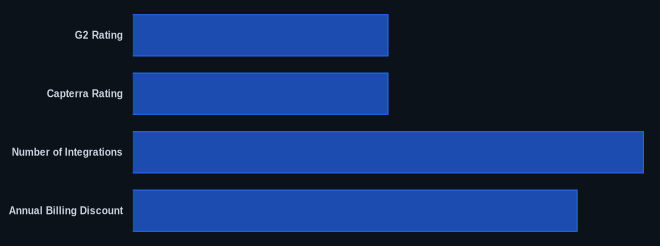
| G2 Rating | 4.7/5 stars (based on 2,627 reviews) | G2 Reviews |
| Capterra Rating | 4.7/5 stars (based on 4,096 user reviews) | Capterra Reviews |
| Starting Price | $0 (Free Plan), $10/seat/month (Standard, annual) | Calendly Pricing |
| Number of Integrations | 32+ direct CRM integrations, hundreds via Zapier | Calendly Integrations |
| Free Tier Available? | Yes | Calendly Pricing |
| AI Features Added? | Yes (AI Assistant, Claude Connector, Notetaker Recaps) | Calendly Blog |
| Annual Billing Discount | 20% | Calendly Pricing |
Our Take
We've seen countless scheduling tools, and for most businesses, Calendly continues to hit the sweet spot between powerful functionality and an effortless user experience. The AI enhancements rolled out in early 2026 – particularly the conversational scheduling and automated CRM recaps – are more than just buzzwords; they represent a meaningful leap in workflow automation. These features actually cut down on administrative overhead, turning what was once just a booking system into a true productivity partner. While we find the jump in price between the Free and Teams plans can be substantial, especially for smaller businesses eyeing those advanced features, the value is there if you use the intelligent routing and reporting. We noted a contradiction where high G2/Capterra ratings coexist with some strongly negative Trustpilot customer service reviews. For paid users, the 24/7 live chat support is generally well-regarded, but be aware that if you encounter an issue that requires deeper technical intervention, your experience might vary.
If you're considering Calendly for your growing team, are you confident that the added features in the Teams plan (like Salesforce integration and advanced routing) will provide enough ROI to justify the price jump to $16/seat/month compared to the Standard plan's $10/seat/month?
FAQ
Q: Is Calendly free to use for teams?
A: Calendly offers a Free Plan which is always free for individual use, but it's limited with only one event type and calendar connection. For team scheduling, collaboration features, and most integrations, you'll need to subscribe to a paid plan like Standard ($10/seat/month annually, as of May 2026, per the official pricing page) or Teams ($16/seat/month annually, as of May 2026, per the official pricing page).
Q: Can I integrate Calendly with my existing CRM like Salesforce or HubSpot?
A: Yes, it integrates with both Salesforce and HubSpot. HubSpot integration is available from the Standard plan upwards. For Salesforce, you'll need at least the Teams plan to access the integration, which also supports advanced features like lead routing based on Salesforce lookup logic. The new AI-generated Notetaker Recaps also sync to both CRMs.
Q: What are the main benefits of upgrading from the Free Plan to a paid subscription?
A: Upgrading unlocks critical features like unlimited event types, connections to multiple calendars per user, removal of Calendly branding, automated workflows, and essential integrations with video conferencing tools and payment processors. Paid plans also offer group events, collective events, and access to 24/7 live chat support, significantly enhancing productivity and professionalism.
