Dropbox Business offers exceptional file syncing and sharing for teams, making it a reliable workhorse for creative agencies and SMBs prioritizing dependable file access over a fully integrated productivity suite. Its core strength lies in its fast, block-level sync, which is especially valuable for teams handling large files and needing cross-platform compatibility. This specialization often comes at a higher cost than bundled alternatives, making it a powerful but specific choice.
What Is Dropbox Business?
Dropbox Business is a cloud storage and collaboration solution for organizations needing secure, scalable file management. At its core, it provides fast, block-level file synchronization across multiple devices and operating systems, ensuring everyone on your team always has the latest version of a document, image, or video. It acts as a centralized hub for team files, offering solid administrative controls and security features that go beyond personal cloud storage. This platform targets businesses that require high-performance file sharing, granular access permissions, and a dependable backbone for their digital assets, especially those working with large or sensitive data.
Key Features
The platform has evolved beyond simple file storage, layering on tools for team collaboration, security, and now, even AI-powered intelligence.
Core File Sync & Storage
The foundation of Dropbox Business remains its exceptional file syncing capabilities. It offers 3 TB of storage for single users on Professional (as of June 2026, per the official pricing page), and 5 TB pooled storage for teams on Standard (as of June 2026, per the official pricing page), scaling to 15 TB or more for Advanced plans (as of June 2026, per the official pricing page). Its block-level sync technology means only the changed parts of a file are uploaded, not the whole thing, which is efficient for large design files or video projects. The tool supports file transfers up to 100 GB (as of June 2026, per the official pricing page) and allows uploads up to 2 TB via web and API (December 2025 update), a significant improvement for media-heavy workflows. File recovery is also generous, extending up to 180 days for Standard (as of June 2026, per the official pricing page) and a full year for Advanced plans (as of June 2026, per the official pricing page), which is a lifesaver if someone accidentally deletes a critical document.
Collaboration & Sharing Tools
Beyond just storing files, the platform helps teams work together. You can create shared team folders with role-based admin controls, making it simple to manage who sees what. The software also includes basic e-signatures, letting you get documents signed without leaving the platform. For those who need more advanced e-signature capabilities, Dropbox Sign (formerly HelloSign) is available, though it’s a separate add-on. File engagement tracking lets you see who’s viewed your shared content and for how long. The tool also boasts deep integrations with over 300,000 apps, including essential creative tools like Adobe Creative Cloud and Figma, as well as communication platforms like Slack and Zoom, making for smoother workflows across your tech stack.
Security & Administration
For businesses, security is paramount, and Dropbox Business provides a strong suite of controls. You get tiered admin management, allowing different levels of access and control within your organization. Features like end-to-end encryption, advanced key management, and compliance tracking help meet regulatory requirements. Single sign-on (SSO) integration simplifies user access and strengthens security by centralizing authentication. The platform also offers remote wipe capabilities, letting you erase business data from lost or stolen devices. In May 2026, the company introduced Dropbox Protect as a standalone solution, giving IT and security admins better tools to manage sensitive content access across Dropbox, Google Drive, and M365, identify risky sharing, fix permissions, and enforce policies. This means more granular control over your data’s lifecycle.
AI-Powered Intelligence (Dash & Protect)
Dropbox has been investing in AI, primarily through Dropbox Dash. This "AI teammate" acts as a universal search tool, allowing you to ask questions and get answers or summaries from your files across various connected apps, including Slack, Google Workspace, and Microsoft 365. It aims to save time by surfacing relevant information quickly. Recent updates to Dash (March 2026, January 2026) have improved connections, added a cleaner chat-first search experience with better citations, and included an AI model selector for chat and writing, suggesting the ability to generate or analyze content. Dropbox Protect also uses intelligent insights to identify risky sharing activities and policy violations, helping admins manage data access more proactively. These features point to a future where the platform could act as a more intelligent data agent, though it hasn't yet reached the "Glean-killer" status some anticipated.
Pricing
Dropbox Business offers a tiered pricing structure, with discounts for annual billing. They also provide a generous 30-day free trial for business plans (two months for annual subscriptions) and a basic free plan with 2 GB of storage. As of June 2026, per the official pricing page:
-
Professional: This plan is designed for a single user and costs $16.58/month when billed annually, or $19.99/month when billed monthly. It includes 3 TB of storage, 180-day file recovery, file transfers up to 100 GB, PDF editing, e-signatures, file engagement tracking, and branding options. It’s a solid choice for freelancers or consultants who need more than basic personal storage but don't require team features.
-
Standard: Starting at a minimum of 3 users, this plan costs $15/user/month when billed annually, or $18/user/month when billed monthly. It provides 5 TB of pooled storage for the team, 180-day file recovery, 100 GB file transfers, team folders, role-based admin controls, and basic e-signatures. This is the entry point for most small and medium-sized teams.
-
Advanced: Also requiring a minimum of 3 users, this plan is priced at $24/user/month when billed annually, or $30/user/month when billed monthly. It starts with 15 TB of pooled storage that scales with more users, offers 1-year file recovery, tiered admin management, end-to-end encryption, advanced key management, compliance tracking, and single sign-on (SSO). This plan is for organizations with more stringent security needs and larger storage requirements.
-
Enterprise: For the largest organizations with complex needs, this plan offers custom pricing. You need to contact sales for a quote, but it typically includes expanded security features and dedicated live technical support.
Hidden Costs/Add-ons:
- Dropbox Sign (formerly HelloSign): While basic e-signatures are included, the full-featured e-signature solution is sold separately. It costs approximately $15-$20/user/month for Essentials (as of June 2026, per the official pricing page), with higher tiers costing more.
- Data Governance: Advanced data governance features may incur additional costs, requiring a sales quote.
- Dropbox Dash: While some AI features are integrated, a full-featured subscription to Dash as a universal search solution could potentially cost $10-$14/user/month (as of June 2026, per the official pricing page) if not fully included in your plan tier.
Dropbox Business pricing hasn't seen significant reported changes to core business plans in the last 12 months.
Pros and Cons
Choosing a file management solution means weighing its strengths against its weaknesses. This is what we've found after extended use.
Pros:
- Ease of Use: The interface is intuitive, making it simple to upload, share, and collaborate. New users pick it up fast.
- Reliable & Fast File Syncing: This is where the platform truly shines. Its block-level sync means files, especially large media and design files, synchronize quickly and reliably across all devices. According to a Capterra user: "Honestly, my favorite thing about Dropbox Business is how fast and reliable the file syncing is. I never really have to worry if the latest version of a file made it through-it just works in the background without me thinking about it."
- Cross-Platform Accessibility: You can access files from Windows, macOS, Linux, iOS, and Android. It’s a truly universal solution for diverse teams.
- Strong Security Features: Admin controls, remote wipe, end-to-end encryption, and advanced key management provide a solid security posture, giving IT admins peace of mind.
- Extensive Third-Party Integrations: It plays well with over 300,000 apps, including industry standards like Adobe Creative Cloud, Figma, and Slack, which helps connect disparate workflows.
- Longer Version History: With up to a year of file recovery for Advanced plans, you have a solid safety net against accidental deletions or unwanted changes.
Cons:
- Relatively Higher Cost: The free 2 GB tier is tiny for businesses, and the paid plans can feel expensive compared to bundled alternatives like Google Workspace or Microsoft 365, which often include more generous storage. This gets expensive fast if you have many users.
- Occasional Sync Issues & Bugs: According to a Capterra reviewer: "The biggest issue with Dropbox Business is bugs and issues sometimes occur that are unusual and can be frustrating with the interruptions it causes to workflow." We’ve also seen slow syncing for very large files or conflicting copies that require manual resolution.
- Basic Collaboration Features: Compared to Google Drive or Microsoft OneDrive, native real-time co-editing and project organization tools are less developed. You'll often need other tools like Google Docs or Office apps for deep collaborative editing.
- E-signature is an Add-on: Despite acquiring HelloSign, the full-featured Dropbox Sign isn't fully integrated into core business plans, presenting a hidden cost for many.
- Support Quality Concerns: Trustpilot reviews describe customer service as "terrible" with technical issues often unresolved. While extensive online resources exist, getting direct, effective human support can be a struggle.
Who Should Use Dropbox Business?
Dropbox Business is best suited for specific types of teams and industries that prioritize file performance and security above all else.
- Creative Agencies & Media Production Houses: Teams working with large media files (video, high-res images, CAD files) will benefit immensely from its fast, block-level sync and generous storage. If you’re pushing 100 GB video files weekly, this platform will make your life easier.
- Remote Teams with Diverse OS Needs: Organizations with employees using a mix of Windows, macOS, Linux, plus mobile devices, will find the cross-platform consistency invaluable. It ensures everyone can access and sync files reliably, regardless of their preferred operating system.
- Businesses Requiring Solid Security & Compliance: For SMBs dealing with sensitive data, the tiered admin controls, end-to-end encryption, and compliance tracking on Advanced and Enterprise plans are critical. Industries like legal, healthcare, or finance can depend on its security framework.
- Organizations Valuing Third-Party Integrations: If your workflow already relies heavily on tools like Adobe Creative Cloud, Figma, Slack, or Zoom, the deep integrations ensure a smoother experience without needing to constantly switch contexts or re-upload files.
- Teams That Don't Need an Integrated Productivity Suite: If your team uses separate tools for word processing (e.g., local Microsoft Office installs) and primarily needs a reliable, secure place for file storage and sharing, without bundled productivity apps, this is a strong contender.
It's not for everyone. If you’re a small startup heavily invested in the Google Workspace or Microsoft 365 ecosystem and primarily work with documents and spreadsheets, you'll likely find better value and integrated collaboration with Google Drive or OneDrive.
Data at a Glance
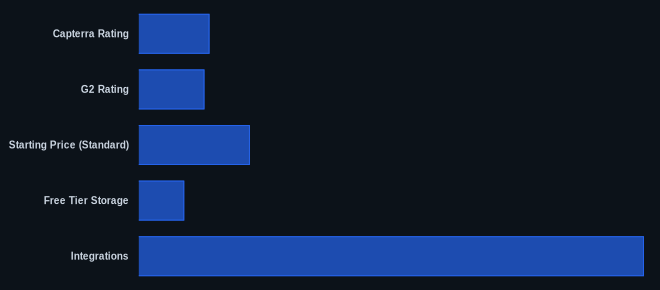
| Metric | Value | Source |
|---|---|---|
| Capterra Rating | 4.5/5 stars (21,693 reviews) | Capterra.com |
| G2 Rating | 4.4/5 stars (15,023 reviews) | G2.com |
| Starting Price (Standard) | $15/user/month (billed annually, min 3 users) | Dropbox.com |
| Free Tier Storage | 2 GB | Dropbox.com |
| Integrations | 300,000+ | Dropbox.com |
| Max File Size Upload | 2 TB | Dropbox.com |
Our Take
Dropbox has made a concerted effort to evolve beyond a simple sync tool, particularly with its investments in AI like Dash and Protect. But here's the kicker: despite sitting on a mountain of file data, it hasn't become the "agentic Glean-killer" many expected. The AI features are neat, but they still feel like an add-on rather than a fundamental reimagining of file management. It’s also clear the company is shifting its focus from pure user growth to increasing Average Revenue Per User (ARPU). This means we'll likely see more emphasis on selling advanced features like Dropbox Sign and Dash as separate, valuable components. Yes, it’s pricey compared to competitors bundled with productivity suites. But if your business workflow demands unparalleled file sync performance for large assets and solid admin controls, the platform still delivers. It’s a specialized tool, and that specialization comes at a cost, but one that’s justifiable for the right use case.
How much is your team paying for storage solutions that don't quite handle your large files?
FAQ
Is Dropbox Business worth the price compared to Google Drive or OneDrive?
For teams handling large files regularly, especially in creative or media industries, the superior sync performance and cross-platform compatibility of Dropbox Business can absolutely justify the higher price. If your team primarily works within Google Workspace or Microsoft 365 apps and mostly uses documents and spreadsheets, you'll likely find better value and integrated collaboration with Google Drive or OneDrive. It’s a direct trade-off between specialized file management excellence and bundled ecosystem value.
Can Dropbox Dash effectively replace dedicated universal search tools like Glean or Affinity?
Dropbox Dash is a strong step towards universal search, offering AI-powered summaries and answers across connected apps. However, it's still evolving. While it significantly improves finding information within your Dropbox and connected apps, it hasn't yet achieved the deep, agentic intelligence or comprehensive ecosystem reach of more established knowledge management solutions like Glean. For many SMBs, it’s a good starting point, but larger enterprises with complex knowledge bases might still need a dedicated enterprise search solution.
What are the main concerns I should have about Dropbox Business's security and privacy?
Dropbox Business generally offers solid security features, including end-to-end encryption, advanced key management on higher tiers, and granular admin controls. They also provide features like remote wipe and compliance tracking. However, no system is entirely foolproof. While they've addressed past security incidents, ensuring your team practices strong password hygiene and uses multi-factor authentication is crucial. For specialized data governance needs, remember that some features, like those offered by Egnyte, might be bundled at lower tiers elsewhere or require additional discussion (and cost) with Dropbox sales.
Sources:
- Dropbox Business Plans Comparison
- Capterra Dropbox Business Reviews
- Dropbox Release Notes
- Trustpilot Dropbox Reviews
- PCMag Dropbox Business Review
- G2 Dropbox Business Reviews