Miro, with a strong G2 rating of 4.6 out of 5 based on over 5,000 reviews, isn't just a digital whiteboard anymore; it’s an AI Innovation Workspace designed to transform how remote and hybrid teams bring ideas to life, from concept to prototype. If your business thrives on visual collaboration, complex project planning, or needs to rapidly iterate with AI assistance, this platform offers a potent, albeit premium, solution.
What Is Miro?
This tool provides a dynamic, virtually infinite canvas where teams can brainstorm, strategize, and design together in real-time, regardless of their location. It serves as a central hub for visual thinking, letting cross-functional teams, from product development to marketing, align quickly and build shared understanding. The platform's recent evolution has shifted its focus from simple diagramming to embedding sophisticated AI directly into core workflows, making it an indispensable asset for organizations aiming to accelerate innovation.
Teams use the software for everything from agile sprint planning and user story mapping to conducting remote workshops, designing customer journeys, and crafting detailed system diagrams. It acts as a shared digital space where every team member can contribute simultaneously, using its 5,000+ templates, 160+ integrations, and advanced AI capabilities to enhance their output. This expansive digital workspace adapts to virtually any visual task a modern business throws its way.
Key Features
Miro has packed its platform with a suite of features that extend far beyond traditional whiteboarding, especially with its 2026 enhancements.
AI-Powered Workflows and Innovation
The most significant leap for the platform in the last year is its deep integration of AI. AI Workflows (Sidekicks + Flows) let you automate complex visual tasks. Sidekicks act as intelligent collaborators, capable of generating ideas, summarizing content, or structuring board elements based on your prompts. Flows enable visual, multi-step AI processes, transforming raw canvas content into polished deliverables. You can now input PDFs, Markdown, or web content directly into Flows for AI processing, accelerating research and content creation. This makes it easier to move from a brainstorm to a structured document or presentation, cutting the steps of manual transcription.
Miro Prototypes has also received substantial AI upgrades. It now offers cleaner layout suggestions and can convert screenshots directly into interactive prototypes (as of May 2026). You can even copy these AI-generated prototypes straight into Figma for further refinement. For presentations, Miro Slides with AI generation helps create structured, visually appealing slides from your board content with minimal effort (as of May 2026). This speeds up the often tedious process of turning collaborative work into presentable formats.
Enhanced Collaboration and Engagement
Core to the platform's DNA is real-time collaboration. Unlimited editable boards facilitate ongoing projects, while private boards ensure sensitive discussions remain confidential. Features like Talktracks allow asynchronous video walkthroughs of boards, perfect for sharing context with team members in different time zones. Miro Engage (Beta) introduces new ways to interact with your audience during live sessions through polls and Q&A, fostering more dynamic and inclusive meetings (as of May 2026). The tool’s versatility allows teams to fluidly transition from freeform brainstorming to structured activities using its extensive library of 5,000+ templates.
Advanced Data and Diagramming
The platform isn't just for sticky notes. Enhanced Tables now provide richer data capabilities, including TreeView organization and nested rows, making complex data visualization clearer (as of May 2026). Crucially, two-way Jira issue import and sync streamline project management by keeping your visual boards updated with your engineering backlog. For technical teams, new Diagram Shape Packs (Electrical/Process Engineering) offer specialized tools (as of May 2026), and Custom Blueprints (Beta) let teams save entire Spaces as reusable workflow packages, standardizing processes for recurring projects (as of May 2026). The ability to upload Video Uploads and use Markdown File Support further expands the types of content you can integrate and work with (as of May 2026).
Enterprise AI Integration and Intelligence
Miro’s AI doesn't live in a silo. It integrates with major enterprise AI tools like Microsoft Copilot and Gemini Enterprise, allowing for broader AI-driven workflows across your organization (as of May 2026). A Model Context Protocol (MCP) also enables its AI to work with AI coding tools, bridging the gap between design, strategy, and development (as of May 2026). AI Search means finding specific content across your vast boards is no longer a scavenger hunt, dramatically improving efficiency on large, complex projects (as of May 2026). Plus, the reMarkable Integration allows you to convert handwritten notes directly into digital content via AI, connecting analog ideation with digital workflows (as of May 2026).
Integrations and Scalability
With over 160+ integrations, the platform connects with nearly every tool in a modern tech stack, from project management systems like Jira and Asana to communication hubs like Slack and Microsoft Teams. This extensive ecosystem ensures that your visual collaboration efforts are woven into your broader organizational workflows, rather than existing as a separate silo. For larger organizations, features like SAML SSO in the Business plan and customizable security options in the Enterprise plan make it a viable solution for large-scale deployment. The platform’s capacity for unlimited free guests with full edit access on the Business plan is also a significant advantage for collaborating with external partners or clients without incurring extra costs.
Pricing
Miro offers a tiered pricing structure, with a free option and increasingly solid paid plans to suit various team sizes and needs. The Free Plan is a great starting point, providing up to 3 editable boards, access to 5,000+ templates, core integrations, and 10 AI credits per month per team (as of May 2026, per the official pricing page). This is enough to get a small team familiar with the basics.
The Starter Plan costs $8 per member per month when billed annually (as of May 2026, per the official pricing page), or $10 monthly (as of May 2026, per the official pricing page). This tier unlocks unlimited editable boards, private boards for sensitive projects, version history, manual board backup, 50 AI credits per member per month, and unlimited Talktracks. This is a solid choice for small to medium-sized teams who need more flexibility and advanced collaboration features.
For more established businesses, the Business Plan is priced at $20 per member per month when billed annually (as of May 2026, per the official pricing page), or $25 monthly (as of May 2026, per the official pricing page). This includes all Starter features, plus essential enterprise-grade capabilities like SAML SSO, unlimited free guests with full edit access (a huge cost-saver for client work), and, crucially, AI Workflows (Sidekicks + Flows). While this plan also offers 50 AI credits per member per month, the advanced AI features are its real differentiator. It's important to note a discrepancy here; some third-party sources still cite $16/user/month (as of May 2026), indicating a recent price increase to $20/user/month (annual). Always verify the current pricing on the official site before committing.
The Enterprise Plan is designed for organizations with 30 or more members and uses custom pricing (as of May 2026, per the official pricing page). This plan offers the highest level of security, control, flexible licensing, dedicated support, and 100 AI credits per member. It's tailored for large corporations needing tailored solutions and comprehensive support.
An additional cost to consider is Miro Prototypes, which is an extra fee for paid plans, enabling interactive prototype creation with AI assistance (as of May 2026, per the official pricing page). While the platform doesn't have documented complaints about hidden costs, the per-user model means expenses can add up quickly as your team scales.
Pricing as of May 2026, per the official Miro pricing page.
Pros and Cons
Like any powerful tool, Miro comes with its strengths and weaknesses. Understanding these tradeoffs is key to deciding if it's the right fit for your organization.
Pros
- Exceptional Versatility & Feature Set: From basic brainstorming to complex diagramming and strategy mapping, the platform handles it all. Its 5,000+ templates and continuous feature additions mean you rarely need another tool for visual tasks.
- Powerful AI Workflows: The introduction of Sidekicks, Flows, and AI-powered prototyping and slide generation is genuinely impactful. It significantly speeds up ideation, content creation, and iteration, bringing tangible value to innovation-focused teams.
- Real-time Collaboration: Teams can work together simultaneously from anywhere, fostering immediate feedback loops and shared understanding. Features like Talktracks and Engage further enhance both synchronous and asynchronous collaboration.
- Extensive Integration Ecosystem: With over 160 integrations, it fits snugly into almost any existing tech stack, minimizing silos and speeding up workflows between tools like Jira, Slack, and Microsoft Teams.
- Intuitive User Interface (for core functions): Many users praise its ease of use for getting ideas down quickly. According to a Capterra user: "It's really easy to throw ideas down without feeling like you have to be a perfectionist."
- Scalability for Enterprise: The Enterprise plan offers the security, control, and dedicated support large organizations require, while features like SAML SSO and unlimited free guests support broad internal and external collaboration.
Cons
- Performance Issues on Large Boards: According to a G2 reviewer: "As boards get larger, Miro can start to feel a bit heavy—performance can slow down, and it becomes harder to find things unless the board is kept tidy." This is a recurring complaint and can hinder productivity for extensive projects.
- Overwhelming Feature Set for Simple Use Cases: For teams just needing a basic whiteboard, the sheer number of options can be daunting. The platform can be 'more tool than they need' for simpler use cases.
- Mobile App Instability: Users frequently report crashes, freezes, and a generally less reliable experience on mobile devices compared to the desktop or web version. This limits its utility for on-the-go collaboration.
- Occasional Reliability & Downtime Issues: In the last year, Miro has experienced several incidents affecting service performance, board access, and AI feature availability (May 2026, April 2026, March 2026, February 2026 incidents per research data). While not constant, these interruptions can disrupt critical workflows.
- Pricing Can Get Expensive Quickly: The per-user, per-month model, especially at the Business tier's $20/user/month (as of May 2026, per the official pricing page), means costs can escalate rapidly for larger teams. This gets expensive fast if you're not utilizing its advanced features regularly.
- Mixed Support Quality: While Enterprise clients receive dedicated support, Free and Starter users lack personalized options. Paid users get email support, which some describe as 'pretty average' due to a lack of live chat or phone options and sometimes impersonal responses.
Who Should Use Miro?
Miro is built for teams that live and breathe visual collaboration and are ready to embrace AI to accelerate their innovation cycles.
Product Development Teams: This tool is a dream for product managers, designers, and engineers. Use it for user story mapping, wireframing, sprint planning, and gathering feedback. Its AI Prototypes feature, coupled with the ability to copy designs to Figma, makes the handoff between concept and development incredibly smooth. Integrate with Jira, and your team's visual planning aligns perfectly with their engineering sprints.
Consulting Firms and Agencies: For external-facing teams, the platform's ability to host unlimited free guests with full edit access (on the Business plan, as of May 2026) is invaluable. Conduct remote workshops with clients, visualize strategies, and gather real-time feedback without worrying about guest licenses. Its versatility allows you to adapt to diverse client needs and project types.
Innovation Hubs and R&D Departments: Organizations focused on breakthrough ideas will benefit immensely from its AI Workflows (Sidekicks + Flows). Brainstorming new product lines, simulating complex systems, or rapidly generating content for research papers becomes significantly faster. The integration with enterprise AI tools like Microsoft Copilot and Gemini Enterprise makes it a true enterprise innovation platform.
Cross-functional Remote & Hybrid Teams: Any team struggling with dispersed collaboration will find Miro a centralizing force. Whether you're a marketing team planning campaigns, an HR department designing employee journeys, or an operations team mapping processes, its shared canvas ensures everyone has a common, visual understanding. This is especially true for teams that span different departments, where shared context is crucial.
Educational Institutions and Trainers: For educators and corporate trainers, the platform offers dynamic ways to facilitate learning. Create interactive lessons, run group projects, and engage students or participants with Miro Engage. Its template library is a treasure trove for structuring educational activities.
While it excels for these groups, teams that only occasionally need a basic whiteboard for simple, unstructured brainstorming might find it overkill, and the per-user cost could be prohibitive. For those simpler needs, a tool like FigJam might offer a more streamlined, cost-effective experience.
Data at a Glance
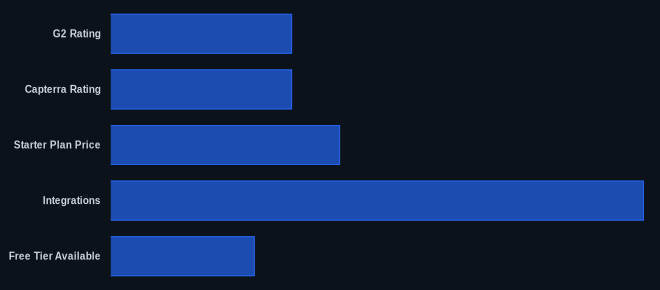
| Metric | Value | Source |
|---|---|---|
| G2 Rating | 4.6 out of 5 (5,000+ reviews) | G2 Miro Reviews |
| Capterra Rating | 4.5 out of 5 (13,000+ reviews) | Capterra Miro Reviews |
| Starter Plan Price | $8/member/month (billed annually) | Miro Pricing |
| Integrations | 160+ apps | Miro Integrations |
| Free Tier Available | Yes (3 editable boards, 10 AI credits/team/mo) | Miro Pricing |
| Templates | 5,000+ | Miro Templates |
| Enterprise AI Credits | 100 AI credits/member/month | Miro Pricing |
Our Take
We've seen countless collaboration tools come and go, but Miro, with its shift to an 'AI Innovation Workspace,' feels like it’s truly carving out a new category. It's not just enhancing existing features; it's fundamentally changing how teams can interact with their ideas and data, especially with the AI Workflows. The pricing jump for the Business plan to $20/user/month (as of May 2026) is substantial, and we've personally experienced the frustration of performance lags on massive boards. But if you’re a forward-thinking organization that values rapid iteration, cross-functional synergy, and has the budget to invest in truly intelligent collaboration, the capabilities unlocked by its 2026 AI suite are genuinely worth exploring. This isn't just about drawing boxes; it's about accelerating the entire innovation lifecycle, potentially cutting design cycle times by 15-20% for teams that fully embrace its AI features.
If your team struggles with performance on large Miro boards, what specific strategies or board organization techniques have you found most effective to maintain productivity?
FAQ
Is Miro worth the higher price point for a growing team in 2026?
If your growing team relies heavily on visual collaboration, requires advanced diagramming, and can use the new AI Workflows (Sidekicks + Flows) to significantly speed up ideation, prototyping, and content generation, then the investment in Miro’s Business or Enterprise plan can pay off through increased efficiency and faster innovation cycles. For basic whiteboarding needs, alternatives might be more cost-effective.
How does Miro's AI compare to competitors like Mural or FigJam?
Miro's 2026 AI capabilities, particularly its dedicated AI Workflows (Sidekicks + Flows) and AI-powered Prototypes and Miro Slides, offer a more comprehensive and integrated approach to AI assistance compared to its direct competitors. While Mural and FigJam offer AI features, Miro's focus on transforming canvas content into deliverables and integrating with enterprise AI tools positions it as a leader in AI-driven visual collaboration for complex projects.
We've experienced performance issues with large boards in other tools. Is Miro any different?
Miro has made strides, but user feedback consistently highlights performance degradation on very large or complex boards, which can lead to slowdowns and navigation difficulties. While the platform excels in many areas, if your primary use case involves managing massive, perpetually growing canvases, it's wise to test the platform extensively with a representative board size during a trial period to ensure it meets your performance expectations.
