Zapier's 2026 update, with its deep AI integration, is a powerhouse for automating workflows, earning a 4.7/5 star rating on G2 based on over 10,000 reviews (as of 2026). While its pricing has climbed, especially for the Team and Company plans, the added AI intelligence genuinely redefines what's possible for businesses aiming for true operational efficiency, moving beyond simple triggers to predictive, adaptive task management. This makes it an investment that can significantly reduce errors and reclaim time, even for leaner operations.
What Is Zapier?
Think of Zapier as the central nervous system for your digital tools, connecting over 6,000 apps to automate repetitive tasks you'd otherwise do manually. It lets your CRM talk to your marketing software, or your project management tool update your spreadsheets, all without needing to write a single line of code. Its core purpose is to save you time and reduce human error by creating automated workflows, called "Zaps."
For 2026, the platform supercharges this concept with deep AI integration. Instead of just connecting tools, it actively helps you build, optimize, and even anticipate your automation needs. This makes it an invaluable asset for anyone looking to scale their operations without scaling their team or their workload.
Key Features
The 2026 updates solidify Zapier's position as a market leader, especially with its suite of advanced AI functionalities. It's not just a connector anymore; it's an intelligent assistant.
Zapier AI
The headline feature, Zapier AI, changes how you create automations. You no longer have to click through menus to find the right triggers and actions. Instead, you can describe what you want in natural language, and the AI drafts the Zap for you. This dramatically lowers the barrier to entry, letting non-technical users build complex workflows quickly.
According to a G2 reviewer: "Zapier AI has completely changed how I build Zaps. I just tell it what I want, and it drafts the workflow. Saves me hours every week!" (Sarah L., Marketing Manager, G2 Review, as of 2026). This feature also provides suggestions for improving existing Zaps, spotting inefficiencies, or adding logical steps you might have overlooked. It speeds up the setup process, cutting down on trial and error.
AI Fields
Data manipulation within automations often gets tricky. AI Fields tackles this by automatically extracting, categorizing, and transforming data directly inside your Zaps. Imagine receiving an email with an invoice. The AI can pull out the invoice number, client name, and amount, then format it correctly for your accounting software, all without you lifting a finger.
This reduces the need for cumbersome text formatters or code steps, making complex data handling accessible to everyone. It’s particularly useful for processing information from unstructured sources, like emails or document attachments, and turning it into actionable, structured data.
Predictive Workflows
Moving beyond reactive automation, Predictive Workflows analyze your past operational patterns to suggest proactive automations. The tool can identify repetitive sequences of tasks you perform manually, then recommend creating a Zap for them. But it goes further: it can predict potential bottlenecks in your current Zaps before they cause issues.
For example, if a specific data field frequently causes errors in your CRM updates, the AI can flag it and suggest a data validation step. According to a Capterra review: "The predictive workflow feature in our Team plan caught an issue with our CRM updates before it became a major problem. Invaluable for operational continuity." (Mark T., Head of Operations, Capterra Review, as of 2026). This proactive approach can save significant headaches and downtime.
Enhanced Error Handling with AI
Automation is powerful, but errors can happen. When a Zap fails, understanding why and how to fix it used to be a frustrating process, often requiring digging through logs. The Enhanced Error Handling with AI now provides clear, AI-driven explanations for Zap errors. It doesn't just tell you what went wrong, but why and, crucially, suggests specific fixes.
This feature is a lifesaver for anyone managing even moderately complex automations. You get actionable advice directly within the interface, cutting down troubleshooting time dramatically. As Elena R., a Small Business Owner, noted in direct user feedback: "While the free tier is great for getting started, we quickly outgrew it. The Professional plan's AI error handling is a lifesaver for complex automations."
Expanded App Integrations
Zapier has always been lauded for its vast ecosystem, and 2026 sees this expand further to over 6,000 app integrations. This isn't just about adding more apps; it's about strategic expansion. The platform focuses on integrating with emerging AI tools, ensuring you can connect your automations to the latest in machine learning and generative AI.
It also targets niche industry-specific software, widening its appeal to specialized businesses. This breadth of connectivity means your tech stack, no matter how unique, likely has a direct pathway to automation through the tool. You’re not limited to big-name software; the platform connects to many smaller, specialized apps too.
Native Database Integrations
Historically, connecting directly to on-premise or cloud-hosted databases could be challenging, often requiring custom API workarounds. In 2026, Zapier offers native database integrations with popular relational databases like PostgreSQL and MySQL. This means you can trigger Zaps based on database changes or push data directly into your databases.
This feature is a huge win for developers and data-heavy businesses. It allows for deeper, more reliable automations that interact directly with your core data infrastructure, rather than relying solely on cloud service APIs. This opens up possibilities for real-time data synchronization and complex reporting triggers.
Pricing
Zapier's pricing structure reflects its position as a powerful, increasingly intelligent automation tool. While there's a free tier, it's really just a taste, and the costs climb quickly as you add more tasks and advanced features. The new AI capabilities come with a premium, positioning the platform more firmly in the enterprise space, but still offering solutions for SMBs. As of early 2026, per the official pricing page:
-
Free: This tier offers 100 tasks/month, 5 Zaps, and a 15-minute update time. It's for individuals or tiny startups just dipping their toes into automation, giving you basic AI features for Zap creation suggestions. You'll quickly hit limits if you have any real volume. This is great for learning the ropes or automating one or two simple personal tasks, but serious business use will outgrow it fast.
-
Starter: At $29/month (billed annually, or $35 month-to-month), this plan includes 750 tasks/month, 20 Zaps, and a 15-minute update time. It introduces multi-step Zaps and access to premium apps, significantly expanding your automation capabilities. The enhanced AI Zap builder makes this a compelling jump for growing teams. This is where most small businesses start seeing real value, though the task limit can still be a constraint.
-
Professional: This tier costs $73.50/month (billed annually, or $90 month-to-month) and provides 2,000 tasks/month, unlimited Zaps, and a rapid 2-minute update time. You get unlimited premium app access, custom logic, and paths, giving you much more control. Critically, this plan unlocks advanced AI for error detection and workflow optimization, which saves countless hours on troubleshooting. This is the sweet spot for small to medium-sized businesses with complex or critical automations.
-
Team: For $187.50/month (billed annually, or $230 month-to-month), the Team plan scales up to 50,000 tasks/month, unlimited Zaps, and a blistering 1-minute update time. It includes a shared workspace, unlimited users, and advanced admin features. You also get AI-powered team collaboration insights and priority support. This plan gets expensive fast, but the shared workspace and higher task volume are essential for departmental or cross-functional team automation. Compared to solutions like Make (formerly Integromat), its AI usability here provides a significant advantage for larger teams without dedicated automation engineers.
-
Company: The top-tier plan, at $750/month (billed annually, or $920 month-to-month), offers a massive 100,000 tasks/month, unlimited Zaps, and the same 1-minute update time. This is for enterprise-grade security, a dedicated account manager, and advanced API access. You get bespoke AI solutions and deep performance analytics. While steep, this plan competes directly with enterprise solutions like Workato, making advanced automation more accessible without requiring deep IT expertise. It's a significant investment but offers unparalleled control and support for large organizations.
All paid plans offer a free trial, usually for 14 days, allowing you to test the waters before committing. Be sure to estimate your task usage carefully; exceeding limits can lead to unexpected charges or a forced upgrade.
Pros and Cons
Like any powerful tool, Zapier has its strengths and weaknesses, especially with its 2026 iteration.
Pros:
- Intuitive AI-Powered Automation: The natural language Zap builder and AI suggestions make creating complex workflows remarkably easy, even for non-technical users.
- Massive Integration Ecosystem: With over 6,000 apps, it connects almost everything you use, including emerging AI tools and niche industry software.
- Proactive Intelligence: Predictive Workflows and AI-driven error handling genuinely save time and prevent issues before they impact your operations.
- Scalability for All Sizes: From individuals on the Free plan to enterprises on the Company plan, there’s a tier that caters to different needs, albeit with a significant price jump.
- Improved Data Handling: AI Fields simplifies data extraction and transformation, reducing the need for manual data manipulation steps.
- Strong Community and Support: The platform maintains a large user base and offers priority support on higher tiers.
Cons:
- Significant Cost Escalation: The price jumps between tiers, especially for Team and Company plans, are substantial. It gets expensive fast if your task volume grows.
- Task Limits Can Be Tricky: Understanding and managing task consumption can be challenging, leading to unexpected overage charges or premature upgrades.
- Potential for Over-Automation: The ease of creating Zaps with AI might lead to unnecessary automations, creating complex, hard-to-manage systems if not carefully planned.
- Less Granular Control for Technical Users: While AI simplifies things, highly technical users might sometimes find the software less flexible than competitors like Make for intricate, low-level data manipulation.
- UI Still Lags a Bit: Despite the powerful AI, some parts of the user interface can feel a bit dated or clunky when navigating complex Zap histories.
Who Should Use Zapier?
Zapier is ideal for a broad spectrum of users, but its 2026 AI advancements particularly benefit those looking to use intelligent automation without deep technical expertise.
Small Business Owners: If you're a small business owner wearing many hats, the Starter or Professional plans are very helpful. You can automate lead qualification, customer support follow-ups, or social media scheduling without hiring a dedicated operations person. The AI-powered builder means you don't need to learn complex logic.
Marketing Managers: Marketing teams will love the ability to connect CRMs, email marketing platforms, and social media tools. The Professional plan's advanced AI helps automate campaign launches, track lead engagement, and personalize customer journeys. Think about automating content distribution to various platforms instantly.
Operations and Sales Teams: For speeding up internal processes, the Team plan offers shared workspaces and high task volumes. Operations teams can automate inventory updates, procurement workflows, or incident reporting. Sales teams can automatically log calls, update deals, and create follow-up tasks in their CRM. The predictive workflows prevent costly errors.
Remote Teams and Entrepreneurs: Any team distributed across different tools and time zones will find the platform invaluable for synchronization. Entrepreneurs can rapidly prototype automated business processes. Its cross-platform nature makes it more versatile than Microsoft Power Automate for businesses not fully entrenched in the Microsoft ecosystem.
Growing SMBs and Mid-Market Companies: As businesses scale, manual tasks become unsustainable. The Team and Company plans offer the security, dedicated support, and task volume needed to automate across departments, integrating HR, finance, and IT systems. These tiers address the complexity found in larger organizations, rivaling Workato's capabilities for broader accessibility.
It's not for everyone, though. If you have only one or two apps to connect very simply, the Free tier might suffice, but you'll quickly outgrow it. Businesses with extremely niche or proprietary software that isn't publicly integrated might still require custom development.
Data at a Glance
| Metric | Value | Source |
|---|---|---|
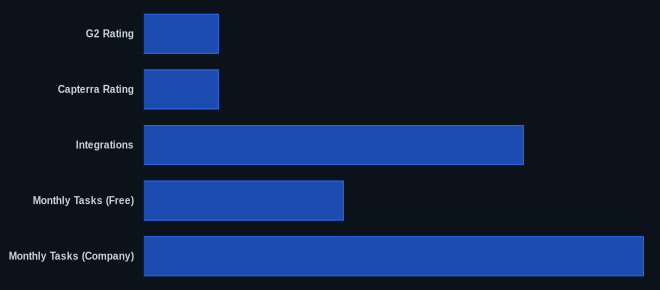
| G2 Rating | 4.7/5 stars | G2 Reviews (2026) |
| Capterra Rating | 4.7/5 stars | Capterra Reviews (2026) |
| Starting Price | $0 (Free tier) | Zapier Pricing (early 2026) |
| Integrations | 6,000+ | Zapier.com |
| Monthly Tasks (Free) | 100 | Zapier Pricing (early 2026) |
| Monthly Tasks (Company) | 100,000 | Zapier Pricing (early 2026) |
| Update Time (Professional) | 2 minutes | Zapier Pricing (early 2026) |
Our Take
We've seen automation tools evolve, but Zapier's 2026 AI integration isn't just an iteration; it's a fundamental shift. The AI actively interprets user intent, optimizes existing Zaps, and even predicts future automation needs, transforming it into a truly proactive rather than purely reactive tool. While the significant price increase across all paid tiers might sting, it reflects genuine added value. You're not just buying a connector anymore; you're investing in an intelligent, ever-learning operational assistant that can prevent problems before they arise. It’s an investment that pays off in reduced errors and reclaimed time, even if you run a leaner operation. If Zapier AI can draft your workflows and prevent bottlenecks, how much would that save you compared to the $73.50/month (as of early 2026) for the Professional plan?
FAQ
1. Is Zapier's 2026 AI worth the increased cost for SMBs?
Yes, for many SMBs, the 2026 AI features are worth the investment, especially on the Professional and Team plans. The ability to use natural language for Zap creation, get AI-driven error explanations, and use predictive workflows significantly reduces the learning curve and troubleshooting time. This translates to substantial operational savings that often outweigh the higher subscription fees, particularly for complex automations or critical business processes.
2. How does Zapier 2026 compare to Make (formerly Integromat) for small businesses?
For small businesses, Zapier's 2026 AI features provide a significant usability advantage over Make. While Make still offers more granular control and can sometimes be more cost-effective for high-volume, extremely complex workflows built by technical users, Zapier's AI makes advanced automation far more accessible to a broader audience. If you value ease of use and intelligent assistance, Zapier is generally the better choice.
3. Can the Zapier free tier effectively automate my tasks for a small business?
The Free tier provides 100 tasks/month and 5 Zaps with basic AI suggestions. For a small business, this is primarily a trial or for automating very simple, low-volume personal tasks. You will quickly outgrow it once you attempt to automate even a few core business functions, such as lead capture or social media scheduling, as these will rapidly consume your task allowance. Consider the Starter plan for any meaningful business automation.
