monday.com’s Standard Work Management plan costs $36/month (annually, for 3 seats, as of May 2026), making it a significant investment for small to medium-sized businesses. This review focuses on monday.com's aggressive positioning as an AI-powered work platform in 2026. It’s for operations managers, team leads, and entrepreneurs who need solid visual work tracking and practical AI integration to cut down on manual tasks and scale efficiently.
What Is monday.com?
At its core, monday.com is a Work Operating System (Work OS) that manages diverse projects and processes across departments. It allows teams to build custom workflows, track progress visually, and centralize communication. Unlike general project management tools, the platform focuses on adaptability, letting you tailor boards, dashboards, and automations to fit almost any use case, from marketing campaigns to software development sprints, or even complex sales pipelines.
The software is built for teams who need more than a simple task list. It thrives when visual clarity is paramount and when you need the flexibility to connect disparate workstreams. Its recent advancements in AI are transforming it into a proactive partner for businesses aiming to optimize operational efficiency.
Key Features
monday.com’s strength lies in its modularity and visual appeal, now significantly enhanced by its AI capabilities. These features combine to offer a solution for managing work.
Visual Workflows and Customization
The platform’s signature boards are intuitive, using color-coding and customizable columns to represent tasks, statuses, timelines, and more. You can choose from Kanban, Gantt charts, Timeline, and Calendar views to visualize your work exactly how you need it. This flexibility helps teams quickly understand project status and bottlenecks, a major praise point among users. According to a G2 user: "monday.com's visual interface makes it incredibly easy to see where everything stands at a glance, and the customization options mean we can tailor it exactly to our team's needs."
Dashboards aggregate data from multiple boards, providing a high-level overview of projects, team workloads, and key performance indicators. This makes reporting straightforward, letting leadership monitor progress without diving into individual tasks. The customizability extends to almost every element, allowing you to build specific solutions for unique team requirements.
AI-Powered Automations and Agents
monday.com truly distinguishes itself in 2026 through its AI capabilities. The platform's recent focus on AI isn't just about adding buzzwords; it's about embedding practical, workflow-enhancing intelligence. The core of this initiative includes monday Sidekick and "Call My Agent" automation blocks.
Sidekick allows users to build complex automations using natural language prompts. Instead of configuring intricate rules manually, you can simply tell Sidekick what you want to happen ("When a task is marked 'Done,' notify the client and move it to the 'Review' board"). This significantly lowers the barrier to entry for powerful automation. A Reddit user highlights this: "The automation capabilities have been a game-changer for us, eliminating so much repetitive manual work."
The "Call My Agent" block takes this further by introducing AI agents directly into workflows. These agents perform decision-based tasks, summarize conversations, flag risks, or enrich data based on specific conditions within a workflow. This isn't just about simple IF/THEN rules; it's about dynamic, intelligent actions that adapt to your data. For example, a "Lead Agent" in monday CRM automatically analyzes incoming leads, prioritizes them based on engagement, and suggests the next best action, cutting manual lead qualification time. AI Columns within templates and AI branding for WorkForms further embed this intelligence across the product suite.
Integrations and Ecosystem
The platform boasts a marketplace with hundreds of integrations, connecting it to tools like Slack, Zoom, Google Drive, Salesforce, and many more. This ensures your work OS doesn't operate in a silo. The solid API and developer tools also allow for custom integrations and marketplace app development, making it highly extensible.
While powerful, these integrations, along with automations, are subject to action limits on lower-tier plans. Exceeding these limits often pushes users to higher, more expensive tiers, a common complaint for growing teams.
Specialized Products
Beyond general Work Management, monday.com offers tailored products for specific business functions:
- monday CRM: Manages sales pipelines, client data, and customer interactions.
- monday Dev: Optimizes software development workflows, issue tracking, and sprint planning.
- monday Service: Speeds up customer support, ticketing, and service requests.
These specialized offerings ensure that while the core platform is flexible, specific industry needs are met with dedicated features and templates.
Pricing
monday.com’s pricing structure is multifaceted, varying by product, plan, number of seats, and billing cycle. They strongly encourage annual billing, offering an 18% discount over monthly payments. A significant change as of May 2026 is the introduction of AI credits, billed separately.
As of May 2026, per the official pricing page, these are the details:
Free Plan (monday Work Management only)
- Up to 2 users.
- Includes 3 boards, unlimited documents, 500 MB storage, and a 1-week activity log.
- This plan is for individuals or very small teams to get a feel for the platform, but it’s limited for serious use.
Paid Plans (minimum 3 seats required for all paid plans)
The 3-seat minimum for all paid plans is a recurring complaint, often forcing smaller teams to pay for unused seats. An App Store user pointed out: "The pricing structure, especially the minimum 3-seat requirement for paid plans, feels a bit misleading and can get expensive for smaller teams."
monday Work Management (and monday dev) – 3 Seats
- Basic Plan:
- ~$12/seat/month (monthly, $36 total, as of May 2026, per the official pricing page).
- ~$9/seat/month (annual, $27 total or $324/year, as of May 2026, per the official pricing page).
- Includes unlimited items/storage/boards/documents, 5 GB storage, and a 1-year activity log.
- Crucially, this plan offers no automations or integrations, severely limiting its utility for modern teams.
- Standard Plan:
- ~$14/seat/month (monthly, $42 total + AI credits, as of May 2026, per the official pricing page).
- ~$12/seat/month (annual, $36 total or $432/year + AI credits, as of May 2026, per the official pricing page).
- Adds Timeline/Gantt/Calendar views, guest access, 250 automation actions/month, and 250 integration actions/month.
- This is typically the entry point for teams needing core project management features and some basic automation.
- Pro Plan:
- ~$24/seat/month (monthly, $72 total + AI credits, as of May 2026, per the official pricing page).
- ~$19/seat/month (annual, $57 total or $684/year + AI credits, as of May 2026, per the official pricing page).
- Includes private boards/docs, chart view, time tracking, formula/dependency columns, 25,000 automation actions/month, and 25,000 integration actions/month.
- This is where the platform truly unlocks its power for medium to large teams.
- Enterprise Plan:
- Custom pricing, requiring direct contact with sales.
- Offers advanced permissions, security, single sign-on (SSO), and dedicated enterprise support.
monday CRM – Annual Billing (no free plan, 14-day free trial)
- Basic CRM: ~$12/user/month (annual, as of May 2026, per the official pricing page).
- Standard CRM: ~$17/user/month (annual, as of May 2026, per the official pricing page).
- Pro CRM: ~$28/user/month (annual, as of May 2026, per the official pricing page).
- Ultimate Plan (formerly Enterprise): Custom pricing (as of May 2026, per the official pricing page).
monday service – 3 Seats (no Basic or Free plan, 14-day free trial)
- Standard Plan:
- ~$31/seat/month (monthly, as of May 2026, per the official pricing page).
- ~$12/seat/month (annually, as of May 2026, per the official pricing page).
- Pro Plan:
- ~$45/seat/month (monthly, as of May 2026, per the official pricing page).
- ~$20/seat/month (annually, as of May 2026, per the official pricing page).
- Enterprise Plan: Custom pricing (as of May 2026, per the official pricing page).
AI Credits
As of May 2026, AI credits are an add-on cost for Standard and Pro plans:
- $0.01 per credit for yearly plans (as of May 2026, per the official pricing page).
- $0.0125 per credit for monthly plans (as of May 2026, per the official pricing page).
This can add up, especially if you heavily use AI automation with Sidekick and 'Call My Agent.'
Hidden Costs/Add-ons
- Seat Blocks: The 3-seat minimum for paid plans can be a significant hidden cost for teams of one or two.
- Automation/Integration Limits: Lower tiers severely limit actions, pushing users to upgrade quickly if automation is a priority.
- Feature Gates: Many core features (like time tracking or private boards) are only available in higher-priced tiers.
- Sales Tax and VAT: These are often added on top of advertised prices.
The last official change to the pricing structure occurred in 2023, but the introduction of AI credits in 2026 represents a notable shift in cost components.
Pros and Cons
Choosing a Work OS means weighing powerful features against practical considerations like cost and complexity.
Pros
- Intuitive and Visually Appealing Interface: Users consistently praise its clean, colorful design which makes tracking progress easy at a glance. It's a significant upgrade for teams moving from simpler tools like Trello.
- High Customizability and Flexibility: The platform can be adapted to almost any workflow or industry. You build your own boards, columns, and dashboards to fit unique team needs, making the tool more flexible than rigid project management tools.
- Powerful AI-Driven Automations and Agents: Features like Sidekick and "Call My Agent" move monday.com beyond simple automation. They allow natural language automation building and decision-based workflows, saving significant manual effort and making operations smarter.
- Scalability for Larger Organizations: The Enterprise plans and advanced features like SSO and solid permissions make it suitable for companies scaling up, offering a centralized system for multiple departments.
- Solid Reporting and Dashboards: Easily visualize data from multiple projects, giving managers and stakeholders clear insights into progress, bottlenecks, and team performance.
- Dedicated Products for Specific Needs: Having specialized versions for CRM, Dev, and Service means businesses don't need to cobble together multiple tools for core functions.
Cons
- Confusing and Expensive Pricing Model: The 3-seat minimum for paid plans and the tier-based feature gating make the platform pricey for small teams. AI credits are a new additional cost. This gets expensive fast, especially if you’re paying monthly.
- Steep Learning Curve for Advanced Features: While the basics are easy, unlocking the full potential with complex automations, formulas, and deep integrations requires a significant time investment. It’s not a tool you can master in an afternoon.
- Limitations in Lower-Tier Plans: Critical features like automations, integrations, and time tracking are severely limited or absent in Basic and Standard plans, forcing upgrades sooner than expected.
- Occasional Reliability/Downtime Issues: Recent incidents (like a 29-minute outage on January 5, 2026, and connectivity issues in December 2025) indicate that while generally stable, service interruptions can occur.
- Mobile App Lacks Desktop Flexibility: While good for quick updates, the mobile app doesn't offer the same depth of customization and filtering as the desktop version, which can be frustrating for remote workers on the go.
- Staff Resistance to Automation: One Redditor noted internal resistance because the tool makes "slacking harder," highlighting a human adoption challenge that even powerful AI can't entirely solve.
Who Should Use monday.com?
monday.com is best suited for organizations that need a highly visual, customizable, and increasingly intelligent platform to manage their work.
- Growing SMBs and Mid-Market Teams: If you have 5+ team members and are looking to consolidate various projects (marketing, IT, sales, operations) into one flexible system, this platform is ideal. Its scalability ensures it grows with you.
- Remote and Hybrid Teams: The visual nature and solid communication features help bridge the distance, keeping everyone aligned regardless of location. The focus on asynchronous updates through boards and documents is a big win.
- Teams with Repetitive Workflows: If your team spends a lot of time on manual tasks that could be automated, the advanced AI automations (Sidekick, 'Call My Agent') are a strong draw. This is for operations managers desperate to speed up processes.
- Businesses Prioritizing Visual Clarity: Industries that rely heavily on visual project tracking, like creative agencies, event planning, or construction, will find the colorful boards and diverse views extremely beneficial.
- Organizations Outgrowing Simpler Tools: If you've hit the limits of tools like Trello or even Asana's basic task management and need more advanced customization, reporting, and integrated AI, monday.com is a powerful next step.
It's not for solo entrepreneurs or very small teams on a shoestring budget, given the 3-seat minimum and tier-based pricing. Similarly, if your primary need is deep, complex document or knowledge management, a tool like Notion might be a better fit.
Data at a Glance
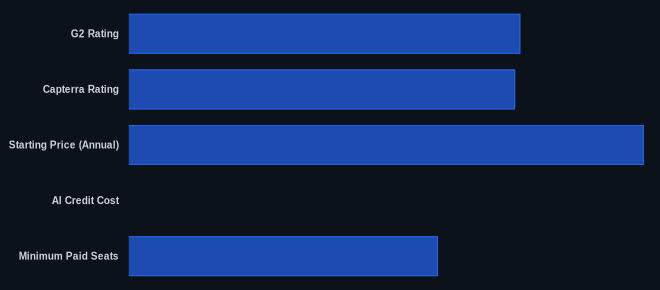
| Metric | Value | Source |
|---|---|---|
| G2 Rating | 4.7/5 stars | G2 monday.com Reviews |
| Capterra Rating | 4.6/5 stars | Capterra monday.com Reviews |
| Starting Price (Annual) | $9/seat/month | monday.com Pricing (Basic Work Management, as of May 2026) |
| Free Tier Available | Yes | monday.com Pricing (Work Management only, up to 2 users) |
| AI Credit Cost | $0.01/credit | monday.com Pricing (Yearly plans, as of May 2026) |
| Minimum Paid Seats | 3 | monday.com Pricing |
| Recent Outage (Jan 2026) | 29 minutes | monday.com |
Our Take
monday.com has moved beyond simply listing features to actively integrating intelligent agents and natural language processing into its core workflow. Sidekick and 'Call My Agent' aren't just parlor tricks; they represent a significant step towards truly smart automation that business owners can practically implement, potentially cutting manual work by a substantial amount (as seen in user testimonials). Yes, it's pricey, and the 3-seat minimum can be a hurdle for nascent teams. But if you’re running an operation with complex, repetitive tasks and you’re serious about investing in a system that can evolve with your needs, the efficiency gains from these AI tools could easily justify the cost. It’s a trade-off: higher investment for higher, more intelligent automation.
If you're considering monday.com, have you calculated how many manual hours per week its AI features could realistically save your team, and how that translates into ROI compared to its 3-seat minimum pricing?
FAQ
Is monday.com a good option for small teams or solo users?
While monday.com offers a free plan for up to two users, its paid plans require a minimum of three seats. This can make it an expensive choice for true small teams (1-2 people) or solo users, as you’ll be paying for unused seats. If you're running a very lean operation or are a freelancer, you might find more cost-effective solutions like ClickUp or even simpler tools initially.
How does monday.com's AI compare to other project management tools?
monday.com’s AI, particularly with features like Sidekick for natural language automation building and "Call My Agent" for decision-based workflows, aims to be more practically useful than some competitors' AI implementations. While many tools offer AI for task generation or summaries, monday.com focuses on giving users the ability to build and deploy intelligent automation agents directly within their operational workflows, making it a stronger contender for actionable AI.
What are the main downsides of using monday.com?
The most common complaints revolve around its pricing structure, especially the mandatory 3-seat minimum for paid plans, which can feel expensive for smaller teams. There's also a learning curve for truly using its advanced features and complex automations. Additionally, critical features like solid automations and integrations are often gated behind higher-tier plans, which can lead to unexpected upgrade costs.
