ClickUp delivers an incredibly feature-rich, customizable platform that aims to consolidate every tool your team uses, but its powerful AI capabilities come with a separate, significant per-user cost, making your total expenses less predictable than its base plans suggest. The 'Free Forever' plan (as of May 2026, per the official pricing page) is remarkably capable, often outperforming competitors' entry-level paid offerings. This tool is for entrepreneurs, remote teams, and SMBs looking to ditch multiple apps for a single, centralized workspace, provided they're willing to invest time upfront in configuration and expect an evolving pricing structure.
What Is ClickUp?
ClickUp positions itself as the ultimate all-in-one work management app, designed to bring tasks, documents, communication, and project management into a unified hub. It's built for teams tired of context-switching between different applications for daily operations. From task tracking and goal setting to sprint management and collaborative docs, the platform adapts to virtually any workflow, whether you're a small startup or a large enterprise. The goal is to make every team more productive by providing one place to plan, organize, and collaborate.
Key Features
The platform's strength lies in its expansive feature set, allowing for deep customization that can cater to nearly any operational need. This flexibility also contributes to its complexity.
Core Project & Task Management
The software's task management capabilities are solid. You can create custom workflows that mirror your team's specific processes, moving tasks through various stages like "To Do," "In Progress," and "Done." It offers a range of views, including Kanban boards, Gantt charts, sprint management, and calendar view, helping teams visualize work in the way that makes the most sense for them. You get unlimited tasks and members even on the free plan (as of May 2026, per the official pricing page).
For complex projects, the platform supports subtasks in multiple lists, allowing granular breakdown of work. Custom fields help you track specific data points relevant to your business, from client IDs to project priorities. The Goals & Portfolio feature helps you align daily work with broader objectives, giving a clear picture of overall progress. A G2 reviewer noted, "The ability to create custom workflows and views to match our workflow has been a great benefit for my IT department. The flexibility in organizing tasks and milestones helps us stay on track, particularly with complex projects."
Collaboration & Communication
Bringing teams together is a core tenet of ClickUp. It includes collaborative docs where teams can co-create and edit documents in real-time, eliminating the need for separate word processors. You can record in-app videos directly from tasks, adding context or instructions quickly. Guest access is available in paid plans, making it easy to share specific projects or tasks with clients or external stakeholders without giving them full workspace access.
For internal communication, the software offers chat functionalities tied directly to tasks or projects. While the free plan includes basic communication, unlimited message history and private docs become available in higher tiers, ensuring comprehensive records for mid-sized teams.
Automation & Integration
ClickUp aims to reduce manual work through extensive automation capabilities. Its automation upgrades in October 2025 brought expanded triggers and actions, letting you automate repetitive tasks like changing a status when a comment is added or assigning a task when a new project is created. In April 2026, Google Drive automations were added, allowing you to create Drive folders or documents directly from tasks and receive notifications.
It also boasts an impressive list of integrations, supporting over 1,000 apps as of 2026. This includes native integrations with tools like Slack, allowing you to manage notifications and even create tasks from Slack messages. The platform also offers a dedicated import tool for competitors like monday.com, simplifying migration.
AI & Productivity with ClickUp Brain
ClickUp has made a significant push into artificial intelligence, rebranding its AI as ClickUp Brain in early 2024 and continually expanding its capabilities. This suite of features enhances productivity and automates more complex tasks.
Key Brain AI features include the Brain Assistant for answering questions about your workspace, @Brain Agent for task execution, AI chat (using models like Claude, ChatGPT, Gemini), and unlimited AI writing for content generation. For enterprise users, it even offers Enterprise Search across the entire workspace.
Newer AI additions, many part of the Everything AI package, include Super Agents, described as "human-like AI agents" for workflow automation. The AI Notetaker now joins any meeting via a shared link, providing summaries and transcripts (as of May 2026). In February 2026, AI auto-classification for task types was introduced, automatically categorizing your work. The Brain AI on Mobile update in May 2026 brought full AI functionality to the mobile app, including talk-to-text. You can even access your ClickUp data directly from the ChatGPT App Store (as of May 2026).
Platform Overhaul and Performance
Between December 2025 and March 2026, ClickUp underwent a major redesign with ClickUp 4.0. This overhaul introduced a converged workspace, a single sidebar for easier navigation, and a rebuilt Home experience. These changes were mandatory by March 2026, aiming to speed up the user interface and address some of the complexity complaints. Alongside this, the company reported 40% faster load times for large workspaces and reduced lag, with a completely overhauled mobile app for improved performance (as of 2026).
Pricing
ClickUp offers a generous free tier alongside several paid plans, with a notable distinction: its core features are competitively priced, but the advanced AI capabilities come at a separate, significant cost. All paid plans are priced lower when billed annually.
As of January 2026, per the official ClickUp pricing page:
-
Free Forever Plan:
- Cost: $0 (as of May 2026, per the official pricing page)
- Includes: 60 MB storage, unlimited tasks, unlimited members, 2FA, collaborative docs, Kanban, sprint management, calendar view, basic custom fields, in-app video recording, 24/7 support. Also includes 100 automations per month (up from 50 in previous years).
- Best for: Individuals or very small teams managing personal tasks or experimenting with the platform. It's surprisingly capable for a free offering.
-
Unlimited Plan:
- Cost: $7 per user/month (billed annually); $10 per user/month (billed monthly).
- Includes: Everything in Free Forever, plus unlimited storage, unlimited spaces/folders/forms, Gantt charts, integrations, native time tracking, goals & portfolio, unlimited custom views, timesheets, and guest access.
- Best for: Small teams (2-10 people) who need more storage, advanced views, and the ability to track time and goals.
-
Business Plan:
- Cost: $12 per user/month (billed annually); $19 per user/month (billed monthly).
- Includes: Everything in Unlimited, plus unlimited dashboards with advanced cards, unlimited message history, private docs, sprint reporting, all dashboard views, Google SSO, unlimited teams, custom exporting, advanced public sharing, and increased automation actions (25,000 per month).
- Best for: Mid-sized teams (10-50 people) needing advanced reporting, security features, and higher automation limits. Vendr data suggests larger teams can often negotiate 15-25% discounts on this tier.
-
Business Plus Plan:
- Cost: $19 per user/month (billed annually); $29 per user/month (billed monthly).
- Includes: Everything in Business, plus subtasks in multiple lists, custom capacity in workload view, custom role creation, increased automation (50,000 actions per month), and team sharing.
- Best for: Growing mid-to-large teams (50+ people) with complex organizational structures and advanced workload management needs.
-
Enterprise Plan:
- Cost: Custom pricing; requires contacting sales.
- Includes: Everything in Business Plus, plus enterprise permissions and governance, unlimited custom roles, advanced SSO options, white labeling, enterprise API, default personal views, MSA & HIPAA availability, guided onboarding, and a dedicated success manager.
- Best for: Large organizations with strict security, compliance, and custom integration requirements.
The Hidden Cost: AI Features as Add-ons
This is where the pricing model gets tricky. Despite ClickUp's heavy emphasis on AI, these features are not bundled into the core paid plans. They are separate add-ons, significantly increasing the per-user cost for teams that want to use them.
-
Brain AI Add-on:
- Cost: $9 per user/month (billed annually).
- Includes: Unlimited Brain Assistant, @Brain Agent, AI chat (Claude, ChatGPT, Gemini), expanded use of premium AI models, unlimited AI writing, and Enterprise Search for your workspace.
- Consideration: This is a mandatory add-on if you want to use the core AI writing and assistant features.
-
Everything AI Add-on:
- Cost: $28 per user/month (as of May 2026, per the official pricing page).
- Includes: Unlimited ambient answers, unlimited AI notetaker, unlimited image generation, unlimited AI fields, unlimited AI automations & dashboards, unlimited AI assign & prioritize, and 3x more usage of Super Agents.
- Consideration: This tier essentially provides full access to the platform's advanced AI capabilities, but at a premium. A team of 10 users on the Business plan would pay $120/month for the core software, but an additional $280/month to access "Everything AI," more than tripling their monthly software expense. This gets expensive fast.
The pricing for 2026 remains stable from late 2025, but the fact that AI is always an extra per-user cost means your perceived value of the base plans might change once you factor in the AI functionality.
Pros and Cons
Choosing a platform like this is about balancing its incredible power with its potential pitfalls.
Pros
- Feature-Rich and Highly Flexible: The sheer number of features and customization options is unparalleled. You can truly adapt it to almost any workflow. From Gantt charts to sprint management, it has it all. "Before using ClickUp, managing tasks, notes, deadlines, and project updates across different tools was difficult… ClickUp helped bring everything into a single workspace," a project manager stated on Capterra.
- All-in-One Platform/Consolidation: It excels at bringing tasks, docs, chat, time tracking, and project management under one roof. This significantly reduces "app-switching" and helps keep everyone on the same page. You can genuinely replace several individual tools.
- Generous Free Plan: The "Free Forever" plan is one of the most capable in the industry. With unlimited users and tasks, it's a solid option for personal use or for small teams getting started, offering more than many competitors' paid entry-level plans.
- No Seat Minimums: Unlike some enterprise solutions, you can start with a single user or a small duo without being forced into expensive minimum seat counts, making it accessible for very small businesses.
- Performance Improvements: While historical complaints about speed are valid, the 2026 updates claim 40% faster load times for large workspaces and a much-improved mobile app.
Cons
- Steep Learning Curve/Overwhelming Complexity: This is the most consistent complaint. The vast feature set and deep customization can feel overwhelming, leading to "click fatigue." Setting it up correctly takes significant time and effort. According to a Product Manager: "I feel insecure when I use ClickUp… I still feel that I don't have control over it."
- Performance Issues (Persist for Large Workspaces): Despite recent improvements, reports of lagging and freezing, especially with thousands of tasks or very active workspaces, still surface. While better, it may not be as snappy as simpler alternatives like Asana or Basecamp.
- AI Features as a Separate, Significant Cost: The biggest point of contention. The core AI features are not included in the base paid plans, adding a substantial $9 to $28 per user/month (as of May 2026, per the official pricing page). This can quickly inflate costs and contradicts the "all-in-one" value proposition for users who expect AI to be integrated.
- Inconsistent Support Quality for Complex Issues: While 24/7 chat support for basic queries is quick (average 5-minute response in 2026), users report that complex technical bugs or unresolved issues can drag on for months, leaving paying customers frustrated. There is no phone support.
- Mobile Experience Still Evolving: While overhauled, some competitors like Asana and Trello often offer a more polished and intuitive mobile app experience, which can be critical for on-the-go teams.
Who Should Use ClickUp?
ClickUp is ideal for several distinct user groups, particularly those who are currently suffering from "app sprawl."
- Teams struggling with tool consolidation: If your team juggles tasks in Trello, documents in Notion, communication in Slack, and time tracking in another tool, this platform is built to bring all of that under one roof. It's a strong choice for businesses seeking to reduce software subscriptions and simplify their tech stack.
- SMBs and growing teams needing deep customization: Companies with unique workflows that standard project management tools can't handle will appreciate the platform's flexibility. If you need custom fields, statuses, views, and automation logic tailored precisely to your operations, this tool delivers.
- Entrepreneurs and small teams looking for a powerful free option (with caveats): The free plan is incredibly generous. It's perfect for individuals or tiny teams who need more than a basic to-do list but aren't ready to commit financially. However, be aware that you'll quickly hit storage and automation limits, and AI features are off-limits without paying.
- Users migrating from more expensive, less flexible tools: Many users switch to the platform from tools like Asana, monday.com, Jira, and Wrike because it offers comparable or even superior functionality at a lower base cost.
Conversely, it's probably not the right fit for:
- Teams that prioritize extreme simplicity and a minimalist interface (e.g., Basecamp users).
- Anyone on a very tight budget where AI features are a necessity, as the add-on costs can be a dealbreaker.
- Teams where performance and speed for extremely large workspaces are the absolute top priority, as lingering lag reports exist.
Data at a Glance
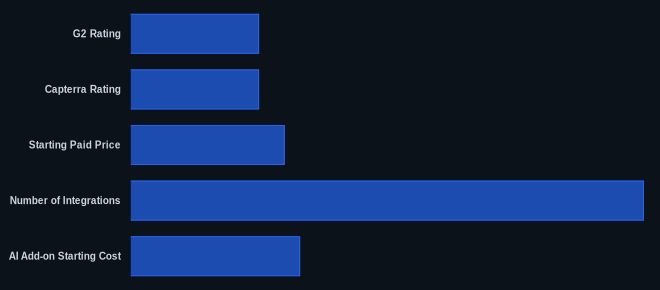
| Metric | Value | Source |
|---|---|---|
| G2 Rating | 4.7/5 stars | G2.com ClickUp Reviews |
| Capterra Rating | 4.6/5 stars | Capterra ClickUp Reviews (as of January 26, 2026) |
| Starting Paid Price | $7/user/month | ClickUp Pricing Page (Unlimited Plan, billed annually) |
| Free Tier Available | Yes | ClickUp Pricing Page |
| Number of Integrations | 1,000+ | ClickUp Official Site |
| AI Add-on Starting Cost | $9/user/month | ClickUp Pricing Page (Brain AI, billed annually) |
Our Take
ClickUp offers unmatched flexibility and a generous free plan, making it a compelling choice for teams looking to consolidate their tools. The ClickUp 4.0 overhaul has addressed some past performance issues, and the depth of features per dollar remains a strong selling point. However, the separate, substantial per-user cost for AI features creates a disconnect in its "all-in-one" promise, making total costs unpredictable for teams seeking to use its most advanced capabilities. This means you need to precisely calculate the cost of AI add-ons for your team size before committing.
If you are a mid-sized team considering the Business plan for $12/user/month, but also need the "Everything AI" features for $28/user/month, have you budgeted for the 233% increase in per-user costs that will add to your total?
FAQ
Q: Is ClickUp's Free Forever plan truly useful for small teams or just individuals?
A: For individuals, it's incredibly useful, offering more features than many basic paid task managers. For small teams (2-3 people), it's a surprisingly solid starting point with unlimited tasks and members. However, its 60 MB storage limit and 100 automations/month (as of May 2026, per the official pricing page) are quickly hit once you start collaborating heavily or storing documents, pushing you towards a paid plan for real team productivity.
Q: How do ClickUp's AI features compare to other project management tools, and is the extra cost worth it?
A: ClickUp's AI features, branded as ClickUp Brain, are powerful, offering everything from writing assistance and meeting summaries (AI Notetaker) to smart task prioritization and even image generation. The acquisition of Codegen in December 2025 further strengthens its AI coding capabilities. However, the extra $9 to $28 per user/month (as of May 2026, per the official pricing page) cost for these add-ons makes it a significant investment. While the functionality is strong, its separate pricing can feel less integrated than AI features found in some competing platforms like Notion AI, which is directly tied to a user's subscription. It's worth it if AI-driven automation and content generation are critical to your daily workflow, but it’s a decision that dramatically impacts your budget.
Q: With the 4.0 update, has ClickUp finally resolved its performance and "lagging" issues?
A: ClickUp has certainly made strides with its 4.0 overhaul, claiming 40% faster load times for large workspaces and a rebuilt mobile app (as of 2026). Many users report noticeable improvements in general speed and responsiveness. However, if your workspace contains thousands of tasks or you're managing exceptionally complex projects, some reports of lingering lag and occasional freezing still surface. While much better, the platform can still demand more resources than simpler alternatives, so set your expectations accordingly for very heavy usage.
