monday.com's pricing can quickly get expensive, especially for smaller teams needing core features, but its strong visual interface and growing AI capabilities offer significant value for teams of 5-10+ that prioritize visual workflows and cross-functional visibility.
What Is monday.com?
This platform positions itself as a complete Work OS, meaning it’s less about rigid task lists and more about flexible, visual workspaces. It's built for teams across various departments – from marketing and sales to operations and development – offering a unified place to plan, track, and deliver work. The core idea is to move beyond disparate tools, bringing all your processes into a single, adaptable environment that's increasingly powered by artificial intelligence.
Key Features
The platform's strength lies in its adaptability, allowing teams to sculpt their digital workspace to match unique workflows. Its evolving AI capabilities are central to its 2026 identity.
Visual Work Management
The tool's standout feature is its highly visual interface. You'll work with boards that can be customized with various column types (status, date, text, numbers, files). These boards can be viewed in multiple ways:
- Timeline and Gantt Views: Essential for project managers tracking deadlines and dependencies.
- Calendar View: Great for content calendars or event planning.
- Map View: Useful for field teams or visualizing projects with location data.
- Kanban View: Perfect for agile teams managing workflows.
This visual flexibility makes complex projects easier to understand at a glance.
AI Integration
monday.com has heavily invested in AI, aiming to make it an intrinsic part of your workflow rather than a standalone feature.
- monday Sidekick: This acts as the main AI interface (as of January 2026), letting you generate content, summarize information, and connect with other tools. It's designed to be your intelligent assistant, living within the Work OS.
- AI Workflows and AI Agents: This system, previously the Workflow Builder (renamed January 2026), lets you automate tasks and trigger actions based on AI insights. For example, a CRM Lead Agent can qualify leads, or AI can generate email copy for outreach.
- AI Columns & Dashboards: You can use AI to populate data in columns, or use AI in dashboards to summarize overdue tasks, flag potential risks, and generate prompts for further action.
- AI for Content: Features like AI Branding for WorkForms and monday vibe custom board widget (May 2026 update) use AI to generate assets and code, accelerating creation processes.
Customization and Flexibility
The "Work OS" approach means you can tailor the software extensively.
- Templates: A vast library of templates jumpstarts workflows for almost any industry or team.
- Drag-and-Drop Functionality: Modifying boards, adding columns, and organizing tasks is intuitive.
- Multi-level Subitems: You can break down complex projects into up to four levels of subitems (January 2026 update), offering granular control over tasks.
- Managed Templates: For larger organizations, the ability to manage and expand instance limits for templates (to 1,000 as of May 2026) ensures consistency across teams.
Collaboration and Communication
Teamwork is central to the platform’s design.
- Real-time Updates: Stay informed with instant notifications and activity logs.
- In-app Communication: Comment directly on tasks, mention teammates, and centralize discussions.
- Guest Access: Easily invite external stakeholders or clients to specific boards without giving them full account access.
- WorkDocs: Collaborate on documents directly within the platform, including integration with Sidekick for content generation (January 2026 update).
Integrations and Automations
While there are limits in lower tiers, the platform offers significant power here.
- Automations: You can automate repetitive tasks, like changing a status when a deadline passes or notifying a team member when a task is completed. The Standard Plan includes 250 automations/integrations per month, while the Pro Plan jumps to 25,000 per month (as of May 2026, per the official pricing page).
- Integrations: Connect with popular tools like Slack, Zoom, Salesforce, and many more, consolidating your tech stack.
Specialized Products
Beyond its core Work Management, the software offers tailored solutions:
- monday CRM: Manages sales pipelines, leads, and customer data.
- monday dev: Streamlines software development workflows, issue tracking, and sprints.
- monday service: For customer support and service desk management.
Each of these products uses the core visual and collaborative strengths of the platform while providing industry-specific features.
Pricing
Let's be blunt: this gets expensive fast, especially if you need more than the basics or have a small team. monday.com's pricing structure is nuanced, based on the product, the number of users, and your billing cycle. All paid plans for Work Management, CRM, and Dev require a minimum of 3 user seats. Opting for annual billing typically saves you 18%.
As of May 21, 2026, per monday.com's official pricing page, here’s the breakdown:
monday Work Management Plans:
- Free Plan: This is great for individuals or very small teams to kick the tires. It supports up to 2 users and 3 boards, offering basic project management. Crucially, it lacks automations and integrations, so it's quite limited for serious work.
- Basic Plan: Starts at $9/seat/month when billed annually (minimum $27/month for 3 users). This includes unlimited items, 5GB storage per seat, and unlimited boards. You get basic integrations, but no automations or more advanced integration capabilities. It’s a step up but still lacks key features for most growing teams.
- Standard Plan (Most Popular): Starting at $12/seat/month annually (minimum $36/month for 3 users). This is where the platform really starts to shine. It includes everything in Basic, plus 250 automations/integrations per month, and critical views like Timeline, Gantt, Calendar, and Map. Guest access is also included. Importantly, this plan now comes with 5 free AI messages per seat per day (as of March 1, 2026), with options to purchase more AI credits if needed (e.g., $36/month for 3 users + an additional $20/month for 2,000 AI credits, totaling $56/month annually for 3 users, as of May 21, 2026, per the official pricing page). This plan hits a sweet spot for many teams.
- Pro Plan: Starting at $19/seat/month annually (minimum $57/month for 3 users). This tier brings serious power. You get all Standard features, a massive jump to 25,000 automations/integrations per month, time tracking, private boards/docs, formula/dependency columns, and chart views. Like the Standard plan, Pro accounts also receive 5 free AI messages per seat per day (as of March 1, 2026).
- Enterprise Plan: This plan offers custom pricing for large organizations that need advanced permissions, top-tier security, governance, and dedicated support. It includes "Sidekick Plus" AI features by default.
Other monday.com Product Pricing:
- monday CRM: (all billed annually, as of May 21, 2026, per the official pricing page)
- Basic: $12/user/month
- Standard: $17/user/month
- Pro: $28/user/month
- Ultimate: Custom pricing.
- No free plan, but a 14-day free trial is available.
- monday dev: (all billed annually, as of May 21, 2026, per the official pricing page)
- Basic: $9/seat/month
- Standard: $12/seat/month
- Pro: $20/seat/month
- Enterprise: Custom pricing.
- No free plan, but a 14-day free trial is available.
- monday service: (all billed annually, as of May 21, 2026, per the official pricing page)
- Standard: $31/seat/month
- Pro: $45/seat/month
- Enterprise: Custom pricing.
- No free plan, but a 14-day free trial is available.
Hidden Costs or Add-ons:
The mandatory 3-seat minimum for all paid plans is a big one. If you're a solo entrepreneur or a two-person startup, you're still paying for three seats. This makes it less appealing for very small teams. Per-seat pricing can also escalate quickly as your team grows. If you hit automation or integration limits on lower tiers, or become a heavy AI user, you'll either pay for add-ons or need to upgrade to a more expensive plan. monday.com's pricing can also be structured in seat blocks, meaning you might end up paying for unused seats if your team size falls between blocks.
Pros and Cons
Choosing a platform like monday.com is a real investment. Here’s a breakdown of where it shines and where it stumbles.
Pros:
- Exceptional Visual Interface: The drag-and-drop, color-coded boards, and diverse views (Gantt, Timeline, Kanban, Calendar) make project tracking intuitive and engaging. It’s a joy to look at and interact with daily.
- High Customization: This is truly a Work OS. You can tailor boards, columns, and workflows to almost any process imaginable. For marketing agencies, for instance, you can design a board specifically for content creation, from ideation to publication.
- Solid Collaboration: Features like real-time updates, guest access, and direct commenting speed up communication and keep everyone on the same page, whether they're in the same office or across continents.
- Strong AI Integration (Emerging): monday Sidekick and AI Workflows are genuinely useful for automating routine tasks, generating content, and deriving insights. It feels like AI is becoming a core assistant, not just a gimmick.
- Cross-functional Visibility: The ability to link boards and create dashboards means leaders can get a high-level overview of progress across multiple teams, breaking down silos.
- Generally Excellent Customer Support: Most users report positive experiences, praising prompt and effective help via 24/7 chat and email, often with responses in under an hour for tickets and near-instant for chat. They have a solid knowledge base too. According to a G2 reviewer: "Monday is a visually appealing, easy-to-use, and powerful tool for teams."
Cons:
- Confusing and Expensive Pricing Model: This is the most repeated complaint. The 3-seat minimum feels punitive for small teams. Pricing escalates quickly, especially if you need automations or advanced features locked behind higher tiers. A marketing agency switched from monday.com to ClickUp specifically due to "pricing jumps and automation limitations."
- Steep Learning Curve for Advanced Features: While the basic interface is intuitive, fully using the Work OS capabilities and setting up complex automations or dashboards can be overwhelming initially. It demands an investment of time to master.
- Feature Limitations in Lower Tiers: Essential productivity boosters like automations and many useful views are gated. If you opt for a Basic Plan, you might quickly feel constrained and forced to upgrade.
- Difficulty with Account Cancellation: Surprisingly, given the general praise for support, one user noted: "After that, unsubscribing or canceling the plans is quite difficult." This contradicts the otherwise high praise for their support system.
- Potential for Over-customization: The sheer flexibility can lead to inconsistent workflows if not managed well, creating more complexity than it solves for some teams.
- "Switching Regret" for Some: On Reddit, one user wrote: "I moved from Asana to Monday.com and my team has never regretted a software transition more." This highlights that while powerful, it's not a universal fit.
Who Should Use monday.com?
This is for teams who are serious about centralizing their work, improving visual clarity, and tapping into AI to boost efficiency.
- Growing SMBs (5+ employees): Especially those that have outgrown simpler tools like Trello and need more structure, customization, and reporting without the rigidity of enterprise-grade software like Smartsheet.
- Marketing Agencies & Creative Teams: They thrive on visual project tracking, content calendars, campaign management, and cross-functional collaboration. The AI content generation features are a bonus here.
- Operations & Project Management Offices (PMOs): Teams that manage complex projects with multiple stakeholders will appreciate the Gantt charts, dependency tracking, and detailed dashboards.
- Remote & Hybrid Teams: Its solid collaboration and real-time updates are excellent for distributed teams needing to stay connected and aware of project status.
- Teams Prioritizing Visual Management: If seeing is believing, and you want to visualize progress with colors, statuses, and diverse views, this is for you.
- Businesses Embracing AI: If you're actively looking to integrate AI agents, content generation, and intelligent automation into your daily work, the platform's AI Work Platform vision aligns with your goals.
It's likely not for solo users, two-person teams (due to the 3-seat minimum), or teams with extremely tight budgets who need a full feature set without upgrading. For them, ClickUp might offer a more cost-effective entry point with its generous free plan and extensive feature set.
Data at a Glance
| Metric | Value | Source |
|---|---|---|
| G2 Rating | 4.7 out of 5 stars (as of May 2026) | G2 monday.com Reviews |
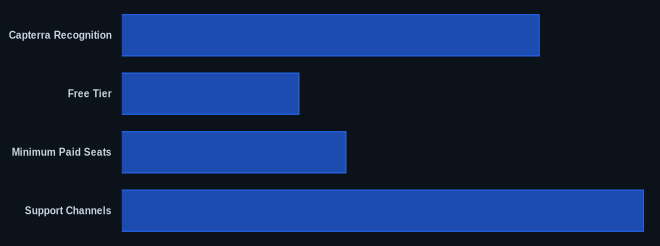
| Capterra Recognition | Recognized in 12 shortlists (as of 2026) | Capterra monday.com |
| Starting Price | $27/month (3 users, Work Management Basic, annually, as of May 21, 2026) | monday.com Pricing |
| Free Tier | Yes (up to 2 users, 3 boards) | monday.com Pricing |
| Minimum Paid Seats | 3 users | monday.com Pricing |
| AI Messages (Standard/Pro) | 5 free per seat per day (as of March 1, 2026) | monday.com Blog |
| Support Channels | 24/7 chat & email | monday.com |
Our Take
monday.com has a clear vision to be an "AI Work Platform," which feels more deliberate than other platforms just tacking on AI features. The pricing, particularly the 3-seat minimum, is a real barrier for smaller operations, but for teams of 5-10+ that need serious visual management and are ready to lean into AI-driven workflows, the value proposition is strong. The platform demands an investment of time and money, but if you use its customization and growing AI capabilities, it can genuinely transform how your team operates. The reported difficulty in canceling plans is a surprising contradiction to their otherwise praised support, and we hope monday.com addresses this.
Given the significant price jump from the Standard to the Pro Plan for Work Management, do you find the 25,000 automations/integrations per month truly necessary for your team, or could you manage with the 250 on the Standard plan?
FAQ
Is monday.com a good choice for small businesses or startups?
It can be, but you need to budget for it. The 3-seat minimum for paid plans means a two-person startup pays the same as a three-person team. While the Free Plan is a starting point, most small businesses will need at least the Standard Plan for essential features like automations and Gantt charts. If you have fewer than three users or a very limited budget, you might find ClickUp or Asana's free or lower-tier plans more accommodating.
How does monday.com's AI compare to competitors like Asana or ClickUp?
monday.com's AI strategy, especially with Sidekick as the central interface (as of January 2026) and the development of AI Workflows and Agents, is focused on being deeply integrated into your daily tasks—from content generation to summarizing project updates. While Asana also offers strong AI-powered automation (Smart Goals, Chat, Summaries) and ClickUp is rapidly expanding its AI features, monday.com is leaning heavily into providing specific, actionable AI agents for different business functions (like the new CRM Lead Agent, added January 2026), making it a competitive choice for teams wanting AI as an active work partner.
What are the main hidden costs associated with monday.com?
The most significant hidden cost is the mandatory 3-seat minimum for all paid plans, meaning solo users or two-person teams pay for an unused seat. Beyond that, exceeding the automation and integration limits on Basic and Standard plans will either force you to upgrade to a more expensive tier or purchase add-on credits. Heavy AI usage can also incur additional costs if you exceed the 5 free AI messages per seat per day (as of March 1, 2026). Always calculate your potential costs based on your actual team size, feature needs, and anticipated AI usage before committing.
