QuickBooks Online Review 2026: AI Accounting for SMBs Unpacked
QuickBooks Online (QBO) has a strong 4.2 out of 5-star rating on G2, cementing its place as a top accounting software for small to medium-sized businesses. Its 2026 iteration offers a powerful, evolving platform, especially for teams ready to embrace AI-driven automation. This isn't just a basic ledger; it’s a sophisticated financial management hub built to cut down manual work, particularly in expense categorization and reporting. If you’re a growing business owner or manage a remote team drowning in receipts, this platform aims to simplify your financial life.
What Is QuickBooks Online?
QuickBooks Online is Intuit’s cloud-based accounting solution. It centralizes financial operations for businesses, targeting entrepreneurs, remote teams, and SMBs needing more than just basic bookkeeping. The software provides tools for invoicing, expense tracking, payroll, inventory, and detailed financial reporting, all accessible from anywhere.
The software helps companies stay compliant, manage cash flow, and gain insights into their financial health without needing a dedicated in-house accountant for every daily task. This means more time focusing on core business activities.
Key Features
The platform has significantly enhanced its capabilities in 2026, with a pronounced focus on artificial intelligence and automation to reduce manual input and prevent errors.
AI-Powered Expense Management
This is where the software truly shines. The AI-powered expense categorization actively learns your spending habits, automatically sorting transactions from connected bank accounts. According to a Reddit user: "QBO's AI-powered expense categorization has saved me hours each month. It's surprisingly accurate and learns my habits quickly." This means less time dragging and dropping, and more reliable data. It's especially useful for remote teams with varied spending, ensuring consistent record-keeping.
Automated Invoicing and Payments
Creating and sending professional invoices is quick and easy. You can set up recurring invoices for regular clients, and the system automatically tracks payments, sending reminders when necessary. The platform integrates directly with payment processors, allowing clients to pay online quickly. This speeds up cash flow, a critical factor for any small business.
Predictive Analytics and Cash Flow Forecasting
QBO now includes advanced predictive analytics. It examines your historical income and expenses to forecast future cash flow with impressive accuracy. This feature helps you anticipate financial peaks and troughs, allowing for proactive decision-making. Knowing your future balance helps avoid unexpected shortfalls.
AI-Driven Anomaly Detection
Security and accuracy are paramount. The tool actively monitors transactions for unusual patterns, flagging potential fraud or errors before they become major problems. This acts like an invisible auditor, constantly safeguarding your finances. It's a subtle but powerful layer of protection.
Smart Reporting Suite
Gone are the days of manually digging through data. The Smart Reporting suite uses machine learning to suggest relevant reports based on your business activity and industry benchmarks. It helps you quickly identify trends, understand profitability, and make data-driven decisions. Custom report builders with natural language processing (NLP) also make querying data much simpler. You can ask for "sales by product last quarter" and get precise results.
Inventory Management
For product-based businesses, the Plus and Advanced tiers offer detailed inventory tracking. You can monitor stock levels, manage cost of goods sold, and track product profitability in real-time. This prevents stockouts and helps optimize purchasing. It’s a core feature many competitors lack in depth.
Project Profitability Tracking
Understanding which projects are actually making money is crucial. The platform allows you to track income and expenses by project, providing clear insights into profitability. This helps you price future projects more accurately and identify your most lucrative services. It’s an invaluable tool for consultants and agencies.
Mobile App for On-the-Go Management
A well-designed mobile app lets you manage finances from anywhere. You can snap receipt photos, send invoices, and check bank balances right from your phone. A G2 reviewer stated, "The integration with my bank accounts is seamless, and the mobile app is incredibly useful for managing my business on the go." This freedom is important for busy entrepreneurs.
Pricing
QuickBooks Online offers a tiered pricing structure designed to scale with your business needs. All prices are as of early 2026, per the official QuickBooks pricing page, and Intuit frequently runs promotional discounts for new subscribers. It’s always smart to check their site for the latest offers.
-
Simple Start: This plan is designed for freelancers, new businesses, or those needing basic accounting.
- $30/month (as of early 2026, per the official QuickBooks pricing page), often $15/month for the first three months, subject to change.
- Includes: Income and expense tracking, invoicing, basic reporting, receipt capture, sales tax tracking.
- One user.
-
Essentials: Ideal for small businesses managing bills and needing more granular control.
- $55/month (as of early 2026, per the official QuickBooks pricing page), often $27.50/month intro offer.
- Includes everything in Simple Start, plus: Bill management, time tracking, multiple currency support.
- Up to three users.
-
Plus: This is the most popular tier for growing businesses, offering a balance of features and scalability.
- $85/month (as of early 2026, per the official QuickBooks pricing page), often $42.50/month intro offer.
- Includes everything in Essentials, plus: Inventory tracking, project profitability tracking, enhanced reporting.
- Up to five users.
-
Advanced: Tailored for larger or more complex businesses requiring extensive customization and support.
- $200/month (as of early 2026, per the official QuickBooks pricing page), often $100/month intro offer.
- Includes everything in Plus, plus: Advanced reporting, dedicated account teams, custom user permissions, batch invoicing.
- Up to 25 users.
There is no free tier, but they typically offer a 30-day free trial. This allows you to test drive the platform before committing. Be sure to use that trial to its fullest.
Pros and Cons
Like any powerful tool, QuickBooks Online has its strengths and weaknesses.
Pros:
- AI-driven automation significantly reduces manual data entry for expenses and reporting.
- Complete features cover almost every accounting need a small or medium business could have, from invoicing to inventory.
- Reliable reporting provides deep financial insights, further enhanced by machine learning suggestions.
- Seamless bank integrations simplify reconciliation and keep your books up-to-date.
- Mobile app is highly functional, letting you manage finances on the go.
- Scalable pricing tiers ensure you only pay for the features you need, growing with your business.
- Extensive third-party integrations with hundreds of business apps.
Cons:
- Steep learning curve for new users, especially those without prior accounting experience. The many features can be overwhelming.
- Customer support can be inconsistent, with users reporting varied experiences in terms of response time and issue resolution. A Capterra review mentioned, "While powerful, the sheer number of features can be overwhelming at first, and customer support can be hit or miss when you really need help quickly."
- Pricing gets expensive fast as you move up the tiers, potentially becoming a significant monthly cost for larger SMBs.
- Occasional syncing issues with bank feeds or third-party integrations, though these are usually temporary.
- Transition challenges for some long-time users migrating from QuickBooks Desktop versions.
- The interface, while functional, can sometimes feel less modern compared to simpler alternatives like Xero.
Who Should Use QuickBooks Online?
QuickBooks Online is best suited for specific types of businesses and teams:
- Growing SMBs with complex needs: If you manage inventory, track project profitability, or need advanced reporting, the Plus or Advanced plans are built for you. Think e-commerce stores, consulting firms, or small manufacturing businesses.
- Remote teams needing centralized financial management: The cloud-based nature and multi-user access (especially in Essentials and above) make it ideal for distributed workforces. Everyone can access the same financial data, staying on the same page.
- Entrepreneurs who value automation: If you’re tired of manual expense categorization and want AI to handle the heavy lifting, the tool’s 2026 updates are a huge win. This means less time on admin and more on strategy.
- Businesses needing strong integration capabilities: With hundreds of available integrations, it connects well with CRM, payroll, and e-commerce platforms. If you run a connected tech stack, this is a strong contender.
- Companies preparing for expansion: The detailed reporting and forecasting tools provide the insights needed to make informed decisions about growth. It’s a tool that helps you plan for the future, not just record the past.
It’s probably not the best fit for solo freelancers who only need basic invoicing and expense tracking, where a simpler tool like FreshBooks might offer better value and a shallower learning curve.
Data at a Glance
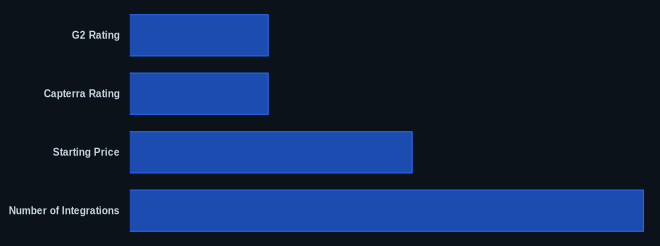
| Metric | Value | Source |
|---|---|---|
| G2 Rating | 4.2 out of 5 stars | G2 Reviews |
| Capterra Rating | 4.3 out of 5 stars | Capterra Reviews |
| Starting Price | $30/month | QuickBooks Pricing |
| Free Tier Available | No | QuickBooks Pricing |
| Number of Integrations | 500+ | QuickBooks Apps |
| AI Features | Yes, extensive | quickbooks.intuit.com |
Our Take
QuickBooks Online, especially in its 2026 iteration, remains the go-to for SMBs serious about scaling and embracing modern financial automation. While the starting tiers can feel a bit pricey for very small operations, and customer support can be inconsistent, the investment pays off for businesses where financial accuracy, inventory management, or project profitability tracking are critical. The new AI features genuinely save hours of tedious work each month, shifting accounting from a chore to a strategic asset. If you can handle a slight learning curve, the depth and power of this tool will serve you well for years.
If you're a growing SMB, are the specific AI features like predictive analytics and anomaly detection worth the step up to the Plus or Advanced tiers for your business?
FAQ
1. Does QuickBooks Online offer a free trial, and how long is it?
Yes, QuickBooks Online typically offers a 30-day free trial. This allows you to fully explore the features of your chosen plan before committing to a paid subscription. You'll need to provide payment information, but you won't be charged until the trial period ends.
2. Is QuickBooks Online suitable for businesses that manage inventory or projects?
Absolutely. For businesses that need to track inventory or monitor the profitability of individual projects, the Plus and Advanced plans are specifically designed for these needs. They offer solid tools for stock management, cost of goods sold, and detailed project-level income and expense tracking.
3. How does QuickBooks Online compare to competitors like Xero or FreshBooks in 2026?
QuickBooks Online generally offers more depth in features like inventory management and advanced reporting, making it ideal for businesses with more complex needs. Xero often wins on user-friendliness and simplicity, particularly for micro-businesses, while FreshBooks specializes in invoicing and time-tracking, making it a strong choice for service-based businesses or freelancers who prioritize those aspects. The 2026 AI updates in the software give it an edge in automation.