Asana's pricing for its Advanced plan jumps 127% from Starter, creating a "management tax" for essential strategic features, and its customer support is often slow and rigid, despite an otherwise intuitive, AI-powered work management experience. This platform suits growing SMBs and larger organizations that prioritize visual project tracking and strategic alignment, provided they budget for its premium tiers and manage their support expectations.
What Is Asana?
Asana is a leading work management tool that centralizes tasks, projects, and goals for teams across departments. It acts as a single source of truth, giving everyone clarity on who's doing what by when. For organizations moving beyond basic task lists, it offers sophisticated features to plan, execute, and monitor work from inception to completion.
Asana excels at providing a structured hierarchy for projects, making it a go-to choice for teams that need to visually track progress and dependencies. If your team juggles multiple initiatives and needs clear dashboards, Asana gives you that birds-eye view you're looking for.
Key Features
Asana has significantly evolved, especially with its recent AI integrations, making it a potent tool for modern workforces. Here’s what stands out in 2026:
AI-Powered Work Management
The biggest leap this year is in its artificial intelligence capabilities, bundled under Asana AI and AI Studio. Starter plans now get 75,000 AI credits (as of June 2026, per the official pricing page), while Advanced plans enhance this with AI Studio for custom AI agents. These tools accelerate workflows and offer new insights.
AI Teammates (introduced in May 2026) automate mundane tasks, while AI Connectors integrate with large language models like Claude, ChatGPT, and Gemini to turn conversations into actionable projects. Imagine a brainstorming session turning into tasks and dependencies with minimal manual entry. For resource planning, AI Insights works with the Timesheets and Budgets add-on to offer smarter allocation suggestions.
Core Project & Task Management
At its heart, Asana remains a solid task and project manager. Even the Personal (Free) plan offers unlimited tasks and projects for up to 2 users (as of June 2026, per the official pricing page), alongside basic views and over 100 integrations. For paid users, the platform provides Timeline/Gantt charts for visual scheduling, a powerful Workflow Builder for process automation, and customizable dashboards.
You get custom fields and forms to tailor data collection to your specific needs. Unlimited automations, available from the Starter tier, let you set up rules to move tasks, update statuses, and notify team members automatically. This cuts a lot of manual busywork.
Strategic Planning & Reporting
Asana truly shines for growing businesses in its ability to connect daily work to bigger strategic objectives. The Advanced plan introduces features like Goals and unlimited Portfolios. This allows leadership to track company objectives (OKRs) and see how individual projects contribute to them across the entire organization.
Portfolio Workload gives managers a clear picture of team capacity, helping prevent burnout and optimize resource allocation. Enhanced integration with tools like Salesforce, Tableau, and Power BI ensures that strategic data flows where it needs to go. Approvals, proofing, form branching, native time tracking, and formula fields further enhance project control and efficiency.
Enterprise Capabilities
For large organizations and regulated industries, Enterprise and Enterprise+ tiers offer tailored solutions. These plans scale up AI Studio credits to 200,000 (as of June 2026, per the official pricing page), and include advanced security features, provisioning, and dedicated support. Enterprise+ specifically addresses stringent compliance needs like HIPAA and data residency, critical for healthcare or financial sectors.
Pricing
Understanding Asana’s pricing can feel confusing, especially with its minimum seat requirements and significant jumps between tiers. As of June 2026, per the official pricing page:
- Personal (Free): Supports up to 2 users. It includes unlimited tasks, unlimited projects, basic project views (List, Board, Calendar), messages, files, and access to over 100 integrations. This is a solid starting point for very small teams or individuals learning the ropes.
- Starter: Priced at $10.99 per user/month when billed annually, or $13.49 per user/month when billed monthly. It requires a minimum of two seats. This tier includes everything in Free, plus Asana AI (75,000 credits), Timeline/Gantt charts, a Workflow Builder, dashboards, custom fields, forms, and unlimited automations. Starter users can also now self-serve the Timesheets and Budgets add-on.
- Advanced: Costs $24.99 per user/month when billed annually, or $30.49 per user/month when billed monthly. This also has a 2-seat minimum. This plan represents a considerable 127% price jump from Starter for many strategic features. It includes everything in Starter, but with enhanced AI Studio (75,000 credits), Goals, unlimited Portfolios, Portfolio Workload, advanced integrations (Salesforce, Tableau, Power BI), approvals, proofing, form branching, native time tracking, scaled security, and formulas.
- Enterprise and Enterprise+: Custom pricing is available for these plans. Enterprise offers 200,000 AI Studio credits and advanced security. Enterprise+ targets regulated industries with HIPAA compliance and data residency requirements.
"Customer success" support is a paid add-on, and 24/7 support is exclusive to Enterprise plans. If you hit a wall, don't expect immediate, expert help unless you're paying top dollar. This gets expensive fast, especially if you need the strategic features of the Advanced plan for your management team.
Pros and Cons
Asana comes with its own set of strengths and weaknesses. It's a trade-off.
Pros:
- Intuitive User Interface (UI): Users consistently praise the platform's clean, visually appealing, and easy-to-navigate interface. A Capterra user states, "I loved Asana's user interface and the fact that they put an emphasis on simplicity and have only the relevant tools to manage projects." This means less time training new team members.
- Solid Task and Project Management: Asana excels at breaking down large projects into manageable tasks, assigning ownership, and setting deadlines. According to a Capterra reviewer: "The best thing about Asana is how well it keeps track of tasks and manages organizations. It makes it easy to plan projects, give out work and keep an eye on progress all in one place."
- Multiple Project Views: From List and Board to Calendar and Timeline (Gantt), Asana offers various ways to visualize project data, catering to different team preferences.
- Strong Cross-functional Collaboration: The platform facilitates collaboration across departments, acting as a central hub for all work. "Asana is an excellent tool and the one my whole team worked from, acting as a central project management tool," a Capterra user notes.
- Connecting Daily Work to Strategic Goals: Features like Portfolios and Goals help leadership link operational tasks directly to organizational objectives, boosting visibility and alignment.
- Powerful AI Integration (2026): The recent addition of AI Teammates, AI Connectors, and AI Insights significantly boosts automation, decision-making, and resource planning capabilities.
Cons:
- Confusing and High Pricing: The seat-based pricing can lead to unexpected costs, especially with the mandatory minimum two seats for paid plans. A G2 reviewer complained, "I was charged an outrageous amount due to their confusing seat-based pricing, and when I tried to resolve the issue, their support team refused to help in any meaningful way."
- Significant Price Jump Between Tiers: The 127% increase from Starter to Advanced for features like Goals and Portfolios feels like a "management tax." This forces businesses to pay a lot more for strategic overview tools.
- Rigid, Unresponsive Customer Support: This is a major pain point. Users frequently report slow response times, reliance on bots, and a lack of flexibility, especially concerning billing. "Customer support is taking longer to respond," a Capterra user mentions, a sentiment echoed widely. Dedicated support often requires a paid add-on or an Enterprise plan.
- Lacks Specialized Developer Features: While great for general project management, Asana doesn't offer native sprint metrics or deeply integrated agile tools specific to software development, unlike competitors like Jira. Many tech teams use it alongside Jira.
- Limited Customization on Lower Tiers: While the higher tiers offer great customization, users on the free or Starter plans might find some limitations if their workflows are unique.
Who Should Use Asana?
Asana is a strong contender for specific types of teams and organizations, but it's not a one-size-fits-all solution.
- Cross-Functional Teams: If your marketing, sales, product, and operations teams need a unified platform to collaborate and track shared initiatives, Asana excels here. It breaks down silos effectively.
- Organizations Prioritizing Visual Project Tracking: Teams that benefit from seeing their projects laid out visually, whether through Gantt charts, Kanban boards, or calendar views, will find the platform highly intuitive and effective.
- Growing SMBs Scaling Strategic Goal Alignment: As your business matures and you need to connect day-to-day tasks to company-wide OKRs and portfolios, the Advanced tier offers powerful tools for leadership visibility.
- Teams Embracing AI for Workflow Automation: With its 2026 AI updates, organizations looking to automate repetitive tasks, generate insights, and integrate large language models into their project workflows will find significant value.
- Not Solo Entrepreneurs or Micro-Teams (Paid Plans): While the Personal (Free) plan is good for individuals, the mandatory 2-seat minimum for paid tiers means it's not cost-effective for a single paid user. You're effectively paying for two users even if you only need one.
- Not Pure Agile Software Development Teams: Engineering teams needing deep sprint planning, velocity charts, and issue tracking often find tools like Jira more suitable as a primary system, although many use Asana in conjunction with other tools for broader business processes.
- Those on a Tight Budget for Support: If you anticipate needing frequent, hands-on customer support, be prepared for potential frustration or the added cost of premium support.
Data at a Glance
| Feature | Value | Source |
|---|---|---|
| G2 Rating (approx.) | Generally Positive | G2 Reviews |
| Capterra Rating (approx.) | Generally Positive | Capterra Reviews |
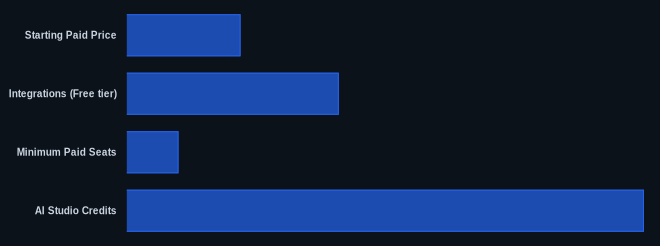
| Starting Paid Price | $10.99 user/month (annual, 2-seat min) | Asana Pricing (as of June 2026) |
| Free Tier | Yes (Personal, up to 2 users) | Asana Pricing (as of June 2026) |
| Integrations (Free tier) | 100+ | Asana Pricing |
| Minimum Paid Seats | 2 | Asana Pricing |
| AI Studio Credits | 75,000 (Starter/Advanced), 200,000 (Enterprise) | Asana Pricing (as of June 2026) |
Our Take
Asana has evolved into an AI-powered work management system, and its user interface remains a joy to use. It’s genuinely excellent at keeping teams aligned and providing visual clarity on complex projects, with powerful strategic features that truly make an impact if your organization prioritizes connecting daily tasks to big-picture goals.
But a significant contradiction emerges: Asana's lauded user-friendliness stands in stark contrast to its rigid, often frustrating customer support. Many users report slower response times, bot reliance, and a lack of flexibility, especially around billing. This leads to what feels like a "management tax" — a 127% price jump from Starter to Advanced for strategic features like Goals and Portfolios. We've seen companies use Asana for years, some switching away after 7-10 years when needs change or that support frustration becomes too much. If you’re considering Asana, weigh its powerful features against the potential for support headaches and the steep price hike for advanced tools.
Do the strategic features in Asana’s Advanced plan, like Goals and Portfolios, truly justify the 127% price increase for your team?
FAQ
1. Is Asana suitable for small teams, given the minimum seat requirement?
The Personal (Free) plan is great for small teams of up to two users, offering core task and project management. However, if you need features beyond the free tier, the paid plans require a minimum of two seats (as of June 2026, per the official pricing page). This means a single user or a small team of 3-4 will pay for more seats than they might strictly need, making it less cost-effective than some competitors like ClickUp or Jira's more generous free tiers for larger teams.
2. How effective are Asana's new AI features in 2026?
The 2026 AI features are a significant upgrade, making Asana genuinely smarter. AI Teammates and AI Connectors (with tools like Claude and ChatGPT) can automate task creation from conversations, draft summaries, and speed up repetitive actions. AI Insights also helps with resource planning when paired with the Timesheets and Budgets add-on. If you're ready to integrate AI into your daily workflows for efficiency gains, these additions are powerful.
3. What should I expect from Asana's customer support?
Be prepared for a mixed experience. While Asana itself is intuitive, customer support is a recurring pain point for many users, especially regarding billing discrepancies. You can expect slow response times and a reliance on automated systems or rigid policies. Dedicated "customer success" support is often a paid add-on, and 24/7 support is reserved for Enterprise customers. Plan for self-service or external community help unless you're on a top-tier plan.