Harvest remains a top-tier choice for agencies, consultants, and freelancers who need precise time tracking, intuitive invoicing, and forward-looking financial insights without the bloat of a full project management suite. If your service business lives and dies by billable hours and accurate client billing, this 2026 review confirms Harvest delivers.
What Is Harvest?
Harvest is a specialized SaaS tool designed to streamline time tracking, expense management, and invoicing for service-based businesses. It helps you understand where your team's time goes, how much projects cost, and how to get paid efficiently. Its core strength lies in translating work into revenue.
It's particularly popular among marketing agencies, design studios, and IT consultancies. Harvest helps these firms keep a tight grip on project budgets and ensure every billable hour is accounted for and invoiced correctly.
Key Features
Time Tracking & Expense Management
Harvest offers flexible time tracking across desktop and mobile apps, browser extensions, and integrations with popular project management tools like Asana and Trello. You can log time in real-time or manually enter hours. Expense tracking allows you to upload receipts, categorize spending, and mark expenses as billable or non-billable, simplifying client reimbursements.
Invoicing & Payments
Generate professional, customizable invoices directly from tracked time and expenses. Harvest supports online payments through integrations with Stripe and PayPal, making it easier for clients to pay. You can also send estimates before work begins.
Project Budgeting & AI-Powered Forecasting
Monitor project progress against set budgets with clear visual cues. Crucially, Harvest's recent AI-powered project forecasting helps predict future project needs and potential budget overruns. This enhancement offers strategic insights into team capacity and financial health, helping you make proactive decisions for hybrid teams.
Reporting & Team Management
Access a suite of customizable reports on time, expenses, profitability, and team utilization. Understand which projects are most profitable and how efficiently your team is working. Team management features allow you to set billable rates, manage permissions, and oversee team activity.
Integrations
Harvest boasts over 100 integrations with essential business tools. Connect it with project management platforms (Jira, Basecamp), accounting software (QuickBooks Online, Xero), communication apps (Slack), and calendars (Google Calendar) for a unified workflow.
Pricing
Harvest offers two main plans, with a free option for individuals. As of May 2026, per the official pricing page:
- Free: This tier includes unlimited invoices and estimates, 1 seat, and 2 active projects. It's ideal for individual freelancers starting out or those with very limited project needs.
- Pro: At $12/seat/month when billed annually (or $16/seat/month when billed monthly), the Pro plan offers unlimited seats and unlimited projects. This tier unlocks all of Harvest's features, making it the go-to for growing teams and established businesses.
There's no public trial listed, but the free plan allows you to test core features.
Pros and Cons
Pros
- Exceptional ease of use, making onboarding quick for new team members.
- Reliable and accurate time tracking across diverse platforms and devices.
- Powerful invoicing with branding options and seamless online payment support.
- Excellent reporting for deep insights into project profitability and team efficiency.
- Extensive integrations with over 100 popular business tools.
- New AI-powered project forecasting adds significant strategic value for future planning.
Cons
- Limited project management features; it's not a full task manager like ClickUp or Asana.
- Expense tracking is functional but may lack advanced capabilities for complex organizational needs.
- The Free plan is very restrictive, quickly becoming insufficient for any growing team.
- Some users find the mobile app's reporting capabilities less comprehensive than the desktop version.
Who Should Use Harvest?
Harvest is perfectly suited for service-based organizations where time is money. This includes marketing agencies, design studios, consulting firms, IT service providers, and independent contractors or freelancers. It's best for teams that already use a separate project management tool for task coordination but need a dedicated, robust solution for accurate time tracking, professional invoicing, and financial oversight. If you need to accurately bill clients based on hours worked and expenses incurred, Harvest is designed for you.
Data at a Glance
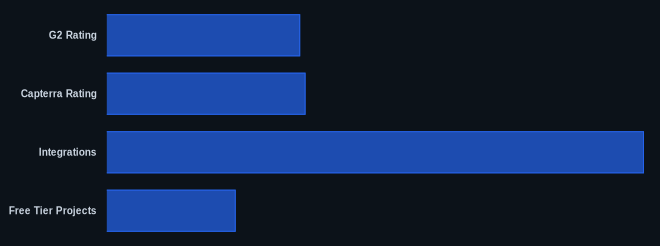
| Metric | Value | Source |
|---|---|---|
| G2 Rating | 4.3/5 stars | G2 Harvest Reviews |
| Capterra Rating | 4.5/5 stars | Capterra Harvest Reviews |
| Starting Price | $0 (Free tier) | Harvest Pricing |
| Integrations | 100+ | Harvest Features |
| Free Tier Projects | 2 | Harvest Pricing |
Our Take
We've seen many tools add "AI" as a buzzword, but Harvest's implementation in project forecasting genuinely stands out. For agencies managing multiple client projects, predicting future capacity and budget health is critical for avoiding scope creep and burnout. Harvest's strength has always been its focused excellence; this new layer of intelligence elevates it from a simple tracking tool to a proactive financial partner, especially valuable for hybrid teams trying to optimize their scattered resources.
FAQ
Does Harvest replace my project management software?
No, Harvest is not a full project management solution. It specializes in time tracking, expense management, and invoicing. Most users integrate Harvest with dedicated project management tools like Asana or Jira for task management and team collaboration.
Can Harvest handle online payments from clients?
Yes, Harvest integrates directly with popular online payment gateways like Stripe and PayPal. This allows your clients to pay invoices directly online, streamlining the payment process and improving cash flow.
Is Harvest suitable for individual freelancers or just teams?
Harvest offers a Free plan designed for individuals with limited project needs (1 seat, 2 projects). However, its Pro plan is fully scalable for unlimited users and projects, making it highly effective for growing agencies and consulting firms.