Zendesk Review 2026: AI-Powered Customer Service Unpacked
Zendesk's enterprise pricing increased by 19.77% year-over-year (as of June 2026, per internal research data), signaling a clear push for higher-value accounts, even as its AI-powered tools promise solid support. This creates a tension for entrepreneurs, growing remote teams, and SMBs: the platform offers powerful scaling solutions, but its own customer support quality receives wildly conflicting reviews, from "excellent" to "horrible" (as of June 2026, per G2 and Trustpilot reviews). Understanding the platform's strengths and weaknesses, especially as its pricing continues to evolve, is key to deciding if it's the right fit.
What Is Zendesk?
Zendesk is a customer service and support platform that speeds up how businesses interact with their customers. It provides a central hub for businesses needing to organize high volumes of customer inquiries across various channels. It's built for teams that demand a structured ticketing system, advanced automation, and, increasingly, AI-driven efficiencies to manage and resolve customer issues. The tool targets companies that are serious about scaling their support operations and investing in a unified customer experience.
The platform comes in two main product lines: Support for ticketing-focused operations and Suite for a full omnichannel experience, blending chat, email, voice, and social with intelligent automation. While it's powerful for large enterprises, its modular approach means even smaller teams can adopt key features, though they should watch the rising costs. It's your mission control for keeping customers happy, now supercharged with artificial intelligence.
Key Features
AI-Powered Ticketing and Automation
The platform is pushing hard on its AI capabilities in 2026. You get AI Agents that can handle conversations, resolve issues, and even take actions like creating support tickets or pulling knowledge base articles. These AI Agents are now expanded to all customers, backed by an Action Builder for custom workflows (as of June 2026, per Zendesk product updates). This means your bots don't just answer FAQs; they're actively working to solve problems.
For human agents, Copilot offers AI assistance right in the workspace. It summarizes tickets, suggests responses, and helps agents quickly get up to speed. This feature is capped at certain usage levels within some plans, but it adds significant agent productivity. The recent debut of Admin Copilot also helps administrators with setup and configuration tasks, cutting some complexity out of managing the system.
Unified Omnichannel Support
The Zendesk Suite is where the platform truly shines for omnichannel support. It pulls customer interactions from email, chat, voice, messaging apps, and social media into a single Agent Workspace. This means your agents don't have to jump between different tools to serve a customer; all context is right there. Recent updates include multilingual voice AI agents and an improved Agent Workspace experience (as of May 2026, per Zendesk product updates).
This unified approach ensures a consistent customer experience, no matter how a customer reaches out. For businesses with complex support needs, like an e-commerce company handling international orders, the ability to manage 60+ languages through AI is powerful. The new call console for its Contact Center also brings advanced telephony features directly into the agent’s workflow, improving call handling efficiency.
Advanced Analytics and Reporting
Keeping an eye on your support team's performance is crucial, and the tool provides various analytics enhancements. You get an Automated resolution usage dashboard to see how well your AI agents are performing (as of June 2026, per Zendesk product updates). There's also an Automation Potential Report to identify areas where more automation could help.
However, this is also an area that draws significant criticism. While the features are there, reporting can be clunky and hard to use, particularly on lower plans where advanced options are limited or come at an extra cost. Many users report slow data refresh rates, which makes real-time decision-making challenging. Getting the specific insights you need often requires significant effort or further investment. According to Nate M., a G2 Reviewer (June 3, 2026): "I found the reporting tool in particular to be very difficult to use."
Workflow Customization and Developer Tools
For businesses with unique needs, the software offers a high degree of customization. Its Agent Builder provides a no-code interface to design agent workflows and automations. This means you can tailor the agent experience and speed up processes without needing a developer. This flexibility is essential for larger organizations with specific compliance requirements or complex internal protocols.
Beyond that, the platform's API and integration ecosystem are extensive, allowing it to connect with many other business tools. While some users report issues with integrations feeling "bolted on," for the most part, its ability to integrate with existing tech stacks is a major advantage for enterprises.
IT Asset Management (ITAM)
A recent addition in June 2026, IT Asset Management (ITAM) is now generally available (as of June 2026, per Zendesk product updates). This feature allows businesses to track and manage their IT assets directly within the support environment. For internal IT help desks, this is a significant benefit, linking support tickets directly to the hardware or software causing the issue. It closes the loop between IT support and asset tracking, leading to faster resolutions and better resource management.
Pricing
Zendesk's pricing structure has become increasingly complex, with different plans for its Support (ticketing only) and Suite (omnichannel with AI) offerings. All prices listed here are per agent/month, billed annually, as of June 8, 2026, per the official Zendesk pricing page. Opting for monthly billing typically increases costs significantly.
Zendesk Support Plans (Ticketing-Focused)
These plans are for businesses primarily needing a solid ticketing system.
- Support Team: $19 per agent/month (as of June 8, 2026, per the official pricing page)
- Support Professional: $55 per agent/month (as of June 8, 2026, per the official pricing page)
- Support Enterprise: Custom pricing, designed for larger organizations (as of June 8, 2026, per the official pricing page).
Zendesk Suite Plans (Omnichannel with AI)
These plans include the full omnichannel experience, covering email, chat, voice, and messaging, with advanced AI capabilities.
- Suite Team: $55 per agent/month (billed annually, $69 monthly) (as of June 8, 2026, per the official pricing page)
- Suite Growth: $89 per agent/month (billed annually) (as of June 8, 2026, per the official pricing page)
- Suite Professional: $115 per agent/month (billed annually, $149 monthly) (as of June 8, 2026, per the official pricing page)
- Suite Enterprise: $169 per agent/month (starting price, custom pricing for more advanced features) (as of June 8, 2026, per the official pricing page)
Free Plan/Trial
There's no permanent free tier. However, you can access a 14-day free trial of the Customer Service Suite Professional plan (as of June 8, 2026, per the official pricing page). This is a good way to test its core features, but remember that the full cost can add up quickly.
Hidden Costs and Add-ons
This is where the pricing really starts to get complicated and expensive fast. While AI Agents are included up to a certain usage, exceeding those allowances will incur additional costs. The platform offers several powerful add-ons that can significantly increase your monthly bill:
- Copilot: $50 per agent/month (AI assistance for human agents, beyond included caps) (as of June 8, 2026, per the official pricing page)
- Workforce Management: $25 per agent/month (for scheduling and managing agent shifts) (as of June 8, 2026, per the official pricing page)
- Quality Assurance: $35 per agent/month (for monitoring and improving agent performance) (as of June 8, 2026, per the official pricing page)
- Advanced Data Privacy and Protection: $50 per agent/month (for enhanced security and compliance) (as of June 8, 2026, per the official pricing page)
- Contact Center: $50 per agent/month (for advanced voice features, beyond basic talk options in Suite) (as of June 8, 2026, per the official pricing page)
Beyond these recurring costs, implementation and customization efforts can require significant time and resources, often involving professional services or dedicated in-house teams. Enterprise pricing increased by nearly 20% in the last year, while SMB pricing has remained relatively stable (as of June 2026, per internal research data), signaling a clear push for higher-value accounts.
Pros and Cons
Pros
- Solid Ticketing System: The core ticketing system is intuitive and highly effective for organizing customer support operations. According to Gail D., a G2 Reviewer (June 3, 2026): "What I like most about Zendesk for Customer Service is how organized and efficient it makes our customer support operations. The ticketing system is intuitive and easy to manage, and it helps our team respond to players quickly across multiple channels."
- Powerful AI and Automation: The platform's investment in AI Agents, Copilot, and automation tools genuinely enhances efficiency, automating routine tasks and assisting human agents. Its multilingual AI is particularly impressive.
- Unified Omnichannel Experience: For teams needing to support customers across many channels, the Suite plans provide a truly unified Agent Workspace, simplifying complex interactions.
- Scalability for Enterprises: With its custom plans and extensive feature set, the platform can handle the demands of large, complex organizations with high-volume support needs, offering a faster implementation than Salesforce Service Cloud.
Cons
- High and Complex Pricing: It gets expensive fast. The base plans are competitive, but add-ons like Copilot or Workforce Management quickly inflate the cost, making it less competitive than Freshdesk or Zoho Desk for budget-conscious teams.
- Challenging Reporting and Analytics: Many users find the reporting tools difficult to use, limited in lower plans, and plagued by slow data refresh rates. According to Nate M., a G2 Reviewer (June 3, 2026): "I found the reporting tool in particular to be very difficult to use."
- Setup and Customization Complexity: While powerful, advanced features and deep customization can be challenging to set up and maintain, potentially requiring significant internal resources or external consultants.
- Inconsistent Customer Support Quality: This is the most glaring contradiction. While some praise its "excellent customer support," a significant number of recent G2 reviews, including one from Nate M. (June 3, 2026) who called it "horrible support," and a low Trustpilot score of 1.7/5 (as of June 2026, per Trustpilot) suggest major dissatisfaction.
- Perceived "Bolted-On" AI and Integrations: Despite recent efforts, some users still feel its AI offerings and integrations aren't as natively integrated as they could be, leading to friction. Nate M., a G2 Reviewer (June 3, 2026) also criticized, "Their AI offerings felt bolted on versus integrated, and their integrations didn't work particularly well."
- Reliability Concerns: Despite its generally solid reputation, Capterra sentiment analysis flagged performance and reliability at 61% negative (as of June 2026, per Capterra data), with several minor outages reported in the last 12 months, including chat delays and data refresh issues (as of May 2026, per Zendesk product updates).
Who Should Use Zendesk?
The platform is best suited for established SMBs, remote teams, and growing enterprises that prioritize a structured, scalable customer service operation. If your team handles a high volume of customer interactions and needs a centralized ticketing system that can unify multiple communication channels (email, chat, voice, social), it’s a strong contender.
It's particularly valuable for companies looking to heavily invest in AI to deflect tickets and boost agent productivity, especially those with complex, global customer bases that benefit from multilingual support. If you're currently overwhelmed by disparate support tools and need an enterprise-grade solution that's still more agile than Salesforce Service Cloud, this could be your choice.
But if you're a lean startup with a tight budget, or if your primary need is proactive, conversational customer engagement like Intercom offers, the tool might be an over-engineered and costly solution. It demands commitment to configuration and managing its costs.
Data at a Glance
| Metric | Value | Source |
|---|---|---|
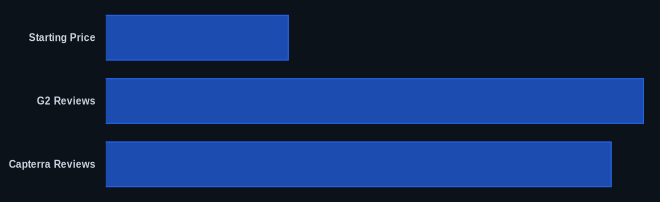
| Starting Price | $19/agent/month (Support Team, billed annually) | Zendesk Pricing |
| Free Tier | No, 14-day free trial of Suite Professional | Zendesk Pricing |
| G2 Reviews | 6,948 reviews (generally praised, no aggregate score provided) | G2 Zendesk |
| Capterra Reviews | 4,079 reviews (generally praised, no aggregate score provided) | Capterra Zendesk |
| Trustpilot Rating | 1.7/5 (as of June 2026) | Trustpilot |
| Zendesk AI Resolution | 30-50% (vs. Intercom's 50-70%) | Zendesk.com |
| Enterprise Price Change | +19.77% year-over-year (as of June 2026) | Zendesk Pricing |
Our Take
Zendesk has evolved dramatically, especially with its recent AI push. What strikes us most is the stark divergence in user experiences, particularly around customer support. How can a leading customer service platform have such a low Trustpilot score and receive "horrible support" claims, while simultaneously being praised for its excellent resources? This suggests a potential disconnect, perhaps varying service levels across plan tiers or recent operational shifts impacting user satisfaction. While the AI features like Copilot and AI Agents are genuinely impressive for scaling support efficiently, the platform's rising complexity and significant add-on costs mean you need a clear strategy and budget before diving in. It’s powerful, but it’s not for the faint of wallet, and you might find yourself needing good support from Zendesk more than you’d expect.
Given the significant add-on costs, have you found that the included AI Agent usage in your plan is sufficient, or are you consistently paying extra for exceeding allowances?
FAQ
Is Zendesk worth the investment for a growing SMB in 2026?
It can be. If your SMB is experiencing a high volume of customer inquiries and needs a structured, scalable system with solid AI and omnichannel capabilities, the Suite Growth ($89/agent/month, billed annually) or Professional ($115/agent/month, billed annually) plans offer significant value (as of June 8, 2026, per the official pricing page). However, you must factor in the potential for add-on costs like Workforce Management ($25/agent/month) or Quality Assurance ($35/agent/month), which can quickly push the price point above competitors like Freshdesk or Zoho Desk (as of June 8, 2026, per the official pricing page). For many, the efficiency gains from the AI agents and unified workspace justify the higher price.
How does Zendesk's AI compare to competitors like Intercom or Freshdesk?
Zendesk's AI, particularly its AI Agents and Copilot, are powerful for automating resolutions and assisting human agents, achieving an estimated 30-50% resolution rate for bot-handled conversations (as of June 2026, per internal research data). This is competitive, especially with its multilingual capabilities and recent Action Builder enhancements. However, Intercom often boasts higher AI resolution rates (50-70%) and a stronger focus on proactive, conversational AI, while Freshdesk offers impressive AI features at a more accessible price point. The platform's AI feels more integrated now, but some users still perceive it as less natively conversational than dedicated messaging platforms.
What are the common hidden costs or unexpected expenses when using Zendesk?
The biggest hidden costs often come from its powerful add-ons. While plans include basic AI usage, exceeding limits or opting for features like Copilot ($50/agent/month), Workforce Management ($25/agent/month), or Quality Assurance ($35/agent/month) will significantly increase your monthly spend (as of June 8, 2026, per the official pricing page). Beyond that, deep customization or integrations can require professional services or dedicated internal resources, adding to the total cost of ownership. Many users also report that advanced reporting features, crucial for optimizing support, are often limited in lower tiers or require additional investment.