Slack Review 2026: Still the King of Team Communication?
Slack remains the gold standard for real-time team communication, especially for hybrid and remote teams that demand deep integrations and organized workflows. It’s an investment for businesses ready to make their digital HQ truly effective.
What Is Slack?
Slack is a communication platform designed to streamline internal and external team interactions. It acts as a central hub for messaging, file sharing, and project coordination, aiming to reduce email clutter and facilitate quicker decision-making. Acquired by Salesforce in 2020, it has evolved into a comprehensive 'digital HQ' for companies of all sizes.
It's built for anyone from startups to large enterprises who need to keep conversations organized by project or team, automate routine tasks, and connect various business tools in one place. Developers, marketers, HR teams, and project managers all find value in its structured yet flexible environment.
Key Features
Channels & Direct Messaging
Organize all conversations into Channels by project, topic, or department. This keeps discussions focused and easily searchable. For private discussions, Direct Messages and group DMs are readily available.
Real-Time & Asynchronous Communication
Huddles offer spontaneous audio/video calls for quick discussions, mimicking an office walkthrough. For asynchronous updates, Clips let you record short video, audio, or screen recordings, perfect for distributed teams across time zones.
Workflows & Integrations
The Workflows builder allows no-code automation for routine tasks, approvals, and information gathering. With over 2,600 apps in its App Directory, Slack integrates with nearly every business tool imaginable, from Google Drive and Zoom to Salesforce and Trello.
Slack Connect
For secure external collaboration, Slack Connect lets you create dedicated channels with partners, clients, and vendors. This is a game-changer for managing projects and communications with outside organizations without leaving Slack.
Search & AI Enhancements
Powerful Search lets you quickly find past messages and shared files. Recent AI integrations, leveraging Salesforce's Einstein AI, include message summarization, intelligent search, and contextual assistance, making it easier to digest information and find answers.
Security & Compliance
Slack offers robust security features, including SSO, 2FA, data encryption, and compliance certifications like GDPR, SOC 2, and ISO/IEC 27001.
Pricing
As of May 2026, per the official pricing page, Slack offers four main tiers (billed annually; monthly rates are typically 20% higher):
- Free: Suitable for very small teams or trials. Limited to 90 days of message history, 10 integrations, and 1-to-1 video calls.
- Pro: $8.75/user/month. This popular tier includes unlimited message history, unlimited integrations, group video calls up to 50 people, screen sharing, custom user groups, 24/7 support, and Slack Connect.
- Business+: $15/user/month. Adds SAML-based SSO, a guaranteed uptime SLA, data exports for all messages, and 24/7 priority support with a 4-hour response time. Designed for larger organizations with stricter security and compliance needs.
- Enterprise Grid: Custom pricing. For the largest enterprises, offering unlimited workspaces, enterprise-grade security and compliance (HIPAA, FINRA), data residency, and dedicated account management.
Pros and Cons
Pros:
- Excellent user interface and user experience; quick to learn and adopt.
- Extensive integration ecosystem acts as a central hub for many workflows.
- Reliable performance and high uptime for critical real-time communication.
- Powerful search functionality for quickly retrieving information and files.
- Slack Connect is invaluable for secure, organized external collaboration.
- Huddles and Clips provide flexible communication options beyond text.
Cons:
- Can become expensive for larger teams, especially compared to bundles like Microsoft Teams.
- Notification overload is common without careful channel management.
- Voice and video call quality is good, but dedicated tools like Zoom often offer more features.
- The Free plan's 90-day message history limit is very restrictive for ongoing team use.
- Some users report a feeling of feature bloat as new functionalities are continuously added.
Who Should Use Slack?
Slack is ideal for small to large teams and enterprises across all industries that prioritize organized, real-time communication and extensive tool integration. It excels in remote and hybrid work environments where a central "digital HQ" is crucial for daily operations and project coordination.
Teams in tech, marketing, creative agencies, and product development will find its channel-based structure and deep integrations particularly powerful. It's also a strong choice for businesses seeking robust security and compliance features available in its higher tiers. While it works for very small teams, those needing ongoing message history will quickly outgrow the Free plan.
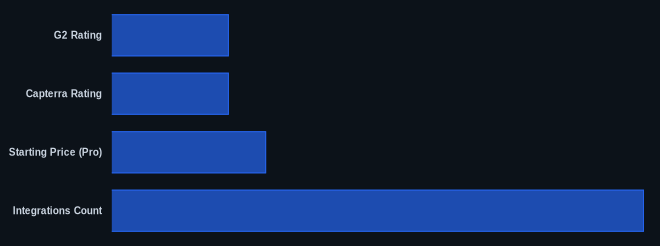
Data at a Glance
| Feature | Value | Source |
|---|---|---|
| G2 Rating | 4.5/5 stars | G2.com |
| Capterra Rating | 4.6/5 stars | Capterra.com |
| Starting Price (Pro) | $8.75/user/month | Slack Pricing Page |
| Integrations Count | 2,600+ | Slack App Directory |
| Free Tier Available | Yes | Slack Pricing Page |
Our Take
We believe Slack, even in 2026, still earns its premium pricing for teams that fully commit to its ecosystem. Its strength isn't just in messaging, but in how it acts as a central nervous system for workflows, especially with Slack Connect enabling seamless external collaboration. While competitors like Microsoft Teams offer tempting bundles, Slack's superior UX and dedicated focus on communication (rather than being one app in a suite) often result in higher adoption and more efficient internal communication for teams prioritizing flexibility and integration depth.
FAQ
Q: Is Slack still worth the cost compared to cheaper alternatives like Microsoft Teams?
A: For many teams, yes. While Microsoft Teams often comes bundled with Office 365, Slack's dedicated focus on communication, superior user experience, and deeper integration capabilities often lead to better team adoption and more efficient workflows. If your team relies heavily on integrations and values a highly intuitive interface, Slack's investment often pays off in productivity.
Q: How do Slack's new AI features enhance team communication?
A: Slack's AI integrations, powered by Salesforce's Einstein AI, are designed to reduce information overload and speed up information retrieval. Features like message summarization help you quickly catch up on channels, while intelligent search and contextual assistance make finding specific information faster, ultimately saving time and improving decision-making.
Q: Can Slack effectively replace email for internal communications?
A: Absolutely. Slack is designed to be a comprehensive digital HQ, drastically reducing the need for internal emails. Its channel-based organization keeps discussions focused, its search capabilities make finding information easy, and features like Huddles and Clips offer quick, informal communication options that email can't match. Many businesses find that adopting Slack significantly cuts down on internal email volume.