
For collaborative, web-based design with an eye on AI and developer handoff, Figma leads the pack. This comparison is for entrepreneurs, remote teams, and SMBs evaluating UI/UX design tools, focusing on collaboration, AI capabilities, and strategic impact on modern design operations.
What Is Figma?
Figma is a browser-based UI/UX design tool that champions real-time collaboration. It's designed for product teams, agencies, and enterprises needing a unified platform for designing, prototyping, and iterating interfaces. Its web-first approach means designers and stakeholders can work on the same file simultaneously, regardless of their operating system.
It excels at managing design systems and bridging the gap with development teams through features like Dev Mode and branching. This makes it ideal for complex projects requiring tight integration between design and engineering.
What Is Adobe XD?
Adobe XD is Adobe's solution for UI/UX design, specializing in rapid prototyping and micro-interactions. It’s built for designers already invested in the Adobe Creative Cloud ecosystem, offering deep integration with tools like Photoshop and Illustrator. XD emphasizes creating interactive prototypes and animations with ease.
While a desktop application, it allows for cloud document storage and sharing. Its strength lies in quick visual iteration and demonstrating user flows, especially for individuals or smaller teams comfortable within the Adobe environment.
What Is Sketch?
Sketch is a powerful, macOS-native vector editor focused on UI design, prototyping, and design system management. For years, it was the industry standard for UI design, known for its robust plugin ecosystem and excellent performance on Apple hardware. It caters to individual designers and teams who prioritize a native desktop experience and extensive customization via plugins.
Sketch Cloud provides a workspace for collaboration, version history, and developer handoff, ensuring teams can share and review designs effectively within the macOS environment.
Key Features
Real-Time Collaboration & Cloud Accessibility
Figma stands out with its real-time, multi-user editing directly in the browser. Anyone with a link can jump in, see cursor movements, and make changes concurrently, akin to Google Docs for design. This is a game-changer for distributed teams and live design reviews.
Adobe XD offers cloud document sharing and commenting but lacks Figma’s simultaneous co-editing capabilities. Collaboration is more asynchronous, focused on sharing prototypes and collecting feedback.
Sketch provides cloud workspace features for version control, developer handoff, and commenting. While it allows for shared libraries and syncing, the core design work happens in the macOS desktop app; true real-time, multi-user editing in the canvas isn't its primary mode.
Prototyping & Animation
Figma offers robust prototyping features, allowing complex flows with conditional logic, interactive components, and animated transitions. Its new branching feature also allows for experimental design paths without affecting the main design.
Adobe XD excels here, particularly with its Auto-Animate feature, which makes creating sophisticated micro-interactions and transitions straightforward. Voice Prototyping and 3D Transforms add unique interactive dimensions not found in the others.
Sketch includes basic prototyping features for connecting artboards and creating simple user flows. For advanced animations, designers often rely on plugins or export to tools like Principle.
Design Systems & Component Management
All three tools offer robust features for creating and managing design systems, symbols, and components. Figma's Auto Layout and shared team libraries make building scalable, responsive components intuitive. Its Organization and Enterprise tiers offer advanced analytics and centralized control over design systems.
Adobe XD uses components and states, along with Repeat Grid, to speed up repetitive design tasks. Its integration with Creative Cloud Libraries ensures consistency across the Adobe suite.
Sketch was a pioneer with its symbols and shared libraries. Its vast plugin ecosystem provides unparalleled customization for design system workflows, making it a favorite for those building intricate component libraries on macOS.
Developer Handoff & AI-Driven Features
Figma's Dev Mode is a dedicated space for developers to inspect designs, grab CSS/Swift/Android code snippets, and track changes without needing a design license. This streamlines the handoff process significantly. For AI, Figma has integrations that assist with content generation and accessibility checks, constantly evolving to offer more intelligent design assistance.
Adobe XD provides design specs for developers to inspect assets and styles. Its Content-Aware Layout and Generative Fill (via Creative Cloud integration) hint at its AI potential, offering smart suggestions and automatic resizing.
Sketch Cloud offers developer handoff, allowing engineers to inspect elements, export assets, and generate CSS. Its AI integration primarily comes via plugins for tasks like image optimization or code generation.
Pricing
Figma
As of May 2026, per the official pricing page:
- Starter: Free (for individuals, limited files and features)
- Professional: $15/editor/month (billed monthly) or $12/editor/month (billed annually) – Unlimited files, shared fonts, team libraries, audio conversations, version history.
- Organization: $45/editor/month (billed annually) – Centralized admin, unified analytics, design system analytics, private plugins, organization-wide search.
- Enterprise: Custom pricing – Advanced security, dedicated success manager, custom contracts.
Adobe XD
As of May 2026, per the official pricing page:
- Starter: Free (limited features, 1 active shared prototype)
- Single App: Included with Adobe Creative Cloud All Apps ($59.99/month, annual paid monthly) or standalone plan at $9.99/month for individual use – Unlimited prototypes, cloud documents.
- Creative Cloud All Apps: $59.99/month (annual paid monthly) – Access to all Adobe creative apps.
- Creative Cloud for Teams: $84.99/user/month (annual plan) – Team libraries, admin console, 1TB cloud storage.
Sketch
As of May 2026, per the official pricing page:
- Standard: $10/editor/month (billed monthly) or $9/editor/month (billed annually) – Desktop app, cloud workspace, real-time collaboration, version history, developer handoff.
- Business: Custom pricing – Advanced security, priority support, dedicated account manager.
Pros and Cons
Figma
Pros:
- Unparalleled real-time collaboration directly in the browser.
- Web-based and cross-platform, accessible from anywhere.
- Extensive plugin ecosystem for extended functionality.
- Strong prototyping features for complex user flows.
- Excellent for building and managing design systems.
- Dev Mode bridges the gap with developers effectively.
Cons:
- Can be slower on very large files with many artboards.
- Some offline limitations; requires internet for full functionality.
Adobe XD
Pros:
- Deep integration with Adobe Creative Cloud (e.g., Photoshop, Illustrator).
- Strong prototyping and micro-interaction features, especially Auto-Animate.
- Good performance for complex prototypes.
- Relatively easy to learn for existing Adobe users.
Cons:
- Collaboration features are not as robust or real-time as Figma's.
- Plugin ecosystem is smaller compared to Figma or Sketch.
- No direct web-based editing; requires a desktop app.
Sketch
Pros:
- Powerful vector editor optimized for macOS.
- Vast and mature plugin community for macOS.
- Strong for design systems and component libraries.
- Excellent performance on macOS, including offline capabilities.
Cons:
- macOS-only (no Windows or web app).
- Collaboration features in Cloud are good but not real-time like Figma.
- Smaller market share compared to Figma.
- Less intuitive for beginners not familiar with vector tools.
Who Should Use Each Tool?
Figma is for product teams, agencies, freelancers, and enterprises prioritizing real-time collaboration, shared design systems, and web-based accessibility. If your team is distributed, works cross-platform, or requires seamless developer handoff (e.g., with Zeplin or Storybook integration), Figma is the clear choice. It scales from small startups to large organizations.
Adobe XD is best suited for designers already within the Adobe ecosystem (e.g., using Photoshop and Illustrator daily). Individuals and smaller teams needing strong prototyping capabilities and tight integration with other Adobe products will find it valuable. If you prioritize quick visual mockups and micro-animations, and primarily work alone or in small, co-located groups, XD fits well.
Sketch is ideal for macOS users and individual designers or small to medium-sized teams who value powerful native app performance, an extensive plugin ecosystem, and robust design system management specifically within the Apple environment. If offline capabilities and a mature vector editing experience are paramount, and your team is primarily Mac-based, Sketch remains a strong contender.
Data at a Glance
| Metric | Figma | Adobe XD | Sketch |
|---|---|---|---|
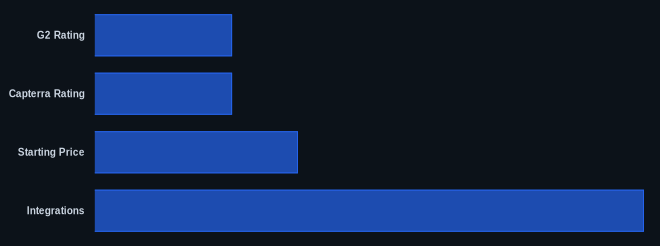
| G2 Rating | 4.7/5 stars (3,000+ reviews) | 4.3/5 stars (2,000+ reviews) | 4.5/5 stars (1,800+ reviews) |
| Capterra Rating | 4.7/5 stars (1,500+ reviews) | 4.4/5 stars (1,000+ reviews) | 4.6/5 stars (800+ reviews) |
| Free Tier | Yes (Starter) | Yes (Starter) | No (free trial available) |
| Starting Price | $12/editor/month (annual, Professional) Figma pricing | $9.99/month (standalone) Adobe XD pricing | $9/editor/month (annual, Standard) Sketch pricing |
| Integrations | 1000+ via plugins/API | Primarily Adobe CC + growing third-party | Extensive via plugins (e.g., Zeplin) |
Our Take
We've seen how critical real-time collaboration has become for product development cycles. While Sketch still holds its own for macOS power users and Adobe XD offers deep CC integration, Figma is truly positioned for the future. Its relentless focus on web-based collaboration, comprehensive design system management, and emerging AI capabilities through its plugin ecosystem and internal features like Dev Mode make it the strategic choice for most modern teams. The ability to branch designs and manage complex workflows directly within the tool reduces friction for enterprise-level design ops, something the others are still catching up on.
FAQ
Q: Which tool is best for a remote team with designers on different operating systems?
A: Figma is unequivocally the best choice. As a web-based tool, it offers seamless real-time collaboration regardless of whether team members are on Windows, macOS, or Linux.
Q: Can these tools effectively handle large enterprise design systems?
A: Yes, all three have features for design systems. However, Figma's Organization and Enterprise tiers, with features like centralized admin, design system analytics, and branching, offer the most comprehensive solution for large-scale enterprise design system management and governance.
Q: How do these tools address developer handoff and code inspection?
A: Figma has Dev Mode, a dedicated interface for developers to inspect designs and grab code snippets. Adobe XD provides design specs for inspection. Sketch Cloud offers developer handoff with asset export and style inspection. Figma's approach is generally considered the most integrated and user-friendly for developers.
