Zapier Review 2026: Automate Anything, Build Everything?
Zapier remains the undisputed champion for no-code automation, connecting over 6,000 apps and evolving significantly in 2026 with powerful AI and advanced logic. This Zapier review dives into whether it’s still the central automation hub for entrepreneurs, remote teams, and SMBs looking to build complex workflows beyond simple integrations.
What Is Zapier?
Zapier allows users to create 'Zaps' – automated workflows between different web applications – without writing any code. It’s designed for anyone who needs to connect their various SaaS tools, from marketing platforms like Mailchimp to CRMs like HubSpot, and ensure data flows seamlessly between them.
For a small business owner, this means automating lead capture into a CRM, sending Slack notifications for new sales, or moving spreadsheet data to a project management tool like Asana. It saves countless hours of manual data entry and reduces human error across a wide range of business functions.
Key Features
Triggers & Actions
This is the core of Zapier: an event in one app (the Trigger) automatically performs an action in another app. Think "New email in Gmail (Trigger) -> Create a task in Trello (Action)."
Multi-Step Zaps
Beyond simple connections, Multi-Step Zaps allow you to chain multiple actions together. For example, a new form submission could trigger an email, update a spreadsheet, and then create a record in Salesforce, all in one automated flow.
Filters & Paths
Filters add conditional logic, only allowing a Zap to continue if certain criteria are met (e.g., "only if the email contains 'urgent'"). Paths take this further, enabling 'if/then' branching logic. You can execute different actions based on data, like sending one email if a customer is new and a different one if they're an existing client.
Formatters
Formatters transform data between apps. This is crucial for ensuring consistency – converting dates, extracting text patterns, or manipulating numbers so that different applications can "understand" each other's data formats.
Webhooks & Code Steps
For unsupported apps or highly custom needs, Webhooks connect to almost any API. For developers on the team, Code Steps allow embedding JavaScript or Python snippets directly into Zaps, extending functionality even further.
AI by Zapier
A significant differentiator for 2026, AI by Zapier integrates artificial intelligence into workflows. This includes tasks like extracting specific data from unstructured text in emails or documents, generating content drafts, or smartly routing inquiries based on natural language processing within a Zap. It moves Zapier beyond simple data transfer into more intelligent decision-making and content creation.
Pricing
As of May 2026, per the official Zapier pricing page:
- Free: 100 tasks/month, 5 Zaps (single-step), 15-minute update time. Good for testing the waters.
- Starter: $19.99/month (billed annually, or $29.99 month-to-month). 750 tasks/month, unlimited Zaps, multi-step Zaps, 15-minute update time. A solid entry point for individuals or small teams.
- Professional: $49.00/month (billed annually, or $69.00 month-to-month). 2,000 tasks/month, unlimited Zaps, multi-step Zaps, Filters, Formatters, Webhooks, 2-minute update time. This tier unlocks critical advanced logic.
- Team: $299.00/month (billed annually, or $399.00 month-to-month). 50,000 tasks/month, unlimited Zaps, shared workspace, premier support, 1-minute update time. Designed for larger departments or growing teams.
- Company: Custom pricing. Includes advanced security, dedicated account manager, unlimited tasks. For enterprise-level needs.
Pros and Cons
Pros:
- Vast Integration Library: Connects with over 6,000+ applications, making it incredibly versatile across any tech stack.
- User-Friendly Interface: The visual builder is intuitive and accessible, even for users with no technical background.
- Powerful Logic: Features like Paths and Filters enable complex, sophisticated automation workflows.
- Scalability: Plans cater to individual users, small businesses, and large enterprises, growing with your needs.
- AI Enhancements: The integrated AI tools significantly expand automation possibilities, handling more intelligent data processing and decision-making.
Cons:
- Pricing Complexity: Costs can escalate quickly for high-volume tasks or when advanced features are needed. Consider alternatives like Make for very high task counts.
- Task Limits: Hitting task limits happens easily, especially for active businesses, often requiring an upgrade to a higher tier.
- Troubleshooting: Debugging complex Zaps can be challenging if errors occur mid-workflow, requiring careful attention to logs.
- Learning Curve for Advanced Features: While basic Zaps are simple, mastering Paths, Code Steps, and Webhooks demands a deeper investment in learning.
Who Should Use Zapier?
Zapier is ideal for entrepreneurs, remote teams, and SMBs looking to automate repetitive tasks across various SaaS applications. It excels for marketing, sales, customer support, and operations teams who need to synchronize data and trigger actions between disparate systems.
If your team uses multiple SaaS tools – think HubSpot for CRM, Trello for project management, Slack for communication, and Google Sheets for data – Zapier can connect them all. Its increasing focus on AI makes it a strong contender for automating more complex, data-driven workflows, helping teams move beyond simple data transfers to more intelligent operations.
Data at a Glance
| Metric | Value | Source |
|---|---|---|
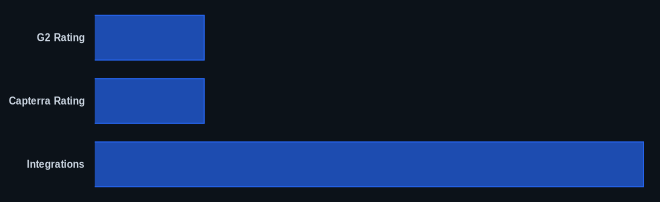
| G2 Rating | 4.7/5 stars | G2.com Zapier Reviews |
| Capterra Rating | 4.7/5 stars | Capterra.com Zapier Reviews |
| Starting Price | $0/month (Free) | Zapier Pricing Page |
| Integrations | 6,000+ | Zapier Features Page |
| Free Tier Included | Yes | Zapier Pricing Page |
Our Take
We find Zapier’s evolution into AI capabilities truly compelling for 2026. While competitors like Make might offer more tasks for your dollar at certain tiers, Zapier’s ease of use combined with its expanding intelligent automation makes it a more accessible choice for many teams. The Paths feature alone transforms basic automation into true business process orchestration, letting you build adaptive workflows without needing a developer on staff.
FAQ
What is the difference between Zapier and a native integration?
A native integration is built directly into two specific apps by their developers, offering deep, often very specific functionality. Zapier, on the other hand, is a third-party platform that connects thousands of apps through its own API, offering a wider range of customizable workflows between virtually any combination of tools you use, often where no native integration exists.
Can Zapier replace a developer for basic automation tasks?
For many repetitive data transfer and action-triggering tasks, yes, Zapier can significantly reduce or eliminate the need for a developer. Its no-code interface empowers business users to build and manage their own automations. However, for highly complex, bespoke system integrations or custom software development, a developer is still essential.
How do I troubleshoot a Zap that isn't working?
Zapier provides a detailed Task History and Zap Runs log where you can see each step of your Zap, including inputs and outputs, and identify where an error occurred. The most common issues are incorrect data mapping, API connection problems, or filters/paths not being met. Their support documentation is also extensive, and for Professional and Team users, dedicated support can assist.