Monday.com Review 2026: More Than Just Project Management?
Monday.com has truly transcended traditional project management, evolving into a versatile Work OS that can centralize diverse business operations. If you're an entrepreneur, remote team, or SMB leader looking to unify workflows across departments and crave deep customization, this platform merits serious consideration.
What Is Monday.com?
Monday.com is a cloud-based Work OS designed to help teams manage nearly any type of work, from project management and CRM to marketing campaigns and HR onboarding. It provides a highly visual and intuitive platform where teams can build custom workflows, automate tasks, and track progress with clarity.
It serves as a central hub, reducing the need for multiple siloed tools. Businesses tired of jumping between spreadsheets, task managers, and communication apps will find its integrated approach appealing for greater efficiency.
Key Features
Work OS Platform
At its core, monday.com offers a flexible platform with customizable dashboards and boards. You can tailor these to specific needs like a sales pipeline, an editorial calendar, or a bug tracking system. Its adaptability makes it suitable for virtually any department.
Visual Interface & Views
The platform boasts a colorful and intuitive interface, making complex data easy to digest. Teams can switch between various views, including Kanban, Gantt, Calendar, Table, Files, Form, Workload, Chart, and Map, allowing everyone to visualize work in their preferred way.
Automation
Monday.com excels with its extensive no-code automation capabilities. Users can set up "recipes" to automate repetitive tasks, send notifications, and trigger actions based on conditional logic. This saves significant time and reduces human error.
Integrations
Connecting to your existing tech stack is straightforward. Monday.com integrates with hundreds of popular tools like Slack, Microsoft Teams, Zoom, Salesforce, HubSpot, Outlook, Gmail, Excel, Zapier, Google Drive, Jira, GitHub, and Dropbox. This ensures your data flows smoothly between systems.
Collaboration
Real-time updates, file sharing, comments, and mentions foster active team collaboration. Features like guest access allow external stakeholders to participate without full internal permissions, streamlining communication with clients or contractors.
Reporting & Analytics
Customizable dashboards allow teams to create widgets for tracking progress, workload, and performance metrics. While powerful for a quick overview, some advanced users might seek deeper granular reporting offered by dedicated business intelligence tools.
Pricing
Monday.com offers several pricing tiers, generally based on a per-user, per-month model, with discounts for annual billing. Prices below are based on 3 users, annual billing, as of May 2026, per the monday.com pricing page.
- Free: Limited to 2 users, 3 boards, 200 items, and basic features. Ideal for solo users or very small teams with minimal needs.
- Basic ($9/user/month): For 3 users, this starts at $27/month annually. Includes unlimited items, unlimited free viewers, 5 GB storage, and prioritized customer support. Focuses on basic project management.
- Standard ($12/user/month): For 3 users, this starts at $36/month annually. Adds timeline & Gantt views, calendar view, guest access, 250 automations/month, and 250 integrations actions/month. A popular choice for growing teams.
- Pro ($19/user/month): For 3 users, this starts at $57/month annually. Includes private boards, chart view, time tracking, formula and dependency columns, 25,000 automations/month, 25,000 integrations actions/month, and API access. Best for teams needing advanced features and high automation.
- Enterprise (Custom Pricing): Tailored for large organizations. Offers advanced reporting & analytics, enterprise-grade security & governance, audit log, 250,000 automations/month, and tailored onboarding. Requires direct contact for a quote.
A free trial is available for paid plans.
Pros and Cons
Pros:
- Highly Customizable: Adapts to virtually any workflow or department, from marketing to software development.
- User-Friendly Interface: Visually appealing and intuitive, reducing the learning curve for new users.
- Powerful Automations: Significantly reduces manual work and improves operational efficiency across teams.
- Versatile: Can be used for a wide range of applications beyond typical project management.
- Excellent Visualizations: Multiple views provide clear insights into data and project progress.
Cons:
- Pricing Complexity/Cost: Can become expensive for larger teams, especially those requiring Pro features. The per-user model adds up quickly.
- Overwhelming for Small Teams: Its vast feature set might be overkill for very simple needs, potentially leading to choice paralysis.
- Reporting Depth: While dashboards are good for overviews, some users may find advanced, granular reporting less robust than dedicated BI tools.
- Guest Limitations: Guest access has certain functional limitations depending on the specific plan.
Who Should Use Monday.com?
Monday.com is an excellent fit for growing SMBs and larger organizations seeking a flexible, visual, and highly customizable Work OS. It's particularly well-suited for cross-functional teams looking to consolidate various tools (like Asana for tasks and Trello for Kanban boards) into a single platform.
Marketing agencies, software development teams, HR departments, creative studios, and even sales teams can leverage its versatility. If your business prioritizes visual management, extensive automation, and a platform that can evolve with your needs, monday.com is a strong contender. For very small teams with basic task management needs, a simpler tool like ClickUp's free tier might suffice.
Data at a Glance
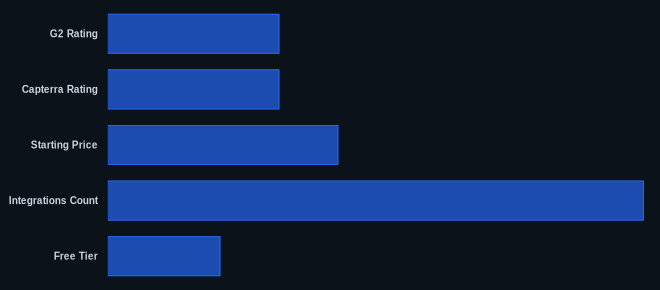
| Metric | Value | Source |
|---|---|---|
| G2 Rating | 4.6/5 stars | G2.com monday.com reviews |
| Capterra Rating | 4.6/5 stars | Capterra.com monday.com reviews |
| Starting Price | $9/user/month | monday.com pricing page |
| Integrations Count | 200+ | monday.com pricing page |
| Free Tier | Yes (up to 2 users) | monday.com pricing page |
Our Take
We find that monday.com's strength lies in its chameleon-like ability to adapt to almost any business process. While it starts as a project management tool, its Work OS capabilities truly differentiate it, allowing a marketing team to track campaigns right alongside a sales team managing leads, all within the same ecosystem. The main hurdle for many will be the per-user pricing, which, while standard, can make the Pro plan a significant investment for a larger team, requiring a clear ROI justification.
FAQ
Q: Is monday.com genuinely a Work OS, or just a glorified project management tool?
A: Monday.com has clearly evolved beyond simple project management. Its extensive customization, automation, and ability to build diverse workflows (e.g., CRM, HR, marketing, operational dashboards) make it a true Work OS. It allows teams to manage varied business functions, not just projects.
Q: Can monday.com scale with my growing business?
A: Yes, monday.com is designed for scalability. Its different pricing tiers, from Basic to Enterprise, accommodate various team sizes and feature requirements. The platform’s flexibility allows you to adapt boards and workflows as your business processes evolve, supporting growth without needing to switch tools.
Q: Is monday.com easy for new users to adopt?
A: Generally, yes. Its visual, intuitive interface and drag-and-drop functionality make it relatively easy to get started. While the sheer number of features might initially seem overwhelming, core functions are straightforward, and the extensive template library helps onboard new users quickly.
